
基于alpine用dockerfile创建的nginx镜像
1、下载alpine镜像
[root@docker43 ~]# docker pull alpine

Using default tag: latest

Trying to pull repository docker.io/library/alpine ...

latest: Pulling from docker.io/library/alpine

4fe2ade4980c: Pull complete

Digest: sha256:621c2f39f8133acb8e64023a94dbdf0d5ca81896102b9e57c0dc184cadaf5528

Status: Downloaded newer image for docker.io/alpine:latest

[root@docker43 ~]# docker images

REPOSITORY          TAG                 IMAGE ID            CREATED             SIZE

docker.io/alpine    latest              196d12cf6ab1        3 weeks ago         4.41 MB
2、编写dockerfile(一)
2.1.创建存放文件目录
[root@docker43 ~]# cd /opt/

[root@docker43 opt]# mkdir alpine_nginx && cd alpine_nginx && touch Dockerfile && touch nginx.conf && touch nginx.vh.default.conf

[root@docker43 alpine_nginx]# ll

总用量 16

-rw-r--r-- 1 root root 5652 10月  4 18:15 Dockerfile

-rw-r--r-- 1 root root  638 10月  4 15:23 nginx.conf

-rw-r--r-- 1 root root  472 10月  4 15:24 nginx.vh.default.conf
2.2. 准备nginx.conf文件
[root@docker43 alpine_nginx]# cat nginx.conf

user  nginx;

worker_processes  1;

error_log  /var/log/nginx/error.log warn;

pid        /var/run/nginx.pid;

events {

    worker_connections  10240;

}

http {

    include       /etc/nginx/mime.types;

    default_type  application/octet-stream;

    log_format  main  '$remote_addr - $remote_user [$time_local] "$request" '

                      '$status $body_bytes_sent "$http_referer" '

                      '"$http_user_agent" "$http_x_forwarded_for"';

    access_log  /var/log/nginx/access.log  main;

    sendfile        on;

    #tcp_nopush     on;

    keepalive_timeout  65;

    #gzip  on;

    include /etc/nginx/conf.d/*.conf;

}
2.3.准备nginx.vh.default.conf文件
[root@docker43 alpine_nginx]# cat nginx.vh.default.conf

server {

    listen       80;

    server_name  localhost;

    #charset koi8-r;

    #access_log  /var/log/nginx/log/host.access.log  main;

    location / {

        root   /usr/share/nginx/html;

        index  index.html index.htm;

    }

    #error_page  404              /404.html;

    # redirect server error pages to the static page /50x.html

    #

    error_page   500 502 503 504  /50x.html;

    location = /50x.html {

        root   /usr/share/nginx/html;

    }

}
2.4.dockerfile文件
# 基础镜像

FROM alpine

# 作者信息

MAINTAINER NGINX Docker Maintainers "1024331014@qq.com"

# 修改源

RUN echo "http://mirrors.aliyun.com/alpine/latest-stable/main/" > /etc/apk/repositories && \

    echo "http://mirrors.aliyun.com/alpine/latest-stable/community/" >> /etc/apk/repositories

# 安装需要的软件

RUN apk update && \

    apk add --no-cache ca-certificates && \

    apk add --no-cache curl bash tree tzdata && \

    cp -rf /usr/share/zoneinfo/Asia/Shanghai /etc/localtime

# 设置变量

ENV NGINX_VERSION 1.14.0

# 编译安装nginx

RUN GPG_KEYS=B0F4253373F8F6F510D42178520A9993A1C052F8 \

	&& CONFIG="\

		--prefix=/etc/nginx \

		--sbin-path=/usr/sbin/nginx \

		--modules-path=/usr/lib/nginx/modules \

		--conf-path=/etc/nginx/nginx.conf \

		--error-log-path=/var/log/nginx/error.log \

		--http-log-path=/var/log/nginx/access.log \

		--pid-path=/var/run/nginx.pid \

		--lock-path=/var/run/nginx.lock \

		--http-client-body-temp-path=/var/cache/nginx/client_temp \

		--http-proxy-temp-path=/var/cache/nginx/proxy_temp \

		--http-fastcgi-temp-path=/var/cache/nginx/fastcgi_temp \

		--http-uwsgi-temp-path=/var/cache/nginx/uwsgi_temp \

		--http-scgi-temp-path=/var/cache/nginx/scgi_temp \

		--user=nginx \

		--group=nginx \

		--with-http_ssl_module \

		--with-http_realip_module \

		--with-http_addition_module \

		--with-http_sub_module \

		--with-http_dav_module \

		--with-http_flv_module \

		--with-http_mp4_module \

		--with-http_gunzip_module \

		--with-http_gzip_static_module \

		--with-http_random_index_module \

		--with-http_secure_link_module \

		--with-http_stub_status_module \

		--with-http_auth_request_module \

		--with-http_xslt_module=dynamic \

		--with-http_image_filter_module=dynamic \

		--with-http_geoip_module=dynamic \

		--with-threads \

		--with-stream \

		--with-stream_ssl_module \

		--with-stream_ssl_preread_module \

		--with-stream_realip_module \

		--with-stream_geoip_module=dynamic \

		--with-http_slice_module \

		--with-mail \

		--with-mail_ssl_module \

		--with-compat \

		--with-file-aio \

		--with-http_v2_module \

	" \

	&& addgroup -S nginx \

	&& adduser -D -S -h /var/cache/nginx -s /sbin/nologin -G nginx nginx \

	&& apk add --no-cache --virtual .build-deps \

		gcc \

		libc-dev \

		make \

		openssl-dev \

		pcre-dev \

		zlib-dev \

		linux-headers \

		curl \

		gnupg \

		libxslt-dev \

		gd-dev \

		geoip-dev \

	&& curl -fSL http://nginx.org/download/nginx-$NGINX_VERSION.tar.gz -o nginx.tar.gz \

	&& curl -fSL http://nginx.org/download/nginx-$NGINX_VERSION.tar.gz.asc  -o nginx.tar.gz.asc \

	&& export GNUPGHOME="$(mktemp -d)" \

	&& found=''; \

	for server in \

		ha.pool.sks-keyservers.net \

		hkp://keyserver.ubuntu.com:80 \

		hkp://p80.pool.sks-keyservers.net:80 \

		pgp.mit.edu \

	; do \

		echo "Fetching GPG key $GPG_KEYS from $server"; \

		gpg --keyserver "$server" --keyserver-options timeout=10 --recv-keys "$GPG_KEYS" && found=yes && break; \

	done; \

	test -z "$found" && echo >&2 "error: failed to fetch GPG key $GPG_KEYS" && exit 1; \

	gpg --batch --verify nginx.tar.gz.asc nginx.tar.gz \

	&& rm -r "$GNUPGHOME" nginx.tar.gz.asc \

	&& mkdir -p /usr/src \

	&& tar -zxC /usr/src -f nginx.tar.gz \

	&& rm nginx.tar.gz \

	&& cd /usr/src/nginx-$NGINX_VERSION \

	&& ./configure $CONFIG --with-debug \

	&& make -j$(getconf _NPROCESSORS_ONLN) \

	&& mv objs/nginx objs/nginx-debug \

	&& mv objs/ngx_http_xslt_filter_module.so objs/ngx_http_xslt_filter_module-debug.so \

	&& mv objs/ngx_http_image_filter_module.so objs/ngx_http_image_filter_module-debug.so \

	&& mv objs/ngx_http_geoip_module.so objs/ngx_http_geoip_module-debug.so \

	&& mv objs/ngx_stream_geoip_module.so objs/ngx_stream_geoip_module-debug.so \

	&& ./configure $CONFIG \

	&& make -j$(getconf _NPROCESSORS_ONLN) \

	&& make install \

	&& rm -rf /etc/nginx/html/ \

	&& mkdir /etc/nginx/conf.d/ \

	&& mkdir -p /usr/share/nginx/html/ \

	&& install -m644 html/index.html /usr/share/nginx/html/ \

	&& install -m644 html/50x.html /usr/share/nginx/html/ \

	&& install -m755 objs/nginx-debug /usr/sbin/nginx-debug \

	&& install -m755 objs/ngx_http_xslt_filter_module-debug.so /usr/lib/nginx/modules/ngx_http_xslt_filter_module-debug.so \

	&& install -m755 objs/ngx_http_image_filter_module-debug.so /usr/lib/nginx/modules/ngx_http_image_filter_module-debug.so \

	&& install -m755 objs/ngx_http_geoip_module-debug.so /usr/lib/nginx/modules/ngx_http_geoip_module-debug.so \

	&& install -m755 objs/ngx_stream_geoip_module-debug.so /usr/lib/nginx/modules/ngx_stream_geoip_module-debug.so \

	&& ln -s ../../usr/lib/nginx/modules /etc/nginx/modules \

	&& strip /usr/sbin/nginx* \

	&& strip /usr/lib/nginx/modules/*.so \

	&& rm -rf /usr/src/nginx-$NGINX_VERSION \

	\

	# Bring in gettext so we can get `envsubst`, then throw

	# the rest away. To do this, we need to install `gettext`

	# then move `envsubst` out of the way so `gettext` can

	# be deleted completely, then move `envsubst` back.

	&& apk add --no-cache --virtual .gettext gettext \

	&& mv /usr/bin/envsubst /tmp/ \

	\

	&& runDeps="$( \

		scanelf --needed --nobanner /usr/sbin/nginx /usr/lib/nginx/modules/*.so /tmp/envsubst \

			| awk '{ gsub(/,/, "\nso:", $2); print "so:" $2 }' \

			| sort -u \

			| xargs -r apk info --installed \

			| sort -u \

	)" \

	&& apk add --no-cache --virtual .nginx-rundeps $runDeps \

	&& apk del .build-deps \

	&& apk del .gettext \

	&& mv /tmp/envsubst /usr/local/bin/ \

	\

	# forward request and error logs to docker log collector

	&& ln -sf /dev/stdout /var/log/nginx/access.log \

	&& ln -sf /dev/stderr /var/log/nginx/error.log

# 将目录下的文件copy到镜像中

COPY nginx.conf /etc/nginx/nginx.conf

COPY nginx.vh.default.conf /etc/nginx/conf.d/default.conf

# 开放80端口

EXPOSE 80

STOPSIGNAL SIGTERM

# 启动nginx命令

CMD ["nginx", "-g", "daemon off;"]
2.5.创建镜像
[root@docker43 alpine_nginx]# docker build -t alpine:nginx .
2.6.创建容器
# 不进行宿主配置文件日志文件挂载

docker run -tid --name zjznginx  -p 80:80 -m 2048m  --memory-swap=2048m  --cpu-shares=256 alpine:nginx

# 挂载配置文件和日志

docker run -tid --name zjznginx  -p 80:80 -v /opt/Webs/nginx/nginx.conf:/etc/nginx/nginx.conf -v /opt/Webs/nginx/logs/:/var/log/nginx -m 2048m  --memory-swap=2048m  --cpu-shares=256 alpine:nginx
查看容器
[root@docker43 alpine_nginx]# docker ps

CONTAINER ID        IMAGE               COMMAND                  CREATED             STATUS              PORTS                NAMES

27c9ed6664ba        alpine:nginx        "nginx -g 'daemon ..."   1 second ago        Up 1 second         0.0.0.0:80->80/tcp   zjznginx
3、编写dockerfile(二)
3.1.创建存放文件目录
[root@docker43 ~]# cd /opt/

[root@docker43 opt]# mkdir alpine_nginx && cd alpine_nginx && touch Dockerfile && touch nginx.conf && touch nginx.vh.default.conf

[root@docker43 alpine_nginx]# ll

总用量 16

-rw-r--r-- 1 root root 5652 10月  4 18:15 Dockerfile

-rw-r--r-- 1 root root  638 10月  4 15:23 nginx.conf

-rw-r--r-- 1 root root  472 10月  4 15:24 nginx.vh.default.conf
3.2.准备nginx.conf文件
[root@docker43 alpine_nginx]# cat nginx.conf

user  nginx;

worker_processes  1;

error_log  /var/log/nginx/error.log warn;

pid        /var/run/nginx.pid;

events {

    worker_connections  10240;

}

http {

    include       /etc/nginx/mime.types;

    default_type  application/octet-stream;

    log_format  main  '$remote_addr - $remote_user [$time_local] "$request" '

                      '$status $body_bytes_sent "$http_referer" '

                      '"$http_user_agent" "$http_x_forwarded_for"';

    access_log  /var/log/nginx/access.log  main;

    sendfile        on;

    #tcp_nopush     on;

    keepalive_timeout  65;

    #gzip  on;

    include /etc/nginx/conf.d/*.conf;

}
3.3. 准备nginx.vh.default.conf文件
[root@docker43 alpine_nginx]# cat nginx.vh.default.conf

server {

    listen       80;

    server_name  localhost;

    #charset koi8-r;

    #access_log  /var/log/nginx/log/host.access.log  main;

    location / {

        root   /usr/share/nginx/html;

        index  index.html index.htm;

    }

    #error_page  404              /404.html;

    # redirect server error pages to the static page /50x.html

    #

    error_page   500 502 503 504  /50x.html;

    location = /50x.html {

        root   /usr/share/nginx/html;

    }

}
3.4.dockerfile文件
# 基础镜像

FROM alpine

# 作者信息

MAINTAINER NGINX Docker Maintainers "1024331014@qq.com"

# 修改源

RUN echo "http://mirrors.aliyun.com/alpine/latest-stable/main/" > /etc/apk/repositories && \

    echo "http://mirrors.aliyun.com/alpine/latest-stable/community/" >> /etc/apk/repositories

# 安装需要的软件

RUN apk update && \

    apk add --no-cache ca-certificates && \

    apk add --no-cache curl bash tree tzdata && \

    cp -rf /usr/share/zoneinfo/Asia/Shanghai /etc/localtime

# 设置变量

ENV NGINX_VERSION 1.14.0

# 编译安装nginx

RUN GPG_KEYS=B0F4253373F8F6F510D42178520A9993A1C052F8 \

	&& CONFIG="\

		--prefix=/etc/nginx \

		--sbin-path=/usr/sbin/nginx \

		--modules-path=/usr/lib/nginx/modules \

		--conf-path=/etc/nginx/nginx.conf \

		--error-log-path=/var/log/nginx/error.log \

		--http-log-path=/var/log/nginx/access.log \

		--pid-path=/var/run/nginx.pid \

		--lock-path=/var/run/nginx.lock \

		--http-client-body-temp-path=/var/cache/nginx/client_temp \

		--http-proxy-temp-path=/var/cache/nginx/proxy_temp \

		--http-fastcgi-temp-path=/var/cache/nginx/fastcgi_temp \

		--http-uwsgi-temp-path=/var/cache/nginx/uwsgi_temp \

		--http-scgi-temp-path=/var/cache/nginx/scgi_temp \

		--user=nginx \

		--group=nginx \

		--with-http_ssl_module \

		--with-http_realip_module \

		--with-http_addition_module \

		--with-http_sub_module \

		--with-http_dav_module \

		--with-http_flv_module \

		--with-http_mp4_module \

		--with-http_gunzip_module \

		--with-http_gzip_static_module \

		--with-http_random_index_module \

		--with-http_secure_link_module \

		--with-http_stub_status_module \

		--with-http_auth_request_module \

		--with-http_xslt_module=dynamic \

		--with-http_image_filter_module=dynamic \

		--with-http_geoip_module=dynamic \

		--with-threads \

		--with-stream \

		--with-stream_ssl_module \

		--with-stream_ssl_preread_module \

		--with-stream_realip_module \

		--with-stream_geoip_module=dynamic \

		--with-http_slice_module \

		--with-mail \

		--with-mail_ssl_module \

		--with-compat \

		--with-file-aio \

		--with-http_v2_module \

	" \

	&& addgroup -S nginx \

	&& adduser -D -S -h /var/cache/nginx -s /sbin/nologin -G nginx nginx \

	&& apk add --no-cache --virtual .build-deps \

		gcc \

		libc-dev \

		make \

		openssl-dev \

		pcre-dev \

		zlib-dev \

		linux-headers \

		curl \

		gnupg \

		libxslt-dev \

		gd-dev \

		geoip-dev \

	&& curl -fSL http://nginx.org/download/nginx-$NGINX_VERSION.tar.gz -o nginx.tar.gz \

	&& curl -fSL http://nginx.org/download/nginx-$NGINX_VERSION.tar.gz.asc  -o nginx.tar.gz.asc \

	&& export GNUPGHOME="$(mktemp -d)" \

	&& found=''; \

	for server in \

		ha.pool.sks-keyservers.net \

		hkp://keyserver.ubuntu.com:80 \

		hkp://p80.pool.sks-keyservers.net:80 \

		pgp.mit.edu \

	; do \

		echo "Fetching GPG key $GPG_KEYS from $server"; \

		gpg --keyserver "$server" --keyserver-options timeout=10 --recv-keys "$GPG_KEYS" && found=yes && break; \

	done; \

	test -z "$found" && echo >&2 "error: failed to fetch GPG key $GPG_KEYS" && exit 1; \

	gpg --batch --verify nginx.tar.gz.asc nginx.tar.gz \

	&& rm -r "$GNUPGHOME" nginx.tar.gz.asc \

	&& mkdir -p /usr/src \

	&& tar -zxC /usr/src -f nginx.tar.gz \

	&& rm nginx.tar.gz \

	&& cd /usr/src/nginx-$NGINX_VERSION \

	&& ./configure $CONFIG --with-debug \

	&& make -j$(getconf _NPROCESSORS_ONLN) \

	&& mv objs/nginx objs/nginx-debug \

	&& mv objs/ngx_http_xslt_filter_module.so objs/ngx_http_xslt_filter_module-debug.so \

	&& mv objs/ngx_http_image_filter_module.so objs/ngx_http_image_filter_module-debug.so \

	&& mv objs/ngx_http_geoip_module.so objs/ngx_http_geoip_module-debug.so \

	&& mv objs/ngx_stream_geoip_module.so objs/ngx_stream_geoip_module-debug.so \

	&& ./configure $CONFIG \

	&& make -j$(getconf _NPROCESSORS_ONLN) \

	&& make install \

	&& rm -rf /etc/nginx/html/ \

	&& mkdir /etc/nginx/conf.d/ \

	&& mkdir -p /usr/share/nginx/html/ \

	&& install -m644 html/index.html /usr/share/nginx/html/ \

	&& install -m644 html/50x.html /usr/share/nginx/html/ \

	&& install -m755 objs/nginx-debug /usr/sbin/nginx-debug \

	&& install -m755 objs/ngx_http_xslt_filter_module-debug.so /usr/lib/nginx/modules/ngx_http_xslt_filter_module-debug.so \

	&& install -m755 objs/ngx_http_image_filter_module-debug.so /usr/lib/nginx/modules/ngx_http_image_filter_module-debug.so \

	&& install -m755 objs/ngx_http_geoip_module-debug.so /usr/lib/nginx/modules/ngx_http_geoip_module-debug.so \

	&& install -m755 objs/ngx_stream_geoip_module-debug.so /usr/lib/nginx/modules/ngx_stream_geoip_module-debug.so \

	&& ln -s ../../usr/lib/nginx/modules /etc/nginx/modules \

	&& strip /usr/sbin/nginx* \

	&& strip /usr/lib/nginx/modules/*.so \

	&& rm -rf /usr/src/nginx-$NGINX_VERSION \

	\

	# Bring in gettext so we can get `envsubst`, then throw

	# the rest away. To do this, we need to install `gettext`

	# then move `envsubst` out of the way so `gettext` can

	# be deleted completely, then move `envsubst` back.

	&& apk add --no-cache --virtual .gettext gettext \

	&& mv /usr/bin/envsubst /tmp/ \

	\

	&& runDeps="$( \

		scanelf --needed --nobanner /usr/sbin/nginx /usr/lib/nginx/modules/*.so /tmp/envsubst \

			| awk '{ gsub(/,/, "\nso:", $2); print "so:" $2 }' \

			| sort -u \

			| xargs -r apk info --installed \

			| sort -u \

	)" \

	&& apk add --no-cache --virtual .nginx-rundeps $runDeps \

	&& apk del .build-deps \

	&& apk del .gettext \

	&& mv /tmp/envsubst /usr/local/bin/ \

	\

	# forward request and error logs to docker log collector

	&& ln -sf /dev/stdout /var/log/nginx/access.log \

	&& ln -sf /dev/stderr /var/log/nginx/error.log

# 将目录下的文件copy到镜像中

COPY nginx.conf /etc/nginx/nginx.conf

COPY nginx.vh.default.conf /etc/nginx/conf.d/default.conf

# 将启动命令搞成个脚本通过脚本启动

RUN echo "/usr/sbin/nginx" >>/etc/start.sh

# 开放80端口

EXPOSE 80

STOPSIGNAL SIGTERM

# 启动nginx命令

CMD ["/bin/sh","/etc/start.sh"]
3.5.创建镜像
[root@docker43 alpine_nginx]# docker build -t alpine:nginx .
3.6.创建容器
# 不进行宿主配置文件日志文件挂载

docker run -ti --restart=always --name zjznginx  -p 80:80 -m 2048m  --memory-swap=2048m  --cpu-shares=256 alpine:nginx bash

# 挂载配置文件和日志

docker run -ti --restart=always --name zjznginx  -p 80:80 -v /opt/Webs/nginx/nginx.conf:/etc/nginx/nginx.conf -v /opt/Webs/nginx/logs/:/var/log/nginx -m 2048m  --memory-swap=2048m  --cpu-shares=256 alpine:nginx bash
PS:因为用的是脚本命令的方式启动的,没有守护进程 ,最后使用bash或者sh进入容器启动然后ctrl+p ctrl+q 退出
具体的解释:docker运行nginx为什么要使用 daemon off
启动nginx
[root@docker43 alpine_nginx]# docker run -ti --restart=always --name zjznginx  -p 80:80 -m 2048m  --memory-swap=2048m  --cpu-shares=256 alpine:nginx bash

bash-4.4# /bin/sh /etc/start.sh
查看容器
[root@docker43 alpine_nginx]# docker ps

CONTAINER ID        IMAGE               COMMAND             CREATED             STATUS              PORTS                NAMES

0da349afebff        alpine:nginx        "bash"              21 seconds ago      Up 20 seconds       0.0.0.0:80->80/tcp   zjznginx
4、测试
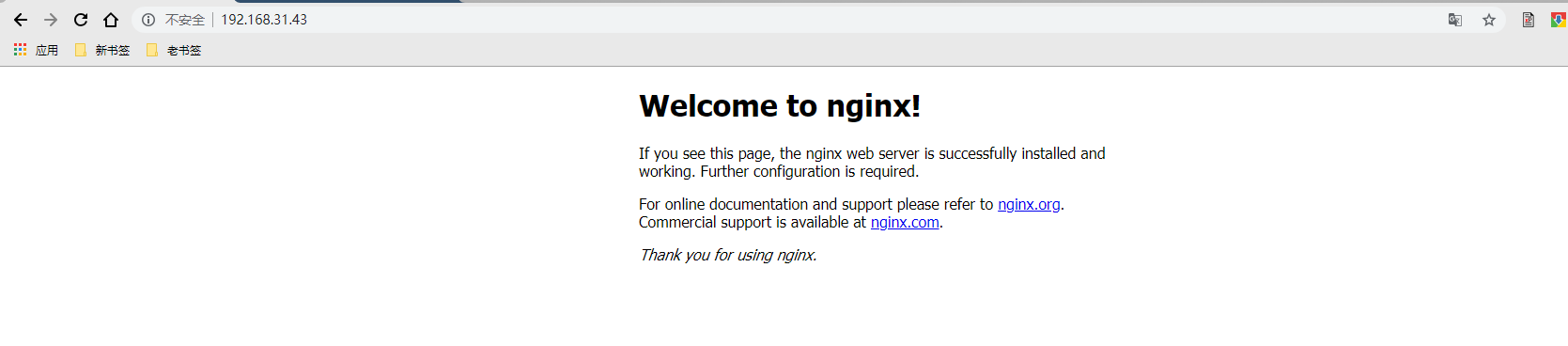
基于alpine用dockerfile创建的nginx镜像的更多相关文章
- 基于alpine用dockerfile创建的ssh镜像
1.下载alpine镜像 [root@docker43 ~]# docker pull alpine Using default tag: latest Trying to pull reposito ...
- 基于alpine用dockerfile创建的tomcat镜像
1.下载alpine镜像 [root@docker43 ~]# docker pull alpine Using default tag: latest Trying to pull reposito ...
- 基于alpine用dockerfile创建的爬虫Scrapy镜像
一.下载alpine镜像 [root@DockerBrian ~]# docker pull alpine Using default tag: latest Trying to pull repos ...
- docker学习系列(二):使用Dockerfile创建自己的镜像
dockerfile可以允许我们自己创建镜像,通过编写里面的下载软件命令,执行docker build 即可生成镜像文件. 初尝dockerfile 新建一个目录test,然后进入这个目录,创建一个名 ...
- Docker之使用Dockerfile创建定制化镜像(四)--技术流ken
前言 在之前的博客<Docker端口映射及创建镜像演示(二)--技术流ken>,演示了如何使用一个现有容器创建一个镜像,以及镜像在阿里云的上传和下载. 但是这样的镜像有很大的局限性,不能根 ...
- Docker之使用Dockerfile创建定制化镜像(四)
Dockerfile简介 镜像的定制实际上就是定制每一层所添加的配置.文件.如果我们可以把每一层修改.安装.构建.操作的命令都写入一个脚本,用这个脚本来构建.定制镜像,那么哪些无法重复的问题.镜像构建 ...
- Dockerfile创建自定义Docker镜像以及CMD与ENTRYPOINT指令的比较
1.概述 创建Docker镜像的方式有三种 docker commit命令:由容器生成镜像: Dockerfile文件+docker build命令: 从本地文件系统导入:OpenVZ的模板. 关于这 ...
- 使用Dockerfile创建一个tomcat镜像,并运行一个简单war包
docker已经看了有一段时间了,对镜像和容器也有了一个大致了解,参考书上的例子制作一个tomcat镜像,并简单运行一个HelloWorld.war 1.首先下载linux环境的tomcat和jdk, ...
- 使用Dockerfile定制ubuntu+nginx镜像
实验目的:书写Dockerfile,定制ubuntu 14.04 + nginx 1.14.0的镜像. 实验过程: 1. 下载nginx-1.14.0 http://nginx.org/downlo ...
随机推荐
- (18)What a planet needs to sustain life
https://www.ted.com/talks/dave_brain_what_a_planet_needs_to_sustain_life/transcript 00:12I'm really ...
- ubuntu下非交互式安装MySQL
$ sudo su -# MYSQL_PASS=nova 设定mysql的密码和nova数据库的密码# cat <<MYSQL_PRESEED | debconf-set-selectio ...
- .net 根据网址生成静态页
生成HTML页面代码 public int Htmls(int id) { ; string strHtmlContent = ""; HttpWebRequest request ...
- 为在python中使用dotnet程序安装clr
直接在命令行中录入 pip install pythonnet 会有一个ssl错误提示 ...Could not fetch URL https://pypi.python.org/simple/py ...
- Linux安装Oracle 11g Grid Infrastructure 出现OUI-10182错误解决办法
已确保安装的ORACLE_BASE目录是属于grid:oinstall 但安装时总是报:OUI-10182 The effective user ID does not match the own ...
- java基础-day25
第02天 java基础加强 今日内容介绍 u Properties的基本操作 u 反射综合案例 u BeanUtils概述及使用 第1章 Properties的基本操作 1.1 Properti ...
- http基本概念
- Android-WebView与本地HTML(播放视频)
assets资源目录里面的文件介绍: RealNetJSCallJavaActivity_files文件夹
- WPF学习笔记(3):ListView根据内容自动调整列宽
DataGrid中,只要不设置DataGrid的宽度和列宽度,或者将宽度设置为Auto,那么表格就会根据内容自动调整宽度,以显示所有内容.但如果是ListView,按以上方法设置,却达不到列宽自动调整 ...
- WPF 触摸屏小键盘样式
WPF程序,用于平板时,一些输入数量的地方我们需要弹出小键盘输入,这个键盘可以调系统的,也可以自己写. 分享个我现在用的一个数字键盘界面. <Window xmlns:dxe="htt ...