
【转】Code Your Own PHP MVC Framework in 1 Hour
Introduction
MVC architectural pattern is almost in everywhere today, whether you are working on Java, C#, PHP, iOS projects. This might not be 100% exact, but PHP community has the most amount of MVC frameworks. Today you might be using Zend, tomorrow on another project you might have to change to Yii or Laravel or CakePHP. If you are new to MVC frameworks and you just download one from the official website, you might feel overwhelmed when you look at the framework’s source code, yes, it is complex, as these popular frameworks are not written in a month - they are published, refined, tested again and again, and the functionalities are added constantly. So from my experience, knowing the core design methodologies of MVC framework is critical, otherwise you might feel that you will have to learn another framework and another framework again and again when you get new projects using new frameworks.
The best way to understand MVC is to write you own MVC framework from scratch! In this series of articles I am going to show you how to code one, so that you might get to understand why certains things happen that way in a framework.
MVC architectural pattern
M: Model
V: View
C: Controller
The core concept of MVC is to separate business logic from displaying(the View part). First let me explain the whole workflow of an HTTP request & HTTP response. For example, we have a commerce website and we want to add a certain product. A very simple URL would be look like this:
http://bestshop.com/index.php?p=admin&c=goods&a=add
http://bestshop.com is the domain name or base URL;
p=admin means the Platform is admin panel, or the Backend site of the system. We also have a Frontend site, which is public to the world(in this case, it would be p=public)
c=goods&a=add means this URL requests the ‘goods’ Controller’s add action method.
Front Controller Design Pattern
What is index.php in the above example? This file is called ‘Front Controller’ in PHP’s MVC frameworks. The name is usually index.php, but you can name it something else(few people do that thought…) One of the function of this index.php file is, it works as the single entry point for any HTTP requests, that is, no matter what resource you request in the URL, it will all go into this index.php file first. But why? How does the magic happen? Front Controller design pattern is implemented in PHP using Apache HTTP server’s distribution configuration file called .htaccess. In this file, we can tell the Apache HTTP server to redirect all requests to index.php using its rewrite module. You can code similar to this:
<IfModule mod_rewrite.c>

   Options +FollowSymLinks

   RewriteEngine on

   # Send request via index.php

   RewriteCond %{REQUEST_FILENAME} !-f

   RewriteCond %{REQUEST_FILENAME} !-d

   RewriteRule ^(.*)$ index.php/$1 [L]

</IfModule>
This configuration file is very powerful and when you change it, you don’t need to restart Apache. If you change Apache’s other configuration files, you need to restart it, the reason is that for other Apache configuration files, Apache only will read them when it’s started, that’s why any change requires a restart(Apache is mainly written in C by the way). But for .htaccess distribution configuration file, no restart is needed for any change.
Simply put, index.php will also do the proper initialization for the framework and it will route the request to the proper Controller(goodsController in above example) and an action method(member function) within that Controller class.
Our MVC Framework’s Structure
So let’s create our frameworks structure.

application directory is the web app’s directory;
framework directory is for the framework itself;
public directory is to store all the public static resources like html, css and js files.
index.php is the ‘entry-point’ file, the front controller.
Now within application folder, we create these subfolders:

config - stores the app’s configuration files
controllers - this is for all app’s Controller classes
model - this is for all app’s Model classes
view - this is for all app’s View classes
Now within the application/controllers folder, we will create two folders for the frontend and backend platforms:
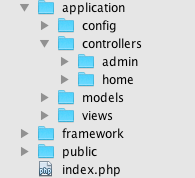
And in the view folder, the same for frontend and backend:

As you can see, within the application folder, we created frontend and backend subfolder in controllers and views folder, as our application has a frontend site and a backend site. But why we did not do the same in the models folder?
Well, the reason here is, normally for a web app:
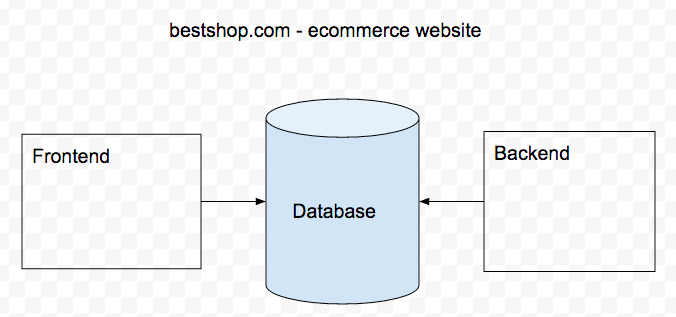
Frontend and Backend can be two different ‘websites’, but the are CRUD the same database, that’s why an internal user updated a product’s price, the price is immediately show on the frontend public page - backend and frontend share the same database/tables.
So that’s why both backend and frontend can share a set of Model classes, and that’s why we didn’t create separate folders in the models folder.
Now let’s move on to the framework directory, some frameworks name this folder using the framework’s name, say ‘symfony’. In this folder, we quickly create these subfolders first:

core - it will store the framework’s core classes
database - database related classes, such as database driver classes
helpers - help/assistant functions
libraries - for class libraries
Now move on to the public folder, we create these subfolders:

css - for css files
images - for images files
js - for javascript files
uploads - for uploaded files, such as uploaded images
Ok, so far this is our mini MVC framework’s structure.
Framework’s core class
Now under framework/core folder, we’ll create the framework’s first class - Framework.class.php in framework/core folder
// framework/core/Framework.class.php

class Framework {

   public static function run() {

       echo "run()";

   }
we created a static function called run(). Now test it in index.php:
<?php

require "framework/core/Framework.class.php";

Framework::run();
You can see the result in browser(how to config your virtual host is skipped here). Normally this static function is called run() or bootstrap(). Within this function, we can do 3 main things here, as shown in the code below:
 Copy Code
class Framework {
public static function run() {
// echo "run()";
self::init();
self::autoload();
self::dispatch();
}
private static function init() {
}
private static function autoload() {
}
private static function dispatch() {
}
}
Initialization
Here is the code for the init() method:
Copy Code// Initialization
private static function init() {
// Define path constants
define("DS", DIRECTORY_SEPARATOR);
define("ROOT", getcwd() . DS);
define("APP_PATH", ROOT . 'application' . DS);
define("FRAMEWORK_PATH", ROOT . "framework" . DS);
define("PUBLIC_PATH", ROOT . "public" . DS);
define("CONFIG_PATH", APP_PATH . "config" . DS);
define("CONTROLLER_PATH", APP_PATH . "controllers" . DS);
define("MODEL_PATH", APP_PATH . "models" . DS);
define("VIEW_PATH", APP_PATH . "views" . DS);
define("CORE_PATH", FRAMEWORK_PATH . "core" . DS);
define('DB_PATH', FRAMEWORK_PATH . "database" . DS);
define("LIB_PATH", FRAMEWORK_PATH . "libraries" . DS);
define("HELPER_PATH", FRAMEWORK_PATH . "helpers" . DS);
define("UPLOAD_PATH", PUBLIC_PATH . "uploads" . DS);
// Define platform, controller, action, for example:
// index.php?p=admin&c=Goods&a=add
define("PLATFORM", isset($_REQUEST['p']) ? $_REQUEST['p'] : 'home');
define("CONTROLLER", isset($_REQUEST['c']) ? $_REQUEST['c'] : 'Index');
define("ACTION", isset($_REQUEST['a']) ? $_REQUEST['a'] : 'index');
define("CURR_CONTROLLER_PATH", CONTROLLER_PATH . PLATFORM . DS);
define("CURR_VIEW_PATH", VIEW_PATH . PLATFORM . DS);
// Load core classes
require CORE_PATH . "Controller.class.php";
require CORE_PATH . "Loader.class.php";
require DB_PATH . "Mysql.class.php";
require CORE_PATH . "Model.class.php";
// Load configuration file
$GLOBALS['config'] = include CONFIG_PATH . "config.php";
// Start session
session_start();
}
From the comments you can see the purpose of each steps.
Autoloading
We don’t want to manually code include or require for a class file what we need in every script in the project, that’s why PHP MVC frameworks have this autoloading feature. For example, in Symfony, if you put your own class file under ‘lib’ folder, then it will be auto loaded. Magic? No, there is no magic. Let’s implement our autoloading feature in our mini framework.
Here we need to use a PHP built-in function called spl_autoload_register
Copy Code// Autoloading
private static function autoload(){
spl_autoload_register(array(__CLASS__,'load'));
}
// Define a custom load method
private static function load($classname){
// Here simply autoload app’s controller and model classes
if (substr($classname, -10) == "Controller"){
// Controller
require_once CURR_CONTROLLER_PATH . "$classname.class.php";
} elseif (substr($classname, -5) == "Model"){
// Model
require_once MODEL_PATH . "$classname.class.php";
}
}
Every framework has a name conversion, ours is no exception. For a controller class, it should be xxxController.class.php, for a model class, it should be xxxModel.class.php. Why for a new framework you come across, you must follow its naming convention? Autoloading is one of the reasons.
Routing/Dispatching
// Routing and dispatching

private static function dispatch(){

    // Instantiate the controller class and call its action method

    $controller_name = CONTROLLER . "Controller";

    $action_name = ACTION . "Action";

    $controller = new $controller_name;

    $controller->$action_name();

}
In this step, index.php will dispatch the request to the proper Controller::Action() method. It’s very simple here just for an example.
Base Controller class
There is always a base controller class(or several) in the framework’s core classes. For example, In Symfony it’s called sfActions; in iOS it’s called UIViewController. Here we will just name it Controller, the file name is Controller.class.php
Copy Code<?php
// Base Controller
class Controller{
// Base Controller has a property called $loader, it is an instance of Loader class(introduced later)
protected $loader;
public function __construct(){
$this->loader = new Loader();
}
public function redirect($url,$message,$wait = 0){
if ($wait == 0){
header("Location:$url");
} else {
include CURR_VIEW_PATH . "message.html";
}
exit;
}
}
Base Controller has a property called $loader, it is an instance of Loader class(introduced later). Please note the phrase ‘ it is an instance of Loader class’ -- preciously speaking, $this->loader is a reference variable which reference/points to an instance of Load class. We don’t talk more about this here, but this is actually a very important concept. I have met some PHP developers who believe after this statement:
$this->loader = new Loader();
$this->loader is an object. No, it’s a reference. This term starts from Java, before Java, it’s called pointer in C++ or Objective C. Reference is an encapsulated pointer type. For example, in iOS(Objective-C) we create an object using:
UIButton *btn = [UIButton alloc] init];
Loader class
In framework.class.php, we have already implemented application’s controller and model class’ autoloading. But how to load classes in the framework directory? Here we can create a new class called Loader, it will be used to load the framework’s classes and functions. When we need to load a framework’s class, just call this Loader class’s method.
class Loader{

    // Load library classes

    public function library($lib){

        include LIB_PATH . "$lib.class.php";

    }

    // loader helper functions. Naming conversion is xxx_helper.php;

    public function helper($helper){

        include HELPER_PATH . "{$helper}_helper.php";

    }

}
Implementing Model
We will implement Model in the simplest way, by creating two class files:
Mysql.class.php - this class is under framework/database, it is to encapsulate database connection and some basic SQL query methods.
Model.class.php - this is the Base Model class, it contains methods for all kinds of CRUD
Copy Code<?php
/**
*================================================================
*framework/database/Mysql.class.php
*Database operation class
*================================================================
*/
class Mysql{
protected $conn = false; //DB connection resources
protected $sql; //sql statement
/**
* Constructor, to connect to database, select database and set charset
* @param $config string configuration array
*/
public function __construct($config = array()){
$host = isset($config['host'])? $config['host'] : 'localhost';
$user = isset($config['user'])? $config['user'] : 'root';
$password = isset($config['password'])? $config['password'] : '';
$dbname = isset($config['dbname'])? $config['dbname'] : '';
$port = isset($config['port'])? $config['port'] : '3306';
$charset = isset($config['charset'])? $config['charset'] : '3306';
$this->conn = mysql_connect("$host:$port",$user,$password) or die('Database connection error');
mysql_select_db($dbname) or die('Database selection error');
$this->setChar($charset);
}
/**
* Set charset
* @access private
* @param $charset string charset
*/
private function setChar($charest){
$sql = 'set names '.$charest;
$this->query($sql);
}
/**
* Execute SQL statement
* @access public
* @param $sql string SQL query statement
* @return $result,if succeed, return resrouces; if fail return error message and exit
*/
public function query($sql){
$this->sql = $sql;
// Write SQL statement into log
$str = $sql . " [". date("Y-m-d H:i:s") ."]" . PHP_EOL;
file_put_contents("log.txt", $str,FILE_APPEND);
$result = mysql_query($this->sql,$this->conn);
if (! $result) {
die($this->errno().':'.$this->error().'<br />Error SQL statement is '.$this->sql.'<br />');
}
return $result;
}
/**
* Get the first column of the first record
* @access public
* @param $sql string SQL query statement
* @return return the value of this column
*/
public function getOne($sql){
$result = $this->query($sql);
$row = mysql_fetch_row($result);
if ($row) {
return $row[0];
} else {
return false;
}
}
/**
* Get one record
* @access public
* @param $sql SQL query statement
* @return array associative array
*/
public function getRow($sql){
if ($result = $this->query($sql)) {
$row = mysql_fetch_assoc($result);
return $row;
} else {
return false;
}
}
/**
* Get all records
* @access public
* @param $sql SQL query statement
* @return $list an 2D array containing all result records
*/
public function getAll($sql){
$result = $this->query($sql);
$list = array();
while ($row = mysql_fetch_assoc($result)){
$list[] = $row;
}
return $list;
}
/**
* Get the value of a column
* @access public
* @param $sql string SQL query statement
* @return $list array an array of the value of this column
*/
public function getCol($sql){
$result = $this->query($sql);
$list = array();
while ($row = mysql_fetch_row($result)) {
$list[] = $row[0];
}
return $list;
}
/**
* Get last insert id
*/
public function getInsertId(){
return mysql_insert_id($this->conn);
}
/**
* Get error number
* @access private
* @return error number
*/
public function errno(){
return mysql_errno($this->conn);
}
/**
* Get error message
* @access private
* @return error message
*/
public function error(){
return mysql_error($this->conn);
}
}
Here is the Model.class.php
Copy Code<?php
// framework/core/Model.class.php
// Base Model Class
class Model{
protected $db; //database connection object
protected $table; //table name
protected $fields = array(); //fields list
public function __construct($table){
$dbconfig['host'] = $GLOBALS['config']['host'];
$dbconfig['user'] = $GLOBALS['config']['user'];
$dbconfig['password'] = $GLOBALS['config']['password'];
$dbconfig['dbname'] = $GLOBALS['config']['dbname'];
$dbconfig['port'] = $GLOBALS['config']['port'];
$dbconfig['charset'] = $GLOBALS['config']['charset'];
$this->db = new Mysql($dbconfig);
$this->table = $GLOBALS['config']['prefix'] . $table;
$this->getFields();
}
/**
* Get the list of table fields
*
*/
private function getFields(){
$sql = "DESC ". $this->table;
$result = $this->db->getAll($sql);
foreach ($result as $v) {
$this->fields[] = $v['Field'];
if ($v['Key'] == 'PRI') {
// If there is PK, save it in $pk
$pk = $v['Field'];
}
}
// If there is PK, add it into fields list
if (isset($pk)) {
$this->fields['pk'] = $pk;
}
}
/**
* Insert records
* @access public
* @param $list array associative array
* @return mixed If succeed return inserted record id, else return false
*/
public function insert($list){
$field_list = ''; //field list string
$value_list = ''; //value list string
foreach ($list as $k => $v) {
if (in_array($k, $this->fields)) {
$field_list .= "`".$k."`" . ',';
$value_list .= "'".$v."'" . ',';
}
}
// Trim the comma on the right
$field_list = rtrim($field_list,',');
$value_list = rtrim($value_list,',');
// Construct sql statement
$sql = "INSERT INTO `{$this->table}` ({$field_list}) VALUES ($value_list)";
if ($this->db->query($sql)) {
// Insert succeed, return the last record’s id
return $this->db->getInsertId();
//return true;
} else {
// Insert fail, return false
return false;
}
}
/**
* Update records
* @access public
* @param $list array associative array needs to be updated
* @return mixed If succeed return the count of affected rows, else return false
*/
public function update($list){
$uplist = ''; //update fields
$where = 0; //update condition, default is 0
foreach ($list as $k => $v) {
if (in_array($k, $this->fields)) {
if ($k == $this->fields['pk']) {
// If it’s PK, construct where condition
$where = "`$k`=$v";
} else {
// If not PK, construct update list
$uplist .= "`$k`='$v'".",";
}
}
}
// Trim comma on the right of update list
$uplist = rtrim($uplist,',');
// Construct SQL statement
$sql = "UPDATE `{$this->table}` SET {$uplist} WHERE {$where}";
if ($this->db->query($sql)) {
// If succeed, return the count of affected rows
if ($rows = mysql_affected_rows()) {
// Has count of affected rows
return $rows;
} else {
// No count of affected rows, hence no update operation
return false;
}
} else {
// If fail, return false
return false;
}
}
/**
* Delete records
* @access public
* @param $pk mixed could be an int or an array
* @return mixed If succeed, return the count of deleted records, if fail, return false
*/
public function delete($pk){
$where = 0; //condition string
//Check if $pk is a single value or array, and construct where condition accordingly
if (is_array($pk)) {
// array
$where = "`{$this->fields['pk']}` in (".implode(',', $pk).")";
} else {
// single value
$where = "`{$this->fields['pk']}`=$pk";
}
// Construct SQL statement
$sql = "DELETE FROM `{$this->table}` WHERE $where";
if ($this->db->query($sql)) {
// If succeed, return the count of affected rows
if ($rows = mysql_affected_rows()) {
// Has count of affected rows
return $rows;
} else {
// No count of affected rows, hence no delete operation
return false;
}
} else {
// If fail, return false
return false;
}
}
/**
* Get info based on PK
* @param $pk int Primary Key
* @return array an array of single record
*/
public function selectByPk($pk){
$sql = "select * from `{$this->table}` where `{$this->fields['pk']}`=$pk";
return $this->db->getRow($sql);
}
/**
* Get the count of all records
*
*/
public function total(){
$sql = "select count(*) from {$this->table}";
return $this->db->getOne($sql);
}
/**
* Get info of pagination
* @param $offset int offset value
* @param $limit int number of records of each fetch
* @param $where string where condition,default is empty
*/
public function pageRows($offset, $limit,$where = ''){
if (empty($where)){
$sql = "select * from {$this->table} limit $offset, $limit";
} else {
$sql = "select * from {$this->table} where $where limit $offset, $limit";
}
return $this->db->getAll($sql);
}
}
Now we can create a User model class in our application folder, this is for our User table in the database. The code would look like this:
<?php

// application/models/UserModel.class.php

class UserModel extends Model{

    public function getUsers(){

        $sql = "select * from $this->table";

        $users = $this->db->getAll($sql);

        return $users;

    }

}
And our application’s backend indexController could be look like this:
Copy Code<?php
// application/controllers/admin/IndexController.class.php
class IndexController extends BaseController{
public function mainAction(){
include CURR_VIEW_PATH . "main.html";
// Load Captcha class
$this->loader->library("Captcha");
$captcha = new Captcha;
$captcha->hello();
$userModel = new UserModel("user");
$users = $userModel->getUsers();
}
public function indexAction(){
$userModel = new UserModel("user");
$users = $userModel->getUsers();
// Load View template
include CURR_VIEW_PATH . "index.html";
}
public function menuAction(){
include CURR_VIEW_PATH . "menu.html";
}
public function dragAction(){
include CURR_VIEW_PATH . "drag.html";
}
public function topAction(){
include CURR_VIEW_PATH . "top.html";
}
}
So far, our application backend’s Index controller is working, it communicates with Model and passes result variable to the View templates, so it can be rendered in the browser.
This is a very brief introduction to a mini MVC framework, hope it clarifies some basic concepts in the MVC frameworks.
【转】Code Your Own PHP MVC Framework in 1 Hour的更多相关文章
- Spring MVC Framework 注解
ControllerAdvice Spring MVC Framework会把 @ControllerAdvice注解内部使用 @ExceptionHandler.@InitBinder.@Model ...
- Karma - MVC Framework for Unity3D
Karma is an MVC framework for Unity3D. Because of how Unity is structured, it actually turns out to ...
- How to create a site with AJAX enabled in MVC framework.
How to create a site with AJAX enabled in MVC framework. The Project illustrates how to create a web ...
- Code First :使用Entity. Framework编程(8) ----转发 收藏
第8章 Code First将走向哪里? So far, this book has covered all of the Code First components that reached the ...
- Code First :使用Entity. Framework编程(7) ----转发 收藏
第7章 高级概念 The Code First modeling functionality that you have seen so far should be enough to get you ...
- 理解ASP.NET MVC Framework Action Filters
原文:http://www.cnblogs.com/darkdawn/archive/2009/03/13/1410477.html 本指南主要解释action filters,action filt ...
- WebWork2和Spring MVC Framework的比较
http://daihaixiang.blog.163.com/blog/static/3830134200711411515336/ WebWork2和Spring MVC Framework的比较 ...
- ASP.NET MVC Framework
ASP.NET MVC Framework是微软在ASP.NET中所添加的一组类库,这组类库可以使用Model-View-Controller的设计模式来开发ASP.NET的应用程序.它与现有的ASP ...
- TreeFrog Framework : High-speed C++ MVC Framework for Web Application http://www.treefrogframework.org
TreeFrog Framework : High-speed C++ MVC Framework for Web Application http://www.treefrogframework.o ...
随机推荐
- tkinter学习-文本框
阅读目录 Entry 输入框 Text 文本框 Entry: 说明:输入控件,用于显示简单的文本内容 属性:在输入框中用代码添加和删除内容,同样也是用insert()和delete()方法 from ...
- (转) 苹果所有常用证书,appID,Provisioning Profiles配置说明及制作图文教程(精)
原文地址:http://blog.csdn.net/holydancer/article/details/9219333 概述: 苹果的证书繁锁复杂,制作管理相当麻烦,今天决定重置一个游戏项目中的所有 ...
- shell基础学习-难点重点学习
来自shell13问 -e : 啟用反斜線控制字符的轉換(參考下表) -E:關閉反斜線控制字符的轉換(預設如此) -n : 取消行末之換行符號(與 -e 選項下的 \c 字符同意) 要取消一個变量,在 ...
- Verilog学习笔记基本语法篇(二)·········运算符
Verilog HDL的语言的运算符的范围很广,按照其功能大概可以分为以下几类: (1)算术运算符 +,-,*,/,% 优先顺序 !~ * / % + - << > ...
- 在oracle中怎么通过字段名查询其所在的表
ora = //连接描述符名:ora (description = //描述 (address = //网络地址之一 (protocol = tcp) //网络协议(tcp表示TCP/IP协议) (h ...
- java 中 image 和 byte[] 相互转换
java 中 image 和 byte[] 相互转换可恶的…………其实也挺好的 只是把好不容易写出来的东西记下来,怕忘了…… 下面,我来介绍一个简单的 byte[] to image, 我们只需要 ...
- Virtualbox虚拟机相关
Virtualbox虚拟机相关 Virtualbox是我一直使用的虚拟机,由于需要一些测试环境等,会经常使用多个虚拟机.经常捣腾.之前有涉及到一些virtualbox方面的问题的处理,并没有记录下来, ...
- 五、人生苦短,我用python【第五篇】
Python基本数据类型 运算符 1.算数运算: 2.比较运算: 3.赋值运算: 4.逻辑运算: 5.成员运算: 基本数据类型 1.数字 int(整型) 在32位机器上,整数的位数为32位,取值范围为 ...
- PHP cannoy modify header information - headers already sent by ....
我采用的是MVC模式的写法,代码和html分离的写法 <?php require '../mysql_connect.php'; require('../model/functions.php' ...
- 【LeetCode】ZigZag Conversion(Z 字形变换)
这道题是LeetCode里的第6道题. 题目要求: 将一个给定字符串根据给定的行数,以从上往下.从左到右进行 Z 字形排列. 比如输入字符串为 "LEETCODEISHIRING" ...