
table形式的列表页面显示
(该案例在 项目中的reserve_bchmc.html,其对应的后台在CountBean中)
先看一下效果图:
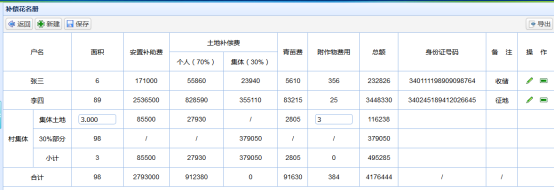
该列表页面并不是用easyUI中的datagrid实现的,而是用table实现页面显示的
原理:页面上的数据每一行数据存放在一个对象里面,与户主相关的数据都是从数据库取的,然后将查询出来的数据放在一个list集合中,查询出几条数据出来list集合中就有几个实体对象,对于后面进行计算的四条数据则是通过查出来的数据计算得到并new一个新的实体对象保存在其中,然后将该对象追加到list集合中,后台统一将该list传到前台,前台通过遍历,按顺序添加到table表中,前面户主数据都是相同的字段,因此只需要调用同一个该行添加操作,而后四条数据则根据对象在list集合中的位置就行一一添加,list集合位置用下标确定。
HTML:
<!DOCTYPE html>
<html lang="en">
<head>
<meta http-equiv="Content-Type" content="text/html; charset=utf-8"/>
<link rel="stylesheet" type="text/css" href="../skin/easyui/icon.css">
<link rel="stylesheet" type="text/css" href="../skin/easyui/default/easyui.css">
<link rel="stylesheet" type="text/css" href="../skin/css/form.css">
<script type="text/javascript" src="../js/jquery.min.js"></script>
<script type="text/javascript" src="../js/easyui/jquery.easyui.min.js"></script>
<script type="text/javascript" src="../js/easyui/locale/easyui-lang-zh_CN.js"></script>
<script type="text/javascript" src="../js/common.js"></script>
<script type="text/javascript" src="../js/DateUtil.js"></script>
<script type="text/javascript" src="../js/JsonUtil.js"></script>
<script type="text/javascript" src="../js/kindeditor/kindeditor-min.js"></script>
<script type="text/javascript" src="../js/validator.js"></script>
<style type="text/css">
.datagrid-toolbar {border-bottom: 1px #95B8E7 solid;}
</style>
</head>
<body class="easyui-layout">
<div data-options="region:'center',title:'补偿花名册'">
<!---表格列表-->
<div title="">
<div class="datagrid-toolbar" style="padding: 5px;">
<div style="float: left">
<a href="#" class="easyui-linkbutton" onClick="back()" data-options="iconCls:'icon-back'">返回</a>
<a onclick="toAdd('')" class="easyui-linkbutton" data-options="iconCls:'icon-add'">新建</a>
<a class="easyui-linkbutton" class="btnSave" onClick="save()" data-options="iconCls:'icon-save'">保存</a>
</div>
<div style="float: right">
<a onclick="toExport()" class="easyui-linkbutton" data-options="iconCls:'icon-export'">导出</a>
</div>
<!---消除浮动--->
<div style="clear: both"></div>
</div>
</div> <div data-options="region:'center'">
<form id="form">
<table class="TBLForm" cellpadding="5" width="100%">
<thead>
<tr>
<td rowspan="2" colspan="2" align="center" height="30px">户名</td>
<td rowspan="2" align="center" height="30px">面积</td>
<td rowspan="2" align="center" height="30px">安置补助费</td>
<td colspan="2" align="center" height="30px">土地补偿费</td>
<td rowspan="2" align="center" height="30px">青苗费</td>
<td rowspan="2" align="center" height="30px">附作物费用</td>
<td rowspan="2" align="center" height="30px">总额</td>
<td rowspan="2" align="center" height="30px">身份证号码</td>
<td rowspan="2" align="center" height="30px">备 注</td>
<td rowspan="2" align="center" height="30px">操 作</td>
</tr>
<tr>
<td align="center" height="30px">个人(70%)</td>
<td align="center" height="30px" style="border:1px solid #95B8E7">集体(30%)</td>
</tr>
</thead>
<tbody></tbody>
</table>
</form>
</div>
</div>
</body>
JavaScript:
<script type="text/javascript">

    var pid=getQueryStr("id");

    var pageNum=getQueryStr("pageNum");

    var flag;

    $(function(){

        loadTable();

    })

function getJsonParam(){

    var json={pid:pid};

    return json2str(json);

}

//初始化表格

function loadTable(){

    var data = getJsonData("../getTableList.hebe",getJsonParam());

    var arr = [];

//len代表相同字段的数据数组下标

    var len = data.length - 4;

    $.each(data, function(i, row) {

        //遍历数组下标

        //if中是遍历最后四条不同的记录数据

        if(i >= len) {

            if(i==len) {

                arr.push('<tr><td rowspan="3" align="center" height="30px">村集体</td>');

                arr.push('<td align="center" height="30px">集体土地</td>');

                arr.push('<td align="center" height="30px" ondblclick="updatemj(this)"><input class="easyui-numberbox" id="jttdmj" precision="3" value="'+row.mj+'" style="width: 80px"/></td>');

                arr.push('<td align="center" height="30px">' + row.azbcf + '</td>');

                arr.push('<td align="center" height="30px">' + row.grtdbcf + '</td>');

                arr.push('<td align="center" height="30px">/</td>');

                arr.push('<td align="center" height="30px">' + row.qmf_bz + '</td>');

                arr.push('<td align="center" height="30px" ondblclick="updatefz(this)"><input class="easyui-numberbox" id="jttdfzwf" value="' + row.jttdfzwf + '" style="width: 80px"/></td>');

                arr.push('<td align="center" height="30px">' + row.ze + '</td>');

                arr.push('<td align="center" height="30px">' + row.sfzhm + '</td>');

                arr.push('<td align="center" height="30px">' + row.remark + '</td>');

                arr.push('<td align="center" height="30px"></td></tr>');

            }

            if(i==len+1) {

                arr.push('<td align="center" height="30px">30%部分</td>');

                arr.push('<td align="center" height="30px">' + row.mj + '</td>');

                arr.push('<td align="center" height="30px">/</td>');

                arr.push('<td align="center" height="30px">/</td>');

                arr.push('<td align="center" height="30px">' + row.jttdbcf + '</td>');

                arr.push('<td align="center" height="30px">/</td>');

                arr.push('<td align="center" height="30px">/</td>');

                arr.push('<td align="center" height="30px">' + row.ze + '</td>');

                arr.push('<td align="center" height="30px"></td>');

                arr.push('<td align="center" height="30px"></td>');

                arr.push('<td align="center" height="30px"></td></tr>');

            }

            if(i==len+2) {

                arr.push('<td align="center" height="30px">小计</td>');

                arr.push('<td align="center" height="30px">' + row.mj + '</td>');

                arr.push('<td align="center" height="30px">' + row.azbcf + '</td>');

                arr.push('<td align="center" height="30px">' + row.grtdbcf + '</td>');

                arr.push('<td align="center" height="30px">' + row.jttdbcf + '</td>');

                arr.push('<td align="center" height="30px">' + row.qmf_bz + '</td>');

                arr.push('<td align="center" height="30px">' + row.dsfzwf + '</td>');

                arr.push('<td align="center" height="30px">' + row.ze + '</td>');

                arr.push('<td align="center" height="30px">' + row.sfzhm + '</td>');

                arr.push('<td align="center" height="30px">' + row.remark + '</td>');

                arr.push('<td align="center" height="30px"></td></tr>');

            }

            if(i==len+3){

                arr.push('<td colspan="2" align="center" height="30px">合计</td>');

                arr.push('<td align="center" height="30px">' + row.mj + '</td>');

                arr.push('<td align="center" height="30px">' + row.azbcf + '</td>');

                arr.push('<td align="center" height="30px">' + row.grtdbcf + '</td>');

                arr.push('<td align="center" height="30px">' + row.jttdbcf + '</td>');

                arr.push('<td align="center" height="30px">' + row.qmf_bz + '</td>');

                arr.push('<td align="center" height="30px">' + row.dsfzwf + '</td>');

                arr.push('<td align="center" height="30px">' + row.ze + '</td>');

                arr.push('<td align="center" height="30px">/</td>');

                arr.push('<td align="center" height="30px">/</td>');

                arr.push('<td align="center" height="30px"></td></tr>');

            }

            //else中是相同字段的数据

        } else {

            arr.push('<tr><td colspan="2" align="center" height="30px">' + row.hm + '</td>');

            arr.push('<td align="center" height="30px">' + row.mj + '</td>');

            arr.push('<td align="center" height="30px">' + row.azbcf + '</td>');

            arr.push('<td align="center" height="30px">' + row.grtdbcf + '</td>');

            arr.push('<td align="center" height="30px">' + row.jttdbcf + '</td>');

            arr.push('<td align="center" height="30px">' + row.qmf_bz + '</td>');

            arr.push('<td align="center" height="30px">' + row.dsfzwf + '</td>');

            arr.push('<td align="center" height="30px">' + row.ze + '</td>');

            arr.push('<td align="center" height="30px">' + row.sfzhm + '</td>');

            arr.push('<td align="center" height="30px">' + row.remark + '</td>');

            arr.push('<td align="center" height="30px">');

            arr.push('<a onclick="toAdd('+ row.id + ')" class="easyui-linkbutton" title="修改" data-options="plain: true,iconCls:\'icon-edit\'"></a> ');

            arr.push('<a onclick="toDelet('+ row.id + ')" class="easyui-linkbutton" title="删除" data-options="plain: true,iconCls:\'icon-remove\'"></a></td></tr>');

        }

    });

    //将动态添加的行放在form表单中

    $(".TBLForm tbody").html(arr.join(""));

//渲染一下

    $.parser.parse($(".TBLForm tbody"));

}

</script>
该模块中有几个小点需要注意:
1. 用数组arr动态的为table添加行,动态数据显示
2. push方法中添加td标签,在该标签中还可加input标签
3. 用list集合进行前后台数据传输
table形式的列表页面显示的更多相关文章
- python 全栈开发,Day114(装饰器,排序规则,显示列,添加按钮,定制ModelForm,自定义列表页面,自定制URL)
一.装饰器 装饰器本质上就是一个python函数,他可以让其他函数在不需要做任何代码变动的前提下,增加额外的功能,装饰器的返回值也是一个函数对象. 装饰器的应用场景:比如插入日志,性能测试,事务处理, ...
- 使用jQuery 中的显示与隐藏动画效果实现折叠下拉菜单的收缩和展开,在页面的列表中有若干项,列表的每项中有一个二级列表,二级列表默认为隐藏状态。点击列表的项,切换二级列表的显示或隐藏状态
查看本章节 查看作业目录 需求说明: 使用jQuery 中的显示与隐藏动画效果实现折叠下拉菜单的收缩和展开,在页面的列表中有若干项,列表的每项中有一个二级列表,二级列表默认为隐藏状态.点击列表的项,切 ...
- 从零开始编写自己的C#框架(22)——添加普通列表页面
普通列表页面指的是上一章那种有层次感列表以外的正常列表页面,由于上一章已讲解了正常添加页面的相关操作了,所以部分相关的操作本章节就不再罗嗦重复一次了.大家可以试试先用本章内容中的一些简单介绍,自己使用 ...
- 利用mybatis的分页插件实现商品列表的显示
分析思路: 当我们点击查询商品的时候,会出现商品的列表,并按上下页可以实现分页的查询的功能. 首先首先我们先找到商品查询商品的按钮在jsp的那个页面,即首页index.jsp 这里有个url即显示商品 ...
- 如何用Mvc实现一个列表页面-异步加载
在接触Mvc后,开始有点觉得很累,什么都要自己做,完全没有WebForm的易用性: 大概用了一个月左右的时候,越用用顺手,就习惯了MVC的这种开发方式,灵活,简洁: 当初学习MVC,网上看资料,都是讲 ...
- 循序渐进VUE+Element 前端应用开发(5)--- 表格列表页面的查询,列表展示和字段转义处理
在我们一般开发的系统界面里面,列表页面是一个非常重要的综合展示界面,包括有条件查询.列表展示和分页处理,以及对每项列表内容可能进行的转义处理,本篇随笔介绍基于Vue +Element基础上实现表格列表 ...
- [ABP教程]第二章 图书列表页面
Web应用程序开发教程 - 第二章: 图书列表页面 关于本教程 在本系列教程中, 你将构建一个名为 Acme.BookStore 的用于管理书籍及其作者列表的基于ABP的应用程序. 它是使用以下技术开 ...
- ASP.NET Aries 入门开发教程2:配置出一个简单的列表页面
前言: 朋友们都期待我稳定地工作,但创业公司若要躺下,也非意念可控. 若人生注定了风雨飘摇,那就雨中前行了. 最机开始看聊新的工作机会,欢迎推荐,创业公司也可! 同时,趁着自由时间,抓紧把这系列教程给 ...
- 基于CkEditor实现.net在线开发之路(5)列表页面开发
这章主要讲解利用控件开发列表页面,我们先从最简单的列表页面开始讲解,这个列表只有一个列表展示.具体开发步骤请看下面动态图 由上动态图可以看出,开发一个简单的列表只有两步, 第一步:拖拽查询控件,设置好 ...
随机推荐
- 【笔记JS/HTML/CSS】CSS3实现鼠标滑动显示动画(transition、transform)
内容中包含 base64string 图片造成字符过多,拒绝显示
- Windows提高_1.4进程通信
进程通信 使用 WM_COPYDATA 客户端(发送端) // 1. 找到窗口程序 HWND hWnd = FindWindow(NULL, L"Window1"); // 2 ...
- 【Linux】centos7 添加脚本到/etc/rc.local文件里,实现开机自启
Linux 设置开机自启动,添加命令到/etc/rc.d/rc.local,本文以设置tomcat自启动为例: 一:添加自启动命令 export JAVA_HOME=/usr/java/jdk1.8. ...
- Nuxt.js使用详解
首先来讲一下服务端渲染 直白的说就是在服务端拿数据进行解析渲染,直接生成html片段返回给前端.具体用法也有很多种比如: 传统的服务端模板引擎渲染整个页面 服务渲染生成htmll代码块, 前端 AJA ...
- git学习(2)----入门
一.git.github和gitlab的区别 Git诞生于2005年,大神Linus的作品,Github诞生于2008年,没有Git就没有GitHub,Github已成为全球最大的代(tong)码(x ...
- Stuts2学习——HelloWorld
这两天从对Struts一窍不通到成功运行HelloWorld,在SSH这条路上迈出了第一步. 下面我把我的第一个Struts程序放上来: 一.新建web project,配置文件等准备工作 1. 新建 ...
- 洛谷——P1168 中位数
P1168 中位数 题目描述 给出一个长度为NN的非负整数序列$A_i$,对于所有1 ≤ k ≤ (N + 1),输出$A_1, A_3, …, A_{2k - 1}A1,A3,…,A2k−1 ...
- (C/C++学习)21.C++中返回引用和返回对象以及传引用和传对象问题
说明:在学习和编写C++代码时,经常会遇到这样的问题:一个带返回值的函数,到底应该返回值呢,还是应该返回引用呢:在传递参数的时候,是应该传递参数的引用呢,还是应该传值呢?请看下面代码: void my ...
- Spring Boot之简单的MVC
最近开始看Spring Boot,发现其开发起来真是方便.今天就来实现一个简单的Spring MVC 请求,纯Java代码的哦. 1.Maven必不可少,先看看都加载了那些依赖: <?xml v ...
- Java基础学习总结(87)——坚持写Java等技术类博客的好处
1.加深对技术点的理解 每天写博客,可以加深对技术点的理解,假如工作中,对某个技术点运用的不熟,当你通过博客的形式写出来,这个过程中,遇到不懂的知识点,你就会查阅相关的资料,弄明白他. 2.自己日后用 ...