
Serial Fluent UDF on Windows
test
test
Table of Contents
1 Serial UDF on Windows OS
Note:
- Udf has to be compiled, can’t be interpolated
Steps:
- launch Fluent from the Command Line
For ansys 16.x, launch Fluent from the Command Line using the VS2015 x86 x64 Cross Tools Command Prompt (not x64 x86 cross tools)
- Open the Start screen (press Windows button on your keyboard, Type 'VS2013 x86 x64 Cross Tools Command Prompt'
- change directory to your working folder, e.g.
cd C:\Users\exw692\kaiming\Shared\ch6_wave_effect\OldGeo\e387UDF\sine - Type “fluent” in the command window to launch Fluent or “C:\Program Files\ANSYS Inc\v161\fluent\ntbin\win64\fluent.exe” (quotation signs included, in case of standard installation; fluent version: 16.1).
Make sure that on the Environment tab 'Setup Compilation Environment for UDF' is ticked. The default address is fine.
- Read mesh/cas file
- Setup turbulence model/boundary conditions, etc.
- Compilation Define/user-defined/functions/compiled, load
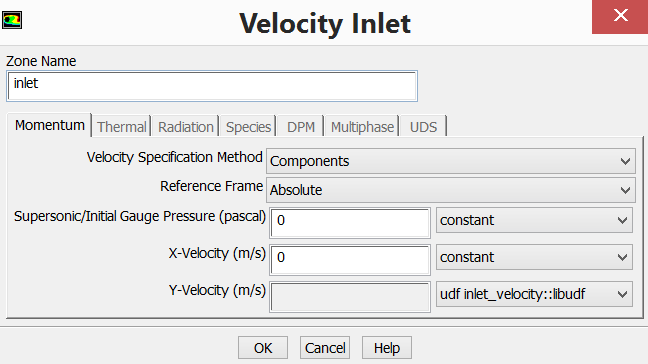
- Hook UDF file to velocity component at inlet Boundary condition/inlet/x or y component velocity/udf

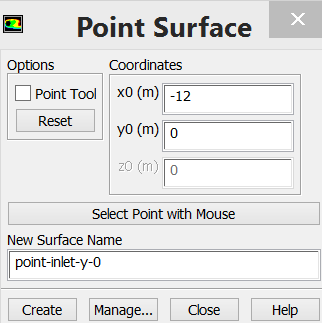
- Setup point monitors at inlet Create a point at inlet and monitor the velocity at the defined point
To create a point at inlet BC
Surface/point Solution--monitors--surface--fill your information to dialog table
Report type: vertex average
Field variable: velocity, velocity magnitude/component;
Surface: a point at inlet BC
- Setup time step size, 0.002s, save cas file Time step, 1/100 period of wave
1 degree per time step, 0.001s, 360 time step per circle of turbine rotation
ω=2*π/T
If ω=14.34, TSR=5.5, T=0.44,
| U(m/s) | TSR | r(m) | Angular velocity | T(s) | time step size |
| 0.6 | 5.5 | 0.23 | 14.34782609 | 0.437919 0.001216 |
- Initialisation, compute from inlet
- Calculation, 200 time steps


https://www.cfd-online.com/Forums/fluent/40392-how-can-i-monitor-pressure-point.html
Serial Fluent UDF on Windows的更多相关文章
- Fluent UDF【1】:简介
前面基本完成了动网格专题的发布,不过还是有一些内容并没有更新进去,比如说in-cylinder.接触检测.2.5D网格重构等.不过这些都是小技巧,写起来挺麻烦,以后有时间再通过案例视频的方式讲解好了. ...
- Fluent UDF【4】:C语言
Fluent UDF利用的是C语言,本文简单介绍在UDF中经常会用到的C语言常识. 本文部分内容来自UDF手册. 1 C语言中的注释 C语言中的注释利用/*及*/来实现.例如: /*这是一个注释*/ ...
- Fluent UDF【2】:学习途径
要怎样做才能做到无畏惧编写任何UDF程序?估计很多与UDF打交道的人都会问到这个问题. 面对UDF文档中那众多的宏描述,小伙伴们是不是感觉到茫然无措,不知从何入手.有时候读别人写好的程序感觉并不难,然 ...
- Fluent UDF【8】:编译型UDF
UDF除了可以以解释的方式外,其还可以以编译的方式被Fluent加载.解释型UDF只能使用部分C语言功能,而编译型UDF则可以全面使用C语言的所有功能. 1 编译型UDF介绍 编译型UDF的构建方式与 ...
- Fluent UDF【3】:环境配置
windows操作系统下UDF的编译需要借助Visual Studio中的C编译器.因此若要想编译UDF,则必须事先配置好编译环境. Visual Studio Visual Stuido(后面简称V ...
- Fluent——UDF监测指定点的物理量
Fluent版本:19.0 Fluent当中提供了监测某一点物理量随迭代次数或者随时间变化的功能,下面我们就介绍如何在UDF当中实现相同的功能,并且UDF更加灵活,通过UDF的方式我们在知道某点运动规 ...
- Fluent UDF【7】:解释型UDF
UDF宏有两种方式可以被Fluent所接受:编译和解释.其中有一些宏既可以被解释也可以被编译,而一些宏则只能被解释.有一些场合只接受编译后的UDF(如动网格中的一些宏),而有些场合既可以接受编译的UD ...
- Fluent UDF【6】:预处理命令
今天要讲的内容是关于C语言的预处理.搞清楚了这个,就可以分析UDF中的各种头文件源代码,从此写UDF不求人. 1 关于预处理 在UDF的各种头文件中(文件路径D:\Program Files\ANSY ...
- Fluent UDF【5】:第一个UDF
这里以一个简单的初始化案例来描述UDF的使用过程. 0 Fluent中的Patch Fluent中提供了全域初始化以及局部Patch功能.对于整体区域的全局初始化可以采用starndard及hybri ...
随机推荐
- bzoj1477 && exgcd学习笔记
exgcd 由于忘记了exgcd,这道题就没做出来... exgcd的用处是求ax+by=gcd(a,b)这样方程的解 大概是这个样子的 void ext_gcd(long long a, long ...
- Java开源JSP标签库
01displytag 与Struts结合使用最出名的一个tag主要是显示表格数据很漂亮.完善. 02cewolf tag 用来在web上显示复杂图形报表的一个jsp tag. 03Loading T ...
- PCB OD工具破解实例应用
以下破解Genesis为例,对OD工具使用进行实例讲解 工具简单 介绍下下载地址: OD工具:是一个新的动态追踪工具,将IDA与SoftICE结合起来的思想,Ring 3级调试器, 是为当今最为流行的 ...
- poj Code(组合数)
Code Time Limit: 1000MS Memory Limit: 30000K Total Submissions: 9918 Accepted: 4749 Description ...
- [Swift通天遁地]三、手势与图表-(3)通过捏合手势放大和缩小图像视图
★★★★★★★★★★★★★★★★★★★★★★★★★★★★★★★★★★★★★★★★➤微信公众号:山青咏芝(shanqingyongzhi)➤博客园地址:山青咏芝(https://www.cnblogs. ...
- cloudera-scm-server启动时出现Caused by: java.io.FileNotFoundException: /var/lib/cloudera-scm-server/.keystore (No such file or directory)问题解决方法(图文详解)
不多说,直接上干货! 问题详情 查看/var/log/cloudera-scm-server.log的启动日志 问题来源 我在用cloudermanager安装好之后,然后,在对如下. 配置kerbe ...
- Linq学习(五)-多表连接
本将主要介绍 内连接与 外连接 1.join Linq to sql from a in Blog_Users join b in Blog_UserInfo on a.UserId equals b ...
- Unity学习-元素类型(三)
在看下面操作时,先记住三句话 1.游戏对象 是由 组件 组成的:衣服 2.材质(Material):就是衣服的设计方案 3.纹理(Texture):做衣服的布料 从GameObject到Cube 第一 ...
- T-SQL查询基础
今天来带大家了解下在sql server 中的查询机制 使用select语句进行查询 1.查询所有的数据行和列 select * from student 2.查询部分行和列 select scode ...
- [ NOIP 1998 ] TG
\(\\\) \(\#A\) 车站 火车从第\(1\)站开出,上车的人数为\(a\),然后到达第\(2\)站,在第\(2\)站有人上.下车,但上.下车的人数相同,因此在第\(2\)站开出时(即在到达第 ...