
ssh_整合总结
开场白:首先,我先帮大家整理一下思路
准备:
数据库,表,数据
jar 包准备
Hibernate 基本jar 包
C3p0 数据库连接池
Spring AOP 基本包
Spring Ioc 基本包
Spring 事务控制
Spring 整合 junit 用户方便测试
Spring 整合Struts 包
Spring-annotation 包
Spring的json插件包
Struts基本jar包
Spring 整合Hibernate
创建实体类
书写Service 层和Dao层
编写Spring的配置
配置IOC注解
配置Hibernate模板和事务控制
测试Spring和Hibernate是否成功
Spring 整合Struts2
配置前端控制器
书写action
测试
OK,思路屡一下后,下面开始书写详细的步骤,(注意:常用的方法和数据库的创建省略 。。。代码省略,自己写测试)
创建数据库 。。。
创建表 。。。
插入测试数据。。。
前端UI界面 。。。
----------------------------------------------------------------------------------------------------------------------------------
Spring 整合Hibernate
导入Hibernate 和 Spring 以及相关 jar 包
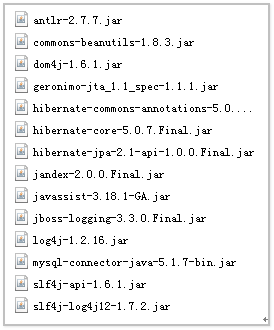


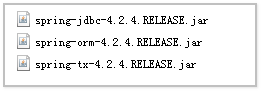
一、创建实体类和映射配置,使用注解 。。。
@Entity //实体类
@Table(name = "数据库表名")
public class Customer{
@Id //主键
@Column(name = "对应数据库中的字段名")
@GeneratedValue(strategy=GenerationType.IDETITY)//主键自增策略,IDETITY = MySql的自增,AUTO = 自适应<<<注意:
如需使用UUID 需要另外一个注解配合使用并且主键类型需要时String类型的:
      @GenericGenerator(name = "Myuuid",strategy = "uuid")
      @GeneratedValue(generator = "Myuuid")>>>
    private Integer 变量名,最好与数据库字段名对应


    @Column(name = "对应数据库中的字段名")
    private Integer 变量名,最好与数据库字段名对应

    。。。
}
二、书写Service 和Dao层 。。。
三、编写Spring的配置文件(applicationContext.xml)本次使用的配置我会加入步数,没有加入步数的本步骤不使用
 <?xml version="1.0" encoding="UTF-8"?>

 <beans xmlns:xsi="http://www.w3.org/2001/XMLSchema-instance"

        xmlns="http://www.springframework.org/schema/beans"

        xmlns:context="http://www.springframework.org/schema/context"

        xmlns:tx="http://www.springframework.org/schema/tx"

        xmlns:aop="http://www.springframework.org/schema/aop"

         xsi:schemaLocation="

         http://www.springframework.org/schema/beans

         http://www.springframework.org/schema/beans/spring-beans-4.2.xsd

         http://www.springframework.org/schema/context

         http://www.springframework.org/schema/context/spring-context-4.2.xsd

         http://www.springframework.org/schema/tx

         http://www.springframework.org/schema/tx/spring-tx-4.2.xsd

         http://www.springframework.org/schema/aop

         http://www.springframework.org/schema/aop/spring-aop-4.2.xsd

        ">

     <!-- 第一步:指定spring在创建容器时要扫描的包 -->

     <context:component-scan base-package="cn.ibbidream"></context:component-scan>

     <!-- 第二步:管理hibernateTemplate -->

     <bean id="hibernateTemplate" class="org.springframework.orm.hibernate5.HibernateTemplate">

         <property name="sessionFactory" ref="sessionFactory"></property>

     </bean>

     <!-- 配置事务 -->

     <bean id="transactionManager" class="org.springframework.orm.hibernate5.HibernateTransactionManager">

         <property name="sessionFactory" ref="sessionFactory"></property>

     </bean>

     <!-- 配置通知 -->

     <tx:advice id="txAdvice" transaction-manager="transactionManager">

         <tx:attributes>

             <tx:method name="*"/>

             <tx:method name="query*" propagation="SUPPORTS" read-only="true"></tx:method>

         </tx:attributes>

     </tx:advice>

     <!-- 配置AOP -->

     <aop:config>

         <aop:pointcut id="pt1" expression="execution(* cn.ibbidream.service.impl.*.*(..))"></aop:pointcut>

         <aop:advisor advice-ref="txAdvice" pointcut-ref="pt1"></aop:advisor>

     </aop:config>

     <!-- 第三步:管理SessionFactory -->

     <bean id="sessionFactory" class="org.springframework.orm.hibernate5.LocalSessionFactoryBean">

         <!-- 第四步:配置管理数据库连接池 -->

         <property name="dataSource" ref="dataSource"></property>

         <!-- 第六步:配置数据库其他信息 -->

         <property name="hibernateProperties">

             <props>

                 <!-- 配置数据库方言 -->

                 <prop key="hibernate.dialect">org.hibernate.dialect.MySQLDialect</prop>

                 <!-- 配置是否在控制台打印sql语句 -->

                 <prop key="hibernate.show_sql">true</prop>

                 <!-- 配置是否格式化输出sql语句 -->

                 <prop key="hibernate.format_sql">true</prop>

                 <!-- 配置生成ddl语句的方式 -->

                 <prop key="hibernate.hbm2ddl.auto">update</prop>

             </props>

         </property>

         <!-- 第七步:配置hibernate的映射文件的注解扫描 -->

         <property name="packagesToScan">

             <array>

                 <value>cn.ibbidream.entity</value>

             </array>

         </property>

     </bean>

     <!-- 第五步:管理dataSource -->

     <bean id="dataSource" class="com.mchange.v2.c3p0.ComboPooledDataSource">

         <property name="driverClass" value="com.mysql.jdbc.Driver"></property>

         <property name="jdbcUrl" value="jdbc:mysql://localhost:3306/crm"></property>

         <property name="user" value="root"></property>

         <property name="password" value="jiajia771"></property>

     </bean>

 </beans>
四、在Service和Dao层中配置AOP注解(Aspect Oriented Programming 面向切面编程。解耦是程序员编码开发过程中一直追求的。AOP也是为了解耦所诞生。) AOP 主要是利用代理模式的技术来实现的。
  @Service("customerService")//声明这是一个Service 层的装配Bean//看不懂的 自行百度

  @Controller//控制层  视图层
@Repository//持久层
@Autowired //自动对象 注入
  @Qualifier("对象注解名称")//如果对象名和属性名一样 可以省略此写法

五、配置Hibernate模板和事务控制(applicationContext.xml)本次使用的配置我会加入步数,没有加入步数的本步骤不使用(其他在上面的配置已经配置完成)
 <?xml version="1.0" encoding="UTF-8"?>

 <beans xmlns:xsi="http://www.w3.org/2001/XMLSchema-instance"

        xmlns="http://www.springframework.org/schema/beans"

        xmlns:context="http://www.springframework.org/schema/context"

        xmlns:tx="http://www.springframework.org/schema/tx"

        xmlns:aop="http://www.springframework.org/schema/aop"

         xsi:schemaLocation="

         http://www.springframework.org/schema/beans

         http://www.springframework.org/schema/beans/spring-beans-4.2.xsd

         http://www.springframework.org/schema/context

         http://www.springframework.org/schema/context/spring-context-4.2.xsd

         http://www.springframework.org/schema/tx

         http://www.springframework.org/schema/tx/spring-tx-4.2.xsd

         http://www.springframework.org/schema/aop

         http://www.springframework.org/schema/aop/spring-aop-4.2.xsd

        ">

     <!-- 指定spring在创建容器时要扫描的包 -->

     <context:component-scan base-package="cn.ibbidream"></context:component-scan>

     <!-- 管理hibernateTemplate -->

     <bean id="hibernateTemplate" class="org.springframework.orm.hibernate5.HibernateTemplate">

         <property name="sessionFactory" ref="sessionFactory"></property>

     </bean>

     <!-- 第一步:配置事务 -->

     <bean id="transactionManager" class="org.springframework.orm.hibernate5.HibernateTransactionManager">

         <property name="sessionFactory" ref="sessionFactory"></property>

     </bean>

     <!-- 第二步:配置通知 -->

     <tx:advice id="txAdvice" transaction-manager="transactionManager">

         <tx:attributes>

             <tx:method name="*"/>

             <tx:method name="query*" propagation="SUPPORTS" read-only="true"></tx:method>

         </tx:attributes>

     </tx:advice>

     <!-- 第三步:配置AOP -->

     <aop:config>

         <aop:pointcut id="pt1" expression="execution(* cn.ibbidream.service.impl.*.*(..))"></aop:pointcut>

         <aop:advisor advice-ref="txAdvice" pointcut-ref="pt1"></aop:advisor>

     </aop:config>

     <!-- 管理SessionFactory -->

     <bean id="sessionFactory" class="org.springframework.orm.hibernate5.LocalSessionFactoryBean">

         <!-- 配置管理数据库连接池 -->

         <property name="dataSource" ref="dataSource"></property>

         <!-- 配置数据库其他信息 -->

         <property name="hibernateProperties">

             <props>

                 <!-- 配置数据库方言 -->

                 <prop key="hibernate.dialect">org.hibernate.dialect.MySQLDialect</prop>

                 <!-- 配置是否在控制台打印sql语句 -->

                 <prop key="hibernate.show_sql">true</prop>

                 <!-- 配置是否格式化输出sql语句 -->

                 <prop key="hibernate.format_sql">true</prop>

                 <!-- 配置生成ddl语句的方式 -->

                 <prop key="hibernate.hbm2ddl.auto">update</prop>

             </props>

         </property>

         <!-- 配置hibernate的映射文件的注解扫描 -->

         <property name="packagesToScan">

             <array>

                 <value>cn.ibbidream.entity</value>

             </array>

         </property>

     </bean>

     <!-- 管理dataSource -->

     <bean id="dataSource" class="com.mchange.v2.c3p0.ComboPooledDataSource">

         <property name="driverClass" value="com.mysql.jdbc.Driver"></property>

         <property name="jdbcUrl" value="jdbc:mysql://localhost:3306/crm"></property>

         <property name="user" value="root"></property>

         <property name="password" value="jiajia771"></property>

     </bean>

 </beans>
六、测试,书写main 方法测试
----------------------------------------------------------------------------------------------------------------------------------------------------------
Spring 整合Struts2
导包
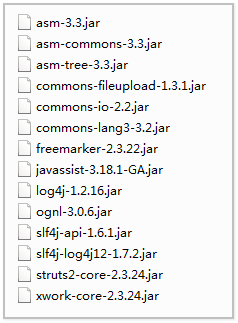
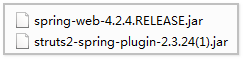

一、配置前端控制器(web.xml)
 <?xml version="1.0" encoding="UTF-8"?>

 <web-app xmlns="http://java.sun.com/xml/ns/javaee"

            xmlns:xsi="http://www.w3.org/2001/XMLSchema-instance"

            xsi:schemaLocation="http://java.sun.com/xml/ns/javaee

           http://java.sun.com/xml/ns/javaee/web-app_3_1.xsd"

            version="2.5">

     <!-- 配置前端控制器整合 -->

     <listener>

         <listener-class>org.springframework.web.context.ContextLoaderListener</listener-class>

     </listener>

     <context-param>

         <param-name>contextConfigLocation</param-name>

         <param-value>classpath:applicationContext.xml</param-value>

     </context-param>

     <!-- 配置Struts 前端控制器 -->

     <filter>

         <filter-name>Struts2</filter-name>

         <filter-class>org.apache.struts2.dispatcher.ng.filter.StrutsPrepareAndExecuteFilter</filter-class>

         <init-param>

             <param-name>struts.devMode</param-name>

             <param-value>true</param-value>

         </init-param>

     </filter>

     <filter-mapping>

         <filter-name>Struts2</filter-name>

         <url-pattern>/*</url-pattern>

     </filter-mapping>

 </web-app>
二、发送请求获取数据
127.0.0.1:8080/customer/queryCustomer
三、编写action(动作类必须以action、actions、struts、struts2为结尾的包下)
@Controller//上面解释过了
@Scope("prototype")//配置为多例模式
@ParentPackage("struts-default")//继承父类
@Namespace(“/customer”)//配置名称空间
@Autowired//自动类型注入
 package cn.ibbidream.web.action;

 import cn.ibbidream.entity.Customer;

 import cn.ibbidream.service.CustomerService;

 import com.opensymphony.xwork2.ActionContext;

 import com.opensymphony.xwork2.ActionSupport;

 import org.apache.struts2.convention.annotation.*;

 import org.hibernate.criterion.DetachedCriteria;

 import org.hibernate.criterion.Projections;

 import org.springframework.beans.factory.annotation.Autowired;

 import org.springframework.beans.factory.annotation.Qualifier;

 import org.springframework.context.annotation.Scope;

 import org.springframework.stereotype.Controller;

 import java.util.HashMap;

 import java.util.List;

 import java.util.Map;

 @Namespace("/customer")

 @Controller

 @ParentPackage(value = "json-default")

 @Scope(value = "prototype")

 public class CustomerAction extends ActionSupport{

     @Autowired

     @Qualifier(value = "customerService")

     private CustomerService customerService;

     @Action(value = "CustomerlistCustomer",results = {@Result(name = "customerlistCustomer",type = "json")})

     public String CustomerlistCustomer(){

         DetachedCriteria dc = DetachedCriteria.forClass(Customer.class);

         //业务流程

         /*

          * 将数据转换成datagrid所需的格式需要两个key:

          *     1、total:数据的总记录数

          *     2、rows:所有客户的集合

          */

         //查询所有客户的总记录数

         //统计查询是一种特殊的投影查询

         dc.setProjection(Projections.rowCount());

         Long count = customerService.queryCountCustomer(dc);

         List<Customer> customers = customerService.queryListCustomer(dc);

         Map<String, Object> map = new HashMap<>();

         map.put("total",count);

         map.put("rows",customers);

         System.out.println(map.toString());

         ActionContext.getContext().getValueStack().push(map);

         return "customerlistCustomer";

     }

 }
四、因为我的前端用的esayUi 写的,所以需要返回json 格式的数据(3.5. 将数据转换成json格式)
1、导入json的插件包
2、修改继承的包
3、将数据封装成所需要的格式(即封装到一个map中)
4、将map压入栈顶
5、返回的结果集类型如图
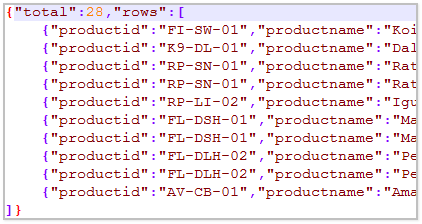
将ParentPackage 继承json-default、json-default继承struts-default ,我上边已经改好了
将返回集类型改为json,三种也做好了
书写一个方法可以查询返回数据的个数的
测试,至此案例完成(注意,本篇文章仅仅帮助初学者理思路的,如果完全按照此文章书如果是小白级别可能写不出来)
如有大神看出错误所在,请在评论区指正
ssh_整合总结的更多相关文章
- SSH_框架整合6--修改Edit员工信息
SSH_框架整合6--修改Edit员工信息 1 加上修改Edit键 (1)emp-list.jsp <td> <a href="emp-input?id=${id }&qu ...
- SSH_框架整合5--验证用户名是否可用
SSH_框架整合5--验证用户名是否可用 1 emp-input.jsp中编写ajax验证用户名是否可用: <script type="text/javascript" SR ...
- SSH_框架整合4--添加员工信息
SSH_框架整合4--添加员工信息 一. 1 index.jsp:添加:<a href="emp-input">添加员工向信息:Add Employees' Infor ...
- SSH_框架整合2—查询显示
4. 完成功能. (1)com.atguigu.ssh.actions包下新建EmployeeAction.java package com.atguigu.ssh.actions; import j ...
- SSH_框架整合1
1 WEB环境下配置Spring 因为是在WEB环境中应用Spring,所以要先配置web.xml: (1)WebContent-WEB-INF-lib包中,加入Spring包下的required ...
- SSH_框架整合7--整个项目CODE
一 架构 1Action类 2 配置文件 3 View页面 二 Code 1 src (1)com.atguigu.ssh.actions >EmployeeAction.java packa ...
- SSH_框架整合3-删除
一.普通删除 1 完善src中 类: (1)EmployeeDao.java中: //2 删除 public void delete(Integer id){ String hql="DEL ...
- [原创]mybatis中整合ehcache缓存框架的使用
mybatis整合ehcache缓存框架的使用 mybaits的二级缓存是mapper范围级别,除了在SqlMapConfig.xml设置二级缓存的总开关,还要在具体的mapper.xml中开启二级缓 ...
- kindeditor4整合SyntaxHighlighter,让代码亮起来
这一篇我将介绍如何让kindeditor4.x整合SyntaxHighlighter代码高亮,因为SyntaxHighlighter的应用非常广泛,所以将kindeditor默认的prettify替换 ...
随机推荐
- RegisterAttached 两种绑定方式
RegisterAttached 含义:使用指定的属性名称.属性类型和所有者类型注册附加属性 绑定方式:C#绑定.WPF绑定 例:需求DataViewModel为DataView的VM层,在DataV ...
- codevs1154能量项链(环形dp,区间dp)
1154 能量项链 2006年NOIP全国联赛提高组 时间限制: 1 s 空间限制: 128000 KB 题目等级 : 黄金 Gold 题目描述 Description 在Mars星球上 ...
- [App Store Connect帮助]三、管理 App 和版本(2.5)输入 App 信息:本地化 App Store 信息
在添加 App 至您的帐户之后,您可以在“App 信息”页面添加语言并输入本地化元数据.若要查看受支持的语言列表,请参见 App Store 本地化.若要了解您可以本地化的属性,请参见必填项.可本地化 ...
- group by 和 select
group by 有一个原则,就是 select 后面的所有列中,没有使用聚合函数的列,必须出现在 group by 后面.
- linux 防火墙关闭
systemctl status firewalld.servicesystemctl status iptables.service关闭防火墙,selinux15:54:43运维-李浩 2017/ ...
- 【洛谷3546_BZOJ2803】[POI2012]PRE-Prefixuffix(String Hash)
Problem: 洛谷3546 Analysis: I gave up and saw other's solution when I had nearly thought of the method ...
- ACM_Repeating Characters
Repeating Characters Time Limit: 2000/1000ms (Java/Others) Problem Description: For this problem, yo ...
- IOS开发 键盘添加工具条 退出 上一项 下一项 简单实现
首先设置每个 UITextField 的 inputAccessoryView 为UIToolBar : 将所有的 textField 放入一个数组: 设置 UITextField UITextFie ...
- 初步认识kafka
Kafka是用于日志处理的分布式消息队列,Kafka使用scala语言开发的. 各个开源分布式处理系统Cloudera.Apache Storm.Spark都支持与Kafka集成.其日志处理的一个场景 ...
- 把datagrid转换成gridview
public gridview datagrid2gridview(datagrid dg) { gridview gv = new gridview(); foreach(var p in dg.c ...