
c# ServiceStack web 搭建
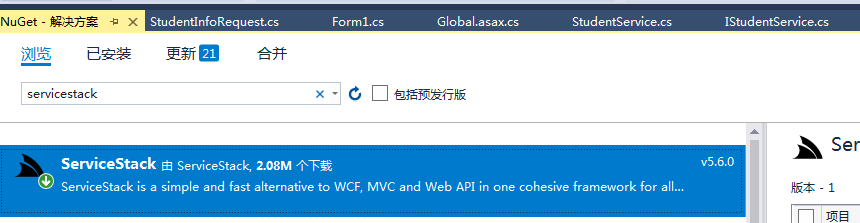
用的是4.5的.net版本
构建model
    /// <summary>

    /// 通过id获取资料

    /// </summary>

    //[Route("/GetStudentInfo", "POST")]

    public class StudentInfoRequest : IReturn<StudentInfo>

    {

        public int id { get; set; }

    }

    /// <summary>

    /// 获取所有用户信息

    /// </summary>

    [Route("/GetAllStudentInfo", "POST")]

    public class GetAllStudentInfoRequest : IReturn<StudentInfo>

    {

    }

   public class StudentInfo

    {

        public int id { get; set; }

        public string name { get; set; }

        public int age { get; set; }

        public string grade { get; set; }

    }
添加mvc web应用,创建service
public interface IStudentService

    {

        int Post(StudentInfo model);

        StudentInfo Get(StudentInfoRequest request);

        bool Delete(StudentInfoRequest request);

        List<StudentInfo> Any(GetAllStudentInfoRequest request);

        bool Put(StudentInfo model);

    }

 public class StudentService : Service, IStudentService

    {

        private static List<StudentInfo> data = new List<StudentInfo>();

        public int Post(StudentInfo model)

        {

            if (data.Count <= )

            {

                model.id = ;

                data.Add(model);

            }

            else

            {

                model.id = data.Select(it => it.id).Max() + ;

                data.Add(model);

            }

            return model.id;

        }

        public bool Delete(StudentInfoRequest request)

        {

            var selectData = data.Where(it => it.id == request.id).FirstOrDefault();

            if (selectData == null)

            {

                return false;

            }

            else

            {

                data.Remove(selectData);

                return true;

            }

        }

        public StudentInfo Get(StudentInfoRequest request)

        {

            return data.Where(it => it.id == request.id).FirstOrDefault();

        }

        public List<StudentInfo> Any(GetAllStudentInfoRequest request)

        {

            return data;

        }

        public bool Put(StudentInfo model)

        {

            var selectData = data.Where(it => it.id == model.id).FirstOrDefault();

            if (selectData == null)

            {

                data.Add(model);

            }

            else

            {

                data.Remove(selectData);

                data.Add(model);

            }

            return true;

        }

    }
web全局文件配置
protected void Application_Start()

        {

            new APIServiceHost().Init();

        }

        public class APIServiceHost : AppHostBase

        {

            //Register your web service with ServiceStack.

            public APIServiceHost()

                : base("API服务", typeof(APIServiceHost).Assembly)

            {

                //Routes.Add(typeof(int), "/Student", "POST", "添加学生信息", "");

                //Routes.Add(typeof(bool), "/Student", "DELETE", "删除学生信息", "");

                //Routes.Add<StudentInfo>("/Student", "GET");

                //Routes.Add<List<StudentInfo>>("/Student", "GET");

                //Routes.Add<bool>("/Student", "PUT");

                //Routes.Add<int>("/Grade", "POST")

                //      .Add<bool>("/Grade/{Id}", "DELETE")

                //      .Add<GradeInfo>("/Grade/{Id}", "GET")

                //      .Add<List<GradeInfo>>("/Grade", "GET")

                //      .Add<bool>("/Grade", "PUT");

                //启用请求参数合法性验证功能:

                Plugins.Add(new ValidationFeature());

                //Plugins.Add(new ProtoBufFormat());

                //JsConfig.EmitCamelCaseNames = false;

                //Plugins.Add(new SwaggerFeature());

                Plugins.Add(new CorsFeature("*.test.com"));

            }

            public override void Configure(Funq.Container container)

            {

                //Register any dependencies your services use here.

            }

        }
web.config的配置文件必须加上 红色标记的路径
<system.webServer>

    <modules>

      <remove name="TelemetryCorrelationHttpModule" />

      <add name="TelemetryCorrelationHttpModule" type="Microsoft.AspNet.TelemetryCorrelation.TelemetryCorrelationHttpModule, Microsoft.AspNet.TelemetryCorrelation" preCondition="integratedMode,managedHandler" />

      <remove name="ApplicationInsightsWebTracking" />

      <add name="ApplicationInsightsWebTracking" type="Microsoft.ApplicationInsights.Web.ApplicationInsightsHttpModule, Microsoft.AI.Web" preCondition="managedHandler" />

    </modules>

    <validation validateIntegratedModeConfiguration="false" />

    <handlers>

      <!--<add path="*.aspx" name="DefaultHttpApplication" type="System.Web.UI.PageHandlerFactory" verb="*" ></add>-->

      <add path="*" name="ServiceStack.Factory" type="ServiceStack.HttpHandlerFactory, ServiceStack" verb="*" preCondition="integratedMode" resourceType="Unspecified" allowPathInfo="true" />

    </handlers>

  </system.webServer>
然后对接服务
 protected const string listenOnUrl = "http://localhost:2285/";//web的连接

对接接口

StudentInfo model = new StudentInfo();

            GetStudent(model);

            using (JsonServiceClient client = new JsonServiceClient(listenOnUrl))

            {

                model.id = client.Post<int>(model);

            }
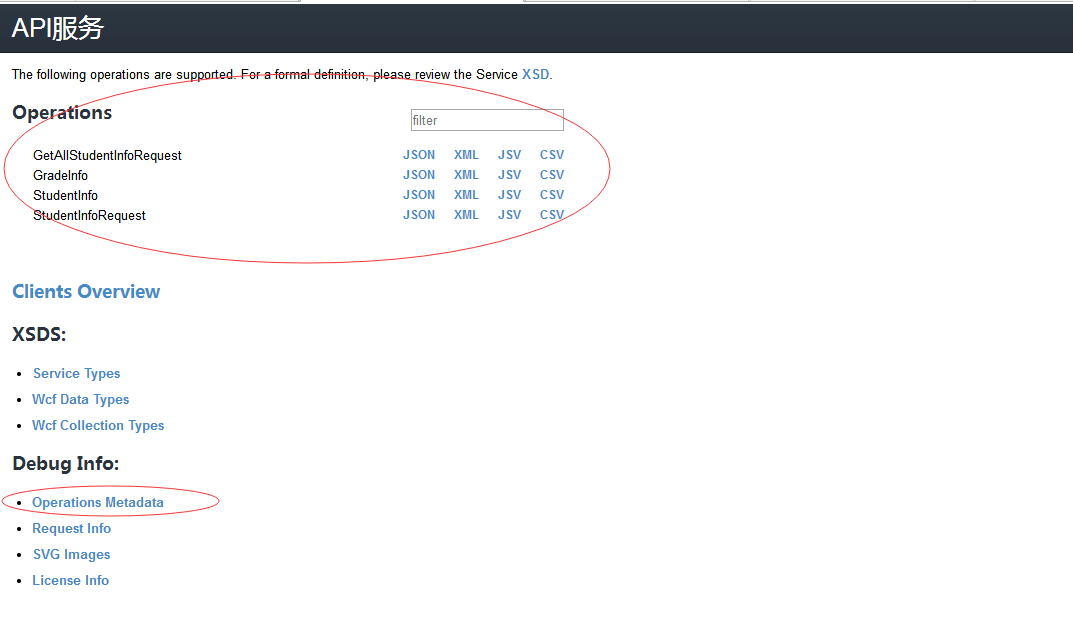
启动后的样子
c# ServiceStack web 搭建的更多相关文章
- ServiceStack Web Service 创建与调用简单示列
目录 ServiceStack 概念 ServiceStack Web Service 创建与调用简单示列 上篇文章介绍了ServiceStack是什么,本章进入主题,如何快速简单的搭建Service ...
- IIS web搭建之虚拟主机
IIS web搭建之虚拟主机 虚拟目录:能将一个网站的文件分散存储在同一个计算机的不同目录和其他计算机. 使用虚拟目录的好处: 1.将数据分散保存到不同的磁盘或者计算机上,便于分别开发和维护. 2.当 ...
- Shiro的原理及Web搭建
shiro(java安全框架) 以下都是综合之前的人加上自己的一些小总结 Apache Shiro是一个强大且易用的Java安全框架,执行身份验证.授权.密码学和会话管理.使用Shiro的易于理解的A ...
- Tomcat WEB搭建+Nginx负载均衡动静分离+DNS解析的实验
实验拓扑图: 实验环境: 在VMware workstation搭建虚拟环境,利用网络适配器的Nat和桥接模式模拟内网和外网环境. 实验过程中需要安装的工具包包括:vim unzip lrzsz ls ...
- Flask 使用pycharm 创建项目,一个简单的web 搭建
1:新建项目后 2:Flask web 项目重要的就是app 所有每个都需要app app=Flask(__name__) 3:Flask 的路径是有app.route('path')装饰决定, ...
- pycharm环境下用Python+Django开发web搭建
1.安装pycharm: 2.安装Python: 3.安装mysql: 4.安装Django; pip3 install django 5.创建Django工程命令方式: # 创建Django程序 d ...
- 使用 ServiceStack 构建跨平台 Web 服务
本文主要来自MSDN杂志<Building Cross-Platform Web Services with ServiceStack>,Windows Communication Fou ...
- 使用 ServiceStack 构建跨平台 Web 服务(转)
出处:http://www.cnblogs.com/shanyou/p/3348347.html 本文主要来自MSDN杂志<Building Cross-Platform Web Service ...
- Win7下Python WEB环境搭建
环境介绍: Win7 64位 SP1 Python:2.7.6 网关接口:flup Nginx安装:http://blog.csdn.net/jacson_bai/article/details/46 ...
随机推荐
- 第11组 Alpha冲刺(5/6)
第11组 Alpha冲刺(5/6) 队名 不知道叫什么团队 组长博客 https://www.cnblogs.com/xxylac/p/11898559.html 作业博客 https://edu ...
- Java-ZipUtil
Zip 压缩工具类,不支持压缩空文件夹. 简单版 import java.io.FileOutputStream; import java.io.IOException; import java.ni ...
- Csdn账号如何注销?
Csdn账号如何注销? 请在ios端app设置内注销 ios端注销在设置页面的底部左下角,andriod在2019.07月底更新,即可支持 文章来源:刘俊涛的博客 欢迎关注,有问题一起学习欢迎 ...
- JDK的新特性
JDK5新特性 a,自动拆装箱 b,泛型 c,可变参数 d,静态导入 e,增强for循环 f,互斥锁 g,枚举 JDK7新特性 * A:二进制字面量 * B:数字字面量可以出现下划线 * C:swit ...
- 006-log-logback,slf4j+logback
一.概述 Logback作为流行的log4j项目的继承者.它是由log4j的创始人Ceki Gulcu设计的.它是建立在上十年优质日志系统设计经验之上而产生的产品,即logback,它比所有现有的日志 ...
- BUUCTF-writeup
Reverse RSA 使用openssl模块 rsa -pubin -text -modulus -in pub.key得到n值,在 factordb.com上分解大素数得到p,q值,脚本生成pri ...
- Ubuntu16.04安装vmware pro 15激活码
VMware Workstation Pro 15 激活许可证UY758-0RXEQ-M81WP-8ZM7Z-Y3HDAVF750-4MX5Q-488DQ-9WZE9-ZY2D6UU54R-FVD91 ...
- sparkStream---1
1.本地scala版 import org.apache.spark._ import org.apache.spark.streaming._ import org.apache.spark.str ...
- 参照UB单创建DN并过账
*&---------------------------------------------------------------------* *& Form FRM_DN_POST ...
- 打印Linq生成的SQL语句
var t1 = source.OrderBy<T>(orderby).Skip<T>(_skip).Take<T>(_take); var t2 = t1.ToO ...