
使用Struts2实现图片上传和拦截器
今天来分享一个图片上传
现在很多小项目里面基本上都有要显示图片的功能,所以呢图片上传是基本要掌握的啦
一般的图片上传原理就是从本地选择一张图片然后通过io流发布到服务器上去
上传方案基本有三种:
1、上传到tomcat服务器
2、上传到指定文件目录,添加服务器与真实目录的映射关系,从而解耦上传文件与tomcat的关系
文件服务器
3、在数据库表中建立二进制字段,将图片存储到数据库
一:创建数据库表并且连接数据库
struts_class表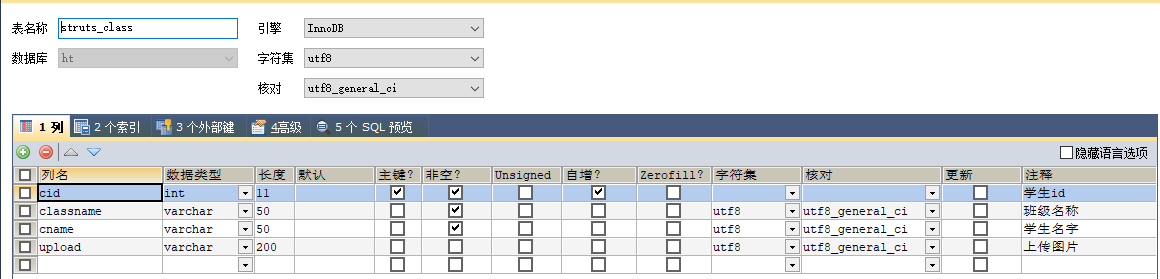
config.properties配置文件

二:dao层
ClassDao类
package com.crud.dao;

import java.sql.SQLException;

import java.util.List;

import com.crud.entity.Class;

import com.crud.util.BaseDao;

import com.crud.util.EntityBaseDao;

import com.crud.util.PageBean;

import com.crud.util.StringUtils;

/**

 * 班级dao方法类

 * @author Administrator

 */

public class ClassDao extends EntityBaseDao<Class>{

/**

 * 查询分页方法,查询数据公用方法

 * @param c

 * @param paBean

 * @return

 * @throws InstantiationException

 * @throws IllegalAccessException

 * @throws SQLException

 */

    public List<Class> list(Class c,PageBean paBean) throws InstantiationException, IllegalAccessException, SQLException{

        String sql="select * from struts_class where true ";

        String classname=c.getClassname();

        int cid=c.getCid();

        if (cid!=0) {

            sql +=" and cid = "+cid;

        }

        if (StringUtils.isNotBlank(classname)) {

            sql+=" and classname like '%"+classname+"%'";

        }

        return super.executeQuery(sql,paBean,Class.class);

    }

    /**

     * 新增方法

     * @param c

     * @return

     * @throws NoSuchFieldException

     * @throws SecurityException

     * @throws IllegalArgumentException

     * @throws IllegalAccessException

     * @throws SQLException

     */

    public int add(Class c) throws NoSuchFieldException, SecurityException, IllegalArgumentException, IllegalAccessException, SQLException {

        String sql="insert into struts_class values(?,?,?)";

        return super.executeUpdate(sql, new String[] {"classname","cname","upload"},c);

    }

    /**

     * 删除方法

     * @param c

     * @return

     * @throws NoSuchFieldException

     * @throws SecurityException

     * @throws IllegalArgumentException

     * @throws IllegalAccessException

     * @throws SQLException

     */

    public int del(Class c) throws NoSuchFieldException, SecurityException, IllegalArgumentException, IllegalAccessException, SQLException {

        String sql="delete from struts_class where cid=?";

        return super.executeUpdate(sql, new String[] {"cid"},c);

    }

    /**

     * 修改方法

     * @param c

     * @return

     * @throws NoSuchFieldException

     * @throws SecurityException

     * @throws IllegalArgumentException

     * @throws IllegalAccessException

     * @throws SQLException

     */

    public int edit(Class c) throws NoSuchFieldException, SecurityException, IllegalArgumentException, IllegalAccessException, SQLException {

        String sql="update struts_class set classname=?,cname=?,upload=? where cid=?";

        return super.executeUpdate(sql, new String[] {"cid","classname","cname","upload"},c);

    }

}
三:web层
BaseAction类
package com.crud.web;

import javax.servlet.ServletContext;

import javax.servlet.http.HttpServletRequest;

import javax.servlet.http.HttpServletResponse;

import javax.servlet.http.HttpSession;

import org.apache.struts2.interceptor.ServletRequestAware;

import org.apache.struts2.interceptor.ServletResponseAware;

/**

 * 每一个开发的子控制器要用的属性都定义在通用的action中。

 * @author Administrator

 *

 */

public class BaseAction implements ServletRequestAware, ServletResponseAware{

    /**

     * 为了传值使用

     */

    protected HttpServletResponse response;

    protected HttpServletRequest request;

    protected HttpSession session;

    protected ServletContext application;

    /**

     * 为了配置跳转页面所用

     */

    protected final static String SUCCESS = "success";

    protected final static String FAIL = "fail";

    protected final static String LIST = "list";

    protected final static String ADD = "add";

    protected final static String EDIT = "edit";

    protected final static String DETAIL = "detail";

    /**

     * 具体传值字段    后端向jsp页面传值所用字段

     */

    protected Object result;

    protected Object msg;

    protected int code;

    public Object getResult() {

        return result;

    }

    public Object getMsg() {

        return msg;

    }

    public int getCode() {

        return code;

    }

    @Override

    public void setServletResponse(HttpServletResponse arg0) {

        this.response = arg0;

    }

    @Override

    public void setServletRequest(HttpServletRequest arg0) {

        this.request = arg0;

        this.session = arg0.getSession();

        this.application = arg0.getServletContext();

    }

}
ClassAction类
package com.crud.web;

import java.io.File;

import java.io.IOException;

import java.sql.SQLException;

import java.util.List;

import org.apache.commons.io.FileUtils;

import com.crud.dao.ClassDao;

import com.crud.entity.Class;

import com.crud.util.PageBean;

import com.opensymphony.xwork2.ActionSupport;

import com.opensymphony.xwork2.ModelDriven;

/**

 * 班级web层

 * @author Administrator

 */

public class ClassAction extends BaseAction implements ModelDriven<Class>{

    private ClassDao cldao=new ClassDao();

    private Class cls=new Class();

    //

    private File file;

    private String fileContentType;

    private String fileFileName;   //文件名称

    public String list() {

        PageBean pageBean=new PageBean();

        pageBean.setRequest(request);

        try {

            List<Class> list = this.cldao.list(cls, pageBean);

            request.setAttribute("mylist", list);

            request.setAttribute("pageBean", pageBean);

        } catch (InstantiationException | IllegalAccessException | SQLException e) {

            // TODO Auto-generated catch block

            e.printStackTrace();

        }

        return "list";

    }

    /**

     * 直接上传图片

     * @return

     * @throws SQLException

     * @throws IllegalAccessException

     * @throws IllegalArgumentException

     * @throws SecurityException

     * @throws NoSuchFieldException

     */

    public String upload() throws NoSuchFieldException, SecurityException, IllegalArgumentException, IllegalAccessException, SQLException {

        try {

            //注意:在linux下是没有E盘的,linux下只有一个盘服,那么意味着当打包linux服务器的时候需要改动代码;

//        这个时候通常是这么解决的将targetPath对应目录串,配置到资源文件中,通过properties类进行读取

//        那么需要将项目发布到linux服务器的时候,只需要改变xxx.properties文件中targetPath=E:/黄婷 T221/Y2/struts2/04、拦截器与文件上传

//            实际图片的储存位置

            String targetPath="E:/黄婷 T221/Y2/struts2/04、拦截器与文件上传";

//            存到数据库中的地址

            String serverPath ="/uploads";

            FileUtils.copyFile(file, new File(targetPath+"/"+fileFileName));

//            注意:数据库存放是网络请求地址,而不是本地图片存放地址

            cls.setUpload(serverPath+"/"+fileFileName);

            this.cldao.edit(cls);

        } catch (IOException e) {

            // TODO Auto-generated catch block

            e.printStackTrace();

        }

        return "toList";

    }

    /**

     * 跳转文件上传页面

     * @return

     * @throws SQLException

     * @throws IllegalAccessException

     * @throws InstantiationException

     */

    public String preupload() throws InstantiationException, IllegalAccessException, SQLException {

        Class cl = this.cldao.list(cls, null).get(0);

        request.setAttribute("cls",cl);

        return "toUpload";

    }

    /**

     * 跳转新增修改页面的公用方法

     * @return

     * @throws SQLException

     * @throws IllegalAccessException

     * @throws InstantiationException

     */

    public String preSave() throws InstantiationException, IllegalAccessException, SQLException {

        if (cls.getCid()!=0) {

            Class cl = this.cldao.list(cls, null).get(0);

            request.setAttribute("cls",cl);

        }

        return "preSave";

    }

    /**

     * 新增

     * @return

     */

    public String add() {

        try {

            result = this.cldao.add(cls);

        } catch (Exception e) {

            // TODO: handle exception

            e.printStackTrace();

        }

        return "toList";

    }

    /**

     * 删除

     * @return

     */

    public String del() {

        try {

            this.cldao.del(cls);

        } catch (NoSuchFieldException | SecurityException | IllegalArgumentException | IllegalAccessException

                | SQLException e) {

            // TODO Auto-generated catch block

            e.printStackTrace();

        }

        return "toList";

    }

    /**

     * 修改

     * @return

     */

    public String edit() {

        try {

            this.cldao.edit(cls);

        } catch (NoSuchFieldException | SecurityException | IllegalArgumentException | IllegalAccessException

                | SQLException e) {

            // TODO Auto-generated catch block

            e.printStackTrace();

        }

        return "toList";

    }

    @Override

    public Class getModel() {

        // TODO Auto-generated method stub

        return null;

    }

    //上传图片属性的getset方法

    public File getFile() {

        return file;

    }

    public void setFile(File file) {

        this.file = file;

    }

    public String getFileContentType() {

        return fileContentType;

    }

    public void setFileContentType(String fileContentType) {

        this.fileContentType = fileContentType;

    }

    public String getFileFileName() {

        return fileFileName;

    }

    public void setFileFileName(String fileFileName) {

        this.fileFileName = fileFileName;

    }

}
前端界面
clsList.jsp
<%@ page language="java" contentType="text/html; charset=UTF-8"
pageEncoding="UTF-8"%>
<%@taglib prefix="c" uri="http://java.sun.com/jsp/jstl/core"%>
<%@taglib prefix="z" uri="/zking" %>
<!DOCTYPE html PUBLIC "-//W3C//DTD HTML 4.01 Transitional//EN" "http://www.w3.org/TR/html4/loose.dtd">
<html>
<head>
<meta http-equiv="Content-Type" content="text/html; charset=UTF-8">
<title>Insert title here</title>
</head>
<body>
<h2>班级</h2><br>
<form action="${pageContext.request.contextPath }/sy/cls_list.action" method="post">
班级名:<input type="text" name="classname">
<input type="submit" value="确定">
</form>
<a href="${pageContext.request.contextPath }/sy/cls_preSave.action">新增</a>
<table border="1" width="100%">
<tr>
<td>编号</td>
<td>班级名</td>
<td>学生名</td>
<td>图片</td>
<td>操作</td>
</tr>
<c:forEach items="${mylist }" var="c">
<tr>
<td>${c.cid }</td>
<td>${c.classname }</td>
<td>${c.cname}</td>
<td>
<img style="width: 60px;height:60px;" src="${pageContext.request.contextPath }/${c.cid }">
</td>
<td>
<a href="${pageContext.request.contextPath }/sy/cls_preSave.action?cid=${c.cid}">修改</a>
<a href="${pageContext.request.contextPath }/sy/cls_del.action?cid=${c.cid}">删除</a>
<a href="${pageContext.request.contextPath }/sy/cls_upload.action?cid=${c.cid}">图片上传</a>
</td>
</tr>
</c:forEach>
</table>
<z:page pageBean="${pageBean}"></z:page>
</body>
</html>
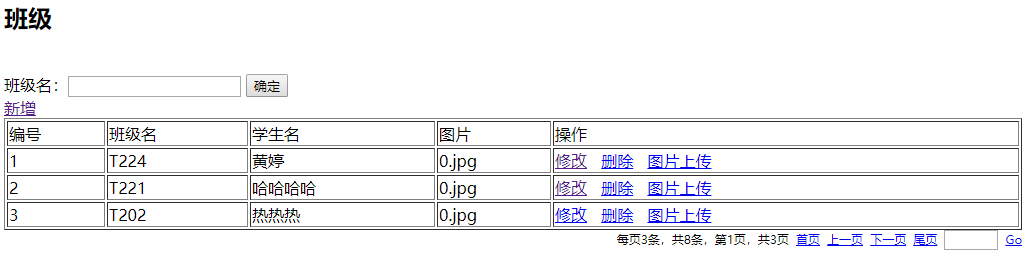
效果图:
上传图片的前端页面:
upload.jsp
<%@ page language="java" contentType="text/html; charset=UTF-8"

    pageEncoding="UTF-8"%>

<!DOCTYPE html PUBLIC "-//W3C//DTD HTML 4.01 Transitional//EN" "http://www.w3.org/TR/html4/loose.dtd">

<html>

<head>

<meta http-equiv="Content-Type" content="text/html; charset=UTF-8">

<title>Insert title here</title>

</head>

<body>

<form action="${pageContext.request.contextPath}/sy/cls_upload.action" method="post" enctype="multipart/form-data">

    <input type="hidden" name="cid" value="${cls.cid}"><br>

    <input type="hidden" name="classname" value="${cls.classname }"><br>

    <input type="hidden" name="cname" value="${cls.cname }"><br>

    <!-- name对应的值决定了action属性的命名 -->

    <input type="file" name="file" ><br>

    <input type="submit">

</form>

</body>

</html>
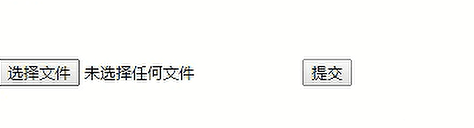
效果图:
修改server.xml配置文件
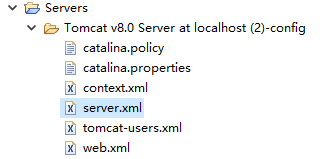
<Context path="/T224_struts/upload" docBase="E:/黄婷 T221/Y2/struts2/04、拦截器与文件上传/"/>
四:拦截器Interceptor
拦截器有两种方式
1.implements Interceptor
2.extends AbstractInterceptor
OneInterceptor 类
package com.crud.web;

import com.opensymphony.xwork2.ActionInvocation;

import com.opensymphony.xwork2.interceptor.Interceptor;

public class OneInterceptor implements Interceptor{

    @Override

    public void destroy() {

        // TODO Auto-generated method stub

    }

    @Override

    public void init() {

        // TODO Auto-generated method stub

    }

    @Override

    public String intercept(ActionInvocation arg0) throws Exception {

        // TODO Auto-generated method stub

        System.out.println("========OneInterceptor=====1");

        String invoke = arg0.invoke();

        System.out.println("============OneInterceptor============2");

        return invoke;

    }

}
TwoInterceptor类
package com.crud.web;

import com.opensymphony.xwork2.ActionInvocation;

import com.opensymphony.xwork2.interceptor.Interceptor;

public class TwoInterceptor implements Interceptor{

    @Override

    public void destroy() {

        // TODO Auto-generated method stub

    }

    @Override

    public void init() {

        // TODO Auto-generated method stub

    }

    @Override

    public String intercept(ActionInvocation arg0) throws Exception {

        // TODO Auto-generated method stub

        System.out.println("========TwoInterceptor=====1");

        String invoke = arg0.invoke();

        System.out.println("============TwoInterceptor============2");

        return invoke;

    }

}
效果图:

图解运行原理:
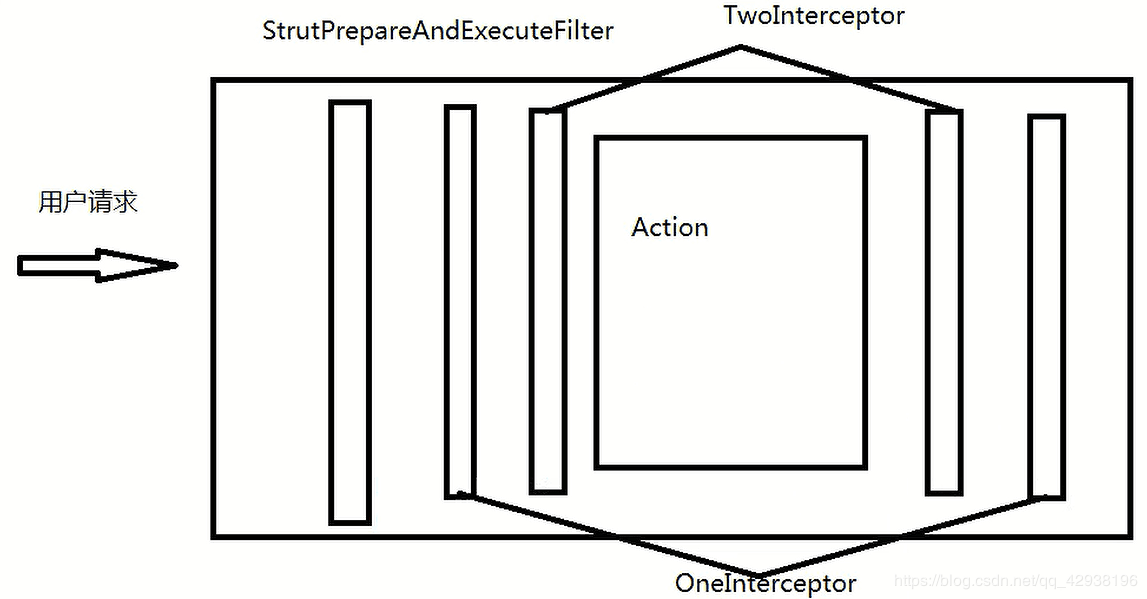
今天的分享到此结束!
使用Struts2实现图片上传和拦截器的更多相关文章
- SpringMVC入门(二)—— 参数的传递、Controller方法返回值、json数据交互、异常处理、图片上传、拦截器
一.参数的传递 1.简单的参数传递 /* @RequestParam用法:入参名字与方法名参数名不一致时使用{ * value:传入的参数名,required:是否必填,defaultValue:默认 ...
- struts2多图片上传实例【转】
原文地址:http://blog.csdn.net/java_cxrs/article/details/6004144 描述: 通过struts2实现多图片上传. 我使用的版本是2.2.1,使用的包有 ...
- struts2之多文件上传与拦截器(8)
前台jsp <s:form action="uploadAction" enctype="multipart/form-data" method=&quo ...
- xhEditor struts2实现图片上传
xhEditor的环境搭建请参考http://blog.csdn.net/itmyhome1990/article/details/38422255,这时我们打开图片功能 是没有上传按钮的 如果想要出 ...
- struts2 基础3 文件上传、拦截器
文件上传: 1.将头设置为enctype=”multipart/form-data” <form action="${pageContext.request.contextPath } ...
- springmvc文件上传和拦截器
文件上传 用到这两个包 配置视图解析器:springmvc配置文件配置 <!-- id必须要是"multipartResolver" --> <bean id=& ...
- 04springMVC结构,mvc模式,spring-mvc流程,spring-mvc的第一个例子,三种handlerMapping,几种控制器,springmvc基于注解的开发,文件上传,拦截器,s
1. Spring-mvc介绍 1.1市面上流行的框架 Struts2(比较多) Springmvc(比较多而且属于上升的趋势) Struts1(即将被淘汰) 其他 1.2 spring-mv ...
- 2017/2/12:springMVC的简单文件上传跟拦截器
1.写文件上传的界面jsp代码如下重点为文件上传标签的类型 2.写登录成功跟失败的界面:成功自己写 3.写springMVC的文件上传的controller的方法 4.最后一步配置spring-ser ...
- Struts2单文件上传原理及示例
一.文件上传的原理 表单元素的enctype属性指定的是表单数据的编码方式,该属性有3个值: 1.application/x-www-form-urlencoded:这是默认编码方式,它只处理表单域里 ...
随机推荐
- FLUENT导入CHEMKIN机理的单位问题【转载】
转载自:http://blog.sina.com.cn/s/blog_4a0a8b5d0101pj3c.html CHEMKIN机理导入后,发现速率常数全变了,那么他们是怎样变化的呢? FLUENT中 ...
- linux系统普通用户设置密码
linux系统中如何给一个普通用户grindnt设置密码 一.新密码符合规则,用以下方式修改: #root用户直接更改gridnt密码,不需要输入旧密码 [root@subsname home]# p ...
- GitHub发卡系统zfaka配置历程
GitHub发卡系统zfaka配置历程 1项目介绍 ZFAKA发卡系统(本系统基于yaf+layui开发) 项目地址 https://github.com/zlkbdotnet/zfaka 我 ...
- Redis Desktop Manager的下载及安装
一.下载Redis Desktop Manager 1. Redis Desktop Manager 的下载路径 (1)https://pan.baidu.com/s/1Jvr9MbgFn4UJh4M ...
- 个微信小程序云开发云函数
1. project.config.json写上云函数所在目录"cloudfunctionRoot": "cloudfunctions/",如图 2. app. ...
- [i.MX]飞思卡尔IMX6处理器的GPIO-IOMUX_PAD说明
在linux或android系统中,假如我们要配置飞思卡尔IMX6处理器的GPIO管脚,比如是GPIO_19这个管脚,那么要像这样: #define MX6Q_PAD_GPIO_19__GPIO_4_ ...
- P1964 【mc生存】卖东西
P1964 [mc生存]卖东西 题解 很简单, 暴力 注意一个小点就好 代码 #include<iostream> #include<cstdio> #include<c ...
- Jupyter Notebook 远程连接配置(转载)
转载博客的Jupyter Notebook远程连接配置方法. 0 - 参考资料 https://www.jianshu.com/p/08f276d48669?utm_campaign=maleskin ...
- win7 安装 IIS 配置ASP 【原创】
1.安装https://jingyan.baidu.com/article/5553fa8215f7ef65a2393413.html2.测试localhost 打开测试没问题3.配置网站--添加站 ...
- 关于Mysql中GROUP_CONCAT函数返回值长度的坑
1.GROUP_CONCAT函数: 功能:将group by产生的同一个分组中的值连接起来,返回一个字符串结果. 语法:group_concat( [distinct] 要连接的字段 [order b ...