
Python输入输出练习,运算练习,turtle初步练习
- Hello World!

- 简单交互(交互式,文件式)教材P19
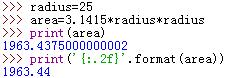
radius=25

area=3.1415*radius*radius

print(area)

print('{:.2f}'.format(area))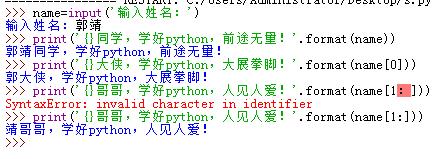
- 用户输入两个数字,计算并输出两个数字之和:
a=input('请输入第一个数字:')

b=input("请输入第二个数字:")

c=float(a)+float(b)

print('两数之和为:')

print(c)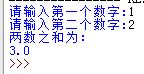
- 用户输入三角形三边长度,并计算三角形的面积:(海伦公式)
while 1==1:

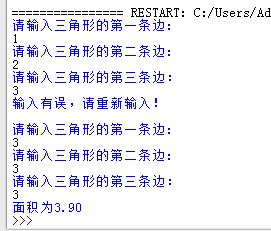
    a=float (input('请输入三角形的第一条边:\n'))

    b=float (input('请输入三角形的第二条边:\n'))

    c=float (input('请输入三角形的第三条边:\n'))

    if (a+b>c)and (a+c>b)and (b+c>a)and abs((a-b)<c)and abs((a-c)<b)and abs((b-c)<a):

        break

    else:

        print('输入有误,请重新输入!\n')

p=float ((a+b+c)/2 )

s=float(p*(p-a)*(p-b)*(p-c))**0.5

print ('面积为%.2f'%s)
- 输入半径,计算圆的面积。
#r=float(input('请输入圆的半径:'))

print('面积为:',3.1415*float(input('请输入圆的半径:'))**2)- 画一组同切圆
import turtle

turtle.circle(10)

turtle.circle(40)

turtle.circle(80)

turtle.circle(100)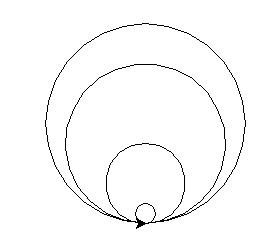
- 画一个五角星
import turtle

for i in range(5):

    turtle.forward(100)

    turtle.left(144)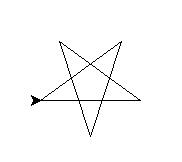
- 画一个全黄色的五角星
import turtle

turtle.shape('turtle')

turtle.speed(10)

turtle.color('yellow')

turtle.fillcolor('yellow')

turtle.begin_fill()

for i in range(5):

    turtle.forward(100)

    turtle.left(144)

turtle.end_fill()
- 思考
- 画一组同心圆。
import turtle

turtle.speed(10)

turtle.penup()

turtle.goto(0,100)

turtle.pendown()

turtle.circle(10)

turtle.penup()

turtle.goto(0,80)

turtle.pendown()

turtle.circle(30)

turtle.penup()

turtle.goto(0,60)

turtle.pendown()

turtle.circle(50)

turtle.penup()

turtle.goto(0,40)

turtle.pendown()

turtle.circle(70)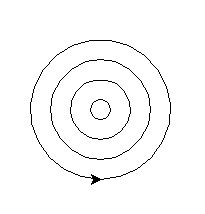
- 画国旗上的五个五角星。
import turtle

turtle.speed(41)

turtle.penup()

turtle.goto(-300,240)

turtle.pendown()

##画国旗背景

turtle.fillcolor('red')

turtle.begin_fill()

turtle.forward(600)

turtle.right(90)

turtle.forward(400)

turtle.right(90)

turtle.forward(600)

turtle.right(90)

turtle.forward(400)

turtle.end_fill()

##画大五角星

turtle.penup()

turtle.goto(-263,163)

turtle.pendown()

turtle.color('yellow')

turtle.fillcolor('yellow')

turtle.begin_fill()

turtle.right(90)

for i in range(5):

    turtle.forward(100)

    turtle.right(144)

turtle.end_fill()

##画小五角星

##第一个

turtle.penup()

turtle.goto(-126,211)

turtle.pendown()

turtle.color('yellow')

turtle.fillcolor('yellow')

turtle.begin_fill()

turtle.right(90)

for i in range(5):

    turtle.forward(20)

    turtle.right(144)

turtle.end_fill()

##第二个

turtle.penup()

turtle.goto(-100,160)

turtle.pendown()

turtle.color('yellow')

turtle.fillcolor('yellow')

turtle.begin_fill()

turtle.right(90)

for i in range(5):

    turtle.forward(20)

    turtle.right(144)

turtle.end_fill()

##第三个

turtle.penup()

turtle.goto(-107,116)

turtle.pendown()

turtle.color('yellow')

turtle.fillcolor('yellow')

turtle.begin_fill()

turtle.right(90)

for i in range(5):

    turtle.forward(20)

    turtle.right(144)

turtle.end_fill()

##第四个

turtle.penup()

turtle.goto(-133,95)

turtle.pendown()

turtle.color('yellow')

turtle.fillcolor('yellow')

turtle.begin_fill()

turtle.right(90)

for i in range(5):

    turtle.forward(20)

    turtle.right(144)

turtle.end_fill()

Python输入输出练习,运算练习,turtle初步练习的更多相关文章
- Python 输入输出 数据类型 变量
python输入输出 数据类型 变量 输入输出 print()在Python3中是函数 >>>print('hello world') #print注意print前面不要有任何空格 ...
- python的三元运算
python的三元运算是先输出结果,再判定条件.其格式如下: >>> def f(x,y): return x - y if x>y else abs(x-y) #如果x大于y ...
- python字符串的运算有哪些
python字符串的运算有哪些 1,链接符号 + 2,判断字符串是否在某个字符串中 ‘s’ in ‘this’ 返回bool 3,字符串索引 a="this a my" a[0], ...
- #6 Python数据类型及运算
前言 前文讲述了Python的输入输出以及变量的相关知识点,本节将探讨Python的数据类型以及数据之间的运算方式! 一.Python数据类型 上一节弄清了变量,其实变量所指向的值是有自己独特的数据类 ...
- python基础(四)运算
作者:Vamei 出处:http://www.cnblogs.com/vamei 欢迎转载,也请保留这段声明.谢谢! Python的运算符和其他语言类似 (我们暂时只了解这些运算符的基本用法,方便我们 ...
- Python学习教程(learning Python)--3.3.2 Python的关系运算
如果if的condition不用布尔表达式来做条件判断而采用关系表达式,实际上关系表达式运算的结果要么是True要么是False.下面我们先了解一些有关关系运算符的基础知识,如下表所示. 做个小程序测 ...
- Python输入输出(IO)
程序会有输入和输出,输入可以从标准输入或是从一个文件读入数据,程序的输出可以以一种友好可读的方式(human-readable)打印出来,或是写进一个文件,而标准输入和标准输出(键盘和显示器)在程序的 ...
- Python学习入门基础教程(learning Python)--3.3.2 Python的关系运算
如果if的condition不用布尔表达式来做条件判断而采用关系表达式,实际上关系表达式运算的结果要么是True要么是False.下面我们先了解一些有关关系运算符的基础知识,如下表所示. 做个小程序测 ...
- 吾八哥学Python(五):Python基本数学运算
今天我们学习Python里的基本数学运算方法,还是通过例子来练习吧! 加减乘除求余 #加法 print(12+34) #减法 print(30-10.0) #乘法 print(3*5) #除法 pri ...
随机推荐
- Shopex如何清理缓存
一.进入后台,点击 右上角 的"关于" 二.点击:缓存系统: 三.点击"清空缓存" 四.清除成功!
- JavaScript中的数组Array方法
push(),pop()方法 push(),pop()方法也叫栈方法,push()可以理解成,向末尾推入,而pop()恰好相反,可以理解成从末尾移除(取得). var nums=[1,2,3,4]; ...
- MySQL grant命令使用
MySQL 赋予用户权限命令的简单格式可概括为: grant 权限 on 数据库对象 to 用户 一.grant 普通数据用户,查询.插入.更新.删除 数据库中所有表数据的权利. grant sele ...
- go的变量redeclare的问题,golang的一个小坑
go的变量声明有几种方式: 1 通过关键字 var 进行声明 例如:var i int 然后进行赋值操作 i = 5 2 最简单的,通过符号 := 进行声明和赋值 例如: i:=5 golang会 ...
- 《Java从入门到放弃》入门篇:hibernate中的多表对应关系
hibernate中的对应关系其实就是数据库中表的对应关系, 就跟某些电影中的某些场景是一样一样滴. 比如可以是一男一女,还可以是一男多女, 更可以是多男一女,最后最后最后还可以是多男多女!!! 有些 ...
- Kotlin 初窥门径[1]:基础概念
Kotlin 是由 JetBrains 开发的基于JVM的语言.JetBrains 因为创造了一个强大的Java开发 IDE(Intellij) 而被大家所熟知.Android Studio 就是基于 ...
- exit()与_exit()的区别(转)
http://blog.csdn.net/lwj103862095/article/details/8640037 从图中可以看出,_exit 函数的作用是:直接使进程停止运行,清除其使用的内存空间, ...
- 单线程的JavaScript
Javascript是单线程的 因为JS运行在浏览器中,是单线程的,每个window一个JS线程,既然是单线程的,在某个特定的时刻只有特定的代码能够被执行,并阻塞其它的代码.而浏览器是事件驱动的(Ev ...
- SQL语句查询某字段不同数据的个数(DISTINCT 的使用)
今天做了一个题,学到了一个知识点: 有一个高速收费表VF,如下: 统计收费涉及的车辆有多少: SQL语句: SELECT COUNT(DISTINCT VchReg) from VF ; 其中 ...
- shell 多进程
shell 多进程来模拟多线程 (1){ } 建立代码块 (2)使用 & 将进程放入后台 [zheng@localhost ~]$ cat threads.sh #!/bin/bash ;i& ...