
Python GUI - Tkinter tkMessageBox
tkMessageBox模块用于显示在您的应用程序的消息框。此模块提供了一个功能,您可以用它来显示适当的消息.
这些功能有些是showinfo,showwarning,showerror,askquestion,askokcancel,askyesno,askretryignore.
方法:
这里是一个简单的语法来创建这个widget:
tkMessageBox.FunctionName(title, message [, options])
参数:
FunctionName: 这是相应的消息框函数的名称.
title: 这是在一个消息框,标题栏显示的文本.
message: 这是要显示的文字作为消息.
options: 选项有替代的选择,你可以用它来定制一个标准的消息框。一些可以使用的选项是默认的。默认选项是用来指定默认的按钮,如中止,重试,或忽略在消息框中。父选项是用来指定要显示的消息框上的顶层窗口.
If the standard message boxes are not appropriate, you can pick the closest alternative (askquestion, in most cases), and use options to change it to exactly suit your needs. You can use the following options (note that messageand title are usually given as arguments, not as options).
default constant
Which button to make default: ABORT, RETRY, IGNORE, OK, CANCEL,YES, or NO (the constants are defined in the tkMessageBox module).
icon (constant)
Which icon to display: ERROR, INFO, QUESTION, or WARNING
message (string)
The message to display (the second argument to the convenience functions). May contain newlines.
parent (widget)
Which window to place the message box on top of. When the message box is closed, the focus is returned to the parent window.
title (string)
Message box title (the first argument to the convenience functions).
type (constant)
Message box type; that is, which buttons to display:ABORTRETRYIGNORE, OK, OKCANCEL, RETRYCANCEL, YESNO, orYESNOCANCEL.
showinfo()

showwarning()

showerror ()
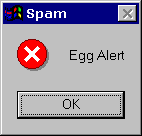
askquestion()

askokcancel()

askyesno ()

askretrycancel ()
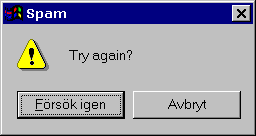
例子:
自行尝试下面的例子:
import Tkinter

import tkMessageBox

top = Tkinter.Tk()

def hello():

   tkMessageBox.showinfo("Say Hello", "Hello World")

B1 = Tkinter.Button(top, text = "Say Hello", command = hello)

B1.pack()

top.mainloop()
这将产生以下结果:

不显示window root窗口
import Tkinter

import tkMessageBox

top = Tkinter.Tk()

top.withdraw()

tkMessageBox.askyesno("Say Hello", "Hello World")

Python GUI - Tkinter tkMessageBox的更多相关文章
- Python GUI - tkinter
目录: Tkinter 组件 标准属性 几何管理 代码实例: 1. Label & Button 2. Entry & Text 3.Listbox列表 4.Radiobutton单选 ...
- python gui tkinter快速入门教程 | python tkinter tutorial
本文首发于个人博客https://kezunlin.me/post/d5c57f56/,欢迎阅读最新内容! python tkinter tutorial Guide main ui messageb ...
- Python GUI——tkinter菜鸟编程(中)
8. Radiobutton 选项按钮:可以用鼠标单击方式选取,一次只能有一个选项被选取. Radiobutton(父对象,options,-) 常用options参数: anchor,bg,bitm ...
- python gui tkinter用法杂记
1.treeview遍历 iids = tree.selection() t = tree.get_children() for i in t: print(tree.item(i,'values') ...
- Python GUI tkinter 学习笔记(一)
第一个python程序 #!/usr/bin/python # -*- coding: UTF-8 -*- from Tkinter import * # 创建一个根窗口,其余的控件都在这个窗口之上 ...
- Python GUI tkinter 学习笔记(三)
草稿 # -*- coding: utf-8 -*- from Tkinter import * root = Tk() Label(root, text = "First").g ...
- Python GUI tkinter 学习笔记(二)
第二个程序 # -*- coding: utf-8 -*- from Tkinter import * class App: def __init__(self, master): # frame 创 ...
- Python GUI with Tkinter (from youtube) 在youtube上能找到很多编程视频...
Python GUI with Tkinter - 1 - Introduction以上链接是一个python tkinter视频系列的第一讲的链接.虽然英语不好,但是,程序还是看得懂的(照着做就可以 ...
- Python GUI之tkinter窗口视窗教程大集合(看这篇就够了)
一.前言 由于本篇文章较长,所以下面给出内容目录方便跳转阅读,当然也可以用博客页面最右侧的文章目录导航栏进行跳转查阅. 一.前言 二.Tkinter 是什么 三.Tkinter 控件详细介绍 1. T ...
随机推荐
- java开发网易电话面试 一面总结
晚上八点多自己在看视频的时候突然接到杭州来的一个电话,当时觉得很奇怪,突兀,接通之后被告知是杭州网易打来的,没有简单的自我介绍,没有多余的废话,直接入主题,吓得我心里怪紧张的,完全没有准备,但是也没有 ...
- 2017 ACM/ICPC Asia Regional Shenyang Online spfa+最长路
transaction transaction transaction Time Limit: 4000/2000 MS (Java/Others) Memory Limit: 132768/1 ...
- 微信公众平台接口调用第一步(获取access_token)
最近公司需要开发微信公众号,闲着无聊就写写博客,希望能帮到你我 上代码: package test; import java.util.List; import java.util.ArrayList ...
- JS自定义对象以及相关成绩系统完整案例演示
[自定义对象] 1.基本概念 ①对象是拥有一系列无无序属性和方法的集合 ②键值对:对象中的数据,用以键值对的形式存在,对象的每个属性和方法,都对应一个键值,以键取值 ③属性:描述对象特征的一系列变量称 ...
- 【★】Web精彩实战之<智能迷宫>
JS精彩实战之<智能迷宫> ---宝贵编程经验分享会--- hello大家好,这里是Web云课堂,之前的一年里我们经历了Html和CSS的系统攻城,此时的你们已经是做静态(动静结 ...
- 201521123055 《Java程序设计》第6周学习总结
1. 本章学习总结 2. 书面作业 Q1.代码阅读:Child压缩包内源代码 1.clone方法 1.1 Object对象中的clone方法是被protected修饰,在自定义的类中覆盖clone方法 ...
- 201521123024 《Java程序设计》第6周学习总结
1. 本周学习总结 2. 书面作业 1.clone方法 1.1 Object对象中的clone方法是被protected修饰,在自定义的类中覆盖clone方法时需要注意什么? 用protected修饰 ...
- 201521123029《Java程序设计》第六周学习总结
1. 本周学习总结 1.1 面向对象学习暂告一段落,请使用思维导图,以封装.继承.多态为核心概念画一张思维导图,对面向对象思想进行一个总结. 注1:关键词与内容不求多,但概念之间的联系要清晰,内容覆盖 ...
- 201521123045 《Java程序设计》第4周学习总结
第4周作业-面向对象设计与继承 1. 本周学习总结 1.1 尝试使用思维导图总结有关继承的知识点. 2. 书面作业 Q1.注释的应用使用类的注释与方法的注释为前面编写的类与方法进行注释,并在Eclip ...
- 201521123045 《JAVA程序设计》第1周学习总结 1
1. 本周学习总结 学习了入门的java知识,知道了jdk.eclipse等基础软件,了解了如何编译最基础的java程序.知道了java的基本原理以及java的几种数据类型.掌握使用简单编译器编写ja ...