
LKD: Chapter 5 System Call
在Linux中,处理器所作的事可以归纳为3种情况:
1、In user-space, executing user code in a process;
2、In kernel-space, in process context, executing on behalf of a specific process;
3、In kernel-space, in interrupt context, not associated with a process, handling an interrupt.
而在user-space中想要和内核交互的唯一办法就是通过system call,简称syscall。
System Call Implementation:
A meme related to interfaces in Unix is "Provide mechanism, not policy."
参数检测:内核代码不应随意接受指向user-space的指针,此时必须使用一下两种方法中的一种来检测。
1、写入user-space时,使用copy_to_user();
2、从user-space读入时,使用copy_from_user()。
下面来尝试实现一个system call:
1、首先在arch/x86/ia32/ia32entry.S最后添加上自己的syscall:
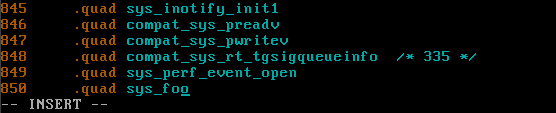
可见我们这里sys_foo的编号是337。
2、在arch/x86/include/asm/unistd_32.h中定义syscall number:
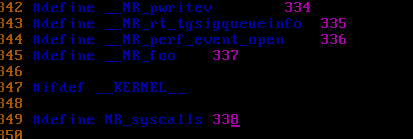
这里出了点意外,不知下面怎么多了两行#ifdef .... #define ...,还把我的337给用了在前面添加我的#define __NR_foo 337后,将后面NR_syscalls的337改成338.
3、最后,我们在kernel/sys.c中定义实际的foo()这个syscall:
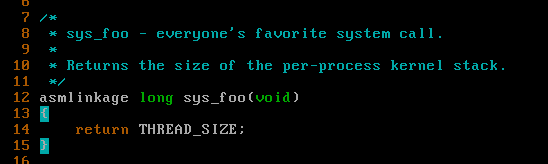
这就算完成了。
接着编译安装内核:
# cd linux-2.6.32.68

# make menuconfig(按默认配置就行)
# make all(要等超级久的啊。。)
# make modules_install
# make install
# update-grub
# reboot
结果编译不通过,才明白在第3步kernel/sys.c中添加的代码不应该在开头添加。将其移动到最后后,继续编译!
可是昨晚已经弄到了23点多了,干脆睡觉去了。一早醒来提示说磁盘空间不够了。对于virtualbox的vdi映像,可以用如下命令扩容:
VBoxManage modifyhd "cloned.vdi" --resize //这里的单位是M
但是我一直觉得centos不太满足我的要求,所以索性重装了个ubuntu 14.04,虚拟机就是方便!
接下来我们要从user-space中调用这个syscall。我们通过linux提供的macros来包装这个syscall。
这些macros命名为_syscalln(),其中最后一个n是指参数个数,在0到6间。
新建文件test.c:
#define __NR_foo 337

__syscall0(long, foo)

int main()

{

    long stack_size;

    stack_size = foo();

    printf("The kernel stack size is %ld\n", stack_size);

    return ;

}
编译显示__syscall0那里出错了:unknown type name 'foo'
网上查是说syscall0这个macro已经过时了,使用syscall()代替。
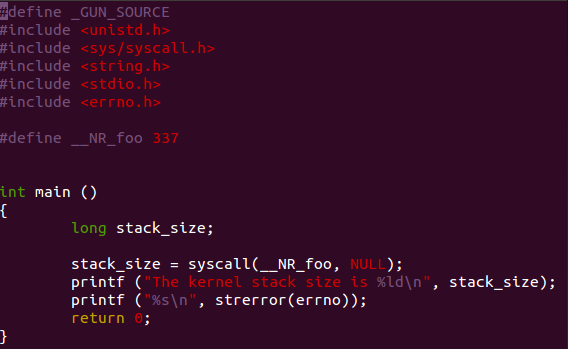
成功调用了syscall:

但是我虚拟机中的ubuntu不知怎么不能和宿主机共享剪贴板,干脆再装个32位的fedora23算了。
LKD: Chapter 5 System Call的更多相关文章
- LKD: Chapter 9 An Introduction to Kernel Synchronization
This chapter introduces some conception about kernel synchronization generally. Critical Regions: Co ...
- LKD: Chapter 8 Bottom Halves and Deferring Work
In 2.6.x, there are 3 mechanisms for implementing a bottom half: softirqs, tasklets and work queues. ...
- LKD: Chapter 7 Interrupts and Interrupt Handlers
Recently I realized my English is still far from good. So in order to improve my English, I must not ...
- LKD: Chapter 6 Kernel Data Structures
这一章我们研究四种主要的数据结构: linked lists, queues, maps, binary trees. Linked Lists:(<linux/list.h>) 在lin ...
- imx6 system boot
imx6开机启动就进入download模式,有的板子进入文件系统之后会进入download模式.查看datasheet,Chapter 8 System Boot查找原因,记录于此. freescal ...
- halcon算子
halcon的算子列表 Chapter 1 :Classification 1.1 Gaussian-Mixture-Models 1.add_sample_class_gmm 功能:把一个训练样 ...
- halcon的算子列表
Chapter 1 :Classification 1.1 Gaussian-Mixture-Models 1.add_sample_class_gmm 功能:把一个训练样本添加到一个高斯混合模型的训 ...
- s3c6410_MMU地址映射过程详述
参考: 1)<ARM1176 JZF-S Technical Reference Manual>: Chapter 3 System Control Coprocessor Chapter ...
- Cracking the coding interview--问题与解答
http://www.hawstein.com/posts/ctci-solutions-contents.html 作者:Hawstein出处:http://hawstein.com/posts/c ...
随机推荐
- JVM性能调优,GC
刚刚做完了一个项目的性能测试,“有幸”也遇到了内存泄露的案例,所以在此和大家分享一下. 主要从以下几部分来说明,关于内存和内存泄露.溢出的概念,区分内存泄露和内存溢出:内存的区域划分,了解GC回收机制 ...
- mac idea sbt工程打jar包
1.首先保证sbt已下载,否则下载homebrew:在命令行输入/usr/bin/ruby XXX ->下载完成后在终端输入brew install sbt ->安装完毕后可以打jar包 ...
- 【机器学习实战】第5章 Logistic回归
第5章 Logistic回归 Logistic 回归 概述 Logistic 回归虽然名字叫回归,但是它是用来做分类的.其主要思想是: 根据现有数据对分类边界线建立回归公式,以此进行分类. 须知概念 ...
- Babylon.GUI官方文档翻译
Babylon.GUI是一个基于Babylon.js的WebGL库,可以用来在WebGL3D场景中生成交互性UI与动态纹理.相比于html ui,Babylon.GUI的功能较为简化,但使用起来也更加 ...
- 异步任务--celery发送邮件
安装两个python包: pip install celery==3.1.25 pip install django-celery==3.1.17 在配置文件settings.py中做如下配置: a) ...
- echarts教程-asp.net+ashx实现堆积柱状
说说看.崔西莲夫人紧接着说. 想不到史春吉是这种人. 你会这样说倒是有趣,因为这正是我当时的感觉.这跟奈维尔的个性不合.奈维尔,就像大部分男人一样,通常都是尽量避开任何可能造成尴尬或不愉快的场面.我怀 ...
- SIP简介,第1部分:SIP初探
说明:以下内容来着之前下载的一份文档,现将概念部分摘录在BLog,完成文档将放在文件中. SIP简介,第1部分:SIP初探 时间:2006-04-07作者:Emmanuel Proulx浏览次数: 2 ...
- SSM框架中的注解,配置和控制器相关笔记
常规SSM实例 探索SSM理论的前提,应该是在对框架基础的运作方式有一定了解,以下是个人Android后台项目,用SSM框架快速搭建,以下是代码,主要 观察结构. 代码结构: model实体类 Ida ...
- 还原NuGet程序包
官网:https://msdn.microsoft.com/zh-cn/magazine/hh547106.aspx 在获取团队中的项目或者下载他人的项目Demo后,运行项目有时会提示某些dll找不到 ...
- redhat7 Samba
1.先安装Samba服务 yum install -y samba samba-client 2.配置文件 vi /etc/samba/smb.conf --主配置文件 [global] --全局 ...