
Day5模块-time和datetime模块
模块是封装一段代码来实现某种功能。
分为三类:
1.自定义模块
2.标准库,内置模块
3.开源模块
-----------------------------------------------------------------------------------------------------
1.time模块
 >>> import time

 #返回处理器时间,3.3后变成了time.process_time()测量处理器运算时间,不包括sleep时间,不稳定

 >>> print(time.clock())

 2.9933526190766363e-06

 >>> print(time.process_time())

 0.09360059999999999

 #返回与utc时间的时间差,以秒计算\

 >>> print(time.altzone)

 -32400

 #本地时间

 >>> print(time.localtime())

 time.struct_time(tm_year=2017, tm_mon=5, tm_mday=21, tm_hour=20, tm_min=54, tm_s

 ec=47, tm_wday=6, tm_yday=141, tm_isdst=0)

 #返回utc时间的struc时间对象格式

 >>> print(time.gmtime(time.time()-800000))

 time.struct_time(tm_year=2017, tm_mon=5, tm_mday=12, tm_hour=6, tm_min=41, tm_se

 c=56, tm_wday=4, tm_yday=132, tm_isdst=0)

 #返回时间格式

 >>> print(time.asctime())

 Sun May 21 20:56:26 2017

 >>> print(time.asctime(time.localtime()))

 Sun May 21 20:55:55 2017
日期字符串转换为时间戳
 #将字符串转换成struct对象

 >>> string_2_struct = time.strptime("2016/05/22","%Y/%m/%d")

 >>> print(string_2_struct)

 time.struct_time(tm_year=2016, tm_mon=5, tm_mday=22, tm_hour=0, tm_min=0, tm_sec

 =0, tm_wday=6, tm_yday=143, tm_isdst=-1)

 >>>

 #将struct对象转换为时间戳对象

 >>> string_2_stamp = time.mktime(string_2_struct)

 >>> print(string_2_stamp)

 1463846400.0
时间戳转换为字符串
 >>> print(time.time()) #当前utc时间,时间是秒

 1495372102.3229373

 >>> print(time.gmtime()) #struct对象的时间格式

 time.struct_time(tm_year=2017, tm_mon=5, tm_mday=21, tm_hour=13, tm_min=8, tm_se

 c=29, tm_wday=6, tm_yday=141, tm_isdst=0)

 #将utc时间戳转换成struct_time格式

 >>> print(time.gmtime(time.time()-86640))

 time.struct_time(tm_year=2017, tm_mon=5, tm_mday=20, tm_hour=13, tm_min=1, tm_se

 c=42, tm_wday=5, tm_yday=140, tm_isdst=0)

 #将utc struct_time格式转成指定的字符串格式

 >>> print(time.strftime("%Y-%m-%d %H:%M:%S",time.gmtime()))

 2017-05-21 13:07:45
时间加减
 >>> import datetime

 >>> print("datetime".center(50,'*'))

 *********************datetime*********************

 >>> print(datetime.datetime.now()) #返回当前时间

 2017-05-21 21:12:10.507988

 # 时间戳直接转成日期格式 2016-08-19

 >>> print(datetime.date.fromtimestamp(time.time()))

 2017-05-21

 #返回当前时间

 >>> print(datetime.datetime.now())

 2017-05-21 21:17:05.163842

 #时间戳直接转成日期格式 2016-08-19

 >>> print(datetime.date.fromtimestamp(time.time()))

 2017-05-21

 #当前时间加3天

 >>> print(datetime.datetime.now()+datetime.timedelta(3))

 2017-05-24 21:17:39.092782

 #当前时间减3天

 >>> print(datetime.datetime.now()+datetime.timedelta(-3))

 2017-05-18 21:17:46.039180

 #当前时间加3小时

 >>> print(datetime.datetime.now()+datetime.timedelta(hours=3))

 2017-05-22 00:18:01.337055

 #当前时间加30分钟

 >>> print(datetime.datetime.now()+datetime.timedelta(minutes=30))

 2017-05-21 21:49:16.833373
时间替换
 >>> c_time = datetime.datetime.now()

 >>> print(c_time.replace(minute=3,hour=2))

 2017-05-21 02:03:05.940477

 >>> print(datetime.datetime.now)

 <built-in method now of type object at 0x0000000067D262C0>

 >>> print(datetime.datetime.now())

 2017-05-21 21:23:49.137948
| Directive | Meaning | Notes |
|---|---|---|
%a |
Locale’s abbreviated weekday name. | |
%A |
Locale’s full weekday name. | |
%b |
Locale’s abbreviated month name. | |
%B |
Locale’s full month name. | |
%c |
Locale’s appropriate date and time representation. | |
%d |
Day of the month as a decimal number [01,31]. | |
%H |
Hour (24-hour clock) as a decimal number [00,23]. | |
%I |
Hour (12-hour clock) as a decimal number [01,12]. | |
%j |
Day of the year as a decimal number [001,366]. | |
%m |
Month as a decimal number [01,12]. | |
%M |
Minute as a decimal number [00,59]. | |
%p |
Locale’s equivalent of either AM or PM. | (1) |
%S |
Second as a decimal number [00,61]. | (2) |
%U |
Week number of the year (Sunday as the first day of the week) as a decimal number [00,53]. All days in a new year preceding the first Sunday are considered to be in week 0. | (3) |
%w |
Weekday as a decimal number [0(Sunday),6]. | |
%W |
Week number of the year (Monday as the first day of the week) as a decimal number [00,53]. All days in a new year preceding the first Monday are considered to be in week 0. | (3) |
%x |
Locale’s appropriate date representation. | |
%X |
Locale’s appropriate time representation. | |
%y |
Year without century as a decimal number [00,99]. | |
%Y |
Year with century as a decimal number. | |
%z |
Time zone offset indicating a positive or negative time difference from UTC/GMT of the form +HHMM or -HHMM, where H represents decimal hour digits and M represents decimal minute digits [-23:59, +23:59]. | |
%Z |
Time zone name (no characters if no time zone exists). | |
%% |
A literal '%' character. |
字符串、时间格式、utc时间的转换关系
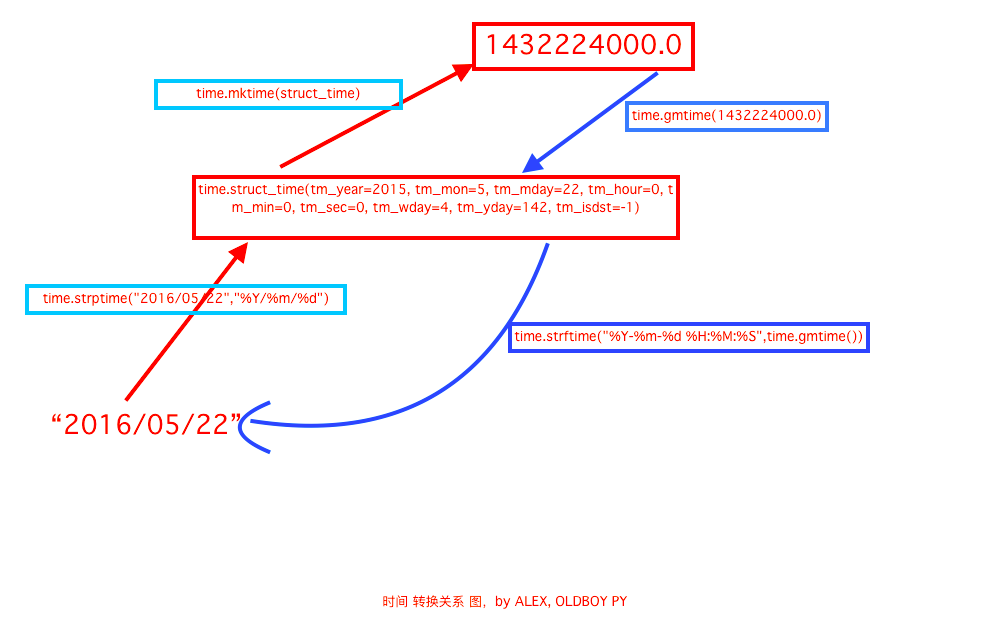
a.字符串转换为utc时间
>>> time.strptime("2016/05/22","%Y/%m/%d")
time.struct_time(tm_year=2016, tm_mon=5, tm_mday=22, tm_hour=0, tm_min=0, tm_sec=0, tm_wday=6, tm_yday=143, tm_isdst=-1)
>>> struct_time = time.strptime("2016/05/22","%Y/%m/%d")
>>> time.mktime(struct_time)
1463846400.0
b.utc时间转换为字符串
>>> time.gmtime(1463846400.0)
time.struct_time(tm_year=2016, tm_mon=5, tm_mday=21, tm_hour=16, tm_min=0, tm_se
c=0, tm_wday=5, tm_yday=142, tm_isdst=0)
>>> time.strftime("%Y-%m-%d %H:%M:%S",time.gmtime())
'2017-05-21 13:30:47'
Day5模块-time和datetime模块的更多相关文章
- python常用模块之time&datetime模块
python常用模块之time&datetime模块 在平常的代码中,我们经常要与时间打交道.在python中,与时间处理有关的模块就包括:time和datetime,下面分别来介绍: 在开始 ...
- 模块学习-time,datetime模块
1 time.timezone #以秒为单位显示时区 >>> import time >>> time.timezone -28800 北京为东八区,所以为-288 ...
- Day5 - Python基础5 常用模块学习
Python 之路 Day5 - 常用模块学习 本节大纲: 模块介绍 time &datetime模块 random os sys shutil json & picle shel ...
- Python 常用模块之time&datetime 和random
本节大纲: 模块介绍 time &datetime模块 random 一.模块介绍: 模块,用一砣代码实现了某个功能的代码集合. 类似于函数式编程和面向过程编程,函数式编程则完成一个功能,其他 ...
- Python时间日期格式化之time与datetime模块总结
1 引言 在实际开发过程中,我们经常会用到日期或者时间,那么在Python中我们怎么获取时间,以及如何将时间转换为我们需要的格式呢?在之前的开发中,也曾遇到time.datetime等模块下的不同函数 ...
- time&datetime模块
在Python中,和时间处理相关的模块有time,datatime,calendar(不常用)三个. UTCC(Coordinated Universal Time,世界协调时)亦即格林威治天文时间, ...
- day 5 模块导入、常用模块os shutil sys commands subprocess hashlib json pickle zipfile traceback random datetime
os: os.getcwd() 获取当前工作目录,即当前python脚本工作的目录路径 os.chdir("dirname") 改变当前脚本工作目录:相当于shell下cd os. ...
- Python时间日期格式化之time与datetime模块
1 引言 在实际开发过程中,我们经常会用到日期或者时间,那么在Python中我们怎么获取时间,以及如何将时间转换为我们需要的格式呢?在之前的开发中,也曾遇到time.datetime等模块下的不同函数 ...
- 第十章、datetime模块
目录 第十章.datetime模块 一.datetime 模块 第十章.datetime模块 一.datetime 模块 import datetime#返回当前时间 print(datetime.d ...
随机推荐
- Linux文件管理上
Linux文件管理 作者:Vamei 出处:http://www.cnblogs.com/vamei 欢迎转载,也请保留这段声明.谢谢! 对于计算机来说,所谓的数据就是0和1的序列.这样的一个序列 ...
- 玩转 SSH(六):SpringMVC + MyBatis 架构搭建(注解版)
一.创建 SSMVCAnnoDemo 项目 点击菜单,选择“File -> New Project” 创建新项目.选择使用 archetype 中的 maven-webapp 模版创建. 输入对 ...
- SQL使用视图的优缺点
视图是为了查询方便!也就是多个表的总结!但是不能对视图增删改! 在做数据库开发中使用视图的优点有: 1.视图的好处就是在你做复杂的查询逻辑时可以简化你的思考过程. 2.用视图可以隐藏一定的信息,用过滤 ...
- 六行python代码的爱心曲线
前些日子在做绩效体系的时候,遇到了一件囧事,居然忘记怎样在Excel上拟合正态分布了,尽管在第二天重新拾起了Excel中那几个常见的函数和图像的做法,还是十分的惭愧.实际上,当时有效偏颇了,忽略了问题 ...
- redis的安装和测试
redis一直都是调用别人部署好的,近日想要自己从灵开始搭建一次.其中也生出不少枝节,与各位猿友共同分享,望少走些弯路! 1.提前准备的资源 redis安装包(本人上传到csdn不需积分即可下载): ...
- CF #312 E. A Simple Task 线段树
题目链接:http://codeforces.com/problemset/problem/558/E 给一个字符串,每次对一个区间内的子串进行升序或者降序的排列,问最后字符串什么样子. 对于字符串排 ...
- DirectFB环境搭建
一.下载安装包 http://www.directfb.org/index.php?path=Main%2FDownloads git clone git://git.directfb.org/git ...
- [ext4]磁盘布局 - inode bitmap & table
在[磁盘布局 group部分]已经介绍过ext4的整体布局,其中存在两个与inode有关的名称:inode bitmap和inode table. Inode bitmap,用于表示inode tab ...
- Vue 项目实战系列 (一)
最近一直在学习Vue,基本的文档看完后就需要进行具体的项目进行练手了,本系列文章主要是将我学习过程记录下来,和大家一起学习交流. 我在git上找到了一个淘票票的Vue项目,项目地址: https:// ...
- codeforces 803C Maximal GCD(GCD数学)
Maximal GCD 题目链接:http://codeforces.com/contest/803/problem/C 题目大意: 给你n,k(1<=n,k<=1e10). 要你输出k个 ...