
【转】JDBC学习笔记(6)——获取自动生成的主键值&处理Blob&数据库事务处理
转自:http://www.cnblogs.com/ysw-go/
获取数据库自动生成的主键
我们这里只是为了了解具体的实现步骤:我们在插入数据的时候,经常会需要获取我们插入的这一行数据对应的主键值。
具体的代码实现:

 1 /**
 2      * 获取数据库自动生成的主键
 3      */
 4     @Test
 5     public void testGetKeyValues(){
 6         Connection connection=null;
 7         PreparedStatement preparedStatement=null;
 8         ResultSet rs=null;
 9         try {
10             connection=JDBCTools.getConnection();
11             String sql="insert into customers(name,email,birth)"+
12             " values(?,?,?)";
13 //            preparedStatement=connection.prepareStatement(sql);
14             //我们这里使用重载的prepareStatement(sql,flag)方法
15             //来生成prepareStatement对象
16             preparedStatement=connection.prepareStatement(sql, Statement.RETURN_GENERATED_KEYS);
17             preparedStatement.setString(1, "ABCDE");
18             preparedStatement.setString(2, "abcd@guigu.com");
19             preparedStatement.setDate(3, new Date(new java.util.Date().getTime()));
20             preparedStatement.executeUpdate();
21             //通过getGeneratedKeys方法获取包含了新生成的主键的ResultSet对象
22             //在ResultSet结果集中,只包含一列,列名:GENERATED_KEY,用于存放新生成的主键值
23             rs=preparedStatement.getGeneratedKeys();
24             if(rs.next()){
25                 System.out.println(rs.getObject(1));
26             }
27             ResultSetMetaData rsmd=rs.getMetaData();
28             for(int i=0;i<rsmd.getColumnCount();i++){
29                 System.out.println(rsmd.getColumnName(i+1));
30             }
31         } catch (Exception e) {
32             e.printStackTrace();
33         }finally{
34             JDBCTools.release(rs,preparedStatement,connection);
35         }
36     }
处理Blob
Blob的基本概念
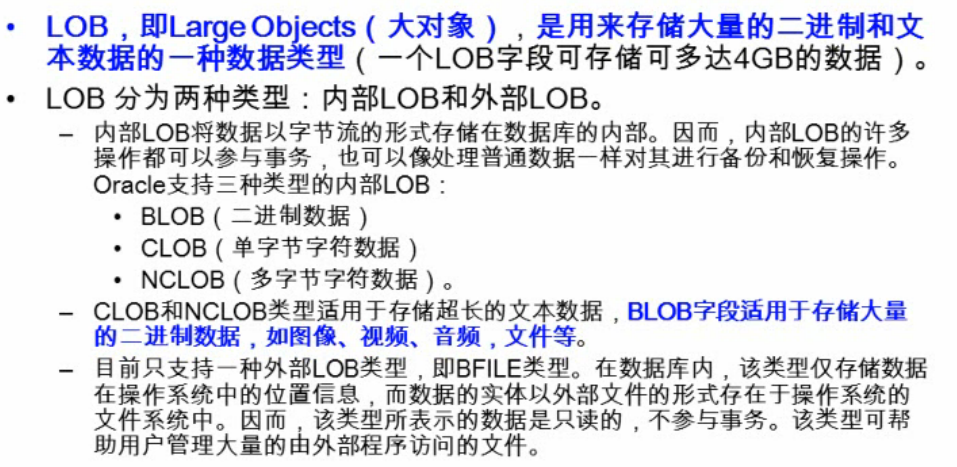
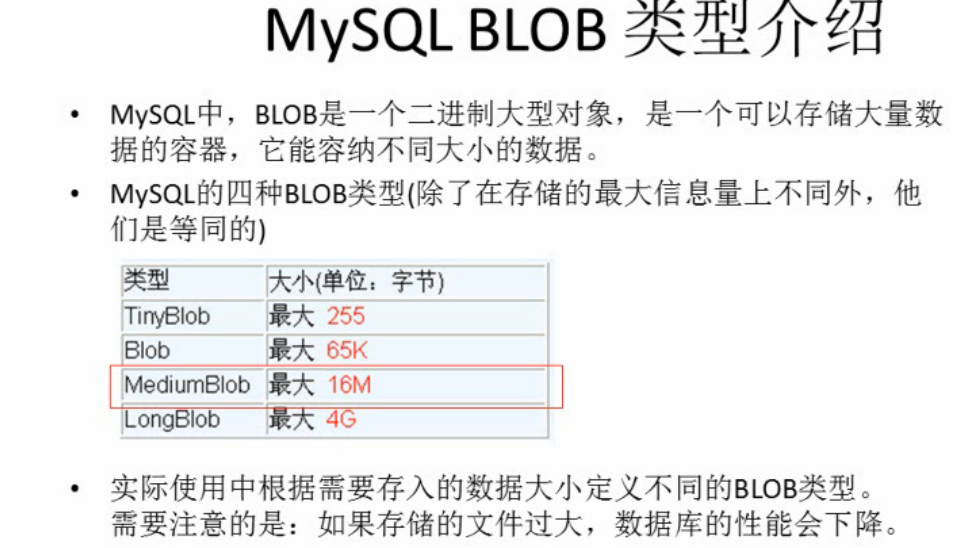
1).插入Blob类型数据
    /**
     * 插入Blob类型的数据必须使用PreparedStatement
     * 因为Blob类型的数据是无法使用字符串拼写的
     *
     * 调用setBlob(int index,InputStream,inputStream)
     */
具体代码实现:
 1 @Test
 2     public void testInsertBlod(){
 3         Connection connection=null;
 4         PreparedStatement preparedStatement=null;
 5         ResultSet rs=null;
 6         try {
 7             connection=JDBCTools.getConnection();
 8             String sql="insert into customers(name,email,birth,picture)"+
 9             " values(?,?,?,?)";
10 //            preparedStatement=connection.prepareStatement(sql);
11             //我们这里使用重载的prepareStatement(sql,flag)方法
12             //来生成prepareStatement对象
13             preparedStatement=connection.prepareStatement(sql);
14             preparedStatement.setString(1, "ABCDE");
15             preparedStatement.setString(2, "abcd@guigu.com");
16             preparedStatement.setDate(3, new Date(new java.util.Date().getTime()));
17             InputStream inputStream=new FileInputStream("blob.png");
18             preparedStatement.setObject(4, inputStream);
19             preparedStatement.executeUpdate();
20
21         } catch (Exception e) {
22             e.printStackTrace();
23         }finally{
24             JDBCTools.release(rs,preparedStatement,connection);
25         }
26     }
2).读取Blob类型数据
/**
     * 读取Blob数据:
     * 1.使用getBlob方法,读取Blod对象
     * 2.调用Blob的getBinaryStream()方法得到输入流,再使用IO操作即可
     */
具体代码实现:
 1 @Test
 2     public void testReadBlob(){
 3         Connection connection = null;
 4         PreparedStatement preparedStatement = null;
 5         ResultSet resultSet = null;
 6         try {
 7             connection = JDBCTools.getConnection();
 8             String sql = "select id,name,email,birth,picture"+
 9             " from customers where id =18";
10             preparedStatement = connection.prepareStatement(sql);
11             resultSet = preparedStatement.executeQuery();
12             if (resultSet.next()) {
13                 int id=resultSet.getInt(1);
14                 String name=resultSet.getString(2);
15                 String email=resultSet.getString(3);
16                 System.out.println(id+":"+name+":"+email);
17                 Blob pictureBlob=resultSet.getBlob(5);
18                 InputStream inputStream=pictureBlob.getBinaryStream();
19                 OutputStream out=new FileOutputStream("flo.png");
20                 byte[] buffer=new byte[1024];
21                 int len =0;
22                 while((len=inputStream.read(buffer))!=-1){
23                     out.write(buffer,0,len);
24                 }
25                 out.close();
26                 inputStream.close();
27             }
28         } catch (Exception e) {
29             e.printStackTrace();
30         } finally {
31             JDBCTools.release(resultSet, preparedStatement, connection);
32         }
33     }
数据库事务
数据库事务概述
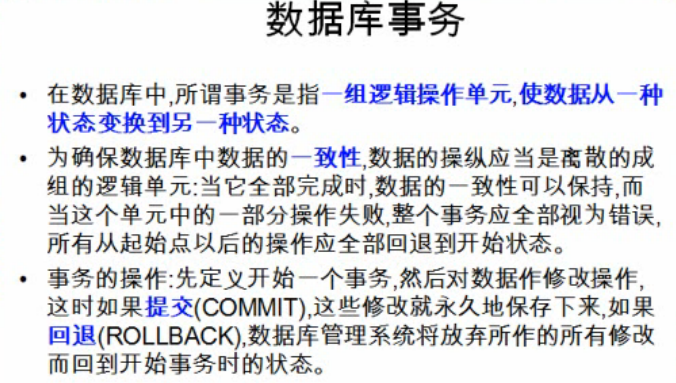
数据库事务的四个属性
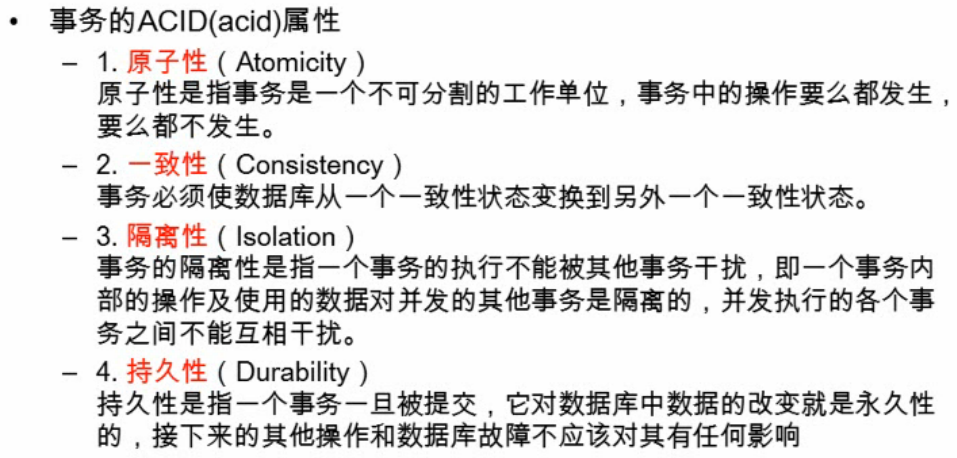
JDBC的数据库事务
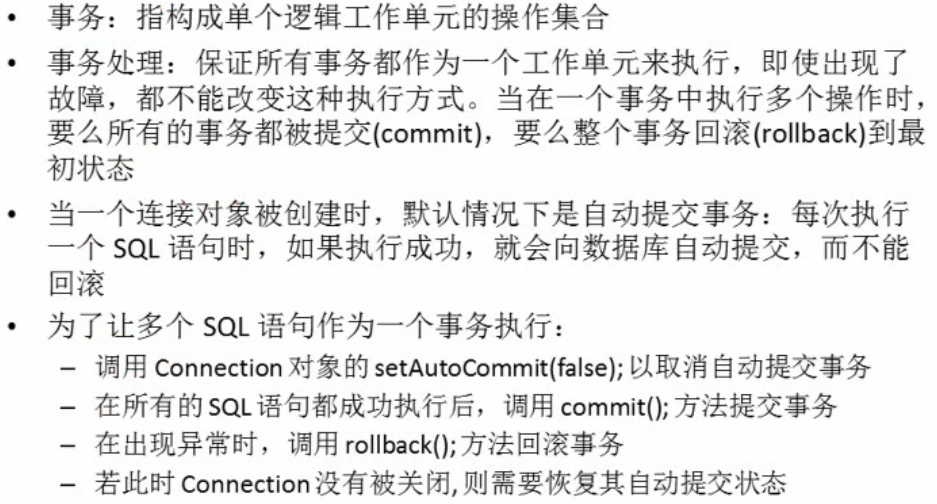
我们做一个小实验:
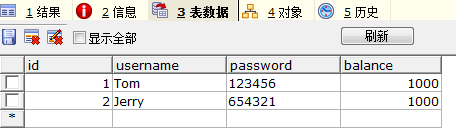
先建立一个数据表:
试验中要用到的更新数据的通用方法update():
 1     public static void update(Connection connection,String sql,
 2             Object ...args){
 3             /**
 4              * 执行SQL语句,使用PreparedStatement
 5              */
 6             PreparedStatement preparedStatement=null;
 7             try {
 8                 preparedStatement=connection.prepareStatement(sql);
 9                 for(int i=0;i<args.length;i++){
10                     preparedStatement.setObject(i+1, args[i]);
11                 }
12                 preparedStatement.executeUpdate();
13             } catch (Exception e) {
14                 e.printStackTrace();
15             }finally{
16                 JDBCTools.release(null, preparedStatement, null);
17     }
我们要完成的是:Tom->Jerry汇款500元
* 数据库事务
* 关于事务:
* 1.如果多个操作,每个操作使用的是自己的单独的连接,则无法保证事务
* 2.具体步骤:
* 1).开始事务,取消默认自动提交行为
* 2).如果事务的操作都成功,则提交事务:connection.commit();
* 3).回滚事务:若出现异常,则在catch块中回滚事务
我们组织代码就按照上面的步骤来进行.
 1 public void testTeansaction() throws Exception{
 2         Connection connection=null;
 3         try {
 4             connection=JDBCTools.getConnection();
 5             System.out.println(connection.getAutoCommit());
 6             String sql="update users set balance=balance-500 where id=1";
 7             //开始事务:取消默认提交
 8             connection.setAutoCommit(false);
 9             update(connection,sql);
10             int i=10/0;
11             System.out.println(i);
12             sql="update users set balance=balance+500 where id=2";
13             JDBCTools.update(sql);
14             //提交事务
15             connection.commit();
16         } catch (Exception e) {
17             e.printStackTrace();
18             //回滚事务
19             try {
20                 connection.rollback();
21             } catch (SQLException e1) {
22                 e1.printStackTrace();
23             }
24         }finally{
25             //关闭连接
26             JDBCTools.release(null, null, connection);
27         }
28     }
可以发现,因为我们使用的是同一个connection连接,当异常(除数为0)发生的时候,事务会发生回滚,数据库的数据会恢复到事务开始之前的状态.
【转】JDBC学习笔记(6)——获取自动生成的主键值&处理Blob&数据库事务处理的更多相关文章
- JDBC学习笔记(6)——获取自动生成的主键值&处理Blob&数据库事务处理
获取数据库自动生成的主键 [孤立的技术是没有价值的],我们这里只是为了了解具体的实现步骤:我们在插入数据的时候,经常会需要获取我们插入的这一行数据对应的主键值. 具体的代码实现: /** * 获取数据 ...
- JDBC 获取自动生成的主键
为什么需要获取自动生成的主键 例如:
- Java -- JDBC 获取数据库自动 生成的主键值
public class Demo4 { /* create table test1 ( id int primary key auto_increment, name varchar(20) ); ...
- MYSQL 之 JDBC(十一): JDBC获取插入记录的主键值
取得数据库自动生成的主键值 package com.litian.jdbc; import javax.swing.plaf.nimbus.State; import java.sql.*; /** ...
- (jdbc)取得数据库自动生成的主键方法
一些类,在前面的博客中有,就不重复了 public class Test2 { TestDAO t=new TestDAO(); /*前提是数据表的主键是自动增加的, *取得数据库自动生成的主键 * ...
- javaweb学习总结(三十七)——获得MySQL数据库自动生成的主键
测试脚本如下: 1 create table test1 2 ( 3 id int primary key auto_increment, 4 name varchar(20) 5 ); 测试代码: ...
- Java_jdbc 基础笔记之十五 数据库连接(取得数据库自动生成的主键)
public class testGetKeyValue { /** * 取得数据库自动生成的主键 */ @Test public void testGeneratedKeys() { Connect ...
- 五.获得MYSQL数据库自动生成的主键
测试脚本如下: 1 create table test1 2 ( 3 id int primary key auto_increment, 4 name varchar(20) 5 ); 测试代码: ...
- javaweb(三十七)——获得MySQL数据库自动生成的主键
测试脚本如下: 1 create table test1 2 ( 3 id int primary key auto_increment, 4 name varchar(20) 5 ); 测试代码: ...
随机推荐
- lab1-Junit&Eclemma
Software Testing, Lab 1 March 10. 2016, by 赵国佺(3014218108) 一. environment setup Firstly, I downl ...
- Spring Boot HTTP over JSON 的错误码异常处理
摘要: 原创出处:www.bysocket.com 泥瓦匠BYSocket 希望转载,保留摘要,谢谢! “年轻人不要怕表现,要敢于出来表现,但还是那句话,要有正确的度,你的表现是分析问题和解决问题的能 ...
- python 接口自动化测试--框架整改(五)
代码结构: 目标架构: 1.用例分析器,自动根据接口的参数,类型生成测试用例 2.数据分析器,自动维护接口参数数据,动态数据自动生成,返回结果自动查询判断 3.核心调用引擎,分SOAP和HTTP两种, ...
- python 中的input()和raw_input()功能与使用区别
在python中raw_input()和input()都是提示并获取用户输入的函数,然后将用户的输入数据存入变量中.但二者在处理返回数据类型上有差别. input()函数是raw_intput()和e ...
- 微信JS图片上传与下载功能--微信JS系列文章(三)
概述 在前面的文章微信JS初始化-- 微信JS系列文章(一)中已经介绍了微信JS初始化的相关工作,接下来本文继续就微信JS的图片上传功能进行描述,供大家参考. 图片上传 $(function(){ v ...
- HTML 表单常用的代码元素
表单: 将数据通过浏览器提交到服务器的媒介.<form action="" method="get/post" ></form> get ...
- [Openfire]使用WebSocket建立Openfire的客户端
近日工作闲暇之余,对IM系统产生了兴趣,转而研究了IM的内容.找了半天,知道比较流行的是Openfire的系统,Openfire有许多平台实现,由于我是做Web的,所以当然是希望寻找Web的实现.Op ...
- Yahoo前端优化十四条军规
相信互联网已经越来越成为人们生活中不可或缺的一部分.Ajax,flex等等富客户端的应用使得人们越加“幸福”地体验着许多原先只能在C/S实 现的功能. 比如Google机会已经把最基本的office应 ...
- Appium 解决手势密码 java
if(driver.getPageSource().contains("绘制解锁图案")){//检测是否是有手势密码出现 List<AndroidElement> el ...
- Nginx+Tomcat动静分离脚本
#!/bin/bashsetenforce 0systemctl stop firewalldtar -zxvf nginx-1.8.0.tar.gz -C /usr/src/ cd /usr/src ...