
Tensorflow机器学习入门——网络可视化TensorBoard
一、在代码中标记要显示的各种量
tensorboard各函数的作用和用法请参考:https://www.cnblogs.com/lyc-seu/p/8647792.html
import tensorflow as tf

import numpy as np

import matplotlib.pyplot as plt

import os

#设置当前工作目录

os.chdir(r'H:\Notepad\Tensorflow')

def add_layer(inputs, in_size, out_size, n_layer, activation_function=None):

    layer_name = 'layer%s' % n_layer

    with tf.name_scope(layer_name):

        Weights = tf.Variable(tf.random_normal([in_size, out_size]), name='W')

        biases = tf.Variable(tf.zeros([1, out_size]) + 0.1, name='b')

        Wx_plus_b = tf.add(tf.matmul(inputs, Weights), biases)

        if activation_function is None:

            outputs = Wx_plus_b

        else:

            outputs = activation_function(Wx_plus_b, )

    #histogram用来显示训练过程中变量的分布情况

    tf.summary.histogram(layer_name + '/weights', Weights)

    tf.summary.histogram(layer_name + '/biases', biases)

    tf.summary.histogram(layer_name + '/outputs', outputs)

    return outputs

#数据

x_data = np.linspace(-1,1,300)[:, np.newaxis]

noise = np.random.normal(0, 0.05, x_data.shape)

y_data = 5*np.square(x_data) - 0.5 + noise

#输入

with tf.name_scope('inputs'):

    xs = tf.placeholder(tf.float32, [None, 1], name='x_input')

    ys = tf.placeholder(tf.float32, [None, 1], name='y_input')

#3层网络

l1 = add_layer(xs, 1, 10, 1,activation_function=tf.nn.relu)

l2 = add_layer(l1, 10, 10,2, activation_function=tf.nn.relu)

prediction = add_layer(l2, 10, 1,3, activation_function=None)

#损失与训练

with tf.name_scope('loss'):

    loss = tf.reduce_mean(tf.reduce_sum(tf.square(ys - prediction),

                                        reduction_indices=[1]))

    tf.summary.scalar('loss-haha', loss)

with tf.name_scope('train'):

    train_step = tf.train.GradientDescentOptimizer(0.1).minimize(loss)

#运行

init = tf.global_variables_initializer()

#merge_all 可以将所有summary全部保存到磁盘,以便tensorboard显示。

merged = tf.summary.merge_all()

with tf.Session() as sess:

    sess.run(init)
  #FileWriter指定一个文件用来保存图。可以调用其add_summary()方法将训练过程数据保存在filewriter指定的文件中

    writer = tf.summary.FileWriter("logs/", sess.graph)#输出Graph

    for i in range(10000):

        sess.run(train_step, feed_dict={xs: x_data, ys: y_data})

        if i % 50 == 0:

            result = sess.run(merged,feed_dict={xs: x_data, ys: y_data})

            writer.add_summary(result, i)
二、在log文件夹所在目录打开cmd,并输入‘ tensorboard --logdir=logs ’
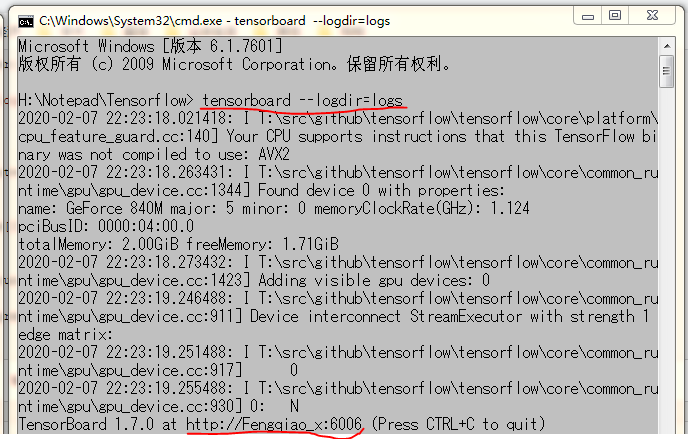
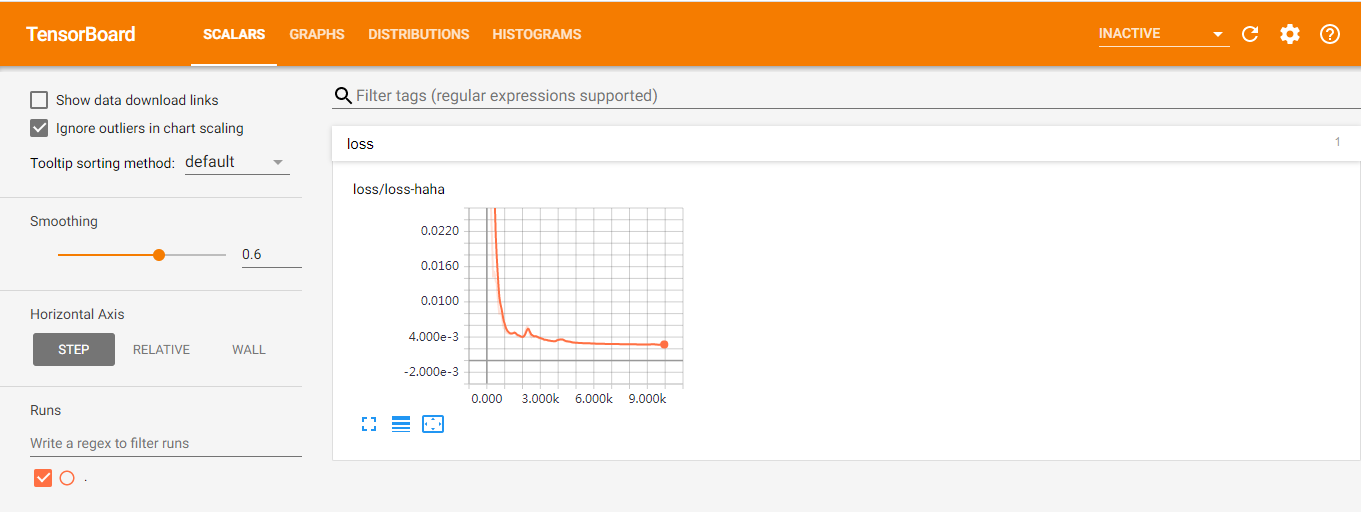
三、在Google Chrome浏览器中输入cmd中给出的网址: http://Fengqiao_x:6006
Tensorflow机器学习入门——网络可视化TensorBoard的更多相关文章
- 吴裕雄 python 神经网络——TensorFlow 训练过程的可视化 TensorBoard的应用
#训练过程的可视化 ,TensorBoard的应用 #导入模块并下载数据集 import tensorflow as tf from tensorflow.examples.tutorials.mni ...
- Tensorflow机器学习入门——MINIST数据集识别
参考网站:http://www.tensorfly.cn/tfdoc/tutorials/mnist_beginners.html #自动下载并加载数据 from tensorflow.example ...
- Tensorflow机器学习入门——读取数据
TensorFlow 中可以通过三种方式读取数据: 一.通过feed_dict传递数据: input1 = tf.placeholder(tf.float32) input2 = tf.placeho ...
- Tensorflow机器学习入门——常量、变量、placeholder和基本运算
一.这里列出了tensorflow的一些基本函数,比较全面:https://blog.csdn.net/M_Z_G_Y/article/details/80523834 二.这里是tensortflo ...
- Tensorflow机器学习入门——ModuleNotFoundError: No module named 'tensorflow.keras'
这个bug的解决办法: # from tensorflow.keras import datasets, layers, models from tensorflow.python.keras imp ...
- Tensorflow机器学习入门——MINIST数据集识别(卷积神经网络)
#自动下载并加载数据 from tensorflow.examples.tutorials.mnist import input_data mnist = input_data.read_data_s ...
- Tensorflow机器学习入门——cifar10数据集的读取、展示与保存
基本信息 官网:http://www.cs.toronto.edu/~kriz/cifar.html 共60000张图片:50000张用于训练.10000张用于测试 图片大小为:32X32 数据集图片 ...
- Tensorflow机器学习入门——AttributeError: module 'scipy.misc' has no attribute 'toimage'
这个bug的解决办法: import cv2 # scipy.misc.toimage(image_array).save('cifar10_data/raw/%d.jpg' % i) cv2.imw ...
- TensorFlow.NET机器学习入门【0】前言与目录
曾经学习过一段时间ML.NET的知识,ML.NET是微软提供的一套机器学习框架,相对于其他的一些机器学习框架,ML.NET侧重于消费现有的网络模型,不太好自定义自己的网络模型,底层实现也做了高度封装. ...
随机推荐
- Python中的bool类型
Python 布尔类型 bool python 中布尔值使用常量True 和 False来表示:注意大小写 比较运算符< > == 等返回的类型就是bool类型:布尔类型通常在 if 和 ...
- python调用c++开发的动态库
此处列举一下python调用Windows端动态库. # *- coding=utf-8 -* import ctypes from ctypes import * import os objdll ...
- 消息队列(四)--- RocketMQ-消息发送2
概述 接着我们上一篇继续分析消息发送,上节讲到消息发送前有可能遇到 broker 失效的情况,RocketMQ 主要是采用两种策略 : 重试发送 broker 故障延迟机制 后者指的是当发送给 ...
- 【C语言】输入一个正整数,判断其是否为素数
素数的定义: 素数(prime number)又称质数,有无限个. 素数定义为在大于1的自然数中,除了1和它本身以外不再有其他因数,这样的数称为素数.代码1: #include<stdio.h& ...
- leetCode练题——27. Remove Element
1.题目 27. Remove Element——Easy Given an array nums and a value val, remove all instances of that valu ...
- 「CF815C」Karen and Supermarket
传送门 Luogu 解题思路 树形背包. 设 \(f[i][j][0/1]\) 表示在以 \(i\) 为根的子树中选 \(j\) 件商品的最少花费. 边界条件: \(f[i][j][0] = \min ...
- Elasticsearch系列---初识mapping
概要 本篇简单介绍一下field数据类型mapping的相关知识. mapping是什么? 前面几篇的实战案例,我们向Elasticsearch索引数据时,只是简单地把JSON文本放在请求体里,至于J ...
- 记C++中发现的隐式转换问题
#include <iostream> #include <string> using std::cin; using std::cout; using std::endl; ...
- string和stringBuffer,stringBuilder的区别
1,String类的内容一旦声明后是不可改变的,改变的只是其内存的指向,而StringBuffer类的对象内容是可以改变的. 2,对于StringBuffer,不能像String那样直接通过赋值的方式 ...
- 29 对象&函数
switch: 穿越: 没有判断结果的情况下执行下一个case的语句块,叫穿越 或者穿越: switch(s%10){ case 1: case 2: case 3: s++; break; defa ...