
Tensorflow机器学习入门——网络可视化TensorBoard
一、在代码中标记要显示的各种量
tensorboard各函数的作用和用法请参考:https://www.cnblogs.com/lyc-seu/p/8647792.html
import tensorflow as tf

import numpy as np

import matplotlib.pyplot as plt

import os

#设置当前工作目录

os.chdir(r'H:\Notepad\Tensorflow')

def add_layer(inputs, in_size, out_size, n_layer, activation_function=None):

    layer_name = 'layer%s' % n_layer

    with tf.name_scope(layer_name):

        Weights = tf.Variable(tf.random_normal([in_size, out_size]), name='W')

        biases = tf.Variable(tf.zeros([1, out_size]) + 0.1, name='b')

        Wx_plus_b = tf.add(tf.matmul(inputs, Weights), biases)

        if activation_function is None:

            outputs = Wx_plus_b

        else:

            outputs = activation_function(Wx_plus_b, )

    #histogram用来显示训练过程中变量的分布情况

    tf.summary.histogram(layer_name + '/weights', Weights)

    tf.summary.histogram(layer_name + '/biases', biases)

    tf.summary.histogram(layer_name + '/outputs', outputs)

    return outputs

#数据

x_data = np.linspace(-1,1,300)[:, np.newaxis]

noise = np.random.normal(0, 0.05, x_data.shape)

y_data = 5*np.square(x_data) - 0.5 + noise

#输入

with tf.name_scope('inputs'):

    xs = tf.placeholder(tf.float32, [None, 1], name='x_input')

    ys = tf.placeholder(tf.float32, [None, 1], name='y_input')

#3层网络

l1 = add_layer(xs, 1, 10, 1,activation_function=tf.nn.relu)

l2 = add_layer(l1, 10, 10,2, activation_function=tf.nn.relu)

prediction = add_layer(l2, 10, 1,3, activation_function=None)

#损失与训练

with tf.name_scope('loss'):

    loss = tf.reduce_mean(tf.reduce_sum(tf.square(ys - prediction),

                                        reduction_indices=[1]))

    tf.summary.scalar('loss-haha', loss)

with tf.name_scope('train'):

    train_step = tf.train.GradientDescentOptimizer(0.1).minimize(loss)

#运行

init = tf.global_variables_initializer()

#merge_all 可以将所有summary全部保存到磁盘,以便tensorboard显示。

merged = tf.summary.merge_all()

with tf.Session() as sess:

    sess.run(init)
  #FileWriter指定一个文件用来保存图。可以调用其add_summary()方法将训练过程数据保存在filewriter指定的文件中

    writer = tf.summary.FileWriter("logs/", sess.graph)#输出Graph

    for i in range(10000):

        sess.run(train_step, feed_dict={xs: x_data, ys: y_data})

        if i % 50 == 0:

            result = sess.run(merged,feed_dict={xs: x_data, ys: y_data})

            writer.add_summary(result, i)
二、在log文件夹所在目录打开cmd,并输入‘ tensorboard --logdir=logs ’
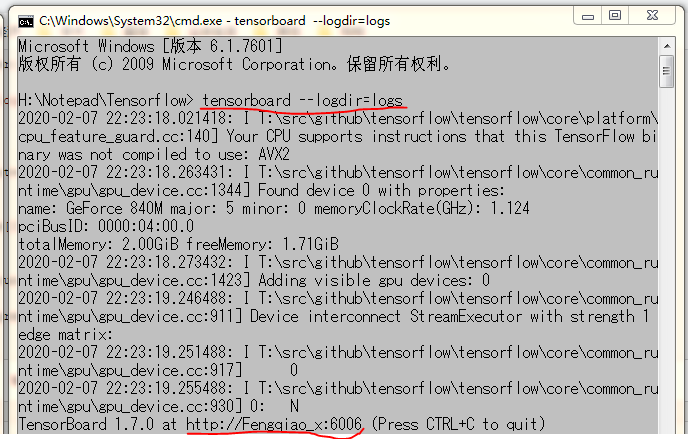
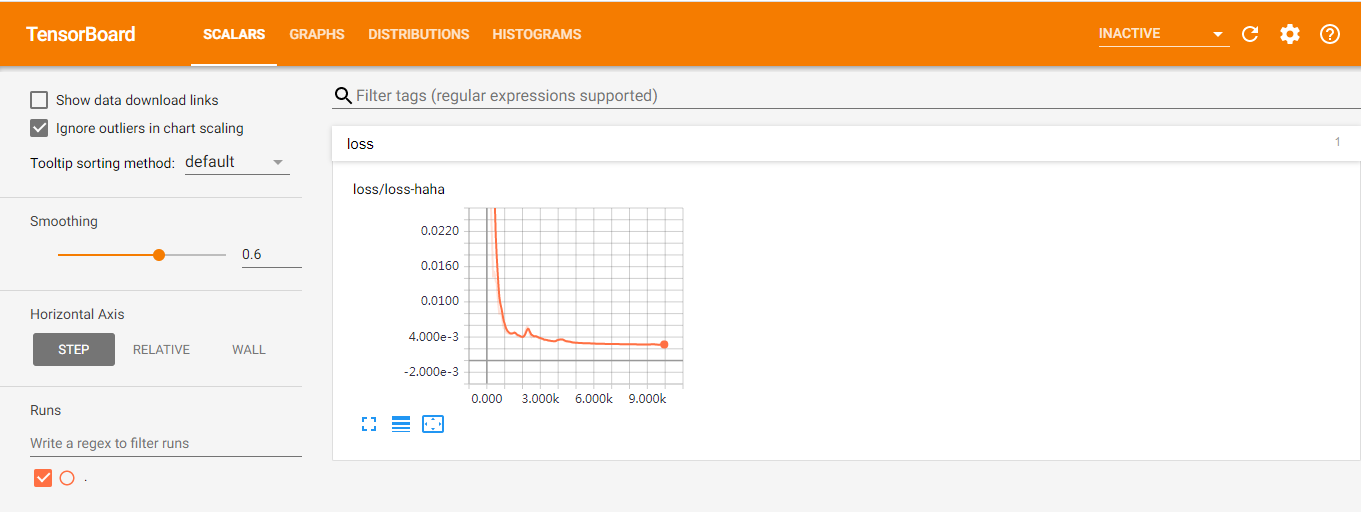
三、在Google Chrome浏览器中输入cmd中给出的网址: http://Fengqiao_x:6006
Tensorflow机器学习入门——网络可视化TensorBoard的更多相关文章
- 吴裕雄 python 神经网络——TensorFlow 训练过程的可视化 TensorBoard的应用
#训练过程的可视化 ,TensorBoard的应用 #导入模块并下载数据集 import tensorflow as tf from tensorflow.examples.tutorials.mni ...
- Tensorflow机器学习入门——MINIST数据集识别
参考网站:http://www.tensorfly.cn/tfdoc/tutorials/mnist_beginners.html #自动下载并加载数据 from tensorflow.example ...
- Tensorflow机器学习入门——读取数据
TensorFlow 中可以通过三种方式读取数据: 一.通过feed_dict传递数据: input1 = tf.placeholder(tf.float32) input2 = tf.placeho ...
- Tensorflow机器学习入门——常量、变量、placeholder和基本运算
一.这里列出了tensorflow的一些基本函数,比较全面:https://blog.csdn.net/M_Z_G_Y/article/details/80523834 二.这里是tensortflo ...
- Tensorflow机器学习入门——ModuleNotFoundError: No module named 'tensorflow.keras'
这个bug的解决办法: # from tensorflow.keras import datasets, layers, models from tensorflow.python.keras imp ...
- Tensorflow机器学习入门——MINIST数据集识别(卷积神经网络)
#自动下载并加载数据 from tensorflow.examples.tutorials.mnist import input_data mnist = input_data.read_data_s ...
- Tensorflow机器学习入门——cifar10数据集的读取、展示与保存
基本信息 官网:http://www.cs.toronto.edu/~kriz/cifar.html 共60000张图片:50000张用于训练.10000张用于测试 图片大小为:32X32 数据集图片 ...
- Tensorflow机器学习入门——AttributeError: module 'scipy.misc' has no attribute 'toimage'
这个bug的解决办法: import cv2 # scipy.misc.toimage(image_array).save('cifar10_data/raw/%d.jpg' % i) cv2.imw ...
- TensorFlow.NET机器学习入门【0】前言与目录
曾经学习过一段时间ML.NET的知识,ML.NET是微软提供的一套机器学习框架,相对于其他的一些机器学习框架,ML.NET侧重于消费现有的网络模型,不太好自定义自己的网络模型,底层实现也做了高度封装. ...
随机推荐
- LAMP调优
1.编译安装httpd前修改: 在安装包目录下 vim include/ap_release.h 搜索:BASEVENDOR 修改其八项隐藏curl -I http://地址 中的Server ...
- ES-moreLikeThisQueryBuilder-文章推荐
//获取推荐文章 public Object getRecommendList2(String name) { NativeSearchQueryBuilder queryBuilder = new ...
- nginx 配置Tp5项目时出现 404 Not Found nginx
1.首先看了nginx报错日志 报 signal process started signal process started表示还有 产生原因 1.可能你的nginx.conf 内容配置的有问题. ...
- 「JSOI2015」送礼物
「JSOI2015」送礼物 传送门 看到这题首先想到分数规划. 我们发现对于当前区间,如果它的最大值和最小值不是分居区间的两个端点的话,那么我们显然可以把两端多出去的部分舍掉,因为,在区间最大值最小值 ...
- 「JSOI2015」字符串树
「JSOI2015」字符串树 传送门 显然可以树上差分. 我们对于树上每一条从根出发的路径都开一 棵 \(\text{Trie}\) 树,那么我们就只需要在 \(\text{Trie}\) 树中插入一 ...
- 校准产品质量,把控出海航向,腾讯WeTest《2019中国移动游戏质量白皮书》正式开放预约
作者:wetest小编 商业转载请联系腾讯WeTest获得授权,非商业转载请注明出处. 原文链接:https://wetest.qq.com/lab/view/483.html 每当步入一个新的年份, ...
- matlab学习记录
1.在命令框输入preferences,可以调整字体大小 2.产生正太分布函数 参考:https://blog.csdn.net/s334wuchunfangi/article/details/816 ...
- elasticsearch数据组织结构
elasticsearch数据组织结构 1. mapping 1.1. 简介 mapping:意为映射关系,特别是指组织结构.在此语境中可理解为数据结构,包括表结构,表约束,数据类型等 ...
- Spring Boot 使用 Aop 实现日志全局拦截
前面的章节我们学习到 Spring Boot Log 日志使用教程 和 Spring Boot 异常处理与全局异常处理,本章我们结合 Aop 面向切面编程来实现全局拦截异常并记录日志. 在 Sprin ...
- 吴裕雄--天生自然Numpy库学习笔记:NumPy Ndarray 对象
NumPy 最重要的一个特点是其 N 维数组对象 ndarray,它是一系列同类型数据的集合,以 0 下标为开始进行集合中元素的索引. ndarray 对象是用于存放同类型元素的多维数组. ndarr ...