
MVPR下的PHP分页教程
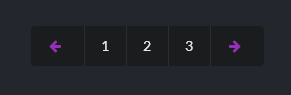
这个PHP分页其实不难,现在就开始看看核心思路吧。
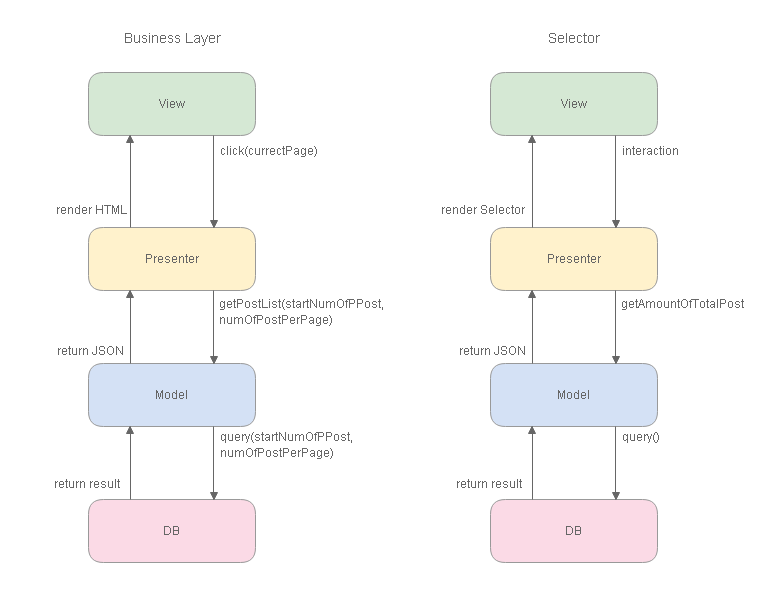
我习惯从最底层开始看起。
1. 首先用LIMIT偏移QUERY的指针
    /*

    *    get hot post by current page

    *    @param [int]startNumOfPPost, [int]numOfPostPerPage

    *    @return [array]post

    */

    function getHotPostByCurrectPage($startNumOfPPost, $numOfPostPerPage)

    {

        consoleLog('CPost func getHotPostByCurrectPage');

        $sql = " SELECT id, category, date, authorId, editorId, title, abstract, abstractImg

                    FROM post

                        WHERE visitable = '1' AND isTop = '1'

                                ORDER BY date DESC, id DESC

                                    LIMIT ".$startNumOfPPost.", ".$numOfPostPerPage;

        $result = mysql_query($sql);

        while ($post = mysql_fetch_array($result))

        {

            $post['authorName'] = $this->getNameByUserId($post['authorId']);

            $post['editorName'] = $this->getNameByUserId($post['editorId']);

            $post['categoryName'] = $this->getCategoryNameById($post['category']);

            $arrPost[] = $post;

        }

        return $arrPost;

    }
2. Presenter渲染HTML
function showHotPostList($currentPage)
{
consoleLogWithTitle('PostPresenter func showHotPostList var currentPage', $currentPage);
$postModel = $this->postModel; // get the first post id of current page
$numOfPostPerPage = $this->numOfPostPerPage;
$startNumOfPPost = ($currentPage-1)*$numOfPostPerPage; // get post from db
$arrPost = $postModel->getHotPostByCurrectPage($startNumOfPPost, $numOfPostPerPage); foreach ($arrPost AS $post)
{
echo '
<div class="gobalPost">
<div class="gobalPostImg">
<a href="#"> <div class="gobalPostImgHeaderCentered" style="background-image: url(\''.$post['abstractImg'].'\');" ></div> </a>
<div class="gobalPostImgTag"> <a href="#">'.$post['categoryName'].'</a> </div>
</div> <!-- gobalPostImg --> <div class="gobalPostContext">
<div class="fontSize20 color111">
<a href="../post/post.php?postId='.$post['id'].'">'.$post['title'].'</a>
</div>
<div class="mTop2 fontSize12 color666">
'.$post['date'].'
  作者:<a href="#">'.$post['authorName'].'</a>
  编辑:<a href="#">'.$post['editorName'].'</a>
</div>
<div class="mTop8 fontSize13 color333">
'.$post['abstract'].'
</div>
</div> <!-- gobalPostContext -->
</div> <!-- gobalPost -->
';
}
}
3. View,视图层
<?php

    $postPresenter->showHotPostList($currentPage);

?>
有了核心的Business层,那就是创建PageSelector。
1. get amoumt of total post in db
2. prensenter render page selector
    function getPageSelectorCellHTML($numOfPage)

    {

        $selectorCellHTML = "";

        for ( $x = 1; $x <= $numOfPage; $x++)

        {

            $selectorCellHTML .= ' <a class="item" href="../../view/home/index.php?currentPage='.$x.'">'.$x.'</a> ';

        }

        return $selectorCellHTML;

    }
    function renderPageSelector($currentPage)

    {

        consoleLogWithTitle('PostPresenter func renderPageSelector var currentPage', $currentPage);

        $postModel = $this->postModel;

        $totalPost = count($postModel->getHotPostOrderById());

        $numOfPage = ceil($totalPost / $this->numOfPostPerPage);

        echo '

        <div class="ui basic very padded center aligned segment container">

            <div class="ui inverted pagination menu">

                <a class="item"><i class="icon purple left arrow"></i></a>

                '.$this->getPageSelectorCellHTML($numOfPage).'

                <a class="item"><i class="icon purple right arrow"></i></a>

            </div>

        </div>

        ';

    }
这里要有良好的命名。renderPageSelector是渲染,getPageSelectorCellHTML是构造HTML。
而renderPageSelector是调用getPageSelectorCellHTML,因此要把构造HTML方法,放在主体之前,这是C++的开发概念。
3. View
<?php $postPresenter->renderPageSelector($currentPage); ?>
那PHP分页功能就完成了。
MVPR下的PHP分页教程的更多相关文章
- PHP 框架: CodeIgniter 分页教程
PHP 框架: CodeIgniter 分页教程 分类: PHP2009-04-23 11:09 3209人阅读 评论(0) 收藏 举报 框架phpbooksdatabaseurl数据库 目录(?)[ ...
- 10个优秀的 HTML5 & CSS3 下拉菜单制作教程
下拉菜单是一个很常见的效果,在网站设计中被广泛使用.通过使用下拉菜单,设计者不仅可以在网站设计中营造出色的视觉吸引力,但也可以为网站提供了一个有效的导航方案.使用 HTML5 和 CSS3 可以更容易 ...
- linux 下安装apache 快速教程
最近自学linux,看鸟哥的文章.提到了apache,所以在虚拟机redhat 5下安装了一把, 结合国内外文章写下快速可行的教程: --------------------------------- ...
- Windows 下安装 Oracle 12c 教程
原文 Windows 下安装 Oracle 12c 教程 申明:本文原作者:Jmq 本文给大家带来的是 Oracle 12C 的安装教程. 1.准备 1.1 下载 Oracle 12c 安装程序 ...
- CentOS下Eclipse的安装教程
CentOS下Eclipse的安装教程 据了解,在Linux下的Java开发很多时候都比较喜欢使用vim + 插件,反而很少使用Eclipse,但是我是第一次使用Linux来进行Java编程,就什么都 ...
- 简单说下 Winform 的分页快速开发框架必须要实现的几个功能之一
简单说下 Winform 的分页快速开发框架必须要实现的几个功能之一 分页非为前端分页 和 后端分页,前端分页只有适用于B/S,B/S的呈现速度远远不如C/S,而C/S则没有这个问题,所以分页必然是 ...
- 分布式进阶(二)Ubuntu 14.04下安装Dockr图文教程(一)
当前,完全硬件虚拟化技术(KVM.Xen.Hyper-V 等)能在一个物理主机上很好地运行多个互相独立的操作系统,但这也带来一些问题:性能不佳,资源浪费,系统反应迟缓等.有时候对用户来说,完全的硬件虚 ...
- Ubuntu下搜狗输入法的安装教程
前面写过一篇centos7下搜狗输入法的安装教程,现在把搜狗输入法在Ubuntu下的安装方法也记录一下,相比之下Ubuntu下安装搜狗输入法要简便得多 安装fcitx以支持搜狗输入法 ...
- Ubuntu下安装JDK详细教程
Ubuntu下安装JDK详细教程 作者:凯鲁嘎吉 - 博客园http://www.cnblogs.com/kailugaji/ Ubuntu版本:Ubuntu-12.04.5-desktop-i386 ...
随机推荐
- MySQL每日执行
drop event if exists upload_deadline; DELIMITER $$ create event upload_deadline day starts timestamp ...
- cf 500 D. New Year Santa Network
直接按边分,2个点在边的一边,1个在另一边,组合出来就是这个边对答案的贡献,权值换了就再重新算个数而已. #include <bits/stdc++.h> #define LL long ...
- 【问题管理】-- Tomcat8部署项目加载静态资源html页面编码错误
1.问题背景及解决方式 最近在回顾Tomcat部署Web项目,自己简单地从Tomcat的下载安装及配置server.xml文件入手,学习Tomcat的项目部署,在自己使用IDEA创建了一个简单地web ...
- Spring 控制反转容器(Inversion of Control – IOC)
系列教程 Spring 框架介绍 Spring 框架模块 Spring开发环境搭建(Eclipse) 创建一个简单的Spring应用 Spring 控制反转容器(Inversion of Contro ...
- 数据结构必做题参考:实验一T1-20,实验2 T1
实验一T1-10 #include <bits/stdc++.h> using namespace std; ; struct Book { string isbn; string nam ...
- CF1141E Superhero Battle
A superhero fights with a monster. The battle consists of rounds, each of which lasts exactly n minu ...
- django下载
pip install django ==2.0.5 创建目录 1创建目录 2终端下进入目录 3输入django-admin startproject project
- 读书笔记 - js高级程序设计 - 第十章 DOM
文档元素 是文档的最外层元素,在Html页面中,文档元素始终都是<html>元素 在xml中,任何元素都可以是文档元素 Node类型 Node.ELEMENT_NODE 元素 Node ...
- SpringAOP切入点的表达式
1. 常用的切入点表达式分为: (1)按类型匹配:within 关键字 (2)按函数匹配:execution (3)按bean的id匹配:bean 2.按类匹配的写法 匹配到具体的类:<aop ...
- tableau中图形分析相关设置
1.柱形堆叠图单元格顶部显示总计值(可通过参考线实现) 2.调节图形单元格的宽窄度 (ctrl + 右键/左键) 3.折线图预测区间 趋势区间线 分析中预测并不是针对所有的日期格式均其作用,比如日期格 ...