
吴裕雄 Bootstrap 前端框架开发——Bootstrap 表单:表单控件状态
<!DOCTYPE html>

<html>

    <head>

        <meta charset="utf-8">

        <title>Bootstrap 实例 - 表单控件状态</title>

        <link rel="stylesheet" href="https://cdn.staticfile.org/twitter-bootstrap/3.3.7/css/bootstrap.min.css">

        <script src="https://cdn.staticfile.org/jquery/2.1.1/jquery.min.js"></script>

        <script src="https://cdn.staticfile.org/twitter-bootstrap/3.3.7/js/bootstrap.min.js"></script>

    </head>

    <body>

        <form class="form-horizontal" role="form">

            <div class="form-group">

                <label class="col-sm-2 control-label">聚焦</label>

                <div class="col-sm-10">

                    <input class="form-control" id="focusedInput" type="text"  value="该输入框获得焦点...">

                </div>

            </div>

            <div class="form-group">

                <label for="inputPassword" class="col-sm-2 control-label">

                    禁用

                </label>

                <div class="col-sm-10">

                    <input class="form-control" id="disabledInput" type="text" placeholder="该输入框禁止输入..." disabled>

                </div>

            </div>

            <fieldset disabled>

                <div class="form-group">

                    <label for="disabledTextInput"  class="col-sm-2 control-label">禁用输入(Fieldset disabled)

                    </label>

                    <div class="col-sm-10">

                        <input type="text" id="disabledTextInput" class="form-control"  placeholder="禁止输入">

                    </div>

                </div>

                <div class="form-group">

                    <label for="disabledSelect"  class="col-sm-2 control-label">禁用选择菜单(Fieldset disabled)

                    </label>

                    <div class="col-sm-10">

                        <select id="disabledSelect" class="form-control">

                            <option>禁止选择</option>

                        </select>

                    </div>

                </div>

            </fieldset>

            <div class="form-group has-success">

                <label class="col-sm-2 control-label" for="inputSuccess">

                    输入成功

                </label>

                <div class="col-sm-10">

                    <input type="text" class="form-control" id="inputSuccess">

                </div>

            </div>

            <div class="form-group has-warning">

                <label class="col-sm-2 control-label" for="inputWarning">

                    输入警告

                </label>

                <div class="col-sm-10">

                    <input type="text" class="form-control" id="inputWarning">

                </div>

            </div>

            <div class="form-group has-error">

                <label class="col-sm-2 control-label" for="inputError">

                    输入错误

                </label>

                <div class="col-sm-10">

                    <input type="text" class="form-control" id="inputError">

                </div>

            </div>

        </form>

    </body>

</html>
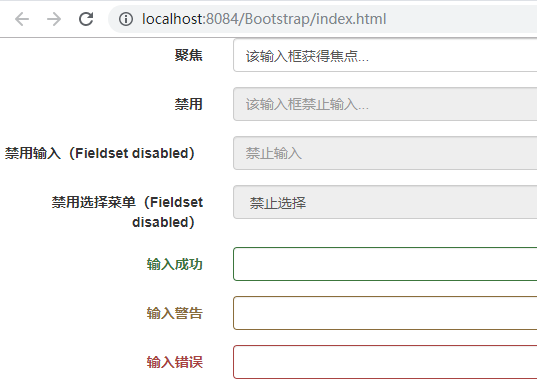
吴裕雄 Bootstrap 前端框架开发——Bootstrap 表单:表单控件状态的更多相关文章
- 吴裕雄 Bootstrap 前端框架开发——Bootstrap 表单:表单帮助文本
<!DOCTYPE html> <html> <head> <meta charset="utf-8"> <title> ...
- 吴裕雄 Bootstrap 前端框架开发——Bootstrap 表单:表单控件大小
<!DOCTYPE html> <html> <head> <meta charset="utf-8"> <title> ...
- 吴裕雄 Bootstrap 前端框架开发——Bootstrap 表单:水平表单
<!DOCTYPE html> <html> <head> <meta charset="utf-8"> <title> ...
- 吴裕雄 Bootstrap 前端框架开发——Bootstrap 表单:内联表单
<!DOCTYPE html> <html> <head> <meta charset="utf-8"> <title> ...
- 吴裕雄 Bootstrap 前端框架开发——Bootstrap 表单
<!DOCTYPE html> <html> <head> <meta charset="utf-8"> <title> ...
- 吴裕雄 Bootstrap 前端框架开发——Bootstrap 表单:静态控件
<!DOCTYPE html> <html> <head> <meta charset="utf-8"> <title> ...
- 吴裕雄 Bootstrap 前端框架开发——Bootstrap 表单:选择框(Select)
<!DOCTYPE html> <html> <head> <meta charset="utf-8"> <title> ...
- 吴裕雄 Bootstrap 前端框架开发——Bootstrap 表单:复选框(Checkbox)和单选框(Radio)
<!DOCTYPE html> <html> <head> <meta charset="utf-8"> <title> ...
- 吴裕雄 Bootstrap 前端框架开发——Bootstrap 表单:文本框(Textarea)
<!DOCTYPE html> <html> <head> <meta charset="utf-8"> <title> ...
随机推荐
- Java数字和字符的对照关系表
/* 数字和字符的对照关系表(编码表): ASCII码表:American Standard Code for Information Interchange,美国信息交换标准代码. Unicode码 ...
- 关于overflow:hidden的作用(溢出隐藏,清除浮动,解决外边塌陷等等)
1.overflow:hidden 溢出隐藏 给一个元素中设置overflow:hidden ,那么该元素的内容若超出了给定的宽度和高度属性,那么超出的部分将会被隐藏,不占位. 代码如下: 运行结果 ...
- mysql免安装版配置启动时出错
今天安装了MySQL5.7的免安装版本,启动时报了服务无法启动的错误,在网上找了好久终于找到了解决方法 我找到解决方法的博客地址是:http://blog.csdn.net/qq_27093465/a ...
- python学习Day25--正则表达式1
[知识点] # 所有模块要经历的两个步骤: ① 要操作的概念本身:正则表达式 时间 ② 使用模块取操作它:re time 1.正则表达式:一种匹配字符串的规则 # ...
- mac下Red Hat 7.4服务器初始化
物料:VMware Fusion for Mac版 rhel-server-7.4-x86_64-dvd.iso 通过VMware安装好虚拟机,打开终端: 1.通过ifconfig查看ip和网 ...
- 【PAT甲级】1004 Counting Leaves (30 分)(BFS)
题意:给出一棵树的点数N,输入M行,每行输入父亲节点An,儿子个数n,和a1,a2,...,an(儿子结点编号),从根节点层级向下依次输出当前层级叶子结点个数,用空格隔开.(0<N<100 ...
- [经验] 如何将 Java 项目发布到云服务器上并可以访问
环境: 云服务器 Linux centos7.6 1: 安装 Tomcat (apache-tomcat-9.0.26.tar.gz) 下载压缩包 --> 通过SSH上传到云服务器 --> ...
- centos 安装phpize
yum -y install php-devel 然后 /usr/bin/phpize
- Python 爬取 热词并进行分类数据分析-[数据修复]
日期:2020.02.01 博客期:140 星期六 [本博客的代码如若要使用,请在下方评论区留言,之后再用(就是跟我说一声)] 所有相关跳转: a.[简单准备] b.[云图制作+数据导入] c.[拓扑 ...
- 下载安装charles并导入证书、使用
抓包原理 1.截获真实客户端的 HTTPS请求,伪装客户端向真实服务端发送 HTTPS 请求. 2.接受真实服务器响应,用 Charles 自己证书伪装服务端向真实客户端发送内容 3.证书导入 看博客 ...