
【JavaScript数据结构系列】07-循环链表CircleLinkedList
【JavaScript数据结构系列】07-循环链表CircleLinkedList
码路工人 CoderMonkey
转载请注明作者与出处
1. 认识循环链表
首节点与尾节点相连的,就构成循环链表。其中,
单向链表首尾相连构成单向循环链表,
双向链表首尾相连构成双向循环链表。
循环链表,可以无限迭代,
迭代过程即是链表头不断移动的过程。
所以迭代过程中链表头尾节点是不断变化的。
1.1 单向循环链表 CircleLinkedList
与前文讲过的单向链表的区别是,
尾节点的后继不再指向 null,而是头节点。
1.2 双向循环链表 CircleDoublyLinkedList
与前文讲过的双向链表的区别是,
头节点的前驱不再指向 null,而是尾节点,
尾节点的后继不再指向 null,而是头节点。
请看码路工人画的循环链表结构示意图: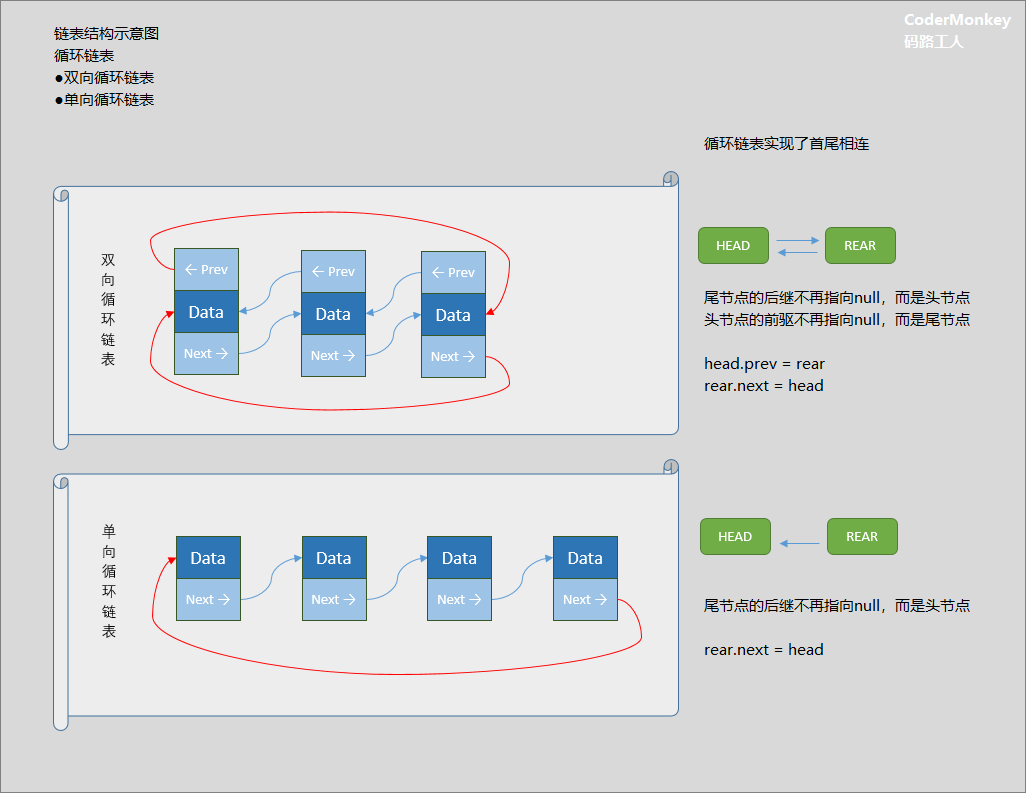
2. 常用方法
这里,我们以【单向循环链表】为例,
实现以下常用方法:
| 方法 | 描述 |
|---|---|
| append(data) | 向链表添加元素 |
| insert(position, data) | 向指定位置插入元素 |
| remove(data) | 删除元素 |
| removeAt(position) | 删除指定位置元素 |
| update(position, data) | 更新指定位置元素 |
| findAt(position) | 查找指定位置元素 |
| indexOf(data) | 获取元素位置 |
| traverse(cb, reversal) | 指定方向遍历 |
| getNext() | 迭代下一个节点 |
| head() | 获取首元素数据 |
| tail() | 获取尾元素数据 |
| size() | 获取链表大小 |
| isEmpty() | 判断链表是否为空 |
| clear() | 清空链表 |
| toString() | 字符串化 |
单向循环链表应是继承自链表,
有些方法没有区别使用继承即可,
这里为了阅读方便就在完整代码里写全了。
在添加、插入或删除节点时,
要注意相应地改变head/tail地指向。
在遍历时,因循环链表尾节点仍有后继,
要避免无限循环,使用index<count判断。
3. 代码实现
若要查看 data-struct-js 的完整代码实现:
git clone https://github.com/CoderMonkie/data-struct-js.git

# 或

git clone https://gitee.com/coder-monkey/data-struct-js.git
若要使用 data-struct-js 的 npm 包:
npm install data-struct-js
封装单向循环链表类
/**

 * 单向循环链表

 */

function CircleLinkedList() {

    this.__head = null

    this.__tail = null

    this.__count = 0

    // 用Node表示链表内部元素

    function Node(data) {

        this.data = data

        this.next = null

        Node.prototype.toString = function () {

            return this.data.toString()

        }

    }

}
3.1 append(data)
添加节点方法
实现分析:
- 如果为空链表,头节点与尾节点的指向新添加的节点
- 然后尾节点的 next 指向头节点
- 如果是非空链表,将尾节点的 next 指向新添加的节点
- 再将尾节点指向 新添加的节点
- 再将新的尾节点的 next 指向头节点
- 添加完成,计数加1
与普通链表不同就在于要维护尾节点的 next 指向,
保持指向头节点。
// 添加节点

CircleLinkedList.prototype.append = function (data) {

  // 1. 创建新元素

  let newNode = new Node(data)

  // 2.1 链表为空时,直接添加到末尾

  if (this.isEmpty()) {

    this.__head = newNode

    this.__tail = newNode

  }

  // 2.2 链表非空时,末尾添加新元素

  else {

    this.__tail.next = newNode

    this.__tail = newNode

  }

  // 2.3 将新的尾节点的后继指向头节点

  this.__tail.next = this.__head

  // 3. 内部计数加1

  this.__count += 1

  return true

}
3.2 insert(position, data)
插入节点方法
实现分析:
- 检查插入位置,范围 0~count-1
- 创建新节点,插入位置分三种情况:
- 1.位置0:修改head指向和tail的next指向
- 2.位置count-1,同append方法
- 3.其它位置:不涉及首尾节点的指向关系,按普通插入即可
// 插入节点

CircleLinkedList.prototype.insert = function (position, data) {

  // 1.边界检查(插入位置)

  if (position < 0 || position > this.__count) return false

  // 2. 创建新元素

  var newNode = new Node(data)

  // 3.1插入到链表头部

  if (position === 0) {

    newNode.next = this.__head

    this.__head = newNode

    this.__tail.next = this.__head

    // 内部计数加1

    this.__count += 1

  }

  // 3.2插入到链表尾部

  else if (position === this.__count) {

    this.append(data)

  }

  // 3.3以外

  else {

    let previous = null

    let current = this.__head

    let index = 0

    while (index < position) {

      previous = current

      current = current.next

      index++

    }

    previous.next = newNode

    newNode.next = current

    // 内部计数加1

    this.__count += 1

  }

  return true

}
3.3 remove(data)
删除节点方法
这里调用了两个其它方法来实现。
- 1.调用 indexOf 方法找到下标
- 2.调用 removeAt 方法删除节点
// 删除节点

CircleLinkedList.prototype.remove = function (data) {

  const position = this.indexOf(data)

  if (position === -1) return false

  return this.removeAt(position)

}
3.4 removeAt(position)
删除指定位置节点
实现分析:
- 1.参数的边界检查
- 2.根据循环链表节点个数,分以下两种情况:
- 2.1只有一个节点:首尾节点全部置空即可
- 2.2多个节点的时候,分以下三种情况:
- 2.2.1删除头节点
- 将删除对象的前驱与后继相连
- 更新头节点指向
- 重新首尾相连(更新尾节点next指向)
- 2.2.2删除尾节点
- 将删除对象的前驱与后继相连
- 更新尾节点指向
- 2.2.3删除其它节点:
- 将删除对象的前驱与后继相连
- 三种情况下此处理相同
// 删除指定位置节点

CircleLinkedList.prototype.removeAt = function (position) {

  // 1.边界检查

  if (position < 0 || position >= this.__count) return false

  // 2.1.链表中只要一个元素的时候

  if (this.__count === 1) {

    // position 只能是 0

    this.__head = this.__tail = null

  }

  // 2.2.链表中有多个元素的时候

  else {

    let index = 0

    let previous = null

    let current = this.__head

    // 2.2.1.找到指定位置元素

    while (index++ < position) {

      previous = current

      current = current.next

    }

    // 2.2.2.使当前元素不再被引用(当删除的不是头节点)

    previous && (previous.next = current.next)

    // A. 如果删除的是头节点

    if (position === 0) {

      // 更新 head 的指针

      this.__head = current.next

      // 重新连接首尾

      this.__tail.next = this.__head

    }

    // B. 如果删除的是尾节点

    else if (position === this.__count - 1) {

      // 更新 tail 的指针

      this.__tail = previous

    }

  }

  // 3.内部计数减1

  this.__count -= 1

  return true

}
3.5 update(position, data)
更新节点
实现分析:
- 更新方法不涉及首尾节点指向关系
- 与普通链表的更新处理相同
// 更新节点

// 因不涉及指向问题,更新方法与LinkedList相同

// 实际开发中使用继承自 CircleLinkedList 的 update 方法

CircleLinkedList.prototype.update = function (position, data) {

  // 1.边界检查

  if (position < 0 || position >= this.__count) return false

  var current = this.__head

  var index = 0

  // 2.找到指定位置元素

  while (index++ < position) {

    current = current.next

  }

  // 3.修改当前元素数据

  current.data = data

  // 4.修改完成,返回 true

  return true

}
3.6 findAt(position)
获取指定位置节点的数据
// 获取指定位置节点

CircleLinkedList.prototype.findAt = function (position) {

  // 边界检查

  if (position < 0 || position >= this.__count) return

  var index = 0

  var current = this.__head

  while (index < position) {

    current = current.next

    index += 1

  }

  return current.data

}
3.7 indexOf(data)
获取下标
// 获取下标

CircleLinkedList.prototype.indexOf = function (data) {

  var current = this.__head

  var index = 0

  // 根据指点数据查找节点元素,探查到尾节点后需停止

  while (index < this.__count) {

    if (current.data == data) {

      return index

    }

    current = current.next

    index += 1

  }

  return -1

}
3.8 traverse(callback)
遍历函数
// 遍历链表

CircleLinkedList.prototype.traverse = function(callback) {

  // 参数检查(回调函数)

  if (!callback || toString.call(callback) !== '[object Function]') return

  // 计数

  let index = 0

  // 起始元素设为 head

  let current = this.__head

  // 头部起始,向后遍历,到链表尾结束

  while (index < this.__count) {

    callback(current.data)

    current = current.next

    index += 1

  }

}
3.9 getNext()
迭代函数
/**

 * 迭代下一个节点

 * 即链表头节点指针后移

 *

 * @returns 所在节点数据

 * @memberof CircleLinkedList

 */

CircleLinkedList.prototype.getNext = function() {

  if (this.isEmpty()) return undefined

  let current = this.__head

  if (this.__count > 1) {

    this.__head = current.next

    this.__tail = current

  }

  return current.data

}
3.10 其它方法
其它方法大都与链表方法一致(toString的循环条件不同)
一并放在完整代码里。
/**

 * 链表:单向循环链表

 */

function CircleLinkedList() {

    // 记录链表首个元素

    this.__head = null

    this.__tail = null

    this.__count = 0

    // 用Node表示链表内部元素

    function Node(data) {

        this.data = data

        this.next = null

        Node.prototype.toString = function () {

            return this.data.toString()

        }

    }

    // 添加节点

    CircleLinkedList.prototype.append = function (data) {

        // 1. 创建新元素

        let newNode = new Node(data)

        // 2.1 链表为空时,直接添加到末尾

        if (this.isEmpty()) {

            this.__head = newNode

            this.__tail = newNode

        }

        // 2.2 链表非空时,末尾添加新元素

        else {

            this.__tail.next = newNode

            this.__tail = newNode

        }

        // 2.3 将新的尾节点的后继指向头节点

        this.__tail.next = this.__head

        // 3. 内部计数加1

        this.__count += 1

        return true

    }

    // 插入节点

    CircleLinkedList.prototype.insert = function (position, data) {

        // 1.边界检查(插入位置)

        if (position < 0 || position > this.__count) return false

        // 2. 创建新元素

        var newNode = new Node(data)

        // 3.1插入到链表头部

        if (position === 0) {

            newNode.next = this.__head

            this.__head = newNode

            this.__tail.next = this.__head

            // 内部计数加1

            this.__count += 1

        }

        // 3.2插入到链表尾部

        else if (position === this.__count) {

            this.append(data)

        }

        // 3.3以外

        else {

            let previous = null

            let current = this.__head

            let index = 0

            while (index < position) {

                previous = current

                current = current.next

                index++

            }

            previous.next = newNode

            newNode.next = current

            // 内部计数加1

            this.__count += 1

        }

        return true

    }

    // 删除节点

    CircleLinkedList.prototype.remove = function (data) {

        const position = this.indexOf(data)

        if (position === -1) return false

        return this.removeAt(position)

    }

    // 删除指定位置节点

    CircleLinkedList.prototype.removeAt = function (position) {

        // 1.边界检查

        if (position < 0 || position >= this.__count) return false

        // 2.1.链表中只要一个元素的时候

        if (this.__count === 1) {

            // position 只能是 0

            this.__head = this.__tail = null

        }

        // 2.2.链表中有多个元素的时候

        else {

            let index = 0

            let previous = null

            let current = this.__head

            // 2.2.1.找到指定位置元素

            while (index++ < position) {

                previous = current

                current = current.next

            }

            // 2.2.2.使当前元素不再被引用(当删除的不是头节点)

            previous && (previous.next = current.next)

            // A. 如果删除的是头节点

            if (position === 0) {

                // 更新 head 的指针

                this.__head = current.next

                // 重新连接首尾

                this.__tail.next = this.__head

            }

            // B. 如果删除的是尾节点

            else if (position === this.__count - 1) {

                // 更新 tail 的指针

                this.__tail = previous

            }

        }

        // 3.内部计数减1

        this.__count -= 1

        return true

    }

    // 更新节点

    // 因不涉及指向问题,更新方法与LinkedList相同

    // 实际开发中使用继承自 CircleLinkedList 的 update 方法

    CircleLinkedList.prototype.update = function (position, data) {

        // 1.边界检查

        if (position < 0 || position >= this.__count) return false

        var current = this.__head

        var index = 0

        // 2.找到指定位置元素

        while (index++ < position) {

            current = current.next

        }

        // 3.修改当前元素数据

        current.data = data

        // 4.修改完成,返回 true

        return true

    }

    // 获取指定位置节点

    CircleLinkedList.prototype.findAt = function (position) {

        // 边界检查

        if (position < 0 || position >= this.__count) return

        var index = 0

        var current = this.__head

        while (index < position) {

            current = current.next

            index += 1

        }

        return current.data

    }

    // 获取下标

    CircleLinkedList.prototype.indexOf = function (data) {

        var current = this.__head

        var index = 0

        // 根据指点数据查找节点元素,探查到尾节点后需停止

        while (index < this.__count) {

            if (current.data == data) {

                return index

            }

            current = current.next

            index += 1

        }

        return -1

    }

    // 遍历链表

    CircleLinkedList.prototype.traverse = function(callback) {

        // 参数检查(回调函数)

        if (!callback || toString.call(callback) !== '[object Function]') return

        // 计数

        let index = 0

        // 起始元素设为 head

        let current = this.__head

        // 头部起始,向后遍历,到链表尾结束

        while (index < this.__count) {

            callback(current.data)

            current = current.next

            index += 1

        }

    }

    /**

     * 迭代下一个节点

     * 即链表头节点指针后移

     *

     * @returns 所在节点数据

     * @memberof CircleLinkedList

     */

    CircleLinkedList.prototype.getNext = function() {

        if (this.isEmpty()) return undefined

        let current = this.__head

        if (this.__count > 1) {

            this.__head = current.next

            this.__tail = current

        }

        return current.data

    }

    // 获取节点个数

    CircleLinkedList.prototype.size = function () {

        return this.__count

    }

    // 是否空链表

    CircleLinkedList.prototype.isEmpty = function () {

        return this.__count === 0

    }

    // 清空链表

    CircleLinkedList.prototype.clear = function () {

        this.__head = null

        this.__count = 0

    }

    // 获取字符串

    CircleLinkedList.prototype.toString = function () {

        let str = '[ '

        let index = 0

        let current = this.__head

        while (index < this.__count) {

            str += current + ' -> '

            current = current.next

            index += 1

        }

        str += ` | Count: ${this.__count} ]`

        return str

    }

}
4. 使用
// ---------------------------------------------

// Test: CircleLinkedList

// ---------------------------------------------

console.log('----Test: CircleLinkedList----')

var circle = new CircleLinkedList()

circle.append("1.Plan")

circle.append("2.Do")

circle.append("3.Check")

circle.append("4.Act")

for (let j = 0; j < 4; j++) {

    const item = circle.getNext()

    console.log(`${j} : ${item}`)

}

circle.traverse(item=>{

    console.log(`Traversing : ${item}`)

})

console.log('---------------------')

circle.remove('2.Do')

console.log(`After remove element 2.Do : ${circle}`, )

circle.removeAt(2)

console.log(`After removeAt(2): ${circle}`)
----Test: CircleLinkedList----

0 : 1.Plan

1 : 2.Do

2 : 3.Check

3 : 4.Act

Traversing : 1.Plan

Traversing : 2.Do

Traversing : 3.Check

Traversing : 4.Act

---------------------

After remove element 2 : [ 1.Plan -> 3.Check -> 4.Act ->  | Count: 3 ]

After removeAt(2): [ 1.Plan -> 3.Check ->  | Count: 2 ]
以上。
做了一份 npm 工具包 data-struct-js ,
基于 ES6 实现的 JavaScript 数据结构,
虽然这个小轮子很少会被使用,
也许对于初学者学习 JavaScript 会有点帮助。
只要简单 install 一下即可,感兴趣的话还可以去
GitHub / Gitee 看源码。(Star 表支持~)
npm install data-struct-js --save-dev
https://github.com/CoderMonkie/data-struct-js
https://gitee.com/coder-monkey/data-struct-js
最后,感谢您的阅读和支持~
-end-
【JavaScript数据结构系列】07-循环链表CircleLinkedList的更多相关文章
- JavaScript进阶系列07,鼠标事件
鼠标事件有Keydown, Keyup, Keypress,但Keypress与Keydown和Keyup不同,如果按ctrl, shift, caps lock......等修饰键,不会触发Keyp ...
- 【JavaScript数据结构系列】03-队列Queue
[JavaScript数据结构系列]03-队列Queue 码路工人 CoderMonkey 转载请注明作者与出处 1. 认识队列Queue结构 队列,跟我们的日常生活非常贴近,我们前面举例了食堂排队打 ...
- 【JavaScript数据结构系列】05-链表LinkedList
[JavaScript数据结构系列]05-链表LinkedList 码路工人 CoderMonkey 转载请注明作者与出处 ## 1. 认识链表结构(单向链表) 链表也是线性结构, 节点相连构成链表 ...
- 【JavaScript数据结构系列】06-双向链表DoublyLinkedList
[JavaScript数据结构系列]06-双向链表DoublyLinkedList 码路工人 CoderMonkey 转载请注明作者与出处 1. 认识双向链表 不同于普通链表/单向链表,双向链表最突出 ...
- 【JavaScript数据结构系列】04-优先队列PriorityQueue
[JavaScript数据结构系列]04-优先队列PriorityQueue 码路工人 CoderMonkey 转载请注明作者与出处 ## 1. 认识优先级队列 经典的案例场景: 登机时经济舱的普通队 ...
- 【JavaScript数据结构系列】02-栈Stack
[JavaScript数据结构系列]02-栈Stack 码路工人 CoderMonkey 转载请注明作者与出处 ## 1. 认识栈结构 栈是非常常用的一种数据结构,与数组同属线性数据结构,不同于数组的 ...
- 【JavaScript数据结构系列】01-数组Array
[JavaScript数据结构系列]01-数组Array 码路工人 CoderMonkey 转载请注明作者与出处 # [JavaScript数据结构系列] # 01-数组Array 数组: 是有序的元 ...
- 【JavaScript数据结构系列】00-开篇
[JavaScript数据结构系列]00-开篇 码路工人 CoderMonkey 转载请注明作者与出处 ## 0. 开篇[JavaScript数据结构与算法] 大的计划,写以下两部分: 1[JavaS ...
- JavaScript进阶系列06,事件委托
在"JavaScript进阶系列05,事件的执行时机, 使用addEventListener为元素同时注册多个事件,事件参数"中已经有了一个跨浏览器的事件处理机制.现在需要使用这个 ...
随机推荐
- 用Swoole4 打造高并发的PHP协程Mysql连接池
码云代码仓库:https://gitee.com/tanjiajun/MysqlPool 代码仓库:https://github.com/asbectJ/swoole4.git 前言 在写这篇文章之前 ...
- 数据结构--顺序栈--C++实现
#include <iostream> #define MaxSize 5000 using namespace std; template <typename T> clas ...
- C++ 模板(template) 的定义
定义: 模板(template)是实现代码重用机制的一种工具,它可以实现类型参数化,把类型定义为参数(模板元编程),从而实现了真正的代码可重用性. 模板是用来批量生成功能和形式都几乎相同的代码的.编译 ...
- 如何用Hexo搭建个人博客
以前用Wordpress搭建过一个博客网站,Wordpress虽然安装简单,功能强大,但是对于个人建站来说有点复杂了.最近发现用Hexo建站很流行,于是将网站从Wordpress迁移到了Hexo. H ...
- Flutter 首页必用组件NestedScrollView
老孟导读:昨天Flutter 1.17版本重磅发布,新的版本主要是优化性能.修复bug,有人觉得此版本毫无亮点,但也从另一方面体现了Flutter目前针对移动端已经较为完善,想了解具体内容,文末有链接 ...
- 解决json字符串转为对象时LocalDateTime异常问题
1 出现异常 这次的异常出现在前端向后端发送请求体里带了两个日期,在后端的实体类中,这两个日期的格式都是JDK8中的时间类LocalDateTime.默认情况下,LocalDateTime只能解析20 ...
- D. Almost All Divisors(数学分解因子)
其实这题并不难啊,但是分解因子的细节一定要小心. \(比如样例48,2是因子说明24也是因子,也就是说假如x存在\) \(那么x一定是因子中的最小数乘上最大数\) \(那我们现在去验证x是否存在,先拿 ...
- LeetCode 刷题1---两数之和
/** 给定一个整数数组 nums 和一个目标值 target,请你在该数组中找出和为目标值的那 两个 整数,并返回他们的数组下标. 你可以假设每种输入只会对应一个答案.但是,你不能重复利用这个数组中 ...
- 王颖奇 20171010129《面向对象程序设计(java)》第十一周学习总结
实验十一 集合 实验时间 2018-11-8 1.实验目的与要求 (1) 掌握Vetor.Stack.Hashtable三个类的用途及常用API: (2) 了解java集合框架体系组成: (3) ...
- C#黔驴技巧之去重(Distinct)
前言 关于C#中默认的Distinct方法在什么情况下才能去重,这个就不用我再多讲,针对集合对象去重默认实现将不再满足,于是乎我们需要自定义实现来解决这个问题,接下来我们详细讲解几种常见去重方案,孰好 ...