
face_recognition实时人脸识别
具体安装移步:https://www.cnblogs.com/ckAng/p/10981025.html
更多操作移步:https://github.com/ageitgey/face_recognition
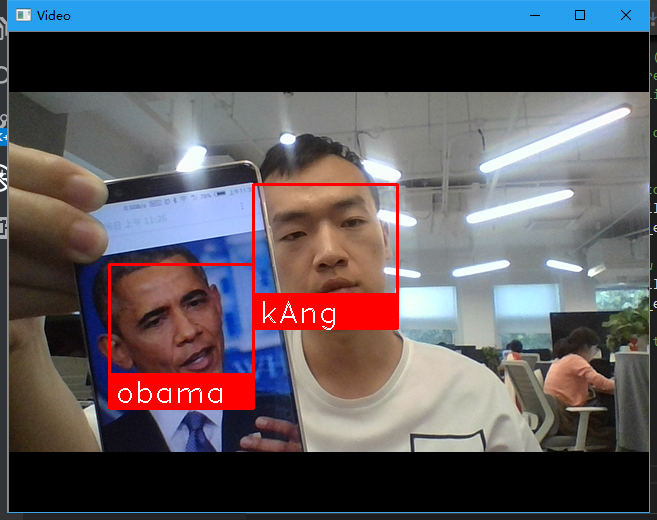
#!/usr/bin/env python3

# -*- coding: utf-8 -*-

import face_recognition

import cv2

import numpy as np

# This is a demo of running face recognition on live video from your webcam. It's a little more complicated than the

# other example, but it includes some basic performance tweaks to make things run a lot faster:

#   1. Process each video frame at 1/4 resolution (though still display it at full resolution)

#   2. Only detect faces in every other frame of video.

# PLEASE NOTE: This example requires OpenCV (the `cv2` library) to be installed only to read from your webcam.

# OpenCV is *not* required to use the face_recognition library. It's only required if you want to run this

# specific demo. If you have trouble installing it, try any of the other demos that don't require it instead.

# Get a reference to webcam #0 (the default one)

video_capture = cv2.VideoCapture(0)

# Load a sample picture and learn how to recognize it.

obama_image = face_recognition.load_image_file("img/kAng.jpg")

obama_face_encoding = face_recognition.face_encodings(obama_image)[0]

# Load a second sample picture and learn how to recognize it.

biden_image = face_recognition.load_image_file("img/test10.jpg")

biden_face_encoding = face_recognition.face_encodings(biden_image)[0]

# Create arrays of known face encodings and their names

known_face_encodings = [

    obama_face_encoding,

    biden_face_encoding

]

known_face_names = [

    "kAng",

    "obama"

]

# Initialize some variables

face_locations = []

face_encodings = []

face_names = []

process_this_frame = True

while True:

    # Grab a single frame of video

    ret, frame = video_capture.read()

    # Resize frame of video to 1/4 size for faster face recognition processing

    small_frame = cv2.resize(frame, (0, 0), fx=0.25, fy=0.25)

    # Convert the image from BGR color (which OpenCV uses) to RGB color (which face_recognition uses)

    rgb_small_frame = small_frame[:, :, ::-1]

    # Only process every other frame of video to save time

    if process_this_frame:

        # Find all the faces and face encodings in the current frame of video

        face_locations = face_recognition.face_locations(rgb_small_frame)

        face_encodings = face_recognition.face_encodings(rgb_small_frame, face_locations)

        face_names = []

        for face_encoding in face_encodings:

            # See if the face is a match for the known face(s)

            matches = face_recognition.compare_faces(known_face_encodings, face_encoding)

            name = "Unknown"

            # # If a match was found in known_face_encodings, just use the first one.

            # if True in matches:

            #     first_match_index = matches.index(True)

            #     name = known_face_names[first_match_index]

            # Or instead, use the known face with the smallest distance to the new face

            face_distances = face_recognition.face_distance(known_face_encodings, face_encoding)

            best_match_index = np.argmin(face_distances)

            if matches[best_match_index]:

                name = known_face_names[best_match_index]

            face_names.append(name)

    process_this_frame = not process_this_frame

    # Display the results

    for (top, right, bottom, left), name in zip(face_locations, face_names):

        # Scale back up face locations since the frame we detected in was scaled to 1/4 size

        top *= 4

        right *= 4

        bottom *= 4

        left *= 4

        # Draw a box around the face

        cv2.rectangle(frame, (left, top), (right, bottom), (0, 0, 255), 2)

        # Draw a label with a name below the face

        cv2.rectangle(frame, (left, bottom - 35), (right, bottom), (0, 0, 255), cv2.FILLED)

        font = cv2.FONT_HERSHEY_DUPLEX

        cv2.putText(frame, name, (left + 6, bottom - 6), font, 1.0, (255, 255, 255), 1)

    # Display the resulting image

    cv2.imshow('Video', frame)

    # Hit 'q' on the keyboard to quit!

    if cv2.waitKey(1) & 0xFF == ord('q'):

        break

# Release handle to the webcam

video_capture.release()

cv2.destroyAllWindows()
face_recognition实时人脸识别的更多相关文章
- 使用dlib中的深度残差网络(ResNet)实现实时人脸识别
opencv中提供的基于haar特征级联进行人脸检测的方法效果非常不好,本文使用dlib中提供的人脸检测方法(使用HOG特征或卷积神经网方法),并使用提供的深度残差网络(ResNet)实现实时人脸识别 ...
- Asp.net+WebSocket+Emgucv实时人脸识别
上个月在网上看到一个用web实现简单AR效果的文章,然后自己一路折腾,最后折腾出来一个 Asp.net+WebSocket+Emgucv实时人脸识别的东西,网上也有不少相关资料,有用winform的也 ...
- face_recognition开源人脸识别库:离线识别率高达99.38%
基于Python的开源人脸识别库:离线识别率高达99.38%——新开源的用了一下感受一下 原创 2017年07月28日 21:25:28 标签: 人脸识别 / 人脸自动定位 / 人脸识别开源库 / f ...
- Opencv摄像头实时人脸识别
Introduction 网上存在很多人脸识别的文章,这篇文章是我的一个作业,重在通过摄像头实时采集人脸信息,进行人脸检测和人脸识别,并将识别结果显示在左上角. 利用 OpenCV 实现一个实时的人脸 ...
- Ubuntu下使用face_recognition进行人脸识别
Face Recognition是一个基于Python的人脸识别库,在github上地址如下:https://github.com/ageitgey/face_recognition. 看着挺好玩,本 ...
- c# 利用AForge和百度AI开发实时人脸识别
baiduAIFaceIdentify项目是C#语言,集成百度AI的SDK利用AForge开发的实时人脸识别的小demo,里边包含了人脸检测识别,人脸注册,人脸登录等功能 人脸实时检测识别功能 思路是 ...
- AI人工智能之基于OpenCV+face_recognition实现人脸识别
因近期公司项目需求,需要从监控视频里识别出人脸信息.OpenCV非常庞大,其中官方提供的人脸模型分类器也可以满足基本的人脸识别,当然我们也可以训练自己的人脸模型数据,但是从精确度和专业程度上讲Open ...
- 在win10上安装face_recognition(人脸识别)
github上有个项目face_recognition,是用于人脸识别的 主要是window上安装这个项目会繁琐些,linux上据项目文档上介绍是妥妥的. 项目地址: https://github. ...
- Python 人工智能之人脸识别 face_recognition 模块安装
Python人工智能之人脸识别face_recognition安装 face_recognition 模块使用系统环境搭建 系统环境 Ubuntu / deepin操作系统 Python 3.6 py ...
随机推荐
- matplotlib常见操作
import osimport numpy as npfrom PIL import Imageimport matplotlib.pyplot as plt img = Image.open(os. ...
- 实用类-<装箱与拆箱>
装箱:把基本数据类型装换为对应的对象类 作用:1.在需要使用对象类型的时候,装换成对应的对象类型(集合里面) 2.转换完成以后,拥有相应的属性和方法,方便咱们的数据操作 拆箱 Integer intO ...
- 敏捷团队协作:Confluence简易教程
0.Confluence简介 Confluence是一个企业级的Wiki软件,可用于在企业.部门.团队内部进行信息共享和协同编辑. 1.基础概念 Confluence的使用并不复杂,只需掌握如下几 ...
- JS垂直落体回弹原理
/* *JS垂直落体回弹原理 */ <!DOCTYPE html PUBLIC "-//W3C//DTD XHTML 1.0 Transitional//EN" " ...
- django 模版内置的过滤器
一.add 将传进来的参数添加到原来的值上面.这个过滤器会尝试将“值”和“参数”转换成整形然后进行相加.如果转换成整形过程中失败了,那么将会将“值”和“参数”进行拼接.如果是字符串,那么会拼接成字符串 ...
- NXP TJA1040, TJA1042, TJA1050 TJA1051, TJA1057, TJA1044, TJA1055区别
历史关系 PCA82C250和PCA82C251是属于NXP第一代 CAN PHY(CAN物理层收发器): TJA1050, TJA1040和TJA1041是属于NXP第二代CAN PHY: TJA1 ...
- 完全取代VC上原有的view
如果需要在这个VC上放置一个subviewA,作用相当于取代self.view,那么最好不要使用 [self.view addSubView: subviewA]; 而要使用 self.view = ...
- KMP(模板)
kmp算法是解决单模匹配问题的算法,难点在于求next[]数组 求next[]数组:对于模板串的所有前缀子串的最长公共前后缀的长度,就是next[]数组的值 eg:主串为cbbbaababac 子串 ...
- C# 增加时间的三个方法
第一个是使用方法形式的实例方法: incrementer.CountedADozen += IncrementDozensCount; //方法引用形式 第二个是使用方法形式的静态方法: incre ...
- 虚拟机下安装 VMwareTools 实现宿主机和虚拟机的文件共享
$ mount /dev/sr0 /media/ #点击 虚拟机 安装 VMwareTools 挂载 $ cd /media/ $ cp VMwareTools-10.1.6-5214329.tar. ...