
ASP.NET MVC升级到ASP.NET Core MVC踩坑小结
写在前面
ASP.NET Core是微软新推出的支持跨平台、高性能、开源的开发框架,它的优势不必多说,因为已经说得太多了。当然,现在依然有着数量庞大的系统运行于.NET Framework上,由于有大量的Break Changes,很多项目项目团队也不敢贸然升级,其中的考量也不全部是技术原因,更多的可能还是业务推进因素。
小编自年前开始考虑升级一套电商系统,原先是基于.NET Framework 4.5的,打算直接升级到.NET Core 3.1,由于系统规模比较庞大,所以一旦开工就是一个漫长的工程,我的博客也在很长时间没有再更新,有点对不起读者了。
年前第一次重构时,由于低估这套系统的复杂性再加上有些冒进,步子迈得有点大,出现了很多问题,不得不重新开始。这一次重构先易后难,步步为营,难题统一在后面解决,到现在已经完成了全部工程的百分之八十,后面的也没有太困难了,所以特地抽出时间小结一下。
详细内容
类库部分
类库部分的迁移应该是最简单的了,我是创建了一个新的类库,然后把代码copy过去,很少有地方需要修改,当然了有一些引用的第三方类库需要特殊对待,如Automapper、Autofac、FluentValidation等,这些也很简单,看看文档就行。
.NET Framework中,会有一些常用的封装库,如Session、Cookie和HttpRuntime等,这些变化比较大,所以自己在Startup中启用。
- Session:
- Startup.Configure:
1: app.UseSession(new SessionOptions
2: {3: Cookie = new CookieBuilder
4: {5:
6: },
7: IdleTimeout = TimeSpan.FromSeconds(1),
8: IOTimeout = Timeout.InfiniteTimeSpan
9: });
- Startup.ConfigureServices:
1: services.AddSession();
- Startup.ConfigureServices:
- 使用Session,可以通过HttpContext调用:
1: HttpContext.Session.SetString("sessionId", sessionValue);2: HttpContext.Session.GetString("sessionId");3: context.Session.Remove("sessionId"); - Cookie:
1: Response.Cookies.Append("User", "1", new CookieOptions()2: {3: Expires = DateTime.Now.AddMinutes(10)
4: });
5: Response.Cookies.Delete("User");
.csharpcode, .csharpcode pre
{
font-size: small;
color: black;
font-family: consolas, "Courier New", courier, monospace;
background-color: #ffffff;
/*white-space: pre;*/
}
.csharpcode pre { margin: 0em; }
.csharpcode .rem { color: #008000; }
.csharpcode .kwrd { color: #0000ff; }
.csharpcode .str { color: #006080; }
.csharpcode .op { color: #0000c0; }
.csharpcode .preproc { color: #cc6633; }
.csharpcode .asp { background-color: #ffff00; }
.csharpcode .html { color: #800000; }
.csharpcode .attr { color: #ff0000; }
.csharpcode .alt
{
background-color: #f4f4f4;
width: 100%;
margin: 0em;
}
.csharpcode .lnum { color: #606060; }
-->
HttpRuntime的使用,可以通过IMemoryCache替换,具体的使用方法可参考MSDN
- System.Drawing已经不存在了,我使用的是ZKWeb.System.Drawing,基本上类名、枚举名没变化,只是命名空间Drawing变成了DrawingCore
- 依赖注入部分全部迁移到Startup.ConfigureServices
Controller部分
顺便说一下,静态资源部分,如JS、CSS、Image、Font这些复制到wwwroot目录上,另外app.UseStaticFiles();会在模板中出现。
1、获取Controller及Action信息,可以通过RouteData.Values["controller"].ToString(),RouteData.Values["action"].ToString()
2、很多的信息都放到了Request.Header[“”]中,如果之前可以用过Request直接点出来的,但是现在点不出来了,可以尝试使用这种方式,说不准会有意外惊喜。另外有一个相关的常量在这里出示一下,使用方式即Request.Header[HeaderNames.Authority],当然Request.HttpMethod 改为了 Request.Method。
1: public static class HeaderNames
2: {
3: public static readonly string Accept;
4: public static readonly string AcceptCharset;
5: public static readonly string AcceptEncoding;
6: public static readonly string AcceptLanguage;
7: public static readonly string AcceptRanges;
8: public static readonly string AccessControlAllowCredentials;
9: public static readonly string AccessControlAllowHeaders;
10: public static readonly string AccessControlAllowMethods;
11: public static readonly string AccessControlAllowOrigin;
12: public static readonly string AccessControlExposeHeaders;
13: public static readonly string AccessControlMaxAge;
14: public static readonly string AccessControlRequestHeaders;
15: public static readonly string AccessControlRequestMethod;
16: public static readonly string Age;
17: public static readonly string Allow;
18: public static readonly string Authority;
19: public static readonly string Authorization;
20: public static readonly string CacheControl;
21: public static readonly string Connection;
22: public static readonly string ContentDisposition;
23: public static readonly string ContentEncoding;
24: public static readonly string ContentLanguage;
25: public static readonly string ContentLength;
26: public static readonly string ContentLocation;
27: public static readonly string ContentMD5;
28: public static readonly string ContentRange;
29: public static readonly string ContentSecurityPolicy;
30: public static readonly string ContentSecurityPolicyReportOnly;
31: public static readonly string ContentType;
32: public static readonly string Cookie;
33: public static readonly string CorrelationContext;
34: public static readonly string Date;
35: public static readonly string DNT;
36: public static readonly string ETag;
37: public static readonly string Expect;
38: public static readonly string Expires;
39: public static readonly string From;
40: public static readonly string Host;
41: public static readonly string IfMatch;
42: public static readonly string IfModifiedSince;
43: public static readonly string IfNoneMatch;
44: public static readonly string IfRange;
45: public static readonly string IfUnmodifiedSince;
46: public static readonly string KeepAlive;
47: public static readonly string LastModified;
48: public static readonly string Location;
49: public static readonly string MaxForwards;
50: public static readonly string Method;
51: public static readonly string Origin;
52: public static readonly string Path;
53: public static readonly string Pragma;
54: public static readonly string ProxyAuthenticate;
55: public static readonly string ProxyAuthorization;
56: public static readonly string Range;
57: public static readonly string Referer;
58: public static readonly string RequestId;
59: public static readonly string RetryAfter;
60: public static readonly string Scheme;
61: public static readonly string SecWebSocketAccept;
62: public static readonly string SecWebSocketKey;
63: public static readonly string SecWebSocketProtocol;
64: public static readonly string SecWebSocketVersion;
65: public static readonly string Server;
66: public static readonly string SetCookie;
67: public static readonly string Status;
68: public static readonly string StrictTransportSecurity;
69: public static readonly string TE;
70: public static readonly string TraceParent;
71: public static readonly string TraceState;
72: public static readonly string Trailer;
73: public static readonly string TransferEncoding;
74: public static readonly string Translate;
75: public static readonly string Upgrade;
76: public static readonly string UpgradeInsecureRequests;
77: public static readonly string UserAgent;
78: public static readonly string Vary;
79: public static readonly string Via;
80: public static readonly string Warning;
81: public static readonly string WebSocketSubProtocols;
82: public static readonly string WWWAuthenticate;
83: public static readonly string XFrameOptions;
84: }
.csharpcode, .csharpcode pre
{
font-size: small;
color: black;
font-family: consolas, "Courier New", courier, monospace;
background-color: #ffffff;
/*white-space: pre;*/
}
.csharpcode pre { margin: 0em; }
.csharpcode .rem { color: #008000; }
.csharpcode .kwrd { color: #0000ff; }
.csharpcode .str { color: #006080; }
.csharpcode .op { color: #0000c0; }
.csharpcode .preproc { color: #cc6633; }
.csharpcode .asp { background-color: #ffff00; }
.csharpcode .html { color: #800000; }
.csharpcode .attr { color: #ff0000; }
.csharpcode .alt
{
background-color: #f4f4f4;
width: 100%;
margin: 0em;
}
.csharpcode .lnum { color: #606060; }
-->
3、Request.IsAjaxRequest
这个已经不存在了,可以自行实现。
1: public static bool IsAjaxRequest(this HttpRequest request)
2: {
3: if (request == null)
4: throw new ArgumentNullException("request");
5:
6: if (request.Headers != null)
7: return request.Headers["X-Requested-With"] == "XMLHttpRequest";
8: return false;
9: }
4、Area注册
之前的AreaRegistration已经不存在,如果需要设置Area,可以在每个Controller上设置[Area(“Admin”)],路由处的注册可以考虑如下方式
1: app.UseEndpoints(endpoints =>
2: {
3: endpoints.MapControllerRoute(
4: name: "default",
5: pattern: "{controller=Home}/{action=Index}/{id?}");
6:
7: endpoints.MapControllerRoute(
8: name: "areas",
9: pattern: "{area:exists}/{controller=Home}/{action=Index}/{id?}"
10: );
11: });
.csharpcode, .csharpcode pre
{
font-size: small;
color: black;
font-family: consolas, "Courier New", courier, monospace;
background-color: #ffffff;
/*white-space: pre;*/
}
.csharpcode pre { margin: 0em; }
.csharpcode .rem { color: #008000; }
.csharpcode .kwrd { color: #0000ff; }
.csharpcode .str { color: #006080; }
.csharpcode .op { color: #0000c0; }
.csharpcode .preproc { color: #cc6633; }
.csharpcode .asp { background-color: #ffff00; }
.csharpcode .html { color: #800000; }
.csharpcode .attr { color: #ff0000; }
.csharpcode .alt
{
background-color: #f4f4f4;
width: 100%;
margin: 0em;
}
.csharpcode .lnum { color: #606060; }
-->
5、AbsoluteUri也已经不存在了,但是可以通过如下方式取代:
1: /// <summary>
2: /// Returns the combined components of the request URL in a fully un-escaped form (except for the QueryString)
3: /// suitable only for display. This format should not be used in HTTP headers or other HTTP operations.
4: /// </summary>
5: /// <param name="request">The request to assemble the uri pieces from.</param>
6: /// <returns>The combined components of the request URL in a fully un-escaped form (except for the QueryString)
7: /// suitable only for display.</returns>
8: public static string GetDisplayUrl(this HttpRequest request);
9:
10: /// <summary>Returns the relative URI.</summary>
11: /// <param name="request">The request to assemble the uri pieces from.</param>
12: /// <returns>The path and query off of <paramref name="request" />.</returns>
13: public static string GetEncodedPathAndQuery(this HttpRequest request);
14:
15: /// <summary>
16: /// Returns the combined components of the request URL in a fully escaped form suitable for use in HTTP headers
17: /// and other HTTP operations.
18: /// </summary>
19: /// <param name="request">The request to assemble the uri pieces from.</param>
20: /// <returns>The encoded string version of the URL from <paramref name="request" />.</returns>
21: public static string GetEncodedUrl(this HttpRequest request);
6、过滤器
之前继承ActionFilterAttribute,现在实现IActionFilter,注册方式为services.AddMvc(o=>o.Filters.Add(new XX())),当然之前的很多过滤器或者Controller基类方法已经不存在了,如Controller OnAuthentication。
IResultFilter中的OnResultExecuting(ResultExecutingContext filterContext)需要通过filterContext.Controller as Controller来获取默认的Controller。
最后有一个比较重要的类ActionDescriptor,ControllerDescriptor继承自ActionDescriptor,这里可以通过类型转换获取相关信息。
之前有很多的FilterAttribute也可以通过中间件来取代。
7、Action上被去掉的Attribute,如[ValidateInput(false)],[ChildActionOnly]
View部分
1、页面基类型及扩展
之前我们创建页面基类型,是通过继承System.Web.Mvc.WebViewPage<TModel>来实现,现在我们可以通过RazorPage<TModel>来取代。
扩展HtmlHelper也换成了IHtmlHelper接口。HtmlString也替换了MvcHtmlString,更上层也以接口方式来取代IHtmlContent。
1: public static IHtmlContent XXX(this IHtmlHelper _html, string xxxxx)
2: {
3: //your code
4: return new HtmlString(html.ToString());
5: }
2、Ajax.BeginForm换成了<form asp-controller="DistributorGrade" asp-action="Save" id="addform" data-ajax="true" data-ajax-method="post" data-ajax-begin="begin" data-ajax-success="success">。当前.NET Core 依然支持Html.BeginForm,不过我建议大家有时间的时候都替换一下,具体请参考下一条。
3、第2条出现的asp-action等是通过Razor Tag Helpers来实现的,很多的自定义需要加入到_ViewImports.cshtml,当然一些引用也可以统一放到这里,如@using Microsoft.AspNetCore.Routing,这样就可以在当前的Area中作为全局引用了。
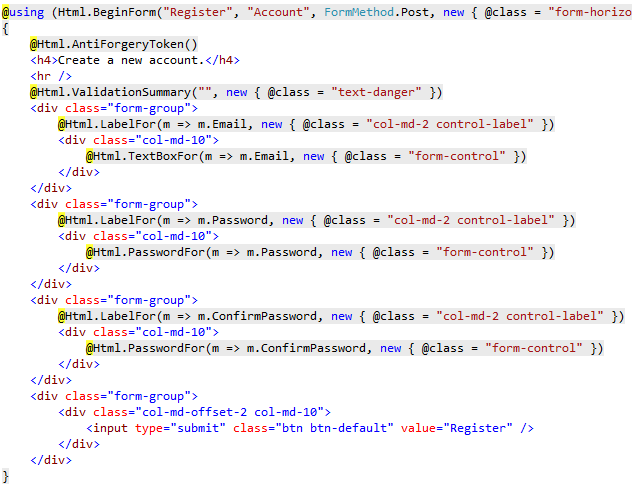
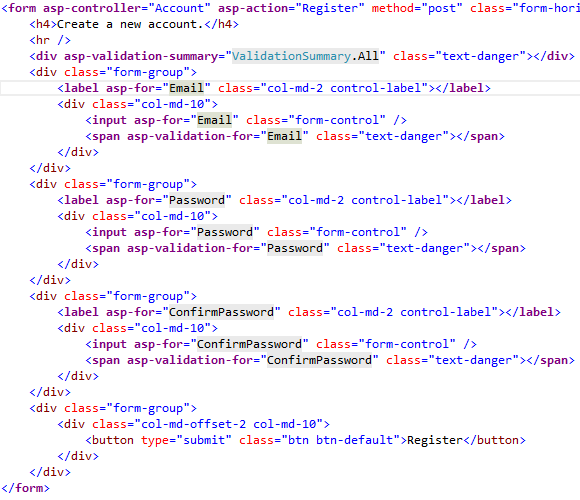
Razor Tag Help是一个十分重要的功能,它使得.NET Core MVC的开发更像是在写Html语言,更加的清晰,更加具有生产力。
如@Html.TextBoxFor()可以用通过<input asp-for=””/>替换,以下图片摘自MSDN:
Framework MVC的写法
Core MVC的写法
一些Tag Help集锦:
Built-in ASP.NET Core Tag Helpers
4、@Html.Action和@Html.RenderAction可以通过ViewComponents来取代
1: public class XXXXViewComponent : ViewComponent
2: {
3: public IViewComponentResult Invoke()
4: {
5: return this.View("");
6: }
7: }
调用方式是await Component.InvokeAsync(“XXXXViewComponent“),详情请点击链接
5、@MvcHtmlString.Create()可以使用new Microsoft.AspNetCore.Html.HtmlString()取代
6、IP地址可以通过HttpRequest.HttpContext.Connection.RemoteIpAddress获取
7、之前通过@helper 定义页面的函数,这个已经被去掉了,现在可以通过@functions来取代
小结
限于篇幅,先总结这么多,系统尚未完全结束,不过升级到.NET Core是一个非常棒的过程,可以更好地体验.NET Core的强大。如果小伙伴在升级过程中也遇到了很多问题,希望这篇文章可以给大家一些帮助,另外我没有写到的,大家可以留个言,我统一收集一下。
ASP.NET MVC升级到ASP.NET Core MVC踩坑小结的更多相关文章
- C# -- HttpWebRequest 和 HttpWebResponse 的使用 C#编写扫雷游戏 使用IIS调试ASP.NET网站程序 WCF入门教程 ASP.Net Core开发(踩坑)指南 ASP.Net Core Razor+AdminLTE 小试牛刀 webservice创建、部署和调用 .net接收post请求并把数据转为字典格式
C# -- HttpWebRequest 和 HttpWebResponse 的使用 C# -- HttpWebRequest 和 HttpWebResponse 的使用 结合使用HttpWebReq ...
- ASP.NET MVC3升级到ASP.NET MVC4 的方法
ASP.NET MVC3升级 ASP.NET MVC4 的方法: 1.先去掉引用的System.Web.Mvc.dll(MVC3版本),重新引入System.Web.Mvc.dll(MVC4版本) 2 ...
- ASP.Net Core开发(踩坑)指南
ASP.NET与ASP.NET Core很类似,但它们之间存在一些细微区别以及ASP.NET Core中新增特性的使用方法,在此之前也写过一篇简单的对比文章ASP.NET MVC应用迁移到ASP.NE ...
- asp.net asp.net application 升级到 asp.net web 解决找不到控件 批量生成.designer文件
颇费周折后,其实很简单,只需要生成designer文件后,重新保存所有页面即可.就是懒得写.懒真的是一种病,手上不能懒,脑子里更不能懒,否则就是给自己挖坑,仔细认真,注意细节!!!! PS:注意修改p ...
- .NET Core + Abp踩坑和填坑记录(1)
1. Net Core 的DI和Abp的DI并存 Startup中 ConfigureServices返回值改为IServiceProvider 在ConfigureServices最后调用retur ...
- .NET CORE迁移踩坑
https://www.cnblogs.com/leolaw/p/10740678.html
- C# .net 提升 asp.net mvc, asp.net core mvc 并发量
1.提升System.Net.ServicePointManager.DefaultConnectionLimit 2.提升最小工作线程数 ------ DefaultConnectionLimit在 ...
- 从零开始实现ASP.NET Core MVC的插件式开发(五) - 插件的删除和升级
标题:从零开始实现ASP.NET Core MVC的插件式开发(五) - 使用AssemblyLoadContext实现插件的升级和删除 作者:Lamond Lu 地址:https://www.cnb ...
- 从零开始实现ASP.NET Core MVC的插件式开发(九) - 升级.NET 5及启用预编译视图
标题:从零开始实现ASP.NET Core MVC的插件式开发(九) - 如何启用预编译视图 作者:Lamond Lu 地址:https://www.cnblogs.com/lwqlun/p/1399 ...
随机推荐
- iOS多线程开发之NSOperation
一.什么是NSOperation? NSOperation是苹果提供的一套多线程解决方案.实际上NSOperation是基于GCD更高一层的封装,但是比GCD更加的面向对象.代码可读性更高.可控性更强 ...
- Hexo和github搭建个人博客 - 朱晨
GitHub账号 mac/pc 环境 12 node.jsgit 创建GitHub仓库 登陆GitHub,创建一个新的Respository Repository name叫做{username}.g ...
- 餐厅随评系列之四:Umu日本料理(米其林二星)
文章目录 在过去的几个月,工作和生活都极其忙碌,因此博客短暂停更了一阵子.慢慢积累下了很多素材,从近期开始恢复博客更新,不过很多内容估计得靠回忆了. 索性采取"倒叙"的方法,先从最 ...
- XX系统测试总结报告
XX系统测试总结报告 1 引言 1.1 编写目的 编写该测试总结报告主要有以下几个目的 1. 通过对测试结果的分析,得到对软件质量的评价 2. 分析测试的过程,产品,资源,信息, ...
- 5G-NR物理信道与调制-下行链路v1.1.0
上接<5G-NR物理信道与调制v1.1.0>下行链路 References Definitions, symbols and abbreviations 帧结构与物理资源 通用函数 上行链 ...
- js作用域其二:预解析
文章目錄 解析机制 JavaScript是一门解释型的语言 , 想要运行js代码需要两个阶段 编译阶段: 编译阶段就是我们常说的JavaScript预解析(预处理)阶段,在这个阶段JavaScript ...
- 安卓注解处理器-processor
最近在学习安卓开源框架发现,很多的开源框架都使用到了注解处理器,例如EventBus3.0.本文通过一个简单的Demo来介绍如何使用注解处理器.Demo链接为https://github.com/cu ...
- Java入门教程八(面向对象)
对象概念 一切皆是对象.把现实世界中的对象抽象地体现在编程世界中,一个对象代表了某个具体的操作.一个个对象最终组成了完整的程序设计,这些对象可以是独立存在的,也可以是从别的对象继承过来的.对象之间通过 ...
- webpack中打包拷贝静态文件CopyWebpackPlugin插件
copyWebpackPlugin: 作用:用于webpack打包时拷贝文件的插件包 安装:npm install copyWebpackPlugin@版本号 使用:// copy custom st ...
- Keras在MNIST实现LeNet-5模型训练时的错误?
当使用Keras API 训练模型时,训练时报错? UnknownError (see above for traceback): Failed to get convolution algorith ...