
Android手机令牌教程
Android手机令牌教程
"沉下心,你不再是小孩子了.多看书,学做人"-JeffLi告诉自己
Written In The Font
花了一个天一夜,搞了这个小东西-安卓手机令牌.事实上,我这边分享,看网上东西也没多少.这就分享了.由于这个会给公司用.有些东西就不方便透露了.希望大家体谅.还有假设须要找我沟通,加群吧!在页面中会有三处出现.
Android手机令牌
- 界面
- java 与 C#服务端交互
- 倒计时和顺计时技术
- 口令生成
Content
android 也不难学,承认花了时间1/2 花在界面上.界面须要经验的积累.和大哥有说有笑搞着界面,我们浩二有木有.要吐槽的能够吐槽,要啥的说啥.
界面
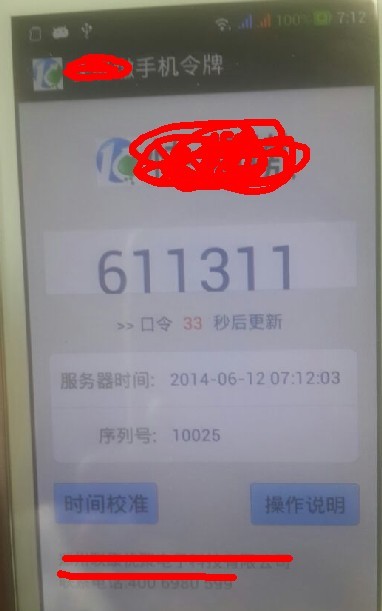
代码:

<RelativeLayout xmlns:android="http://schemas.android.com/apk/res/android"

    xmlns:tools="http://schemas.android.com/tools"

    android:layout_width="match_parent"

    android:layout_height="match_parent"

    android:background="@drawable/my_bg"

    android:gravity="center_horizontal"

    android:paddingBottom="@dimen/activity_vertical_margin"

    android:paddingLeft="@dimen/activity_horizontal_margin"

    android:paddingRight="@dimen/activity_horizontal_margin"

    android:paddingTop="@dimen/activity_vertical_margin"

    tools:context=".MainActivity" >

    <LinearLayout

        android:id="@+id/activity_contact_li_title"

        android:layout_width="fill_parent"

        android:layout_height="wrap_content"

        android:focusable="true"

        android:layout_marginTop="10dp"

        android:gravity="center">

        <ImageView

            android:id="@+id/imageView1"

            android:layout_width="wrap_content"

            android:layout_height="wrap_content"

            android:src="@drawable/ic_launcher" />

        <TextView

            android:id="@+id/textView3"

            android:layout_width="wrap_content"

            android:layout_height="wrap_content"

            android:text="***"

            android:textAppearance="?android:attr/textAppearanceMedium"

            android:textSize="40sp" />

    </LinearLayout>

    <TextView

        android:id="@+id/textView5"

        android:layout_width="wrap_content"

        android:layout_height="wrap_content"

        android:layout_alignParentBottom="true"

        android:layout_marginBottom="14dp"

        android:text="联系电话:" />

    <TextView

        android:id="@+id/textView1"

        android:layout_width="wrap_content"

        android:layout_height="wrap_content"

        android:layout_above="@+id/textView5"

        android:layout_alignLeft="@+id/textView5"

        android:text="***有限公司 " />

    <RelativeLayout

        android:id="@+id/activity_contact_li_editphone"

        android:layout_width="fill_parent"

        android:layout_height="wrap_content"

        android:layout_above="@+id/btnOperatorRemark"

        android:layout_alignLeft="@+id/btnTime"

        android:layout_marginBottom="19dp"

        android:background="@drawable/table_below_bg"

        android:focusable="true"

        android:gravity="center_vertical" >

        <LinearLayout

            android:id="@+id/LinearLayout01"

            android:layout_width="fill_parent"

            android:layout_height="wrap_content"

            android:layout_alignParentLeft="true"

            android:layout_alignParentTop="true"

            android:background="@drawable/table_below_bg"

            android:focusable="true"

            android:gravity="center_vertical" >

            <TextView

                android:layout_width="wrap_content"

                android:layout_height="wrap_content"

                android:layout_centerVertical="true"

                android:layout_marginLeft="10.0dip"

                android:duplicateParentState="true"

                android:text="  序列号:"

                android:textColor="@color/listitem_gray"

                android:textSize="15sp"

                android:textStyle="bold" />

            <TextView

                android:id="@+id/textView4"

                android:layout_width="wrap_content"

                android:layout_height="wrap_content"

                android:layout_marginLeft="14dip"

                android:layout_marginRight="10.0dip"

                android:layout_weight="1"

                android:duplicateParentState="true"

                android:textColor="@color/author_text"

                android:textSize="14sp" />

        </LinearLayout>

    </RelativeLayout>

    <LinearLayout

        android:id="@+id/activity_contact_li_mobilephone"

        android:layout_width="fill_parent"

        android:layout_height="wrap_content"

        android:layout_above="@+id/activity_contact_li_editphone"

        android:layout_alignLeft="@+id/activity_contact_li_editphone"

        android:background="@drawable/table_above_bg"

        android:focusable="true"

        android:gravity="center_vertical" >

        <TextView

            android:layout_width="wrap_content"

            android:layout_height="wrap_content"

            android:layout_centerVertical="true"

            android:layout_marginLeft="10.0dip"

            android:duplicateParentState="true"

            android:text="server时间:"

            android:textColor="@color/listitem_gray"

            android:textSize="15sp"

            android:textStyle="bold" />

        <TextView

            android:id="@+id/textView2"

            android:layout_width="wrap_content"

            android:layout_height="wrap_content"

            android:layout_marginLeft="14dip"

            android:layout_marginRight="10.0dip"

            android:layout_weight="1"

            android:duplicateParentState="true"

            android:text=""

            android:textColor="@color/author_text"

            android:textSize="14sp" />

    </LinearLayout>

    <Button

        android:id="@+id/btnOperatorRemark"

        android:layout_width="100dp"

        android:layout_height="40dp"

        android:layout_alignRight="@+id/activity_contact_li_editphone"

        android:layout_alignTop="@+id/btnTime"

        android:background="@drawable/login_btn_selector"

        android:text="操作说明" />

    <Button

        android:id="@+id/btnTime"

        android:layout_width="100dp"

        android:layout_height="40dp"

        android:layout_above="@+id/textView1"

        android:layout_alignLeft="@+id/textView1"

        android:layout_marginBottom="24dp"

        android:background="@drawable/login_btn_selector"

        android:text="时间校准"

        android:textSize="18sp" />

    <LinearLayout

        android:id="@+id/activity_contact_li_mobilephone"

        android:layout_width="fill_parent"

        android:layout_height="wrap_content"

        android:layout_marginTop="30dp"

        android:layout_below="@+id/activity_contact_li_title"

        android:background="@drawable/table_mid_bg"

        android:focusable="true"

        android:gravity="center_vertical" >

        <TextView

            android:id="@+id/number"

            android:layout_width="match_parent"

            android:layout_height="60dp"

            android:duplicateParentState="true"

            android:gravity="center"

            android:text="123456"

            android:textColor="@color/author_text"

            android:textScaleX="1.2"

            android:textSize="40sp" />

    </LinearLayout>

    <LinearLayout

        android:id="@+id/activity_contact_li_times"

        android:layout_width="fill_parent"

        android:layout_height="wrap_content"

        android:layout_alignLeft="@+id/activity_contact_li_mobilephone"

        android:layout_below="@+id/activity_contact_li_mobilephone"

        android:layout_marginTop="17dp"

        android:focusable="true"

        android:gravity="center" >

        <TextView

            android:id="@+id/textView6"

            android:layout_width="wrap_content"

            android:layout_height="wrap_content"

            android:layout_marginRight="5dp"

            android:text=">> 口令 "

            android:textColor="@color/listitem_blue" />

        <TextView

            android:id="@+id/textView7"

            android:layout_width="wrap_content"

            android:layout_height="wrap_content"

            android:layout_toLeftOf="@+id/textView8"

            android:text="22"

            android:textColor="@color/red" />

        <TextView

            android:id="@+id/textView8"

            android:layout_width="wrap_content"

            android:layout_height="wrap_content"

            android:layout_marginLeft="5dp"

            android:text=" 秒后更新"

            android:textColor="@color/listitem_blue" />

    </LinearLayout>

</RelativeLayout>
java 与 C#服务端交互
这样的东西 一抓一大把,我这边简单就用了下ksoap2-android-assembly-2.4-jar-with-dependencies.jar,发现交互非常easy,url call下然后 调用方法返回值.所以这边代码:
    private String getDateTime() throws Exception {

        // UIHelper.ToastMessage(MainActivity.this, "进去");

        SoapObject rpc = new SoapObject(NAMESPACE, GET_TIME_METHOD_NAME);

        AndroidHttpTransport ht = new AndroidHttpTransport(URL);

        ht.debug = true;

        SoapSerializationEnvelope envelope = new SoapSerializationEnvelope(

                SoapEnvelope.VER11);

        envelope.bodyOut = rpc;

        envelope.dotNet = true;

        envelope.setOutputSoapObject(rpc);

        try {

            ht.call(GET_TIME_SOAP_ACTION, envelope);

        } catch (Exception e) {

            // 校准时间网络错误

            UIHelper.ToastMessage(MainActivity.this, "未连接网络或网络异常");

        }

        SoapObject result = (SoapObject) envelope.bodyIn;

        SoapPrimitive detail = (SoapPrimitive) result

                .getProperty("GetDateTimeResult");

        System.out.println("result" + result);

        System.out.println("detail" + detail);

        // UIHelper.ToastMessage(MainActivity.this, detail.toString());

        return detail.toString();

    }
倒计时和顺计时技术
android端倒计时:
// 倒计时

    Handler handler = new Handler() {

        public void handleMessage(Message msg) { // handle message

            switch (msg.what) {

            case 1:

                recLen--;

                if (recLen < 10) {

                    txtTextTimeBack.setText("0" + recLen);

                }else{

                    txtTextTimeBack.setText("" + recLen);

                }if (recLen > 0) {

                    Message message = handler.obtainMessage(1);

                    handler.sendMessageDelayed(message, 1000); // send message

                } else {

                    // 又一次获取序列号

                    Message message = handler.obtainMessage(1);

                    handler.sendMessageDelayed(message, 1000); // send message

                    String dateTime;

                    try {

                        dateTime = DateFormate.getDateTime();

                        txtDateTime.setText(dateTime);

                    } catch (Exception e) {

                        UIHelper.ToastMessage(MainActivity.this, "未知错误");

                        e.printStackTrace();

                    }

                    turnTimeBack();

                    try {

                        showTheNumber();

                    } catch (Exception e) {

                        // TODO Auto-generated catch block

                        e.printStackTrace();

                    }

                }

            }

            super.handleMessage(msg);

        }

    };
顺时採用上面倒计时的方法里面,加起来合为60
String ss = DateFormate.getStringFromDate(DateFormate.getDateFormString(txtDateTime.getText().toString()));

                if (recLen > 50)

                {

                    ss += "0" + (60-recLen);

                }

                else {

                    ss += "" + (60-recLen);

                }

                txtDateTime.setText(ss);
口令生成
这是核心关键.所以我这边生成的算法就不方便透露了.像沟通的话,加我的群讨论.口令能够依据 序列号 时间 特定字符串生成.这边我提供下 有关算法,像MD5...等都是经常使用的
String key = String.valueOf((dateTimeLong ^ serialNumberLong));

        String result = null;

        MessageDigest mad5 =null;

        try

        {

            mad5 = MessageDigest.getInstance("MD5");

        }

        catch (Exception e)

        {

            e.printStackTrace();

        }
Editor's Note
加油 英语六级,仅仅有自己强大了,人家才会找你,更好的平台给你.
Android手机令牌教程的更多相关文章
- Android扫盲教程大全经典教程全分享
Android扫盲教程大全经典教程全分享,相当于android的简单用户手册下载路径 Android扫盲教程大全经典教程全分享.rar
- Android 游戏教程让人物动起来
在这里给大家分享Android游戏教程怎样让人物动起来,话不多说了,直接进入正题. 一. 准备工作 首先要准备好要使用的人物动作图和地形图.把它分割成16个不同的动作,循环播放同一行的4个不同 ...
- Android studio教程
Android studio教程: http://jingyan.baidu.com/season/44062
- Android开发教程大全介绍
Android是由谷歌在2007年推出的一个开放系统平台,主要针对移动设备市场,目前版本为Android 4.0.Android基于Linux,开发者可以使用Java或C/C++开发Android应用 ...
- ArcGIS Runtime for Android开发教程V2.0(4)基础篇---MapView
原文地址: ArcGIS Runtime for Android开发教程V2.0(4)基础篇---MapView - ArcGIS_Mobile的专栏 - 博客频道 - CSDN.NET http:/ ...
- ArcGIS Runtime for Android开发教程V2.0(3)基础篇---Hello World Map
原文地址: ArcGIS Runtime for Android开发教程V2.0(3)基础篇---Hello World Map - ArcGIS_Mobile的专栏 - 博客频道 - CSDN.NE ...
- ArcGIS Runtime for Android开发教程V2.0(2)开发环境配置
原文地址: ArcGIS Runtime for Android开发教程V2.0(2)开发环境配置 - ArcGIS_Mobile的专栏 - 博客频道 - CSDN.NET http://blog.c ...
- ArcGIS Runtime for Android开发教程V2.0(1)基本概念
原文地址: ArcGIS Runtime for Android开发教程V2.0(1)基本概念 - ArcGIS_Mobile的专栏 - 博客频道 - CSDN.NET http://blog.csd ...
- Android精通教程-第一节Android入门简介
前言 大家好,给大家带来Android精通教程-第一节Android入门简介的概述,希望你们喜欢 每日一句 If life were predictable it would cease to be ...
随机推荐
- iOS面试题整理(一)
代码规范 这是一个重点考察项,曾经在微博上发过一个风格纠错题: 也曾在面试时让人当场改过,槽点不少,能够有 10 处以上修改的就基本达到标准了(处女座的人在这方面表现都很优秀 一个区分度很大的面试题 ...
- sqlserver2008附加数据库——错误3415
权限问题, 在其文件,右击属性>安全>编辑>添加>加一个everyone单击确定>其完全控制, 这样给每个用户权限 ---来自凌波小屋----冯和超笔记-----
- restrict和volatile的作用
每当看到这两个关键字,我都无比的头痛啊,当时看到理解了一下就明白了,但是在此遇到就忘记是怎么用的了,今天就索性写一写吧,好记性不如烂笔头呗,烂笔头不如存在网上. restrict是c99引入的,关键字 ...
- Redis学习 - 入门
业精于勤,荒于嬉:行成于思,毁于随 -- 韩愈·<进学解> 因为工作中需要用到Redis,所以最近抽点时间看了一下,现在将学习的内容整理一下. 一.简介 1.Redis是什么? R ...
- 《JavaScript dom 编程艺术》 placeholder占位符IE8兼容办法。
在<JavaScript dom 编程艺术>第11章学来的. 相对于用JavaScript替换文本框的提示语句 <!DOCTYPE html> <html lang=&q ...
- php常用的排序算法与二分法查找
一 : 归并排序 将两个的有序数列合并成一个有序数列,我们称之为"归并".归并排序(Merge Sort)就是利用归并思想对数列进行排序.根据具体的实现,归并排序包括"从 ...
- 【行为型】Strategy模式
策略模式意图将解决问题的算法分别封装成一个个对象的形式,并使这些算法对象相互间可被替换.模式比较简单,对于策略对象结构的设计,可抽象一个抽象基类,并定义好相关算法(纯)虚接口,并由各种具体的实现算法子 ...
- Python的多线程实现
概述 Python虚拟机使用GIL(Global Interpreter Lock,全局解释器锁)来实现互斥线程对共享资源的访问,暂时无法利用多处理器的优势. Python中,thread和threa ...
- python ATM购物程序
需求: 模拟实现一个ATM + 购物商城程序 额度 15000或自定义 实现购物商城,买东西加入 购物车,调用信用卡接口结账 可以提现,手续费5% 每月22号出账单,每月10号为还款日,过期未还,按欠 ...
- URL加载系统----iOS工程师必须熟练掌握
URL加载系统----iOS工程师必须熟练掌握 iOS根本离不开网络——不论是从服务端读写数据.向系统分发计算任务,还是从云端加载图片.音频.视频等. 当应用程序面临处理问题的抉择时,通常 ...