
python Hbase Thrift pycharm 及引入包
cp -r hbase/ /usr/lib/python2.7/site-packages/

官方示例子
http://code.google.com/p/hbase-thrift/source/browse/trunk/python/test/tables.py
http://yannramin.com/2008/07/19/using-facebook-thrift-with-python-and-hbase/
http://wiki.apache.org/hadoop/Hbase/ThriftApi

将生成的hbase目录copy到python的包下

cp -r hbase /usr/lib/python2./site-packages/

。启动hbase和thrift服务

./bin/start-hbase.sh

./bin/hbase-daemon.sh start thrift
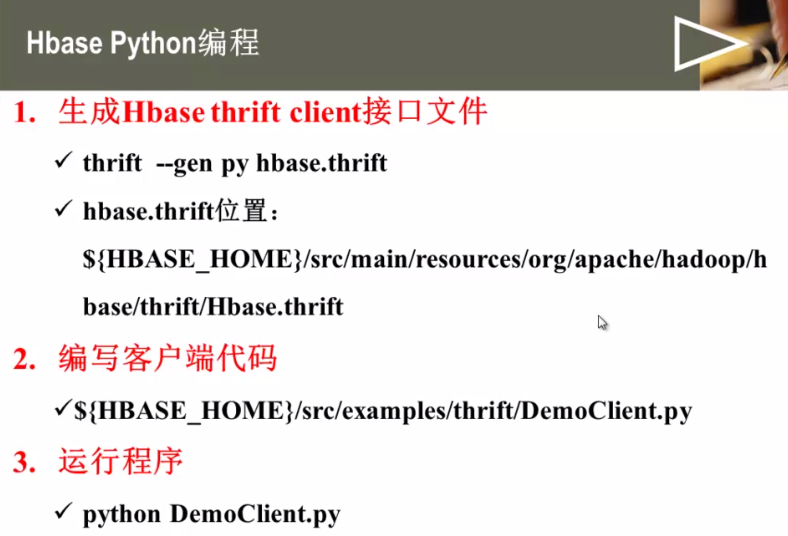
好像需要源码,我反正没找到src目录,忘记了 。。。。。。 忘记当初自己怎么装的了。
# --*-- coding:utf-8 --*--

import sys

import time

# 所有thirft编程都需要的

from thrift import Thrift

from thrift.transport import TSocket, TTransport

from thrift.protocol import TBinaryProtocol

# Hbase的 客户端代码

from hbase import ttypes

from hbase.Hbase import Client, ColumnDescriptor, Mutation

# make socket 这里配置的是hbase zookeeper的地址,因为master只负责负载均衡,读写由zookeeper协调

transport = TSocket.TSocket('localhost', 9090)

# buffering is critical . raw sockets are very slow

transport = TTransport.TBufferedTransport(transport)

# wrap in a protocol

protocol = TBinaryProtocol.TBinaryProtocol(transport)

# create a client to use the protocol encoder

client = Client(protocol)

# connect

transport.open()

t = 'tab2'

# 扫描所有表获取所有表名称

print 'scanning tables ......'

for table in client.getTableNames():

    print 'found:%s' % table

    if client.isTableEnabled(table):

        print ' disabling table: %s' % t

        # 置为无效

        client.disableTable(table)

        print 'deleting table: %s' % t

        # 删除表

        client.deleteTable(table)

# 创建表

columns = []

col = ColumnDescriptor()

col.name = 'entry:'

col.maxVersions = 10

columns.append(col)

col = ColumnDescriptor()

col.name = 'unused:'

columns.append(col)

try:

    print 'creating table : % s' % t

    client.createTable(t, columns)

except Exception, ae:

    print 'Warn:' + ae.message

# 插入数据

invalid = 'foo-\xfc\xa1\xa1\xa1\xa1\xa1'

valid = 'foo-\xE7\x94\x9F\xE3\x83\x93\xE3\x83\xBC\xE3\x83\xAB'

# non-utf8 is fine for data

mutations = [Mutation(column='entry:foo', value=invalid)]

print str(mutations)

client.mutateRow(t, 'foo', mutations)  # foo is row key

# try empty strings

# cell value empty

mutations = [Mutation(column='entry:foo', value='')]

# rowkey empty

client.mutateRow(t, '', mutations)

#this row name is valid utf8

mutations = [Mutation(column='entry:foo', value=valid)]

client.mutateRow(t, valid, mutations)

# run a scanner on the rows we just created

# 全表扫描

print 'starting scanner...'

scanner = client.scannerOpen(t, '', ['entry:'])

r = client.scannerGet(scanner)

while r:

    #printRow(r[0])

    r = client.scannerGet(scanner)

print 'scanner finished '

# 范围扫描

columnNames = []

for (col, desc) in client.getColumnDescriptors(t).items():

    print 'column with name:', desc.name

    print desc

    columnNames.append(desc.name + ':')

print 'stating scanner...'

scanner = client.scannerOpenWithStop(t, '', '', columnNames)

r = client.scannerGet(scanner)

while r:

    # printRow(r[0])

    r = client.scannerGet(scanner)

client.scannerClose(scanner)

print 'scanner finished'

# 关闭socket

transport.close()
现在我们就可以用python来和hbase通信了

#-*-coding:utf- -*-

#!/usr/bin/python

from thrift import Thrift

from thrift.transport import TSocket

from thrift.transport import TTransport

from thrift.protocol import TBinaryProtocol

from hbase import Hbase

from hbase.ttypes import ColumnDescriptor,Mutation,BatchMutation

class HbaseWriter:

        """

                IP地址

                端口

                表名

        """

        def __init__(self,address,port,table='user'):

                self.tableName = table

                #建立与hbase的连接

                self.transport=TTransport.TBufferedTransport(TSocket.TSocket(address,port))

                self.protocol = TBinaryProtocol.TBinaryProtocol(self.transport)

                self.client=Hbase.Client(self.protocol)

                self.transport.open()

                tables = self.client.getTableNames()

                if self.tableName not in tables:

                        print "not in tables"

                        self.__createTable()

                self.write("hell,babay!!!")

                self.read()

        #关闭

        def __del__(self):

                self.transport.close()

        #建表

        def __createTable(self):

                col1 = ColumnDescriptor(name="person:",maxVersions=)

                col2 = ColumnDescriptor(name="contents:",maxVersions=)

                col3 = ColumnDescriptor(name="info:",maxVersions=)

                self.client.createTable(self.tableName,[col1,col2,col3])

        def write(self,content):

                row="abc"

                mutations=[Mutation(column="person:",value=content),Mutation(column="info:",value=content)]

                self.client.mutateRow(self.tableName,row,mutations)

        def read(self):

                scannerId = self.client.scannerOpen(self.tableName,"",["contents:",])

                while True:

                        try:

                                result = self.client.scannerGet(scannerId)

                        except:

                                break

                        contents = result.columns["contents:"].value

                        #print contents

                self.client.scannerClose(scannerId)

if __name__ == "__main__":

        client = HbaseWriter("192.168.239.135","","person")

我们看下使用thrift生成的代码中都提供了那些方法

提供的方法有:

void enableTable(Bytes tableName)

enable表

void disableTable(Bytes tableName)

disable表

bool isTableEnabled(Bytes tableName)

查看表状态

void compact(Bytes tableNameOrRegionName)

void majorCompact(Bytes tableNameOrRegionName)

getTableNames()

getColumnDescriptors(Text tableName)

getTableRegions(Text tableName)

void createTable(Text tableName, columnFamilies)

void deleteTable(Text tableName)

get(Text tableName, Text row, Text column)

getVer(Text tableName, Text row, Text column, i32 numVersions)

getVerTs(Text tableName, Text row, Text column, i64 timestamp, i32 numVersions)

getRow(Text tableName, Text row)

getRowWithColumns(Text tableName, Text row,  columns)

getRowTs(Text tableName, Text row, i64 timestamp)

getRowWithColumnsTs(Text tableName, Text row,  columns, i64 timestamp)

getRows(Text tableName,  rows)

getRowsWithColumns(Text tableName,  rows,  columns)

getRowsTs(Text tableName,  rows, i64 timestamp)

getRowsWithColumnsTs(Text tableName,  rows,  columns, i64 timestamp)

void mutateRow(Text tableName, Text row,  mutations)

void mutateRowTs(Text tableName, Text row,  mutations, i64 timestamp)

void mutateRows(Text tableName,  rowBatches)

void mutateRowsTs(Text tableName,  rowBatches, i64 timestamp)

i64 atomicIncrement(Text tableName, Text row, Text column, i64 value)

void deleteAll(Text tableName, Text row, Text column)

void deleteAllTs(Text tableName, Text row, Text column, i64 timestamp)

void deleteAllRow(Text tableName, Text row)

void deleteAllRowTs(Text tableName, Text row, i64 timestamp)

ScannerID scannerOpenWithScan(Text tableName, TScan scan)

ScannerID scannerOpen(Text tableName, Text startRow,  columns)

ScannerID scannerOpenWithStop(Text tableName, Text startRow, Text stopRow,  columns)

ScannerID scannerOpenWithPrefix(Text tableName, Text startAndPrefix,  columns)

ScannerID scannerOpenTs(Text tableName, Text startRow,  columns, i64 timestamp)

ScannerID scannerOpenWithStopTs(Text tableName, Text startRow, Text stopRow,  columns, i64 timestamp)

scannerGet(ScannerID id)

scannerGetList(ScannerID id, i32 nbRows)

void scannerClose(ScannerID id)
http://blog.csdn.net/poechant/article/details/6618264
http://mmicky.blog.163.com/blog/static/150290154201311801519681/ 按照这个配置python hbase开发环境
编程前切换到/usr/program/python/hbase 然后运行python
>>>from thrift.transport import TSocket
>>>from thrift.protocol import TBinaryProtocol
>>>from hbase import Hbase
都不报错,但是到pycharm报错,原因时python默认搜索当前目录。
到pycharm 需要把 /usr/program/python/hbase 添加到pycharm的path
操作步骤:File>>setting>>project interpreter>>python interpreter>>>paths>>>+ 把/usr/program/python/hbase 文件夹添加进去就好了。
__author__ = 'root'

from thrift.transport import TSocket

from thrift.protocol import TBinaryProtocol

from hbase import Hbase

transport = TSocket.TSocket("localhost", 9090)

protocol = TBinaryProtocol.TBinaryProtocol(transport)

client = Hbase.Client(protocol)

transport.open()

tabs = client.getTableNames()

print tabs
python Hbase Thrift pycharm 及引入包的更多相关文章
- python中引入包的时候报错AttributeError: module 'sys' has no attribute 'setdefaultencoding'解决方法?
python中引入包的时候报错:import unittestimport smtplibimport timeimport osimport sysimp.reload(sys)sys.setdef ...
- Python入门之PyCharm的快捷键与常用设置和扩展(Win系统)
1. PyCharm的快捷键 2 . PyCharm的常用设置和扩展 ---------------------------------------------------------------- ...
- Python入门之PyCharm的快捷键与常用设置和扩展(Mac系统)
1. 快捷键 2 . PyCharm的常用设置和扩展 ------------------------------------------------------------------------- ...
- (转载)Python 的 JPype 模块调用 Jar 包
Python 的 JPype 模块调用 Jar 包 背景与需求 最近学习并安装使用了HttpRunner框架去尝试做接口测试,并有后续在公司推广的打算. HttpRunner由Python开发,调用接 ...
- PyCharm导入tensorflow包报错的问题
[注]PyCharm导入tensorflow包报错的问题 若是你也遇到这个问题,说明你也没有理解tensorflow到底在哪里. 当安装了anaconda3.6后,在PyCharm中设置interpr ...
- 【Python】Java程序员学习Python(十)— 类、包和模块
我觉得学习到现在应该得掌握Python的OOP编程了,但是现在还没有应用到,先留一个坑. 一.类和对象 说到类和对象其实就是在说面向对象编程,学完Java以后我觉得面向对象编程还是很不错的,首先封装了 ...
- [Python开发工具] Pycharm之快捷键
[Python开发工具] Pycharm之快捷键 1 全局搜索: Ctrl+Shift+F,不过PyCharm的更强大, 你可以点选左侧某个目录后再按Ctrl+Shift+F, 这样默认会搜索改目录; ...
- HBase & thrift & C++编程
目录 目录 1 1. 前言 1 2. 启动和停止thrift2 1 2.1. 启动thrift2 1 2.2. 停止thrift2 1 2.3. 启动参数 2 3. hbase.thrift 2 3. ...
- Golang&Python测试thrift
接上篇,安装好之后,就开始编写IDL生成然后测试. 一.生成运行 参考 http://www.aboutyun.com/thread-8916-1-1.html 来个添加,查询. namespace ...
随机推荐
- winfrom 截屏、抓屏 分类: WinForm 2014-08-01 13:02 198人阅读 评论(0) 收藏
截取全屏代码: try { this.Hide(); Rectangle bounds = Screen.GetBounds(Screen.GetBounds(Point.Empty)); Bitma ...
- [置顶] js正则表达式的使用
js中的正则表达式比起C#中的正则表达式要弱很多,但基本够用了 1定义正则表达式 2关于验证的三个这则表达式方法 3正则表达式式的转义字符 1定义正则表达式 在js中定义正则表达式很简单,有两种方式, ...
- 语音控制的tab选项卡
前端开发whqet,csdn,王海庆,whqet,前端开发专家 ladies and 乡亲们,程序猿同志们,周末仍然坚守工作岗位,或者学习不辍的童鞋们,福音来了. 语音识别高不高端.难不难? 今天给大 ...
- 实现html转Xml
最近在做一些网页信息采集的工作,说通俗点就是爬虫工具,要监控页面中某一部分内容是否发生变化.起初考虑用正则表达式去匹配网页源码,经过咨询有经验人士,推荐使用xpath去获取页面内容能获得更好的效率.但 ...
- mysql函数count(*)和count(column)的区别(转)
mysql中count(*)和count(column)使用是有区别的: count(*)对行的数目进行计算,包含NULL count(column)对特定的列的值具有的行数进行计算,不包含NULL值 ...
- java获取计算机硬件参数
public class HardWareUtils { /** * * 获取主板序列号 * * * * @return */ public static String g ...
- CUDA与VS2013安装
@import url(http://i.cnblogs.com/Load.ashx?type=style&file=SyntaxHighlighter.css);@import url(/c ...
- retain two decimal digits.
package kju.o; import static kju.print.Printer.*; import java.text.*; class MathDemo { public static ...
- TOM大师脚本01-查找未建索引的外键
[oracle@Oracle11g 2016]$ cat 022201.sql column columns format a30 word_wrappedcolumn tablename forma ...
- C# 封装
封装就是吧里面实现的细节包起来,这样很复杂的逻辑经过包装之后给别人使用就很方便,别人不需要了解里面是如何实现的,只要传入所需要的参数就可以得到想要的结果.其实这和黑盒测试差不多