
Introduction to Glide, Image Loader Library for Android, recommended by Google
In the passed Google Developer Summit Thailand, Google introduced us an Image Loader Library for Android developed by bumptech named Glide as a library that recommended by Google. It has been used in many Google open source projects till now including Google I/O 2014 official application.
It succeeded in making me interested. I spent a whole night playing with it and decided to share my experience in this blog post. As a begining, I must say that it looks 90% similar to Picasso. To be more precise, I think it is something like a Picasso-clone.
Anyway it is quite different in details. You will learn how.
Import to project
Both Picasso and Glide are on jcenter. You can simply import it to your project with dependency like this:
Picasso
|
1
2
3
|
dependencies { compile 'com.squareup.picasso:picasso:2.5.1'} |
Glide
|
1
2
3
4
|
dependencies { compile 'com.github.bumptech.glide:glide:3.5.2' compile 'com.android.support:support-v4:22.0.0'} |
Anyway Glide also needs Android Support Library v4, please don't forget to import support-v4 to your project like above as well. But it is not kind of a problem since Android Support Library v4 is basically needed in every single new-age Android project.
Basic
As I said, it is very similar to Picasso. The way to load an image to ImageView with Glide is quite the same as Picasso.
Picasso
|
1
2
3
|
Picasso.with(context) .load("http://inthecheesefactory.com/uploads/source/glidepicasso/cover.jpg") .into(ivImg); |
Glide
|
1
2
3
|
Glide.with(context) .load("http://inthecheesefactory.com/uploads/source/glidepicasso/cover.jpg") .into(ivImg); |
Although it looks quite the same but in details Glide is designed far better since with doesn't accept only Context but also Activity and Fragment. Context will be automatically extracted from those things you throw in.
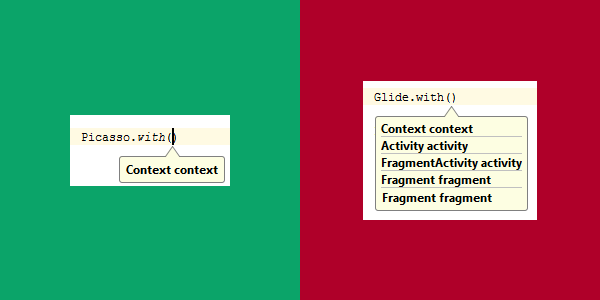
And the brilliant benefit from passing Activity/Fragment to Glide is: image loading would be integrated with Activity/Fragment's lifecycle for example, pause loading in Paused state and automatically resume on Resumed state. So I encourage you to pass the Activity or Fragment to Glide not just a Context if possible.
Default Bitmap Format is RGB_565
Here is the result of image loading comparing to Picasso. (1920x1080 pixels image is loaded into 768x432 pixels ImageView)
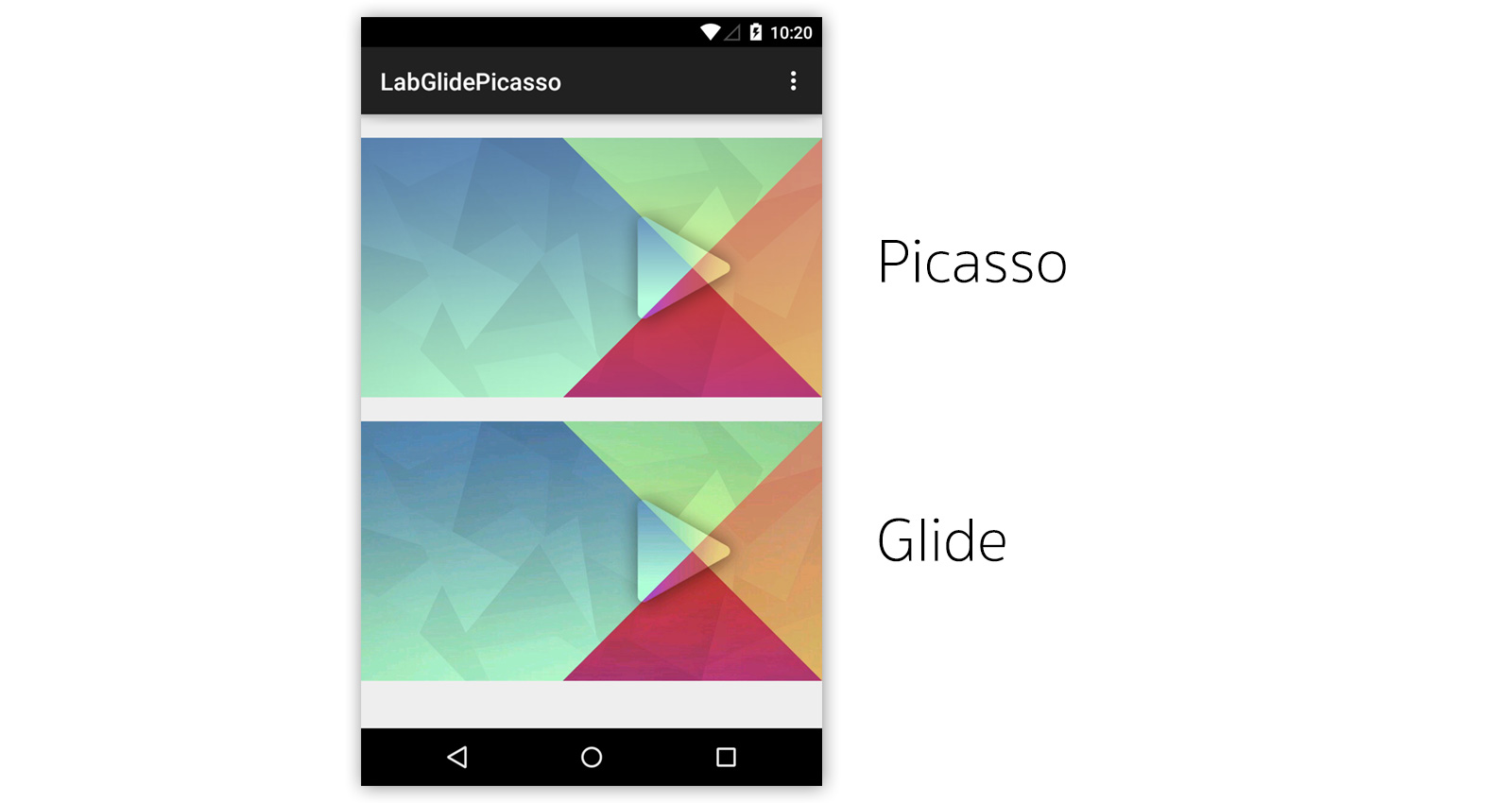
You can notice that image loaded by Glide has the worse quality compared to Picasso. Why? This is because Glide default Bitmap Format is set to RGB_565 since it consumed just 50% memory footprint compared to ARGB_8888.
Here is the memory consumption graphs between Picasso at ARGB8888 and Glide at RGB565. (Base application consumes around 8MB)
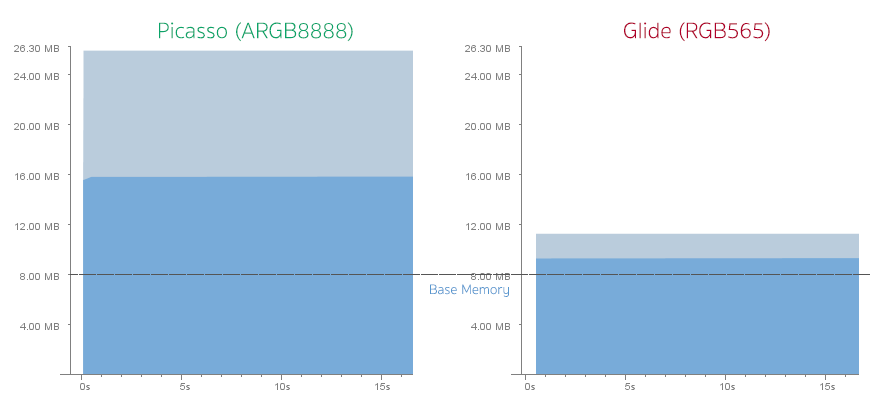
You don't have to do anything if you are ok with the image's quality already. But if think it is unacceptable or just not good enough for you, you can switch Bitmap Format to ARGB_8888 by creating a new class which extended from GlideModule like this:
|
1
2
3
4
5
6
7
8
9
10
11
12
13
|
public class GlideConfiguration implements GlideModule { @Override public void applyOptions(Context context, GlideBuilder builder) { // Apply options to the builder here. builder.setDecodeFormat(DecodeFormat.PREFER_ARGB_8888); } @Override public void registerComponents(Context context, Glide glide) { // register ModelLoaders here. }} |
And then define it as meta-data inside AndroidManifest.xml
|
1
2
|
<meta-data android:name="com.inthecheesefactory.lab.glidepicasso.GlideConfiguration" android:value="GlideModule"/> |
It looks far better now!
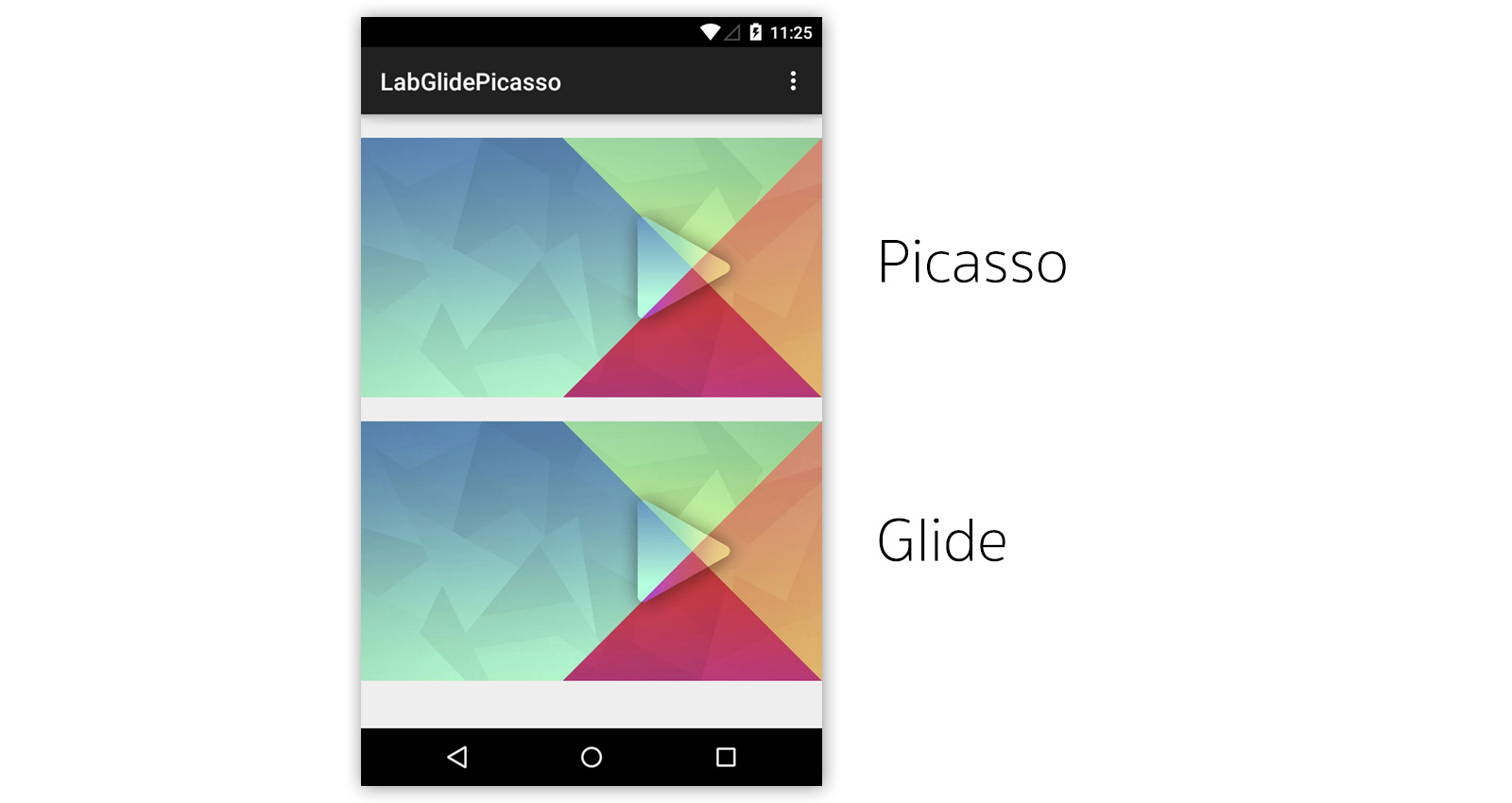
Let's take a look at memory consumption graphs once again. It appears that although Glide consumes almost 2 times than previous but Picasso still consumes a lot memory footprint more than Glide.
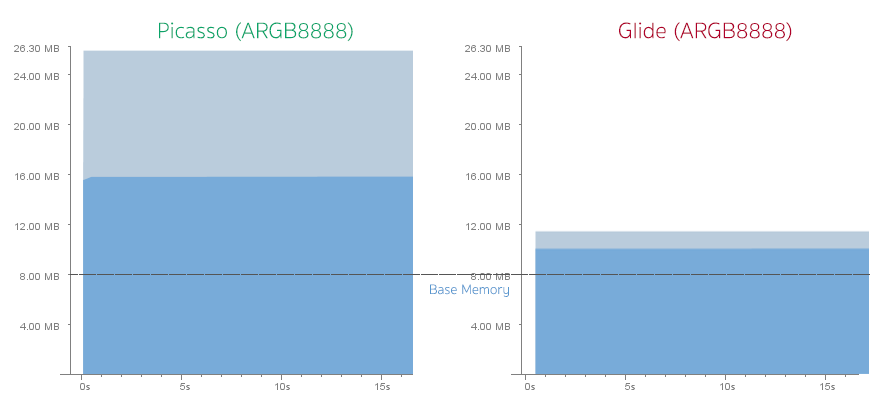
The reason is Picasso loads the full-size image (1920x1080 pixels) into the memory and let GPU does the real-time resizing when drawn. While Glide loads the exact ImageView-size (768x432 pixels) into the memory which is a best practice. Anyway you can change the behavior of Picasso to do the same with resize() command:
|
1
2
3
4
|
Picasso.with(this) .load("http://nuuneoi.com/uploads/source/playstore/cover.jpg") .resize(768, 432) .into(ivImgPicasso); |
But the problem is you need to manually calculate the ImageView's size. Or if your ImageView has the exact size (not set to wrap_content), you can simply do like this.
|
1
2
3
4
5
|
Picasso.with(this) .load("http://nuuneoi.com/uploads/source/playstore/cover.jpg") .fit() .centerCrop() .into(ivImgPicasso); |
Memory consumption graphs are now finally almost the same !
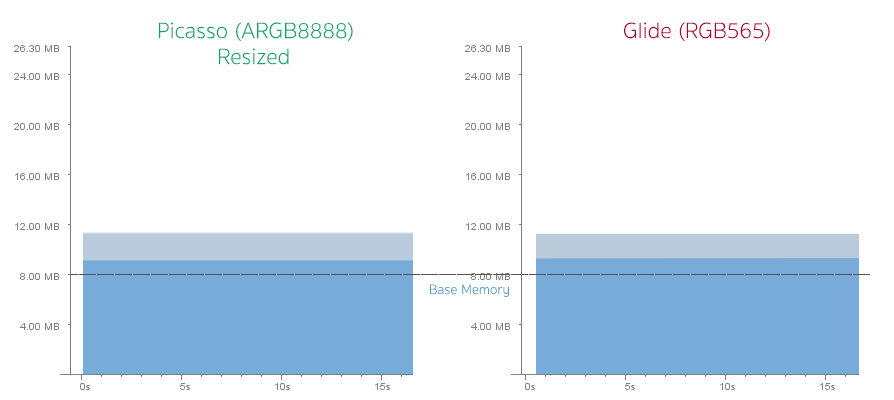
Although memory consumption are quite the same but I must say that Glide beats Picasso in term of functionality of this part since it could calculate the ImageView size automatically in every single case.
Image's quality in details
Here is the result when I tried to zoom an ImageView to the actual size.
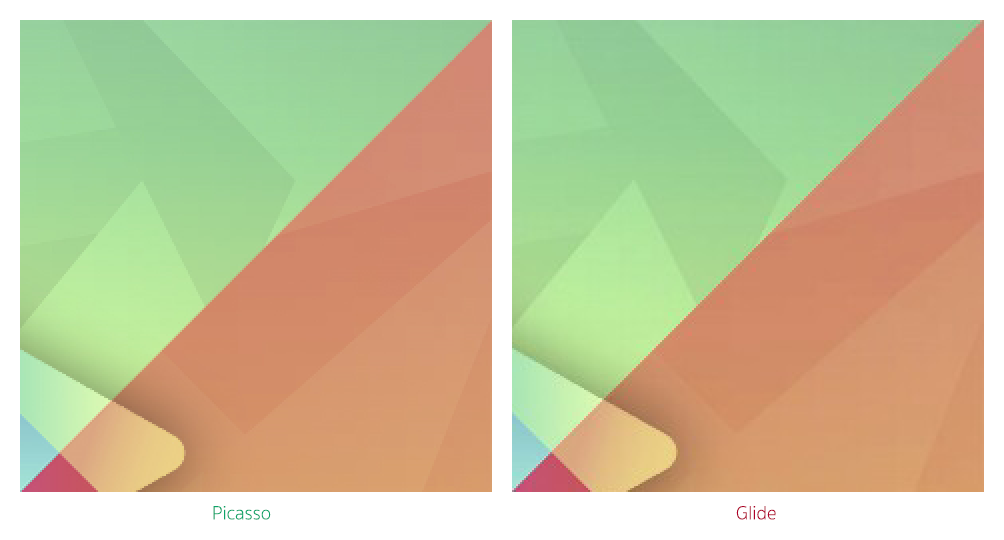
It is noticeable that image loaded by Glide has some hard pixels and is not as smooth as the Picasso one. And till now, I still couldn't find the straight way to change image resizing algorithm.
But if you ask me is it bad? I would say that it is not that noticeable in real use. Quality is acceptable but you just need to set Bitmap Format to ARGB_8888, that's all.
Disk Caching
Default disk caching concept of Picasso and Glide are quite different. From the experiment, the same Full HD image is loaded into ImageView with Picasso and Glide. When I checked the cache folder, it appears that Glide cached the ImageView-size (768x432 pixels) while Picasso cached the full-size one (1920x1080 pixels).
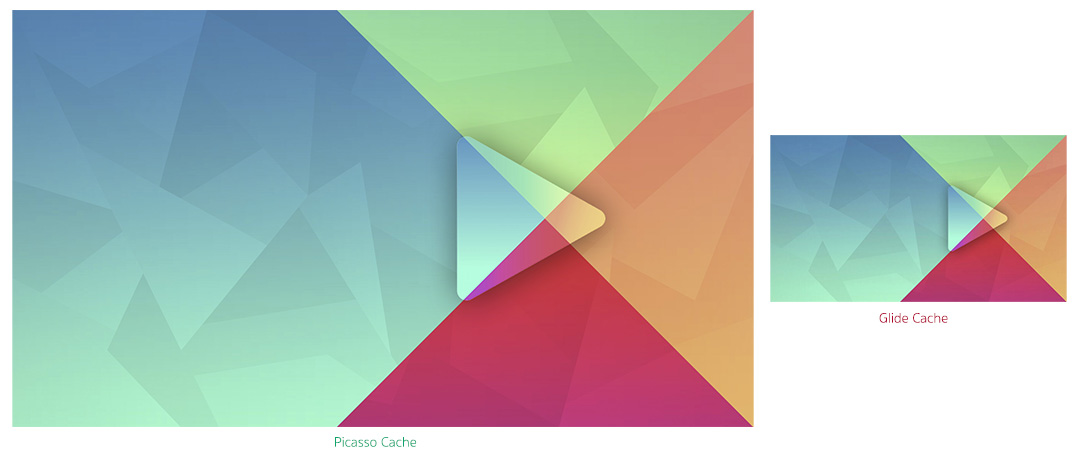
And yes, hard pixels described above is also there. In addition, if image is loaded in RGB565 mode, the cached image will be also in RGB565.
When I tried to adjust ImageView to the different sizes. The result is whatever the size is, Picasso will cache only single size of image, the full-size one. Glide acts differently, caches separate file for each size of ImageView. Although an image has already been loaded once but if you need to load another size the same image, it needs to be downloaded once again before be resized to the right resolution and then be cached.
To be more clear, if there is an ImageView in the first page with 200x200 pixels dimension and there is the another one in the second page with 100x100 pixels that are needed to show the same image. You have to download the same image twice.
Anyway you could adjust its behavior by let Glide cache both the full-size image and the resized onewith this command.
|
1
2
3
4
|
Glide.with(this) .load("http://nuuneoi.com/uploads/source/playstore/cover.jpg") .diskCacheStrategy(DiskCacheStrategy.ALL) .into(ivImgGlide); |
The next time image is requested to show on any ImageView, the full-size image would be loaded from cache, resized and then cached.
An advantage of the way Glide was designed is image could be loaded and showed very fast. While the Picasso way causes some delay on loading since it needs to be resized first before is set to an ImageView even you add this command to make it showed immediately.
|
1
2
|
//Picasso.noFade(); |
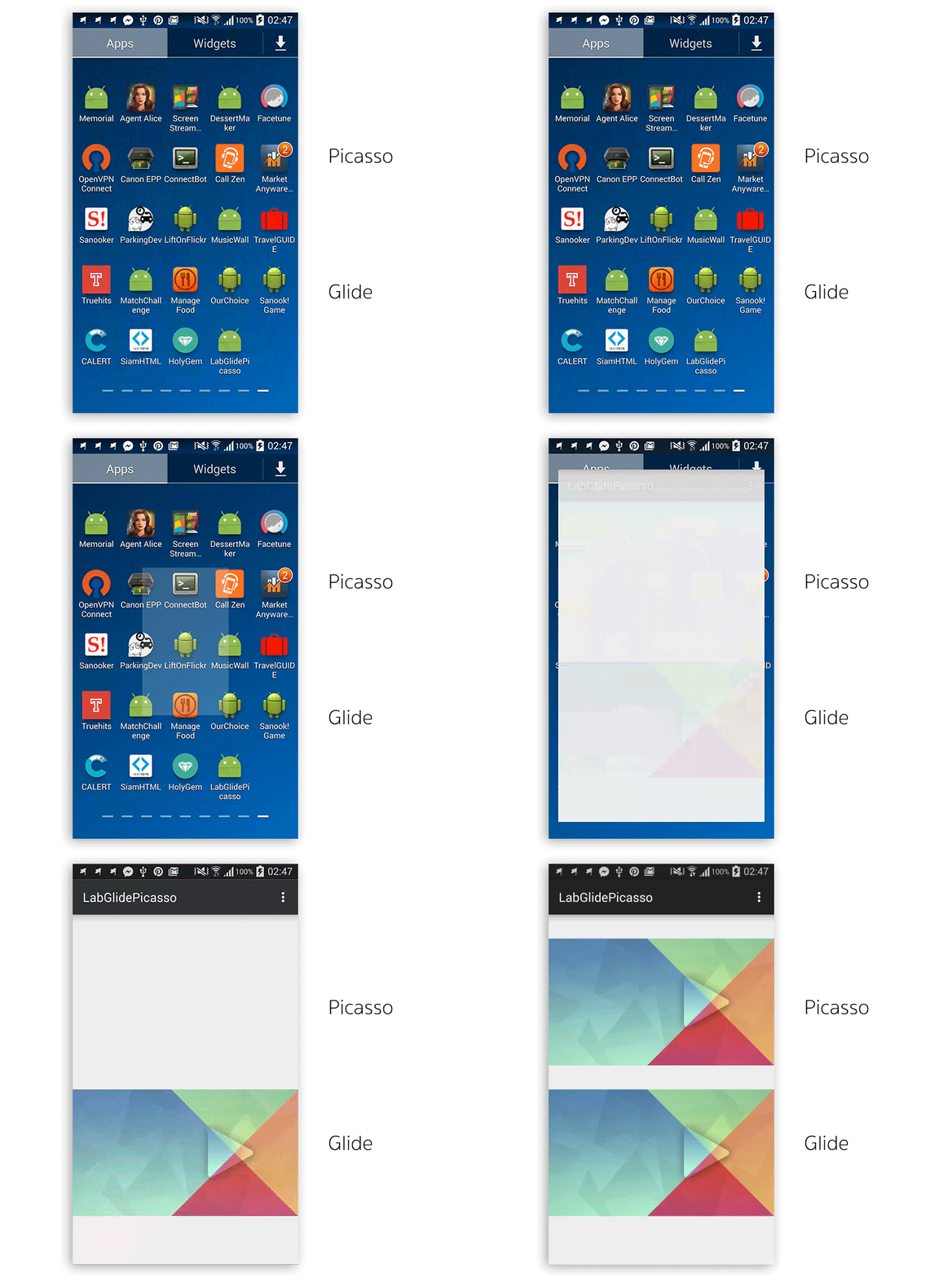
There is some trade off between Picasso's and Glide's way of disk caching. You can choose the way fit your app's requirement best.
For me, I prefer Glide to Picasso since it is far faster although it needs more space to cache the image.
Features
You can do almost all the same things just like Picasso can do with the same style of coding for example, Image Resizing
|
1
2
3
4
5
|
// Picasso.resize(300, 200);// Glide.override(300, 200); |
Center Cropping
|
1
2
3
4
5
|
// Picasso.centerCrop();// Glide.centerCrop(); |
Transforming
|
1
2
3
4
5
|
// Picasso.transform(new CircleTransform())// Glide.transform(new CircleTransform(context)) |
Setting the Placeholder and Error image
|
1
2
3
4
5
6
7
|
// Picasso.placeholder(R.drawable.placeholder).error(R.drawable.imagenotfound)// Glide.placeholder(R.drawable.placeholder).error(R.drawable.imagenotfound) |
As I said, if you are familiar with Picasso, moving to Glide would be just like chewing a candy for you. =)
What that Glide has but Picasso doesn't
An ability to load GIF Animation to a simple ImageView might be the most interesting feature of Glide. And yes, you can't do that with Picasso.
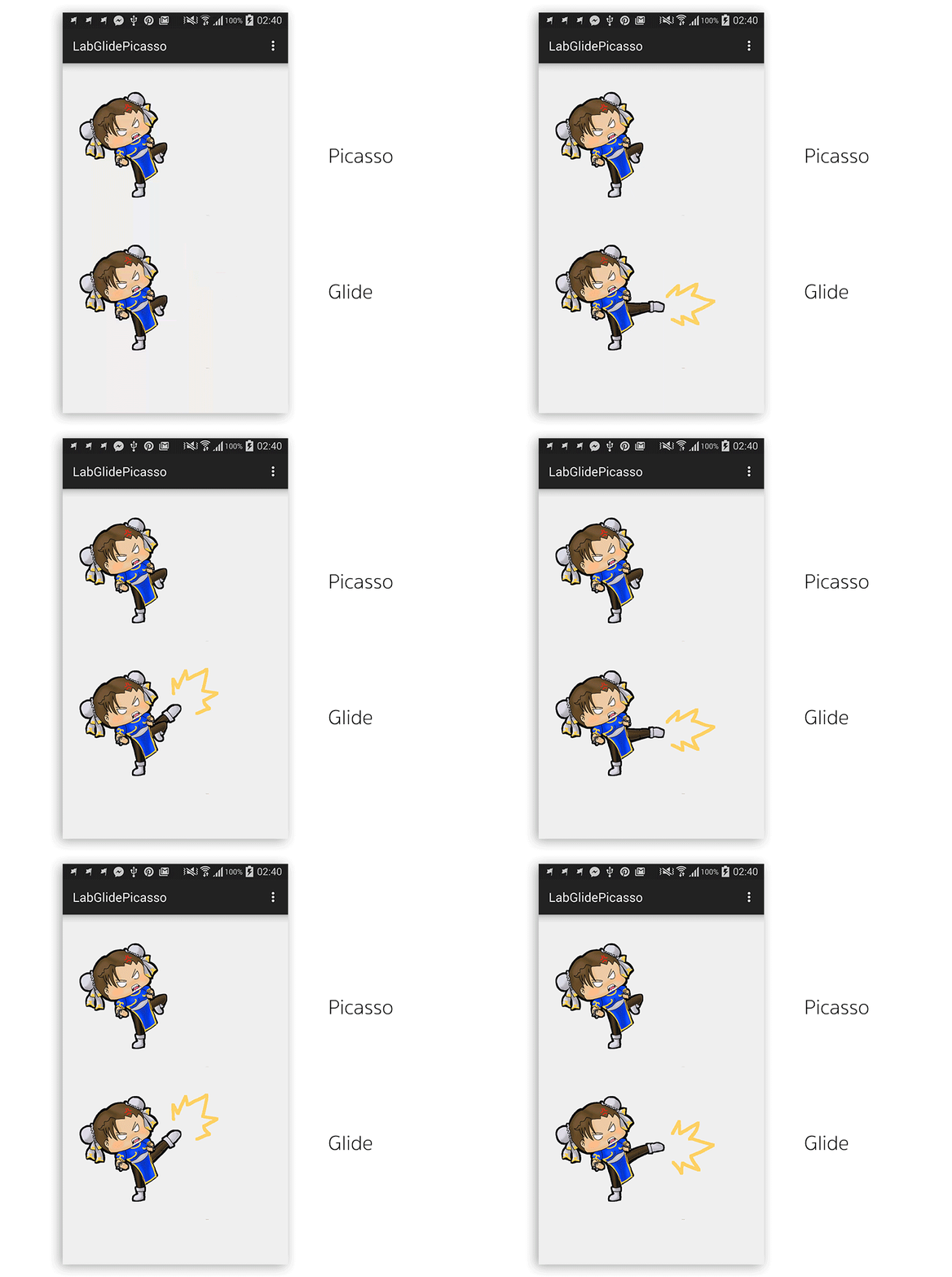
And since Glide is designed to work perfectly with Activity/Fragment's lifecycle so the animation would be automatically paused and resumed along with Activity/Fragment's state.
The way Glide caches is still be the same, resized first and then cached.
Anyway from an measurement I found that GIF Animation consumes quite a lot of memory. Please use it wisely.
Besides GIF Animation loading, Glide is also able to decode any local video file to a still image.
Another feature that might be useful is you can configure the way image appears with an Animator (R.animator) while Picasso could do only one animation, fading in.
The last one if you could generate a thumbnail file of an image you loaded with thumbnail().
Actually there are some other features you can play with but most of them are not that important for general use for example, transcode an image into Byte Array, etc.
Configurations
You can adjust so many configurations for example, size and location of disk caching, maximum limit of memory caching, Bitmap Format and many more. You can read more about this at Configuration page.
Library's size
Picasso (v2.5.1)'s size is around 118KB while Glide (v3.5.2)'s is around 430KB.
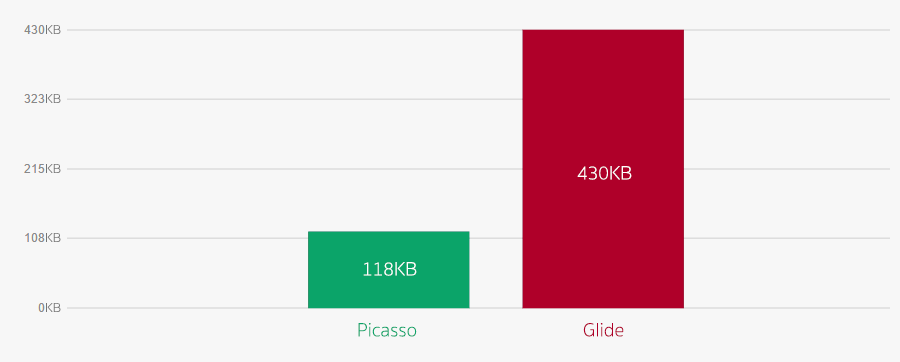
Anyway 312KB difference might not be that significant.
Method count of Picasso and Glide are at 840 and 2678 respectively.
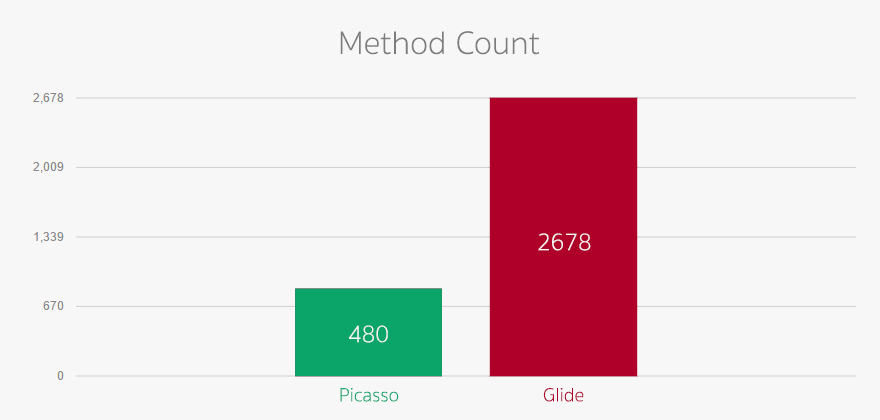
I must say 2678 is quite a lot for 65535 methods limit of Android DEX file. ProGuard is recommended to turn on if you choose Glide. (And you should turn it on anyway for production release).
Conclusion
Neither Glide nor Picasso is perfect. The way Glide loads an image to memory and do the caching is better than Picasso which let an image loaded far faster. In addition, it also helps preventing an app from popular OutOfMemoryError. GIF Animation loading is a killing feature provided by Glide. Anyway Picasso decodes an image with better quality than Glide.
Which one do I prefer? Although I use Picasso for such a very long time, I must admit that I now prefer Glide. But I would recommend you to change Bitmap Format to ARGB_8888 and let Glide cache both full-size image and resized one first. The rest would do your job great!
Resources
There are not so many online resources related to Glide. But here are what I found. Please take a look on links below.
- Glide 3.0: a media management library for Android
- Android: Image loading libraries Picasso vs Glide
Introduction to Glide, Image Loader Library for Android, recommended by Google的更多相关文章
- Build Assimp library for Android
Build Assimp library for Android 首先各路教程中有推荐使用 NDK 或者 STANDALONE TOOLCHAIN 编译的,根据我的理解,这两种方式都是可以的,如果能直 ...
- Android Library和Android APP、Java Library的区别
Android Library和Android APP.Java Library的区别 Android Library在目录结构上与Android App相同,它能包含构建APP所需的一切(如源代码. ...
- [Xamarin.Android] 如何使用Google Map V2 (转帖)
Google Map v1已經在2013年的3月開始停止支援了,目前若要在你的Android手機上使用到Google Map,就必須要使用 到Google Map v2的版本.在Xamarin要使用G ...
- Google搜索中的突变XSS-JavaScript Library Introduced XSS Flaw in Google Search
前言2018年9月26日,开源Closure库(最初由谷歌创建并用于谷歌搜索)的一名开发人员创建了一个提交,删除了部分输入过滤.据推测,这是因为开发人员在用户界面设计方面出现了问题.但此次提交的开发人 ...
- Android开发之Google Map
2013-07-03 Google Map 提供三种视图: 1. 传统的矢量地图,提供行政区域.交通以及商业信息等. 2. 不同分辨率的卫星照片,与Google Earth 基本一样. 3. 地形地图 ...
- [Android]彻底去除Google AdMob广告
应用中包含广告是能够理解的,但经常造成用户误点,或者广告切换时造成下载流量,就有点让人不舒服了. 以下就以Google AdMob广告为例,看怎样彻底去除他. 先分析一下Google AdMob的工作 ...
- Android App在Google App Store中搜不到
情景:Android App在Google App Store上架成功,三星手机可以在Google App Store中搜索到,但是三星tablet却无法在Google App Store中搜索到,目 ...
- Android性能优化Google课程翻译一:Render----OverDraw实战
Context 近期实战了下OverDraw,加深了下理解.在上篇文章里Android性能优化Google课程翻译一:Render----OverDraw 写过详细方法. OverDraw解决方法离不 ...
- 谷歌将一些弱小的库从安卓代码移除Google Removes Vulnerable Library from Android
Google this week released the November 2018 set of security patches for its Android platform, which ...
随机推荐
- maven jetty运行命令
1.先运行build.xml <?xml version="1.0" encoding="UTF-8"?> <project name=&qu ...
- 如何在获取Datarow对象在其所属DataTable中的Index
做项目的时候需要先select一个DataTable的子集,后来又需要子集中这些DataRow的Index, 这个需求本来就有些奇怪,网上也没搜到.刚开始走了很多弯路,后来发现一个简便方法 'dr是你 ...
- Datum Form Goole Android
1. <TurboChargeYourUI-How to make your AndroidUI fast and efficient> 2. <The World of List ...
- Deep Learning 学习随记(八)CNN(Convolutional neural network)理解
前面Andrew Ng的讲义基本看完了.Andrew讲的真是通俗易懂,只是不过瘾啊,讲的太少了.趁着看完那章convolution and pooling, 自己又去翻了翻CNN的相关东西. 当时看讲 ...
- Java 基础(一)
Java不只是一种语言,更是一个完整的平台,有一个庞大的库,其中包含了很多可重用的代码和一个提供诸如安全性.跨操作系统的可移植性以及自动垃圾收集等服务的执行环境. javaSE: 整个java技术的核 ...
- 使用Qt创建第一个OpenCV的Gui应用
写在前面 学习OpenCV有一些小日子了,发现群里还有很多初学OpenCV的人像我当初一样跌跌撞撞到处找资料,所以在这里把学习笔记分享给大家,希望有志学习OpenCV进行计算机视觉活动的小伙伴们能少走 ...
- js 支持的原始数据类型
原始数据类型: 数值型: 1.十进制数 <script> var a =12; a = -12 a = 12.4 a =.23e2 //=>23 a = 2e3 //=>200 ...
- An erroroccurred while filtering resources
maven报错: maven An error occurred while filtering resources Maven -> Update Project... resolved th ...
- discuz二次开发技巧
discuz二次开发技巧 二次开发大多时候知识设置和处理,如果能够获知模板文件获得的变量数组将大大提高我们的开发效率 获取页面已经定义的变量 <--{eval printf_r(get_defi ...
- Bootstrap 和 LESS
Bootstrap 简介 什么是 Bootstrap? Bootstrap 是一个用于快速开发 Web 应用程序和网站的前端框架.Bootstrap 是基于 HTML.CSS.JAVASCRIPT 的 ...