
virtualization-vs-containerization
http://containerz.blogspot.com/2015/03/virtualization-vs-containerization.html
Virtualization vs. Containerization
With system virtualization, the hypervisor provides a full virtual machine to a guest: the entire OS image including the kernel is now dedicated to the virtual machine. CPU virtualization is used to provide each guest with an exclusive view of a full system environment, and these mechanisms also ensure isolation from other guests. Hypervisor-based management of virtual CPUs, memory and I/O devices is used to define resource consumption of guests.
Which one is better?
As always, it depends on your needs. If you just want to have a number of separate instances to run applications, a container environment often provides greater efficiency, both in managing the application environment, starting the application instances, and in resource consumption. Simple modification and deployment of application environments has been a design principle of container solutions like Docker and is entirely in the DevOps spirit (guess you just have been waiting for more buzzwords).
If you want to have best isolation of environments and come from a server virtualization perspective, then system virtualization may be more relevant: Noisy neighbours are much less of an issue than with containers. While many of the container folks currently focus on improving container isolation, virtual machine isolation is still superior. Coming from physical servers, virtual servers are a natural step, and an existing ecosystem around server management can often be applied to virtual servers, too.
On z systems, Linux has good scalability (to run containers), but z is the platform with an extremely efficient virtualization technology (to run virtual servers), and it is inherent in the entire system architecture. Without having measured it, combining the technologies is probably less painful on z Systems than on other platforms.
There is a third way: both.
Combining system virtualization with containers can be done in multiple ways:
1. A Virtual Machine in a Container
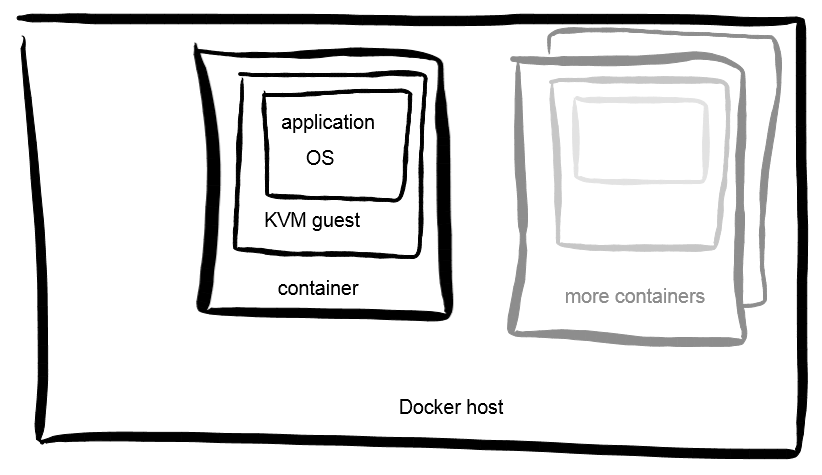
Docker has quite some flexibility on where containers are deployed. One option (called "execution driver") is to use KVM images. This allows to use all the DevOps methods of Docker and combine it with best isolation available, at the cost of having to start up entire Operating System instances when starting containers -- meaning startup time and footprint. Memory efficiencies can only be realized through Kernel Samepage Merging (KSM) -- less effective and efficient, but it's a start.
2. A Container in a Virtual Machine
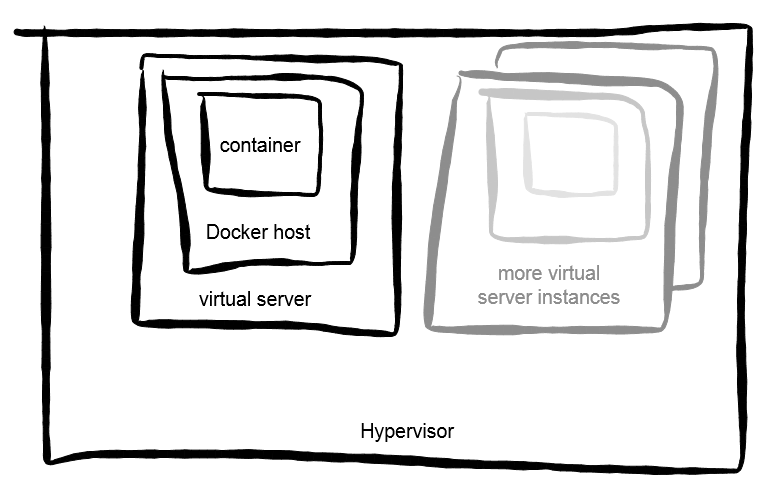
Conversely, you can run a virtual machine and start a container inside. The VM would not be controlled by Docker, but by existing virtualization management infrastructure. Once the OS instance is up, starting a container would then be done using Docker, and no special setup has to be performed for running containers. Again, containers would have strong isolation since the next container runs in another virtual system; footprint-wise, efficiencies would only be possible through memory deduplication techniques by the hypervisor.
2b. Multiple Containers in a Virtual Machine
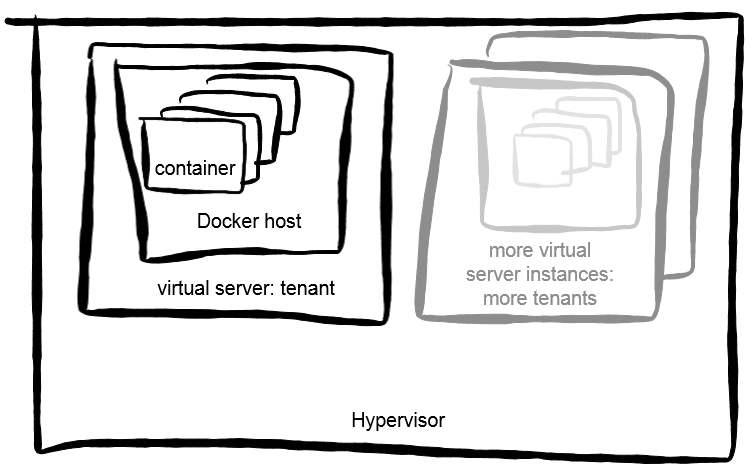
This is a variation of running Docker in a VM, suitable for multi-tenancy environments. Here, the assumption is that strongest isolation is only required between containers of different tenants, and straight Linux container isolation is good enough between several containers of the same tenant. Advantages are lower number of virtual machines to run, best isolation between tenants, and enjoying all the efficiencies of vanilla Docker setups.
To summarize: it depends.
virtualization-vs-containerization的更多相关文章
- [WPF]WPF Data Virtualization和UI Virtualization
这篇博客将介绍WPF中的虚拟化技术. 1. Data Virtualization 通常情况下我们说数据虚拟化是指数据源没有完全加载,仅加载当前需要显示的数据呈现给用户.这种场景会让我们想到数据分页显 ...
- Geneve: Generic Network Virtualization Encapsulation
Earlier this year, VMware, Microsoft, Red Hat and Intel published an IETF draft on Generic Network V ...
- [Virtualization][SDN] VXLAN到底是什么 [转]
写在转发之前: 几个月以前,在北大机房和燕园大厦直接拉了一根光钎.两端彼此为校园内公网IP.为了方便连接彼此机房,我做个一个VPN server在燕园的边界,北大机房使用client拨回.两个物理机房 ...
- Virtualization API之libvirt
The virtualization API 之开源 libvirt探究 By Ruiy: libvirt supports Hypervisors(注,相关的hypervisors项目的权威网站已经 ...
- this computer does not support Intel Virtualization Technology (VT-x) .Haxm can'not be installed
this computer does not support Intel Virtualization Technology (VT-x) .Haxm can'not be installed 本机不 ...
- 【转】How to Start Intel Hardware-assisted Virtualization (hypervisor) on Linux to Speed-up Intel Android x86 Emulator
[转]How to Start Intel Hardware-assisted Virtualization (hypervisor) on Linux to Speed-up Intel Andro ...
- Connecting Docker for Cloud Services using SDN and Network Virtualization
Abstract The explosive scale of container CPUs needs highly efficient network virtualization Chal ...
- RH133读书笔记(10)-Lab 10 Exploring Virtualization
Lab 10 Exploring Virtualization Goal: To explore the Xen virtualization environment and the creation ...
- <Mastering KVM Virtualization>:第一章 了解Linux虚拟化
本章为读者提供了Linux虚拟化中流行技术的深刻见解,以及相较于其他同类技术的优势特点.本书共有14章,囊括了KVM虚拟化中的各个方面,从KVM的内部构造开始,并包括了诸如软件定义网络(SDN),性能 ...
随机推荐
- lib 合并
方法1: 命令如下:lib.exe lib1.lib lib2.lib ... /out:hw.lib 另一种合并的方法: 思路:lib.exe 可以把lib文件里的obj文件取出来,然后把这些obj ...
- WCF - Creating WCF Service
http://www.tutorialspoint.com/wcf/wcf_creating_service.htm Creating a WCF service is a simple task u ...
- centos中忘记root密码问题
centos中root密码问题 几次在虚拟机中安装cenos,都没有提示输入root密码,具体操作如下: 1.在启动的时候,进入启动界面后,按除了Enter键之外的任意键,即可进入该界面.然后 按 ...
- 屯题50AC纪念
从2.1起开始屯题,一直弄到现在才完成了一发50题的目标,实在太弱 (当然之间事比较多,还是挺不容易的) 不过总算是完成了一个小的目标了 接下来两周要进行小高考最后冲刺了,所以我大概不会再怎么刷题了 ...
- GridView導出Excel 解決亂碼問題
Response.Clear(); Response.Charset = "gb2312"; Response.Buffer = true; Response.AddHeader( ...
- SCOI2005互不侵犯King
1087: [SCOI2005]互不侵犯King Time Limit: 10 Sec Memory Limit: 162 MBSubmit: 1499 Solved: 872[Submit][S ...
- 【C++】命令行Hangman #2015年12月15日 00:20:27
增加了可以在构造Hangman对象时通过传入参数设定“最大猜测次数”的功能.少量修改.# 2015年12月15日 00:20:22 https://github.com/shalliestera/ha ...
- combobox的下拉框高度怎样设计合理
orry,代码如下$.extend($.fn.combobox.methods, { autoHeight : function (jq) {//combobox扩展,自动调整高度 ...
- 字典转模型第三方框架---MJExtension
字典转模型第三方框架 Mantle 所有模型都必须继承自MTModel JSONModel 所有模型都必须继承自JSONModel MJExtension 不需要强制继承任何其他类 设计框架需要考虑的 ...
- sublimelinter-jshinter
--- ocalhost:~ nihao$ sudo npm install jshint -gPassword:/usr/local/bin/jshint -> /usr/local/lib/ ...