
PropertyPlaceholderConfigurer 基本用法
一、PropertyPlaceholderConfigurer 的继承体系
PropertyPlaceholderConfigurer位于org.springframework.beans.factory.config 包下,它的继承体系如下
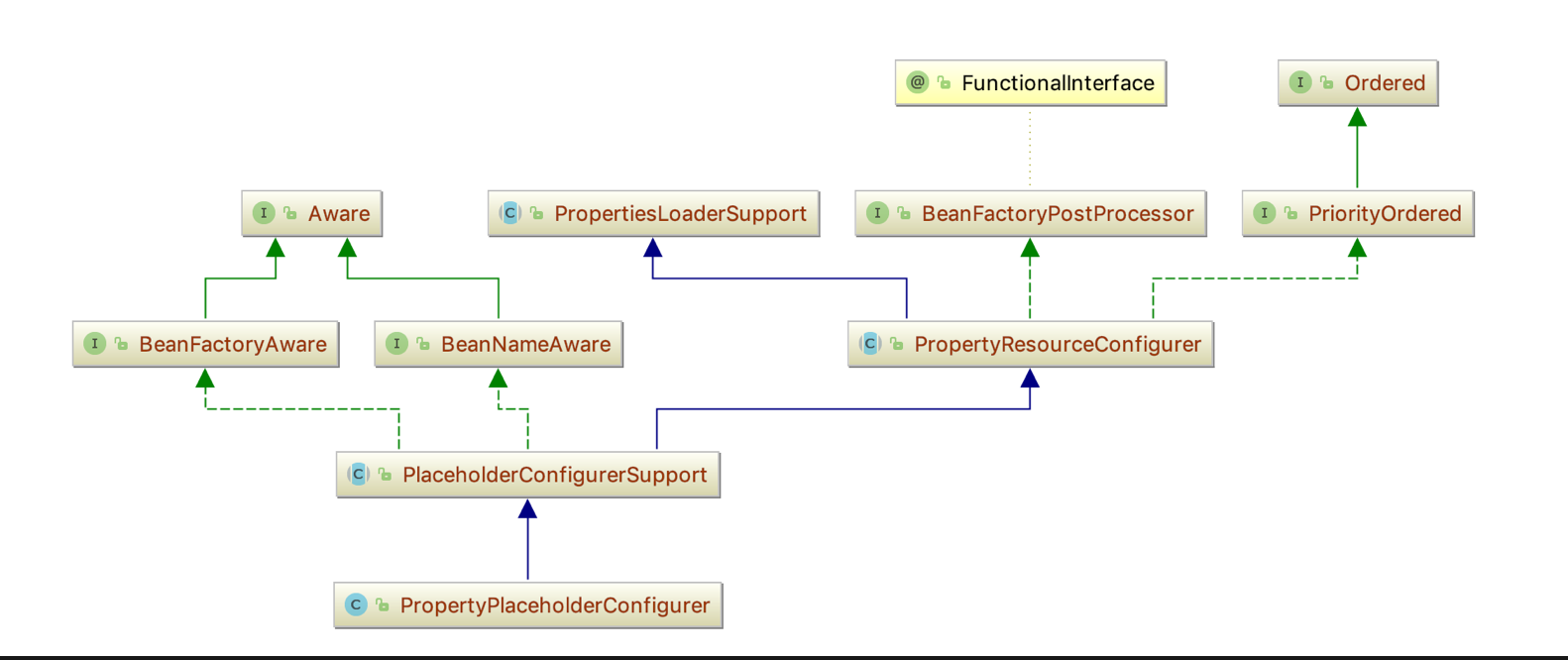

PropertyPlaceholderConfigurer 直接继承于PlaceholderConfigurerSupport,它的已知实现类只有一个
PreferencesPlaceholderConfigurer
二、PropertyPlaceholderConfigurer 的基本概念
源自JavaDoc: PropertyPlaceholderConfigurer 是 PlaceholderConfigurerSupport 的一个子类,用来解析${…} 占位符的,可以使用setLocation和setProperties设置系统属性和环境变量。从Spring3.1 开始,PropertySourcesPlaceholderConfigurer应优先与此实现,通过使用Spring3.1 中的 Environment和 PropertySource机制, 使它的灵活性更强。
但是PropertyPlaceholderConfigurer却适用如下情况:当 spring-context 模块不可用的时候,使用BeanFactory的API 而不是ApplicationContext的API。现有配置使用setSystemPropertiesMode 和 setSystemPropertiesModeName属性,建议用户不要使用这些设置, 而是使用容器的Environment属性;
在Spring3.1 之前,<context:property-placeholder/>命名空间保存了PropertyPlaceholderConfigurer的实例,如果使用spring-context-3.0 xsd的定义的话,仍然会这样做。也就是说,即使使用Spring 3.1,您也可以通过命名空间保留PropertyPlaceholderConfigurer; 只是不更新schemaLocation 并继续使用3.0 XSD。
三、PropertyPlaceholderConfigurer 的基本使用
- PropertyPlaceholderConfigurer是个bean工厂后置处理器的实现,也就是
BeanFactoryPostProcessor接口的一个实现。PropertyPlaceholderConfigurer可以将上下文(配置文 件)中的属性值放在另一个单独的标准java Properties文件中去。在XML文件中用${...}替换指定的properties文件中的值。这样的话,只需要对properties文件进 行修改,而不用对xml配置文件进行修改。 - 在Spring中,使用PropertyPlaceholderConfigurer可以在XML配置文件中加入外部属性文件
PropertyPlaceholderConfigurer 引入外部属性文件
- 定义一个properties 属性文件
jdbc.driverClassName=com.mysql.jdbc.Driver

jdbc.url=jdbc:mysql://localhost:3306/sys

jdbc.username=root

jdbc.password=123456
这是一个最基本的配置数据库连接的设置,前缀统一使用jdbc来命名
- 定义xml用来获取上面properties中的内容
    <beans xmlns="http://www.springframework.org/schema/beans"

       xmlns:xsi="http://www.w3.org/2001/XMLSchema-instance"

       xsi:schemaLocation="http://www.springframework.org/schema/beans

http://www.springframework.org/schema/beans/spring-beans-2.5.xsd">

    <bean class="org.springframework.beans.factory.config.PropertyPlaceholderConfigurer">

        <property name="location">

            <value>database.properties</value>

        </property>

    </bean>

    <bean id="dataSource" class="org.springframework.jdbc.datasource.DriverManagerDataSource">

        <property name="driverClassName" value="${jdbc.driverClassName}" />

        <property name="url" value="${jdbc.url}" />

        <property name="username" value="${jdbc.username}" />

        <property name="password" value="${jdbc.password}" />

    </bean>

	</beans>
通过给PropertyPlaceholderConfigurer 设置一个bean,指定的名称为location,指定value值就能够引入外部配置文件,然后就能够通过${jdbc.key} 来获取properties 中的值
PropertyPlaceholderConfigurer 引入多个属性文件
- 再来定义一个encoding.properties
file.encoding=utf-8

file.name=encoding
- PropertyPlaceholderConfigurer 引入多个属性文件比较简单,需要把location -> locations ,然后直接指定一个list 就能够引入
	<bean class="org.springframework.beans.factory.config.PropertyPlaceholderConfigurer">

        <property name="locations">

            <list>

                <value>database.properties</value>

                <value>encoding.properties</value>

            </list>

        </property>

	</bean>
- 这样,一个简单的数据源就设置完毕了。可以看出:PropertyPlaceholderConfigurer起的作用就是将占位符指向的数据库配置信息放在bean中定义的工具。
- 查看源代码,可以发现,locations属性定义在PropertyPlaceholderConfigurer的祖父类 PropertiesLoaderSupport中,而location只有 setter方法。类似于这样的配置,在spring的源程序中很常见的。PropertyPlaceholderConfigurer如果在指定的Properties文件中找不到你想使用的属性,它还会在Java的System类属性中查找。我们可以通过System.setProperty(key, value)或者java中通过-Dnamevalue来给Spring配置文件传递参数。
PropertyPlaceholderConfigurer 的替代方案
正如PropertyPlaceholderConfigurer基本概念中提到的,Spring可以使用<context:property-placeholder/> 作为PropertyPlaceholderConfigurer 的替代方案,代码如下
    <!-- 指定单个properties -->

    <!--<context:property-placeholder location="database.properties" />-->

    <!-- 指定多个properties-->

    <!--<context:property-placeholder location="classpath:*.properties"/>-->

    <!--<context:property-placeholder location="classpath:database.properties, classpath:encoding.properties"/>-->

    <!-- 指定配置文件加载顺序-->

    <context:property-placeholder order="0" location="database.properties" />

    <context:property-placeholder order="1" location="encoding.properties" />
四、自定义PropertyPlaceholderConfigurer
- 自定义一个SubPropertyPlaceholderConfigurer 继承自PropertyPlaceholderConfigurer
    public class SubPropertyPlaceholderConfigurer extends PropertyPlaceholderConfigurer {

        private static Map<String, String> ctxPropertiesMap;

        @Override

        protected void processProperties(ConfigurableListableBeanFactory beanFactoryToProcess, Properties props) throws BeansException {

            // 调用父类PropertyPlaceholderConfigurer 的构造器

            super.processProperties(beanFactoryToProcess, props);

            // 遍历配置文件的key,Properties 对象就是导入的配置文件

            Enumeration<?> enumeration = props.propertyNames();

            while (enumeration.hasMoreElements()) {

                System.out.println(enumeration.nextElement());

            }

            ctxPropertiesMap = new HashMap<String, String>();

            for (Object key : props.keySet()) {

                String keyStr = key.toString();

                String value = props.getProperty(keyStr);

                ctxPropertiesMap.put(keyStr, value);

            }

        }

        public static String getProperty(String name){

            return ctxPropertiesMap.get(name);

        }

    }
- 需要引入这个自定义的SubPropertyPlaceholderConfigurer
    <bean id="propertyPlaceholderConfigurer" class="com.cxuan.spring.common.SubPropertyPlaceholderConfigurer">

        <property name="location">

            <value>database.properties</value>

        </property>

    </bean>

    <bean id="dataSource" class="org.springframework.jdbc.datasource.DriverManagerDataSource">

        <property name="driverClassName" value="${jdbc.driverClassName}" />

        <property name="url" value="${jdbc.url}" />

        <property name="username" value="${jdbc.username}" />

        <property name="password" value="${jdbc.password}" />

    </bean>
如何启动呢?其实引入的SubPropertyPlaceholderConfigurer 就能够随着Spring加载配置文件而被加载。
直接定义main方法,用ClassPathXmlApplicayionContext引入任意的配置文件即可。
文章参考:
Spring里PropertyPlaceholderConfigurer类的使用](https://www.cnblogs.com/huqianliang/p/5673701.html)
PropertyPlaceholderConfigurer读取配置文件
https://blog.csdn.net/y_index/article/details/79893765
https://blog.csdn.net/eson_15/article/details/51365707
https://blog.csdn.net/wrs120/article/details/84554366
PropertyPlaceholderConfigurer 基本用法的更多相关文章
- PropertyPlaceholderConfigurer的用法:
用法1: <?xml version="1.0" encoding="UTF-8"?> <beans xmlns="http://w ...
- spring读取数据库的配置信息(url、username、password)时的<bean>PropertyPlaceholderConfigurer的用法
用法1: <?xml version="1.0" encoding="UTF-8"?> <beans xmlns="http://w ...
- PropertyPlaceholderConfigurer的用法(使用spring提供的类读取数据库配置信息.properties)
http://www.cnblogs.com/wanggd/archive/2013/07/04/3172042.html(写的很好)
- Spring注解?啥玩意?
目录 基础概念:@Bean 和 @Configuration 使用AnnotationConfigApplicationContext 实例化Spring容器 简单的构造 使用register注册IO ...
- Spring PropertyPlaceholderConfigurer占位符用法
1.PropertyPlaceholderConfigurer是一个bean工厂后置处理器的实现,也就是BeanFactoryPostProcessor接口的一个实现.PropertyPlacehol ...
- PropertiesFactoryBean PropertyPlaceholderConfigurer 区别
正如 stackoverflow上说的,PropertiesFactoryBean 是PropertiesLoaderSupport 直接的实现类, 专门用来管理properties文件的工厂bean ...
- async4j 普通用法、整合spring用法
1.普通用法 asyn4j 是一个java异步方法调用框架,基于消费者与生产者模式. async4j就是基于Executors线程池和反射机制实现的. 包括了异步方法执行,异步回调执行,异步工作缓存模 ...
- MyBatis(七):mybatis Java API编程实现增、删、改、查的用法
最近工作中用到了mybatis的Java API方式进行开发,顺便也整理下该功能的用法,接下来会针对基本部分进行学习: 1)Java API处理一对多.多对一的用法: 2)增.删.改.查的用法: 3) ...
- EditText 基本用法
title: EditText 基本用法 tags: EditText,编辑框,输入框 --- EditText介绍: EditText 在开发中也是经常用到的控件,也是一个比较必要的组件,可以说它是 ...
随机推荐
- HUD:2853-Assignment(KM算法+hash)
传送门:http://acm.hdu.edu.cn/showproblem.php?pid=2853 Assignment Time Limit: 2000/1000 MS (Java/Others) ...
- 在spring boot中使用webSocket组件(二)
该篇演示如何使用websocket创建一对一的聊天室,废话不多说,我们马上开始! 一.首先先创建前端页面,代码如下图所示: 1.login.html <!DOCTYPE html> < ...
- Python虚拟机函数机制之位置参数(四)
位置参数的传递 前面我们已经分析了无参函数的调用过程,我们来看看Python是如何来实现带参函数的调用的.其实,基本的调用流程与无参函数一样,而不同的是,在调用带参函数时,Python虚拟机必须传递参 ...
- MFC自绘按钮的实现,按钮动态效果
最近项目需要实现按钮的动态效果,多方学习,现在终于能实现一些功能了. 过程如下: 第一,新建一MFC对话框应用程序. 第二,删除自带按钮,并添加两个按钮,button1,button2,ID为IDB_ ...
- day01_04.变量
变量的命名规则 变量名由字母小写a-z,大写A-Z,_下划线,数字0-9组成,php的变量名区分大小写;python的变量名也是区分大小写的 注意: PHP变量名必须以美元$符号开始; 变量名开头可以 ...
- 添加rpmforge源 centos 7
(原创)RHEL/CentOS 7.x使用EPEL第三方yum源 时间 2014-07-22 19:45:50 服务器运维与网站架构 原文 http://www.ha97.com/5649.html ...
- 国际化多语言(本地化)缩写 NLS API
NLS Information for Windows 7 LCID Culture Identifier Culture Name Locale Language Country/Region La ...
- DS作业06-图
1.本周学习总结(0--2分) 1.1思维导图 1.2谈谈你对图结构的认识及学习体会. 图这一章的学习,是经过树学习后,难得一章重新寻找到感觉的学习.因为这一章比较少用递归,使用的是结构体,很多东西我 ...
- Linux下安装Mysql出现的常见问题以及解决办法
1.安装时候出现 warning: mysql-community-server-5.7.13-1.el6.x86_64.rpm: Header V3 DSA/SHA1 Signature, key ...
- Linux Shell系列教程之(二)第一个Shell脚本
本文是Linux Shell系列教程的第(二)篇,更多shell教程请看:Linux Shell系列教程 通过上一篇教程的学习,相信大家已经能够对shell建立起一个大体的印象了,接下来,我们通过一个 ...