
iOS 瀑布流封装
一、效果预览

功能描述:WSLWaterFlowLayout 是在继承于UICollectionViewLayout的基础上封装的带头脚视图的瀑布流控件。目前支持竖向瀑布流(item等宽不等高、支持头脚视图)、水平瀑布流(item等高不等宽 不支持头脚视图)、竖向瀑布流( item等高不等宽、支持头脚视图)三种样式的瀑布流布局。
- 前言 :近几个月一直在忙公司的ChinaDaily和国务院项目,没有抽出时间来写,现在终于算是告一段落了,抽出时间来更一篇
二、实现:主要是重写父类的几个涉及布局属性的方法,在对应的布局属性方法中根据需求自定义视图布局属性信息。详情看示例
/** 初始化 生成每个视图的布局信息*/

-(void)prepareLayout;

/** 决定一段区域所有cell和头尾视图的布局属性*/

-(NSArray<UICollectionViewLayoutAttributes *> *)layoutAttributesForElementsInRect:(CGRect)rect ;

/** 返回indexPath位置cell对应的布局属性*/

-(UICollectionViewLayoutAttributes *)layoutAttributesForItemAtIndexPath:(NSIndexPath *)indexPath;

/** 返回indexPath位置头和脚视图对应的布局属性*/

- (UICollectionViewLayoutAttributes *)layoutAttributesForSupplementaryViewOfKind:(NSString *)elementKind atIndexPath:(NSIndexPath *)indexPath;

//返回内容高度

-(CGSize)collectionViewContentSize;
三、 用法:注意遵循WSLWaterFlowLayoutDelegate协议,代理方法和TableView、collectionView的代理方法用法相似。
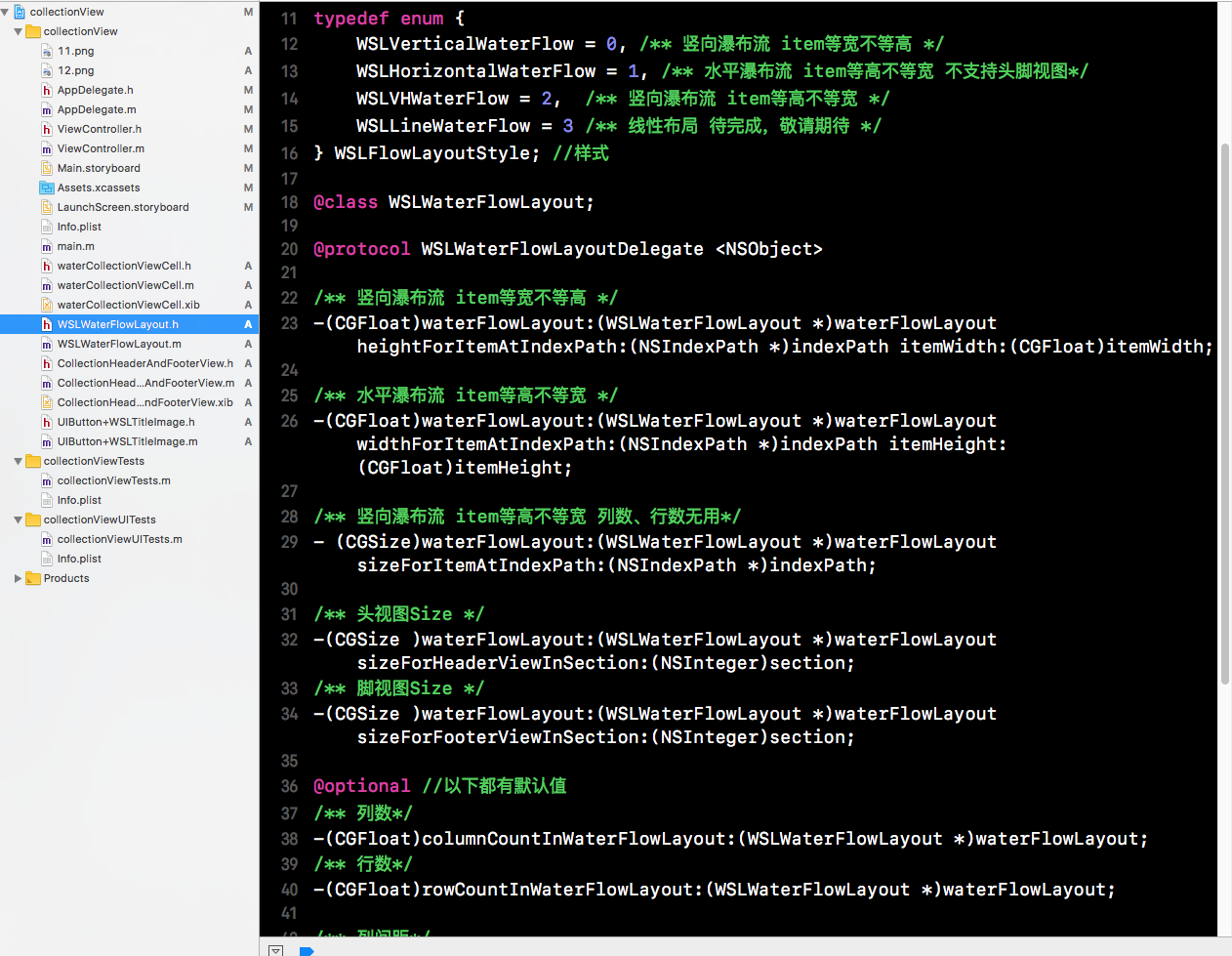
下面是WSLWaterFlowLayout.h中的属性方法和代理方法,含义注释的还算清晰:
typedef enum {

    WSLVerticalWaterFlow = 0, /** 竖向瀑布流 item等宽不等高 */

    WSLHorizontalWaterFlow = 1, /** 水平瀑布流 item等高不等宽 不支持头脚视图*/

    WSLVHWaterFlow = 2,  /** 竖向瀑布流 item等高不等宽 */

    WSLLineWaterFlow = 3 /** 线性布局 待完成,敬请期待 */

} WSLFlowLayoutStyle;//样式

@class WSLWaterFlowLayout;

@protocol WSLWaterFlowLayoutDelegate <NSObject>

/** 竖向瀑布流 item等宽不等高 */

-(CGFloat)waterFlowLayout:(WSLWaterFlowLayout *)waterFlowLayout heightForItemAtIndexPath:(NSIndexPath *)indexPath itemWidth:(CGFloat)itemWidth;

/** 水平瀑布流 item等高不等宽 */

-(CGFloat)waterFlowLayout:(WSLWaterFlowLayout *)waterFlowLayout widthForItemAtIndexPath:(NSIndexPath *)indexPath itemHeight:(CGFloat)itemHeight;

/** 竖向瀑布流 item等高不等宽  列数、行数无用 */

- (CGSize)waterFlowLayout:(WSLWaterFlowLayout *)waterFlowLayout sizeForItemAtIndexPath:(NSIndexPath *)indexPath;

/** 头视图Size */

-(CGSize )waterFlowLayout:(WSLWaterFlowLayout *)waterFlowLayout sizeForHeaderViewInSection:(NSInteger)section;

/** 脚视图Size */

-(CGSize )waterFlowLayout:(WSLWaterFlowLayout *)waterFlowLayout sizeForFooterViewInSection:(NSInteger)section;

@optional  //以下都有默认值

/** 列数*/

-(CGFloat)columnCountInWaterFlowLayout:(WSLWaterFlowLayout *)waterFlowLayout;

/** 行数*/

-(CGFloat)rowCountInWaterFlowLayout:(WSLWaterFlowLayout *)waterFlowLayout;

/** 列间距*/

-(CGFloat)columnMarginInWaterFlowLayout:(WSLWaterFlowLayout *)waterFlowLayout;

/** 行间距*/

-(CGFloat)rowMarginInWaterFlowLayout:(WSLWaterFlowLayout *)waterFlowLayout;

/** 边缘之间的间距*/

-(UIEdgeInsets)edgeInsetInWaterFlowLayout:(WSLWaterFlowLayout *)waterFlowLayout;

@end

@interface WSLWaterFlowLayout : UICollectionViewLayout

/** delegate*/

@property (nonatomic, weak) id<WSLWaterFlowLayoutDelegate> delegate;

/** 瀑布流样式*/

@property (nonatomic, assign) WSLFlowLayoutStyle  flowLayoutStyle;

@end
初始化仅三行代码,只需设置代理和样式,item的大小、头脚视图的大小、行列数以及间距都可以在对应样式的代理方法中自定义,然后设置为UICollectionView的自动流水布局样式,并结合UICollectionView的用法使用,详情看示例:
 WSLWaterFlowLayout * _flow = [[WSLWaterFlowLayout alloc] init];

    _flow.delegate = self;

    _flow.flowLayoutStyle = WSLVerticalWaterFlow;
四、项目结构:
iOS 瀑布流封装
注:本文著作权归作者,由demo大师代发,拒绝转载,转载需要作者授权
iOS 瀑布流封装的更多相关文章
- iOS 瀑布流之栅格布局
代码地址如下:http://www.demodashi.com/demo/14760.html 一 .效果预览 二.确定需求 由下面的需求示意图可知模块的最小单位是正方形,边长是屏幕宽除去边距间隔后的 ...
- IOS 瀑布流UICollectionView实现
IOS 瀑布流UICollectionView实现 在实现瀑布流之前先来看看瀑布流的雏形(此方法的雏形 UICollectionView) 对于UICollectionView我们有几点注意事项 它和 ...
- 瀑布流封装(仿写UITableView)
本篇文章将会仿照苹果系统提供的UITableView类,封装一个瀑布流效果的控件!!! 该控件和系统的UITableView是相同级别的 (继承自系统的UIScrollView) GitHub中Dem ...
- iOS瀑布流实现(Swift)
这段时间突然想到一个很久之前用到的知识-瀑布流,本来想用一个简单的方法,发现自己走入了歧途,最终只能狠下心来重写UICollectionViewFlowLayout.下面我将用两种方法实现瀑布流,以及 ...
- IOS 瀑布流
本篇博客应该算的上CollectionView的高级应用了,从iOS开发之窥探UICollectionViewController(一)到今天的(五),可谓是由浅入深的窥探了一下UICollectio ...
- iOS 瀑布流的Demo
/** * 瀑布流Demo的主要代码,若想看完整的代码请到下面链接去下载 * * 链接: https://pan.baidu.com/s/1slByAHB 密码: r3q6 */ #import &l ...
- iOS 瀑布流的基本原理
/** * 源代码链接 * 链接: https://pan.baidu.com/s/1nvLamEX 密码: kya5 */ #import <UIKit/UIKit.h> @interf ...
- ios 瀑布流的那些事情
转载: 屎壳郎情调-成长日记 首先要知道:瀑布流的核心就是要获取到图片的长宽 网上的很多例子都是加载本地图片的 对于新手而言 改成加载网络图片的确是有点压力的 因为本地的图片 我们是很容易就能获取到 ...
- ios瀑布流
http://blog.csdn.net/shenjx1225/article/details/9037631
随机推荐
- BZOJ1801 [Ahoi2009]chess 中国象棋 【dp】
题目 在N行M列的棋盘上,放若干个炮可以是0个,使得没有任何一个炮可以攻击另一个炮. 请问有多少种放置方法,中国像棋中炮的行走方式大家应该很清楚吧. 输入格式 一行包含两个整数N,M,中间用空格分开. ...
- nodeJS学习(9)--- nodeJS模块:exports vs module.exports
模块简介: 通过Node.js的官方API可以看到Node.js本身提供了很多核心模块 http://nodejs.org/api/ 这些核心模块被编译成二进制文件,可以 require('模块名') ...
- 问题:viewController不会调用dealloc()不会销毁
问题 在调试程序时,我从ViewController A push进 ViewController B,在从B back时发现程序不会执行B里面的dealloc(),很诡异的问题,因为按理说此时点击b ...
- group by timestamp
SELECT DATE_FORMAT( deteline, "%Y-%m-%d %H" ) , COUNT( * ) FROM test GROUP BY DATE_FORMAT ...
- 冬训 day2
模拟枚举... A - New Year and Buggy Bot(http://codeforces.com/problemset/problem/908/B) 暴力枚举即可,但是直接手动暴力会非 ...
- jQuery 拖动排序
原文发布时间为:2010-04-11 -- 来源于本人的百度文章 [由搬家工具导入] <!DOCTYPE html><html lang="en">< ...
- asp.net几种开源上传控件,flash,ajax版,支持多文件
原文发布时间为:2010-03-18 -- 来源于本人的百度文章 [由搬家工具导入] 1、AspnetUpload 地址:http://www.aspnetupload.net/ 最早接触的上传控件。 ...
- css3动画、边框、投影知识
<!doctype html> <html lang="en"> <head> <meta charset="UTF-8&quo ...
- mysql中PDO参数化引号引起的Warning: PDOStatement::execute(): SQLSTATE[HY093]:报错
sql语句之前是这样写的:INSERT INTO tablename SET a = ':a',b = ':b',c = ':c',d = :d,e = :e $data = array ( [':a ...
- Fedora 24 Linux 环境下实现 Infinality 字体渲染增强及 Java 字体渲染改善的方法(修订)
Fedora 24 Linux 桌面环境默认字体渲染引擎 freetype 及字体配置工具 fontconfig 采用的是未经优化的编译及设置,字体渲染效果比较差.而某些 Linux 发行版的桌面字体 ...