
HTML5 实现文件拖放上传
1. [图片] 5375acf5gw1dusqsscfksj.jpg
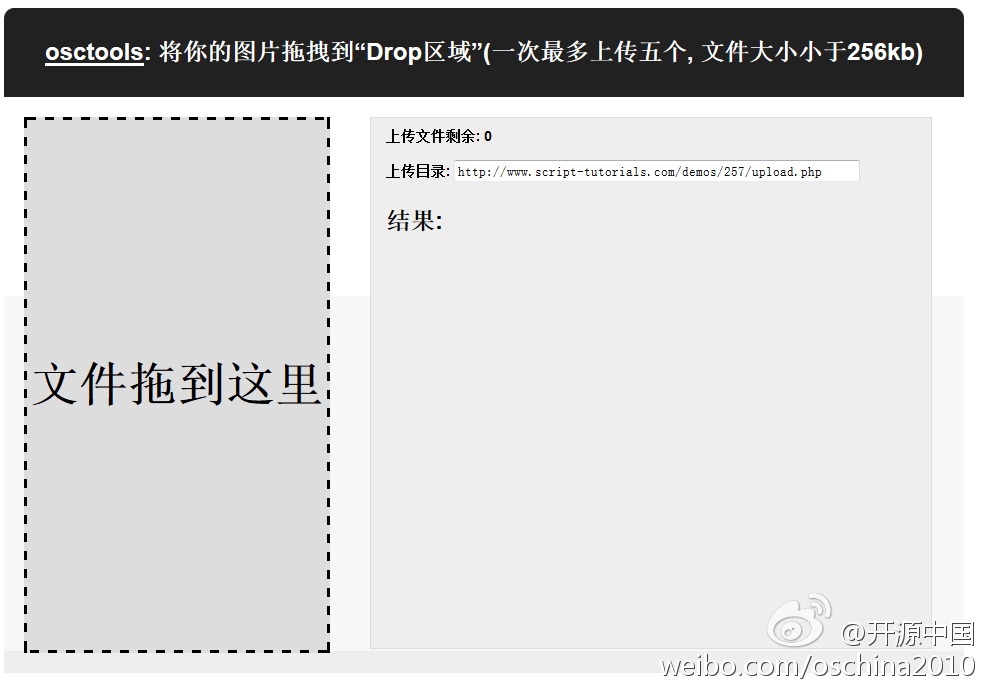
2. [代码][HTML]代码
<!DOCTYPE html>
<html lang="en" >
<head>
<meta charset="utf-8" />
<title>OSCTools JsBin在线演示-HTML5 Drag & Drop 多文件上传 from Script Tutorials</title>
<script class="jsbin" src="http://ajax.googleapis.com/ajax/libs/jquery/1/jquery.min.js"></script>
<style>
.container {
overflow:hidden;
width:960px;
margin:20px auto;
}
.contr {
background-color: #212121;
color: #FFFFFF;
padding: 10px 0;
text-align: center;
border-radius:10px 10px 0 0;
-moz-border-radius:10px 10px 0 0;
-webkit-border-radius:10px 10px 0 0;
}
.upload_form_cont {
background: -moz-linear-gradient(#ffffff, #f2f2f2);
background: -ms-linear-gradient(#ffffff, #f2f2f2);
background: -webkit-gradient(linear, left top, left bottom, color-stop(0%, #ffffff), color-stop(100%, #f2f2f2));
background: -webkit-linear-gradient(#ffffff, #f2f2f2);
background: -o-linear-gradient(#ffffff, #f2f2f2);
filter: progid:DXImageTransform.Microsoft.gradient(startColorstr='#ffffff', endColorstr='#f2f2f2');
-ms-filter: "progid:DXImageTransform.Microsoft.gradient(startColorstr='#ffffff', endColorstr='#f2f2f2')";
background: linear-gradient(#ffffff, #f2f2f2);
color: #000;
overflow: hidden;
}
.info {
background-color: #EEEEEE;
border: 1px solid #DDDDDD;
float: left;
font-weight: bold;
height: 530px;
margin: 20px;
position: relative;
width: 560px;
}
.info > div {
font-size: 14px;
font-weight: bold;
padding: 10px 15px 5px;
}
.info > h2 {
padding: 0 15px;
}
.info > canvas {
margin-left: 15px;
margin-bottom: 10px;
}
.info #url {
width: 400px;
}
#dropArea {
background-color: #DDDDDD;
border: 3px dashed #000000;
float: left;
font-size: 48px;
font-weight: bold;
height: 530px;
line-height: 530px;
margin: 20px;
position: relative;
text-align: center;
width: 300px;
}
#dropArea.hover {
background-color: #CCCCCC;
}
#dropArea.uploading {
background: #EEEEEE url(loading.gif) center 30% no-repeat;
}
#result .s, #result .f {
font-size: 12px;
margin-bottom: 10px;
padding: 10px;
border-radius:10px;
-moz-border-radius:10px;
-webkit-border-radius:10px;
}
#result .s {
background-color: #77fc9f;
}
#result .f {
background-color: #fcc577;
}
</style>
</head>
<body>
<div class="container">
<div class="contr"><h2><a href='http://www.osctools.net/' target='_blank' style='color:white;'>osctools</a>: 将你的图片拖拽到“Drop区域”(一次最多上传五个, 文件大小小于256kb)</h2></div>
<div class="upload_form_cont">
<div id="dropArea">文件拖到这里</div>
<div class="info">
<div>上传文件剩余: <span id="count">0</span></div>
<div>上传目录: <input id="url" value="http://www.script-tutorials.com/demos/257/upload.php"/></div>
<h2>结果:</h2>
<div id="result"></div>
<canvas width="500" height="20"></canvas>
</div>
</div>
</div>
</body>
</html>
3. [代码][JavaScript]代码
// variables
var dropArea = document.getElementById('dropArea');
var canvas = document.querySelector('canvas');
var context = canvas.getContext('2d');
var count = document.getElementById('count');
var destinationUrl = document.getElementById('url');
var result = document.getElementById('result');
var list = [];
var totalSize = 0;
var totalProgress = 0;
// main initialization
(function(){
// init handlers
function initHandlers() {
dropArea.addEventListener('drop', handleDrop, false);
dropArea.addEventListener('dragover', handleDragOver, false);
}
// draw progress
function drawProgress(progress) {
context.clearRect(0, 0, canvas.width, canvas.height); // clear context
context.beginPath();
context.strokeStyle = '#4B9500';
context.fillStyle = '#4B9500';
context.fillRect(0, 0, progress * 500, 20);
context.closePath();
// draw progress (as text)
context.font = '16px Verdana';
context.fillStyle = '#000';
context.fillText('上传进度: ' + Math.floor(progress*100) + '%', 50, 15);
}http://www.huiyi8.com/huawen/
// drag over花纹
function handleDragOver(event) {
event.stopPropagation();
event.preventDefault();
dropArea.className = 'hover';
}
// drag drop
function handleDrop(event) {
event.stopPropagation();
event.preventDefault();
processFiles(event.dataTransfer.files);
}
// process bunch of files
function processFiles(filelist) {
if (!filelist || !filelist.length || list.length) return;
totalSize = 0;
totalProgress = 0;
result.textContent = '';
for (var i = 0; i < filelist.length && i < 5; i++) {
list.push(filelist[i]);
totalSize += filelist[i].size;
}
uploadNext();
}
// on complete - start next file
function handleComplete(size) {
totalProgress += size;
drawProgress(totalProgress / totalSize);
uploadNext();
}
// update progress
function handleProgress(event) {
var progress = totalProgress + event.loaded;
drawProgress(progress / totalSize);
}
// upload file
function uploadFile(file, status) {
// prepare XMLHttpRequest
var xhr = new XMLHttpRequest();
xhr.open('POST', destinationUrl.value);
xhr.onload = function() {
result.innerHTML += this.responseText;
handleComplete(file.size);
};
xhr.onerror = function() {
result.textContent = this.responseText;
handleComplete(file.size);
};
xhr.upload.onprogress = function(event) {
handleProgress(event);
}
xhr.upload.onloadstart = function(event) {
}
// prepare FormData
var formData = new FormData();
formData.append('myfile', file);
xhr.send(formData);
}
// upload next file
function uploadNext() {
if (list.length) {
count.textContent = list.length - 1;
dropArea.className = 'uploading';
var nextFile = list.shift();
if (nextFile.size >= 262144) { // 256kb
result.innerHTML += '<div class="f">文件过大 (max filesize exceeded)</div>';
handleComplete(nextFile.size);
} else {
uploadFile(nextFile, status);
}
} else {
dropArea.className = '';
}
}
initHandlers();
})();
HTML5 实现文件拖放上传的更多相关文章
- 赞!带进度条的 jQuery 文件拖放上传插件
jQuery File Uploader 是一个 jQuery 文件拖放上传插件,包括 Ajax 上传和进度条效果.作者编写这个插件的想法是要保持它非常简单,不像其他的插件,很多的标记,并提供一些 H ...
- 带进度条的 jQuery 文件拖放上传插件
jQuery File Uploader :jQuery File Uploader 是一个 jQuery 文件拖放上传插件 兼容性判断 下载:https://github.com/danielm/u ...
- html5 实现 文件夹上传
先插个背景:最近所在项目有个小需求,就是上传文件要可以同时选择文件夹及文件,然后把文件夹内得文件及所选单文件全部选择上传,借助于搜索关键词没搜到想要的结果(相关文章貌似很好,要么就是遍历文件夹内的文件 ...
- 【方法】Html5实现文件异步上传
1 简介 开发文件上传功能从来不是一件愉快的事,异步上传更是如此,使用过iframe和Flash的上传方案,也都感觉十分的别扭.本文简要简绍利用Html5的FormData实现文件的异步上传,还可以实 ...
- 【实用】Html5实现文件异步上传
1 简介 开发文件上传功能从来不是一件愉快的事,异步上传更是如此,使用过iframe和Flash的上传方案,也都感觉十分的别扭.本文简要简绍利用Html5的FormData实现文件的异步上传,还可以实 ...
- HTML实现文件拖动上传
在大型企业的开发过程中,很多比较有趣而实际的功能往往都是让大家望而却步,我给大家带来一个百度云盘和360云盘的HTML5多文件拖动上传技术: 1:记得导入:common-fileupload.jar包 ...
- js分割文件快速上传
<?php header('Content-type:text/html;charset=UTF-8'); ?> <?php if ($_FILES) { if(!file_exis ...
- 利用Jquery使用HTML5的FormData属性实现对文件的上传
1.利用Jquery使用HTML5的FormData属性实现对文件的上传 在HTML5以前我们如果需要实现文件上传服务器等功能的时候,有时候我们不得不依赖于FLASH去实现,而在HTML5到来之后,我 ...
- HTML5+J2EE实现文件异步上传
P.S. HTML5经过了W3C的8年努力,终于正式推广了.这次升级最大的就是升级了XMLHTTPRequest,让它变成了XMLHTTPRequest Level II(这有啥奇怪的?).这个对象现 ...
随机推荐
- input 对伪元素(:before :after)的支持情况
最近做一个自定义视觉效果的Switch组件,用到了 input:radio 和 label,并在label里用伪元素 :before 模拟状态的切换效果. 但是同事评审的时候说可以不用label,直接 ...
- jquery操作checkbox方法(全选、全不选、至少选择一个、选择值/文本)
原文:http://blog.csdn.net/u014079773/article/details/52371382 在实际开发中我们经常操作checkbox,不仅仅要获得checkbox选中的值, ...
- Android---简单的动画
- windows xp下mysql5.0安装
安装注意要点: 1.不要安装在带有中文的安装路径 2.之前若有安装过mysql,请一定要卸载干净 MySQL安装的图解5.0.28 - CSDN
- nodejs REPL(交互式解释器)
Node.js REPL(交互式解释器) Node.js REPL(Read Eval Print Loop:交互式解释器) 表示一个电脑的环境,类似 Window 系统的终端或 Unix/Linux ...
- TIBCO RV
http://blog.csdn.net/tiercel2008/article/details/6799952
- sublime 汇总
此文内容有原创,还有各种其他博客抄来的经验,技巧,纯属个人使用心得. http://www.cnblogs.com/figure9/p/sublime-text-complete-guide.html ...
- 轻松搞定RabbitMQ(二)——工作队列之消息分发机制
转自 http://blog.csdn.net/xiaoxian8023/article/details/48681987 上一篇博文中简单介绍了一下RabbitMQ的基础知识,并写了一个经典语言入门 ...
- 一起talk GDB吧(第二回:GDB单步调试)
各位看官们,大家好.我们在上一回中说简单地介绍了GDB.这一回中,我们介绍GDB的调试功能:单步 调试. 闲话休提,言归正转. 让我们一起talk GDB吧! 看官们,我们先说一下什么是单步调试.大家 ...
- tree related problems (update continuously)
leetcode Binary Tree Level Order Traversal 这道题是要进行二叉树的层次遍历.对于层次遍历,最简单直观的办法就是进行BFS.于是我们仅仅须要维护一个队列就能够了 ...