
Could not retrieve mirrorlist http://mirrorlist.centos.org/?release=7&arch=x86_64&repo=os&infra=stoc
今天在使用yum安装文件时,出现了以下问题:
root@localhost opt]# yum update

Loaded plugins: fastestmirror

Could not retrieve mirrorlist http://mirrorlist.centos.org/?release=7&arch=x86_64&repo=os&infra=stock error was

12: Timeout on http://mirrorlist.centos.org/?release=7&arch=x86_64&repo=os&infra=stock: (28, 'Resolving timed out after 30568 milliseconds')

 One of the configured repositories failed (Unknown),

 and yum doesn't have enough cached data to continue. At this point the only

 safe thing yum can do is fail. There are a few ways to work "fix" this:

     1. Contact the upstream for the repository and get them to fix the problem.

     2. Reconfigure the baseurl/etc. for the repository, to point to a working

        upstream. This is most often useful if you are using a newer

        distribution release than is supported by the repository (and the

        packages for the previous distribution release still work).

     3. Run the command with the repository temporarily disabled

            yum --disablerepo=<repoid> ...

     4. Disable the repository permanently, so yum won't use it by default. Yum

        will then just ignore the repository until you permanently enable it

        again or use --enablerepo for temporary usage:

            yum-config-manager --disable <repoid>

        or

            subscription-manager repos --disable=<repoid>

     5. Configure the failing repository to be skipped, if it is unavailable.

        Note that yum will try to contact the repo. when it runs most commands,

        so will have to try and fail each time (and thus. yum will be be much

        slower). If it is a very temporary problem though, this is often a nice

        compromise:

            yum-config-manager --save --setopt=<repoid>.skip_if_unavailable=true

Cannot find a valid baseurl for repo: base/7/x86_64- 1
- 2
- 3
- 4
- 5
- 6
- 7
- 8
- 9
- 10
- 11
- 12
- 13
- 14
- 15
- 16
- 17
- 18
- 19
- 20
- 21
- 22
- 23
- 24
- 25
- 26
- 27
- 28
- 29
- 30
- 31
- 32
- 33
- 34
- 35
- 36
- 37
解决方案:
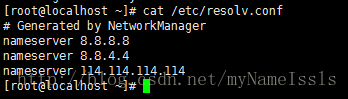
编辑/etc/resolv.conf这个文件,在文件末尾添加nameserver 114.114.114.114这即可
命令:
vim /etc/resolv.conf- 1
修改后的文件如下图:
参考链接:http://www.landui.com/help/show-2739.html
Could not retrieve mirrorlist http://mirrorlist.centos.org/?release=7&arch=x86_64&repo=os&infra=stoc的更多相关文章
- CentOS报错:Could not retrieve mirrorlist http://mirrorlist.centos.org/?release=7&arch=x86_64&repo=os&infra=stock32 error was 14: curl#6 - "Could not resolve host: mirrorlist.centos.org; Unknown error"
今天安装完带图形界面的CentOS 7后,在Terminal中运行yum安装命令时报了以下错误: Could not retrieve mirrorlist http://mirrorlist.cen ...
- Could not retrieve mirrorlist http://mirrorlist.centos.org/?release=7&arch=x86_64&repo=os&infra=stock32 error was 14: curl#6 - "Could not resolve host: mirrorlist.centos.org; Unknown error"
今天安装完带图形界面的CentOS 7后,在Terminal中运行yum安装命令时报了以下错误: 1 2 3 4 5 6 7 8 9 10 11 12 13 14 15 16 17 18 19 20 ...
- yum 安装报错:Could not retrieve mirrorlist http://mirrorlist.centos.org/?release=7&arch=x86_64&repo=os&infra=stock error was 14: curl#6 - "Could not resolve host: mirrorlist.centos.org; Unknown error"
[root@venn09 ~]# yum install -y vim Loaded plugins: fastestmirror Could not retrieve mirrorlist http ...
- Bug Could not retrieve mirrorlist http://mirrorlist.centos.org/?release=7&arch=x86_64&repo=os&infra=stock error was
yum -y install gcc 时候报bug: Could not retrieve mirrorlist http://mirrorlist.centos.org/?release=7& ...
- Linux安装yum install gcc-c++出错:Could not retrieve mirrorlist http://mirrorlist.centos.org/?release=7&arch=x86_64&repo=os&infra=stock error was 14: curl#6 - "Could not resolve host: mirrorlist.centos...
错误如图: 解决办法: 1.修改配置文件 /etc/resolv.conf,该配置文件如下: 2.输入:gedit resolv.conf,修改配置文件内容如下: 3.然后重启: 4.重新进行安装: ...
- 完美解决:Could not retrieve mirrorlist http://mirrorlist.centos.org/?release=6&arch=x
如题: 原因:没有配置resolv.conf 解决方法: 到/etc目录下配置resolv.conf加入nameserver IP,如: nameserver 8.8.8.8nameserver 8. ...
- 【转】CentOS 使用yum命令安装出现错误提示”could not retrieve mirrorlist http://mirrorlist.centos.org ***”
源自:http://www.cnblogs.com/yangbingqi/p/3328610.html 刚安装完CentOS,使用yum命令安装一些常用的软件,使用如下命令:yum grouplist ...
- 【CentOS6.5】安装之DNS配置错误,yum install 软件报错:ERROR 6或者56错误提示”could not retrieve mirrorlist http://mirrorlist.centos.org ***”
刚安装完CentOS,使用yum命令安装一些常用的软件,使用如下命令:yum grouplist | more. 提示如下错误信息: Loaded plugins: fastestmirror Set ...
- CentOS----使用yum命令出现“could not retrieve mirrorlist http://mirrorlist.centos.org ***” - ybq155”
无聊安装了个mini版的32位的CentOS 6.5,进来想安装个东西,yum install emacs 提示什么 Loaded plugins: fastestmirror, refresh-pa ...
随机推荐
- ARC下循环引用的问题
最初 最近在开发应用时碰到使用ASIHttpRequest后在某些机器上发不出请求的问题,项目开启了ARC,代码是这样写的: @implement MainController - (void) fe ...
- ios构造和析构
遵循规则: 构造先父类后子类 析构先子类后父类 所以,自定义的init函数需要首先[super init....] dealloc中[super dealloc]却是放在最后的 - (id)initW ...
- ssh登录时不校验被登录机器的方法
在linux的用户目录下的.ssh文件下,touch config:注意config的权限控制,-rw-r--r--. 配置内容: cat config: Host * StrictHostKeyCh ...
- webpack入门(六)——html-webpack-plugin
html-webpack-plugin 该插件可以简化创建调用webpack bundles的html文件.在每次编译后,文件名会包含有hash值的bundles 特别有用.你可以让插件为您生成一个H ...
- 百科知识 tar文件如何打开
tar 是什么文件格式,是干什么用的,用什么打开 tarball压缩格式,源于Linux的一个指令,Windows上可以用WinRAR打开 Linux的实用程序tar最初是为了制作磁带存档而设计的(把 ...
- 利用display属性写出表格的布局样式
demo地址:http://codepen.io/tianzi77/pen/gpBzjy 元素结构: <h1>display构造的table小样例,IE8及下面浏览器不支持本演示样例< ...
- 阿里云OSS对象存储 简单上传文件
不得不说阿里云的命名比较让人摸不着头脑,开始以为是文件存储NAS,弄了半天什么文件系统,挂载点的搞不明白.后来才搞清楚原来 对象存储OSS才是我需要的. 其中EndPoint就是画红框的部分,但是要加 ...
- <转>关于 error LNK2019:无法解析的外部符号 ,该符号在函数**中被引用的思考
错误提示信息摘抄如下: ---------------------------------------------------------------------------------------- ...
- 对OpenCV中Haar特征CvHaarClassifierCascade等结构理解
首先说一下这个级联分类器,OpenCV中级联分类器是根据VJ 04年的那篇论文(Robust Real-Time Face Detection)编写的,查看那篇论文,知道构建分类器的步骤如下: 1.根 ...
- git mirror的创建与使用
please donwload repo mirro as follow steps, thanks 1.mirror server,server IP:192.168.0.123 1.1 -- de ...