
tf.stack和tf.unstack
 import tensorflow as tf

 a = tf.constant([1,2,3])

 b = tf.constant([4,5,6])

 c1 = tf.stack([a,b],axis=0)

 c2 = tf.stack([a,b],axis=1)

 #take c2 for example showing results of unstack

 d1 = tf.unstack(c2,axis=0) # Return: The list of Tensor objects unstacked from value.

 d2 = tf.unstack(c2,axis=1)

 with tf.Session() as sess:

     print('c1(with shape:{}):\n{}'.format(c1.shape, sess.run(c1)))

     print('c2(with shape:{}):\n{}'.format(c2.shape, sess.run(c2)))

     print('d1(with length:{}):\n{}'.format(len(d1), sess.run(d1)))

     print('d2(with length:{}):\n{}'.format(len(d2), sess.run(d2)))
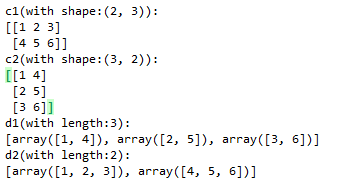
运行结果:
官方API:
https://www.tensorflow.org/api_docs/python/tf/stack
https://www.tensorflow.org/api_docs/python/tf/unstack
tf.stack和tf.unstack的更多相关文章
- tf.concat, tf.stack和tf.unstack的用法
tf.concat, tf.stack和tf.unstack的用法 tf.concat相当于numpy中的np.concatenate函数,用于将两个张量在某一个维度(axis)合并起来,例如: a ...
- tf.stack( )和tf.unstack( )
相同点:他们都增加了矩阵的维度,而split()不改变维度! tf.stack()这是一个矩阵拼接的函数,tf.unstack()则是一个矩阵分解的函数 c是拼接,而d和e则是不同维度的分解
- tf.unstack()、tf.stack()
tf.unstack 原型: unstack( value, num=None, axis=0, name='unstack' ) 官方解释:https://tensorflow.google.cn/ ...
- np.stack() 与 tf.stack() 的简单理解
说明:np ----> numpy tf ----> tensorflownp.stack(arrays, axis=0) np.stack(arrays, axis=0) - ...
- tensorflow 基本函数(1.tf.split, 2.tf.concat,3.tf.squeeze, 4.tf.less_equal, 5.tf.where, 6.tf.gather, 7.tf.cast, 8.tf.expand_dims, 9.tf.argmax, 10.tf.reshape, 11.tf.stack, 12tf.less, 13.tf.boolean_mask
1. tf.split(3, group, input) # 拆分函数 3 表示的是在第三个维度上, group表示拆分的次数, input 表示输入的值 import tensorflow ...
- tf.variable和tf.get_Variable以及tf.name_scope和tf.variable_scope的区别
在训练深度网络时,为了减少需要训练参数的个数(比如具有simase结构的LSTM模型).或是多机多卡并行化训练大数据大模型(比如数据并行化)等情况时,往往需要共享变量.另外一方面是当一个深度学习模型变 ...
- 【TensorFlow基础】tf.add 和 tf.nn.bias_add 的区别
1. tf.add(x, y, name) Args: x: A `Tensor`. Must be one of the following types: `bfloat16`, `half`, ...
- TensorFlow 辨异 —— tf.placeholder 与 tf.Variable
https://blog.csdn.net/lanchunhui/article/details/61712830 https://www.cnblogs.com/silence-tommy/p/70 ...
- TF.VARIABLE、TF.GET_VARIABLE、TF.VARIABLE_SCOPE以及TF.NAME_SCOPE关系
1. tf.Variable与tf.get_variable tensorflow提供了通过变量名称来创建或者获取一个变量的机制.通过这个机制,在不同的函数中可以直接通过变量的名字来使用变量,而不需要 ...
随机推荐
- Android学习笔记(36):Android的两种事件处理方式
Android提供了两种事件处理的方式:基于回调的事件处理 和 基于监听的事件处理. 我们来说的easy理解一点: (1)基于回调的事件处理就是继承GUI组件,并重写该组件的事件处理方法.除了一些特定 ...
- CentOS6 图形界面(gnome)安装(转)
CentOS6相对于CentOS5的安装有了不少的进步,有不少默认的选项可以选择,如: Desktop :基本的桌面系统,包括常用的桌面软件,如文档查看工具. Minimal Desktop :基本的 ...
- IP地址 网段的划分
IP和子网掩码我们都知道,IP是由四段数字组成,在此,我们先来了解一下3类常用的IP A类IP段 0.0.0.0 到127.255.255.255 B类IP段 128.0.0.0 到191.255. ...
- opencl教程
http://www.altera.com.cn/corporate/news_room/releases/2013/products/nr-opencl-sdk-13.0.html http://w ...
- Chrome自带恐龙小游戏的源码研究(七)
在上一篇<Chrome自带恐龙小游戏的源码研究(六)>中研究了恐龙的跳跃过程,这一篇研究恐龙与障碍物之间的碰撞检测. 碰撞盒子 游戏中采用的是矩形(非旋转矩形)碰撞.这类碰撞优点是计算比较 ...
- os如何处理键盘的所有按键,显示or不显示,显示是如何显示
[0]README 0.1) source code and text decription are from orange's implemention of a os , and for comp ...
- 八大排序的python实现
以下是八大排序的python实现,供以后参考,日后扩展 一.插入排序 #-*- coding:utf-8 -*- ''' 描述 插入排序的基本操作就是将一个数据插入到已经排好序的有序数据中,从而得到一 ...
- EasyPlayerPro Windows播放器本地快照抓拍截图功能实现方法
背景描述 作为一个播放器,截图功能必不可少; 下面主要记录一下截图功能的实现: 实现流程 将解码后的帧进行格式转换(目标格式为RGB24); 采用独立的线程进行截图处理; 截图可保存为BMP或JPG两 ...
- Notepad++ QuickText 插件的 HTML 配置: \Notepad++\plugins\Config\QuickText.ini
# 缩写的注解 abbr=<abbr title=''>$</abbr> # 覆盖默认的文本方向 bdo=<bdo dir='rtl'>$</bdo> ...
- Android笔记之ViewModel的使用示例
依赖 implementation 'android.arch.lifecycle:extensions:1.1.1' implementation 'com.squareup.retrofit2:r ...