
你会几种读取/加载 properties配置文件方法
摘要:在java项目中经常会使用到配置文件,这里就介绍几种加载配置文件的方法。
本文分享自华为云社区《【Java】读取/加载 properties配置文件的几种方法》,作者:Copy工程师。
说明
在java项目中经常会使用到配置文件,这里就介绍几种加载配置文件的方法
目录结构
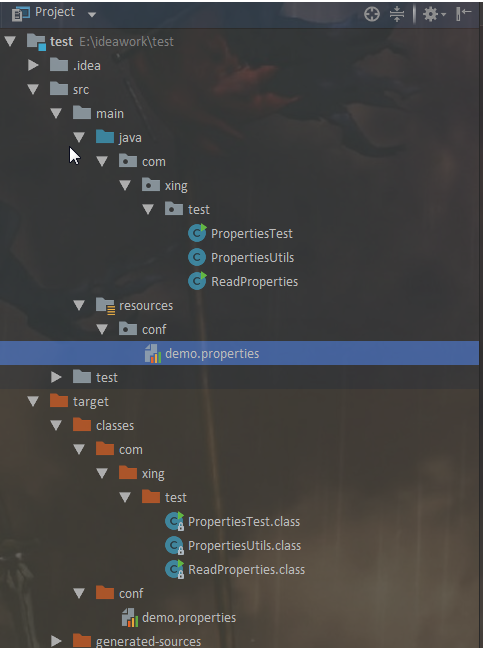
我是使用的maven搭建的项目,resources其实就是在根目录下
配置文件很简单

一、 基于ClassLoader读取配置文件
注意:有局限性只能在类路径下比较方便
Properties properties = new Properties();

// 注意这里的路径是根据根目录写的

InputStream in = ReadProperties.class.getClassLoader().getResourceAsStream("conf/demo.properties");

properties.load(in);

System.out.println("1111111111111---->:"+properties.getProperty("name"));

输出:

1111111111111---->:xing
二、基于InputStream读取配置文件
Properties properties2 = new Properties();

// 以下两种获取文件流的方式都可以,对于小文件第一种更快一点

// 通过BufferedReader获取文件流

try (BufferedReader bufferedReader = new BufferedReader(new FileReader(filePath))) {

    properties2.load(bufferedReader);

    System.out.println("22222222222---->:"+properties2.getProperty("name"));

}catch (Exception e){

    e.printStackTrace();

}

// 通过FileInputStreamm获取文件流

InputStream in2 = new FileInputStream(new File(filePath));

properties2.load(in2);

System.out.println("22222222222---->:"+properties2.getProperty("name"));

输出:

22222222222---->:xing

22222222222---->:xing
三、基于ResourceBundle读取配置文件
// 1. 通过ResourceBundle.getBundle() 静态方法来获取文件 这种方式不需要添加后缀名

 // 注意这里的ResourceBundle.getBundle("conf/demo") 这里不需要写配置文件的后缀 只需要名字即可 xml没试过 这里是properties

ResourceBundle resourceBundle = ResourceBundle.getBundle("conf/demo");

System.out.println("333333333333----->:"+resourceBundle.getString("name"));

// 2. 通过InputStream读取文件

InputStream in3 = new FileInputStream(new File(filePath));

ResourceBundle resourceBundle2 = new PropertyResourceBundle(in3);

System.out.println("333333333333----->:"+resourceBundle2.getString("name"));

输出:

333333333333----->:xing

333333333333----->:xing
四、基于PropertiesConfiguration读取配置文件 需要使用第三方的包
这是我推荐使用的方法,毕竟有大腿在,干嘛不去抱大腿,嘿嘿。我使用的包是commons-configuration2.x 。记住这是版本2 ,不是版本1, 2和1有很大的差别的。
<!-- https://mvnrepository.com/artifact/org.apache.commons/commons-configuration2 -->

<dependency>

    <groupId>org.apache.commons</groupId>

    <artifactId>commons-configuration2</artifactId>

    <version>2.2</version>

</dependency>

try {

    // 直接通过路径读取文件

    Configurations configurations = new Configurations();

    FileBasedConfigurationBuilder.setDefaultEncoding(PropertiesConfiguration.class, "UTF-8");

    PropertiesConfiguration propertiesConfiguration = configurations.properties(filePath);

    System.out.println("444444444444----->:"+propertiesConfiguration.getString("name"));

    //通过reader 读取文件 找了找好像没有通过InputStream读取文件的方式

    PropertiesConfiguration propertiesConfiguration1 = new PropertiesConfiguration();

    propertiesConfiguration1.read(new BufferedReader(new FileReader(new File(filePath))));

    System.out.println("555555555555----->:"+propertiesConfiguration1.getString("name"));

} catch (org.apache.commons.configuration2.ex.ConfigurationException e) {

    e.printStackTrace();

}

输出:

444444444444----->:xing

555555555555----->:xing
整个类:
package com.xing.test;

import org.apache.commons.configuration2.PropertiesConfiguration;

import org.apache.commons.configuration2.builder.FileBasedConfigurationBuilder;

import org.apache.commons.configuration2.builder.fluent.Configurations;

import java.io.*;

import java.util.Properties;

import java.util.PropertyResourceBundle;

import java.util.ResourceBundle;

public class ReadProperties {

    public static void main(String[] args) throws IOException {

        String filePath = ReadProperties.class.getClassLoader().getResource("conf/demo.properties").getPath();

        /** 方法一

         *  基于ClassLoader读取配置文件

         *  有局限性 只能在类路径下比较方便

         */

        Properties properties = new Properties();

        // 注意这里的路径是根据target/classes 的路径写的

        InputStream in = ReadProperties.class.getClassLoader().getResourceAsStream("conf/demo.properties");

        properties.load(in);

        System.out.println("1111111111111---->:"+properties.getProperty("name"));

        /** 方法二

         *  基于InputStream读取配置文件

         *

         */

        Properties properties2 = new Properties();

        // 两种获取文件流的方式都可以,对于小文件第一种更快一点

        // 通过BufferedReader获取文件流

        try (BufferedReader bufferedReader = new BufferedReader(new FileReader(filePath))) {

            properties2.load(bufferedReader);

            System.out.println("22222222222---->:"+properties2.getProperty("name"));

        }catch (Exception e){

            e.printStackTrace();

        }

        // 通过FileInputStreamm获取文件流

        InputStream in2 = new FileInputStream(new File(filePath));

        properties2.load(in2);

        System.out.println("22222222222---->:"+properties2.getProperty("name"));

        /** 方法三

         *  基于ResourceBundle读取配置文件

         *

         */

        // 1. 通过ResourceBundle.getBundle() 静态方法来获取文件 这种方式不需要添加后缀名

        ResourceBundle resourceBundle = ResourceBundle.getBundle("conf/demo");

        System.out.println("333333333333----->:"+resourceBundle.getString("name"));

        // 2. 通过InputStream读取文件

        InputStream in3 = new FileInputStream(new File(filePath));

        ResourceBundle resourceBundle2 = new PropertyResourceBundle(in3);

        System.out.println("333333333333----->:"+resourceBundle2.getString("name"));

        /** 方法四

         *  基于PropertiesConfiguration读取配置文件 需要使用第三方的包

         *

         */

        try {

            Configurations configurations = new Configurations();

            FileBasedConfigurationBuilder.setDefaultEncoding(PropertiesConfiguration.class, "UTF-8");

            PropertiesConfiguration propertiesConfiguration = configurations.properties(filePath);

            System.out.println("444444444444----->:"+propertiesConfiguration.getString("name"));

            //InputStream in4 = new FileInputStream(new File(filePath));

            PropertiesConfiguration propertiesConfiguration1 = new PropertiesConfiguration();

            propertiesConfiguration1.read(new BufferedReader(new FileReader(new File(filePath))));

            System.out.println("555555555555----->:"+propertiesConfiguration1.getString("name"));

        } catch (org.apache.commons.configuration2.ex.ConfigurationException e) {

            e.printStackTrace();

        }

    }

}
后记
通常在读取配置文件的时候都是写个工具类,在程序运行的时候就加载配置文件了。这里简单写了一个,凑合着看吧。
package com.xing.test;

import org.apache.commons.configuration2.PropertiesConfiguration;

import org.apache.commons.configuration2.builder.FileBasedConfigurationBuilder;

import org.apache.commons.configuration2.builder.fluent.Configurations;

import org.apache.commons.configuration2.ex.ConfigurationException;

import org.apache.commons.logging.Log;

import org.apache.commons.logging.LogFactory;

public class PropertiesUtils {

    private static final Log log = LogFactory.getLog(PropertiesUtils.class);

    private static Configurations configurations = null;

    private static PropertiesConfiguration propertiesConfiguration = null;

    private static void initProperties(){

        configurations = new Configurations();

        FileBasedConfigurationBuilder.setDefaultEncoding(PropertiesConfiguration.class, "UTF-8");

        try {

            propertiesConfiguration = configurations.properties(PropertiesUtils.class.getClassLoader().getResource("conf/demo.properties"));

        } catch (ConfigurationException e) {

            log.error("配置文件初始化失败",e);

        }

    }

    static {

        initProperties();

    }

    /**

     *  获取String类型的value

     * @param key

     * @return

     */

    public static String getValueString(String key){

        if (propertiesConfiguration == null){

            initProperties();

        }

        return propertiesConfiguration.getString(key);

    }

    /**

     * 获取int类型的value

     * @param key

     * @return

     */

    public static int getValueInt(String key){

        if (propertiesConfiguration == null){

            initProperties();

        }

        return propertiesConfiguration.getInt(key, 0);

    }

}
其实这个包还可以自动重载的功能,修改了配置文件不需要重启服务器即可加载重载配置文件。
你会几种读取/加载 properties配置文件方法的更多相关文章
- 加载Properties配置文件
/** * 加载Properties配置文件 * * @author ZhangHaiNing * @param file 要读取的文件 * @return */ public static Prop ...
- Java加载Properties配置文件工具类
Java加载Properties配置文件工具类 import org.apache.commons.lang3.StringUtils; import org.apache.log4j.Logger; ...
- 使用Spring加载properties配置文件.md
背景 类似于datasource.properties之类的配置文件,最初通过Java的Properties类进行处理.这种方式有许多弊端,如每次都需要读取配置文件:若将Properties作为成员变 ...
- Spring加载Properties配置文件的三种方式
一.通过 context:property-placeholder 标签实现配置文件加载 1) 用法: 1.在spring.xml配置文件中添加标签 <context:property-plac ...
- Java之JDBC 通过加载properties配置文件连接数据库
通常情况下,我们通过JDBC连接数据库的时候,不会将数据库相关配置写死,因为到时候数据库一有改动,就要重新打包部署到服务器或者替换相关的.class文件,这样非常不灵活.因此,咱们一般会通过读取配置文 ...
- jquery和js的几种页面加载函数的方法以及执行顺序
参考博客:http://www.cnblogs.com/itslives-com/p/4646790.html https://www.cnblogs.com/james641/p/783837 ...
- spring加载properties配置文件
public static void main(String[] args){ String path="E:/workspace/bocMarketData/src/config/P ...
- Spring加载properties文件的两种方式
在项目中如果有些参数经常需要修改,或者后期可能需要修改,那我们最好把这些参数放到properties文件中,源代码中读取properties里面的配置,这样后期只需要改动properties文件即可, ...
- spring入门(二)【加载properties文件】
在开发过程当中需要用到配置信息,这些信息不能进行硬编码,这时配置文件是一个比较好的方式,java提供了properties格式的文件,以键值对的方式保存信息,在读取的时候通过键获得键对应的值,spri ...
- JAVA加载Properties配置资源文件
JAVA加载Properties配置资源文件 制作人:全心全意 配置文件(资源文件):以properties作为拓展名的文件 Java代码是如何加载properties文件的? 必须使用Propert ...
随机推荐
- Redis 6 学习笔记 1 —— NoSQL数据库介绍,Redis常用数据类型
NoSQL数据库介绍(了解) 技术的分类1.解决功能性的问题:Java.Jsp.RDBMS.Tomcat.HTML.Linux.JDBC.SVN,2.进一步地,解决系统功能扩展性的问题:Struts. ...
- HarmonyOS UI 开发
引言 HarmonyOS 提供了强大的 UI 开发工具和组件,使开发者能够创建吸引人的用户界面.本章将详细介绍在 HarmonyOS 中应用 JS.CSS.HTML,HarmonyOS 的 UI 组件 ...
- Go类型嵌入介绍和使用类型嵌入模拟实现“继承”
Go类型嵌入介绍和使用类型嵌入模拟实现"继承" 目录 Go类型嵌入介绍和使用类型嵌入模拟实现"继承" 一.独立的自定义类型 二.继承 三.类型嵌入 3.1 什么 ...
- APP攻防--安卓逆向&JEB动态调试&LSPosed模块&算法提取&Hook技术
JEB环境配置 安装java环境变量(最好jdk11) 安装adb环境变量 设置adb环境变量最好以Android命名 启动开发者模式 设置-->关于平板电脑-->版本号(单机五次) 开启 ...
- logmein
打开以后发现就是简单的字符串操作 关键比较 其中v7出按r转成字符 然后写出脚本进行操作 但是最后输出的结果不太对的样子 看了wp才知道以LL结尾的那个地方转为字符串以后要逆序操作,即字符串在内存中是 ...
- Jenkins从Ubuntu迁移至AlmaLinux问题及相关解决记录
相关背景 之前在Ubuntu平台上搭建了Jenkins(在Ubuntu机器上使用war包安装Jenkins),现在由于一些需求,需要将系统迁移到AlmaLinux平台.由于AlmaLinux属于Cen ...
- JAVA学习week1
本周: 认识到Java是一门面向对象的编程语言,不仅吸收了C++语言的各种优点,还摒弃了C++里难以理解的多继承.指针等概念,因此Java语言具有功能强大和简单易用两个特征.Java语言作为静态面向对 ...
- 一行代码解决IE停用后无法继续使用IE弹窗功能的问题
微软在2023年2月14日通过Edge浏览器更新,彻底封死IE.Windows Update中没有记录.开始菜单中的IE以及桌面IE图标双击自动打开Edge,默认程序设置了IE也没有任何效果,仅能通过 ...
- 2019-2020 ICPC Southwestern European Regional Programming Contest (SWERC 2019-20) L题(SG+状压)
题意:给定一个N*N的表格,其上有三种类型的方格:坚实的地面.潮湿的区域和保护区.连通的湿区方格形成湿区,当两个正方形共用一条边时,它们被认为是连接的.每个湿区必须连接到网格的左右两侧,并且不包含超过 ...
- Django学习(二) 之 模板的使用
写在前面 昨晚应该是睡的最好一天吧,最近一个月睡眠好差,睡不着不说,而且半夜总醒,搞的第二天就会超没精神. 昨天下午去姐姐家,小外甥直接进屋就问我说: 老舅,你都很长时间没来啦,**(前女友)怎么哪去 ...