
Js实现抽奖转盘,和点击返回某个模块顶部的功能
最近写了几个转盘抽奖的活动页面:
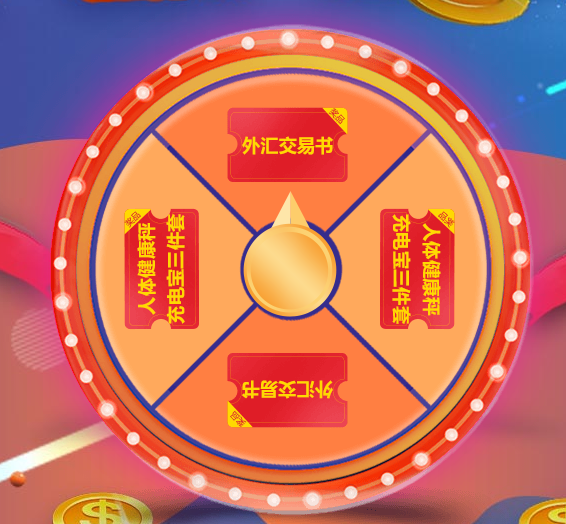
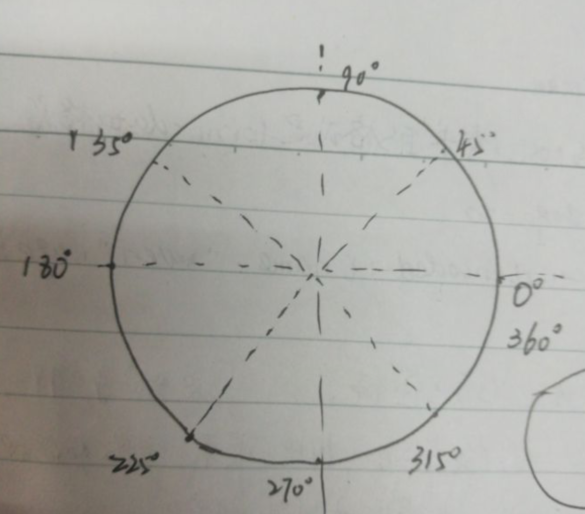
1.设定旋转的角度:
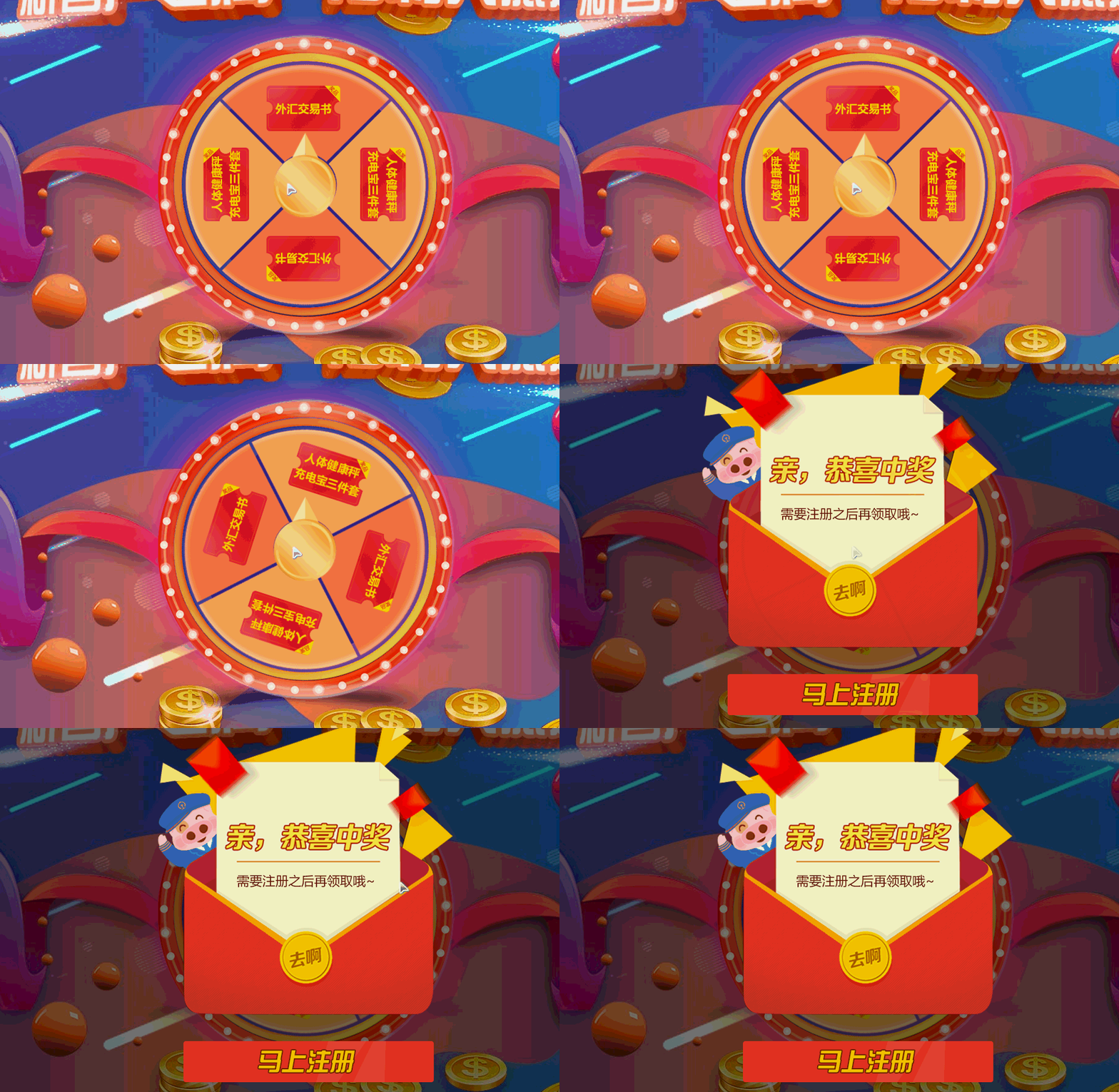
HTML部分:
转盘代码:

    <div class="lottery">

                <div class="lottery_box">

                    <div class="flash-light flash"></div>

                    <div class="lottery_cont" id="lottery_cont"></div>

                       <div class="lottery_btn" id="lottery_btn"></div>

                </div>

            </div>
立即注册弹窗:
<div class="popup">
<div class="popup-img" >
<div class="popup-btn"></div>
<div class="close">X</div>
</div>
</div>
/** lottery css **/

.lottery {

    position: absolute;

    text-align: center;

    height: 549px;

    width: 100%;

    background: url(images/lottery-bg.png) no-repeat top center;

    z-index: 4;

    top: 20%;

}

.lottery_cont{

position: absolute;

    height: 445px;

    width: 444px;

    background: url(images/lottery.png) no-repeat top center;

    z-index: 4;

    top: 52px;

    left: 50%;

    margin-left: -223px;

   transition: all .2s ease-out;

   -webkit-transition:all .2s ease-out;

}

.lottery_btn{

position: absolute;

    height: 126px;

    width: 94px;

    background: url(images/lot-btn.png) no-repeat top center;

    z-index: 4;

    top: 35.6%;

    left: 50%;

    margin-left: -48px;

    cursor: pointer;

}

.lottery_btn:hover{

    transform: scale(1.1);

}

/**popup css **/

.popup {

    position: absolute;

    top: 0px;

    width: 100%;

    background: rgba(0,0,0,0.5);

    z-index: 10;

    height: 100%;

    text-align: center;

    padding: 10% 0;

    display: none;

}

.popup-img{background: url(images/popup.png)top center no-repeat;width:481px;height:590px;margin: 0 auto;position: relative; }

.popup-btn{    position: absolute;

    width: 86%;

    bottom: 0%;

    left: 8%;

    height: 12%;

    cursor: pointer;}

.box {position: relative;}

.close {

    position: absolute;

    top: 0;

    color: #fff;

    font-size: 30px;

    right: -50%;

    cursor: pointer;

}
JS部分:

    var currentdeg=0;  //初始化角度

   function get_ram(){

        var willdeg=360+(parseInt(Math.random()*10)*36);

        return willdeg;

    }

    // var speed=willdeg/5;

       $('#lottery_btn').click(function(){

        var willdeg = get_ram();

      content.style.transform="rotate("+willdeg+"deg)";

        var enddeg=content.style.transform.slice(7);

         enddeg=willdeg-360;

          console.log(enddeg);

       var timer=setTimeout(function(){

            if(45<enddeg&&enddeg<=135){

                $(".popup").show(500);

                $(".popup-btn").addClass('popup-real');

            }

            else if(135<enddeg&&enddeg<=225){

                 $(".popup").show(500);

                $(".popup-btn").removeClass('popup-real');

            }

            else if(225<enddeg&&enddeg<=315){

                $(".popup").show(500);

                $(".popup-btn").addClass('popup-real');

            }

            else if(0<=enddeg&&enddeg<=45||315<enddeg&&enddeg<=360){

                  $(".popup").show(500);

                  $(".popup-btn").removeClass('popup-real');

            }

        },2000);

    });

 $(".close").click(function(){

     $(".popup").fadeOut(1000);

    content.style.transform="rotate(0deg)";

    });
此外滑到固定div的js代码为:
       $(".demo,.real,.popup-btn").click(function(){

         $('html,body').animate({scrollTop:$('#register').offset().top},2000);

                });
添加加载进度条功能:
<div id="loading">

<img src="data:images/loading.gif">

</div>

<style>

div#loading {width: 100%;height: 100%;position: fixed;background:#fff;z-index: 100000;text-align: center;}

 div#loading img{width: auto;position: fixed;top: 50%;}

</style>

<script>

$(window).on('load',function(){

    $("#loading").hide();

});

<script>
Js实现抽奖转盘,和点击返回某个模块顶部的功能的更多相关文章
- 使用CSS3+jquery.js 实现微信抽奖转盘效果
上次发表了一篇 微信抽奖转盘活动-效果源码分析 最近想起了刚接到这个项目时第一时间脑海里迸出的解决方法 “CSS3”! 为什么不能用CSS3来实现呢? 所以我打算用CSS3来实现这个效果.并不需要依赖 ...
- C#保留2位小数几种场景总结 游标遍历所有数据库循环执行修改数据库的sql命令 原生js轮盘抽奖实例分析(幸运大转盘抽奖) javascript中的typeof和类型判断
C#保留2位小数几种场景总结 场景1: C#保留2位小数,.ToString("f2")确实可以,但是如果这个数字本来就小数点后面三位比如1.253,那么转化之后就会变成1.2 ...
- 抽奖转盘(jqueryrotate.js)
jqueryrotate.js抽奖转盘,使用方便,兼容各浏览器,效果如下图 <!DOCTYPE> <head> <meta http-equiv="Conten ...
- jquery.rotate.js可选抽奖次数和中奖内容的转盘抽奖demo
需求: 最多可以抽奖5次,而且,每次只会中“2000元理财金”或者“谢谢参与”,其它的不会抽中(哈哈,果然都是套路). 效果如下: 一.页面结构: <div class="g-cont ...
- 【Vue.js游戏机实战】- Vue.js实现大转盘抽奖总结
大家好!先上图看看本次案例的整体效果. 实现思路: Vue component实现大转盘组件,可以嵌套到任意要使用的页面. css3 transform控制大转盘抽奖过程的动画效果. 抽奖组件内使用钩 ...
- JS:九宫格抽奖转盘实例
工作需要,所以做了个抽奖转盘的插件,当然这里只做最简单的演示.可以用于取代一些flash抽奖程序. 机制说明: 1.通过定义lottery-unit来控制节点的个数及索引: 2.通过设置lottery ...
- js中点击返回顶部
window.scrollTo(0, 0);当点击返回顶部的时候调用这个方法即可 handleScrollTop(){ window.scrollTo(0, 0); }
- Html5-Canvas实现简易的抽奖转盘
###Html5实现抽奖转盘效果 1.实现的基本效果 2.主要的内容 html5中canvas标签的使用 jQueryRotate.js旋转插件 3.主要html代码 <body> < ...
- 利用java实现抽奖转盘(着重安全控制)
本文是针对jquery 实现抽奖转盘作者的一个补充(主要用java去实现转盘结果生成及存储,解决jquery 做法 非法用户采用模拟器实现改变转盘值的风险性),针对jQuery的具体实现,请看案例:h ...
- jquery实现抽奖转盘
用jquery通过配置参数实现抽奖转盘 1.html代码 <!DOCTYPE html> <html lang="zh-CN"> <head> ...
随机推荐
- 【已解决】Windows环境下redis启动失败
在redis安装目录下打开cmd窗口: 依次输入: redis-cli.exe shutdown exit redis-server.exe redis.windows.conf ps:启动失败可能是 ...
- 微服务集成Spring Cloud Alibaba Seata(一)Seata服务搭建
1.Seata介绍 Seata是阿里开源的一款分布式事务解决方案,致力于提供高性能和简单易用的分布式事务服务.数据库事务我们都知道,事务都是遵循ACID原则.而通过使用Seata可以实现在两个服务模块 ...
- JDK9的新特性:String压缩和字符编码
目录 简介 底层实现 总结 简介 String的底层存储是什么?相信大部分人都会说是数组.如果要是再问一句,那么是以什么数组来存储呢?相信不同的人有不同的答案. 在JDK9之前,String的底层存储 ...
- 【直播回顾】OpenHarmony知识赋能五期第三课——多媒体整体介绍
5月5日晚上19点,知识赋能第五期第三节课<OpenHarmony标准系统多媒体子系统整体介绍>,在OpenHarmony开发者成长计划社群内成功举行. 本期课程,由深开鸿资深技术专家郭岳 ...
- winrt新dx截图最小实现
转自:https://stackoverflow.co/questions/11283015 效果还是很不错的 #include <iostream> #include <Windo ...
- Python 简介和用途
什么是Python? Python是一种流行的编程语言,由Guido van Rossum创建,并于1991年发布. 它用于以下领域: 网页开发(服务器端) 软件开发 数学 系统脚本编写 Python ...
- SQline安装
SQLite 安装 SQLite 的一个重要的特性是零配置的,这意味着不需要复杂的安装或管理.本章将讲解 Windows.Linux 和 Mac OS X 上的安装设置. 在 Windows 上安装 ...
- 涂色-【BFS】
涂色 有一幅以二维整数数组表示的图画,每一个整数表示该图画的像素值大小,数值在 0 到 65535 之间.给你一个坐标 (sr, sc) 表示图像渲染开始的像素值(行 ,列)和一个新的颜色值 newC ...
- 禅道统计BUG解决时长过滤节假日和跨天问题
之前发过禅道的各种数据统计报表,使用过程中优化了一些,反映最多的是项目bug的解决时长统计问题: 1.比如当天下班左右提交的bug,研发第二天来解决,晚上这段时间应该去掉,不应计算在内 2.节假日.周 ...
- WPF随笔收录-DataGrid固定右侧列
一.前言 在项目开发过程中,DataGrid是经常使用到的一个数据展示控件,而通常表格的最后一列是作为操作列存在,比如会有编辑.删除等功能按钮.但WPF的原始DataGrid中,默认只支持固定左侧列, ...