
jquery.rotate.js可选抽奖次数和中奖内容的转盘抽奖demo
需求:
最多可以抽奖5次,而且,每次只会中“2000元理财金”或者“谢谢参与”,其它的不会抽中(哈哈,果然都是套路)。
效果如下:
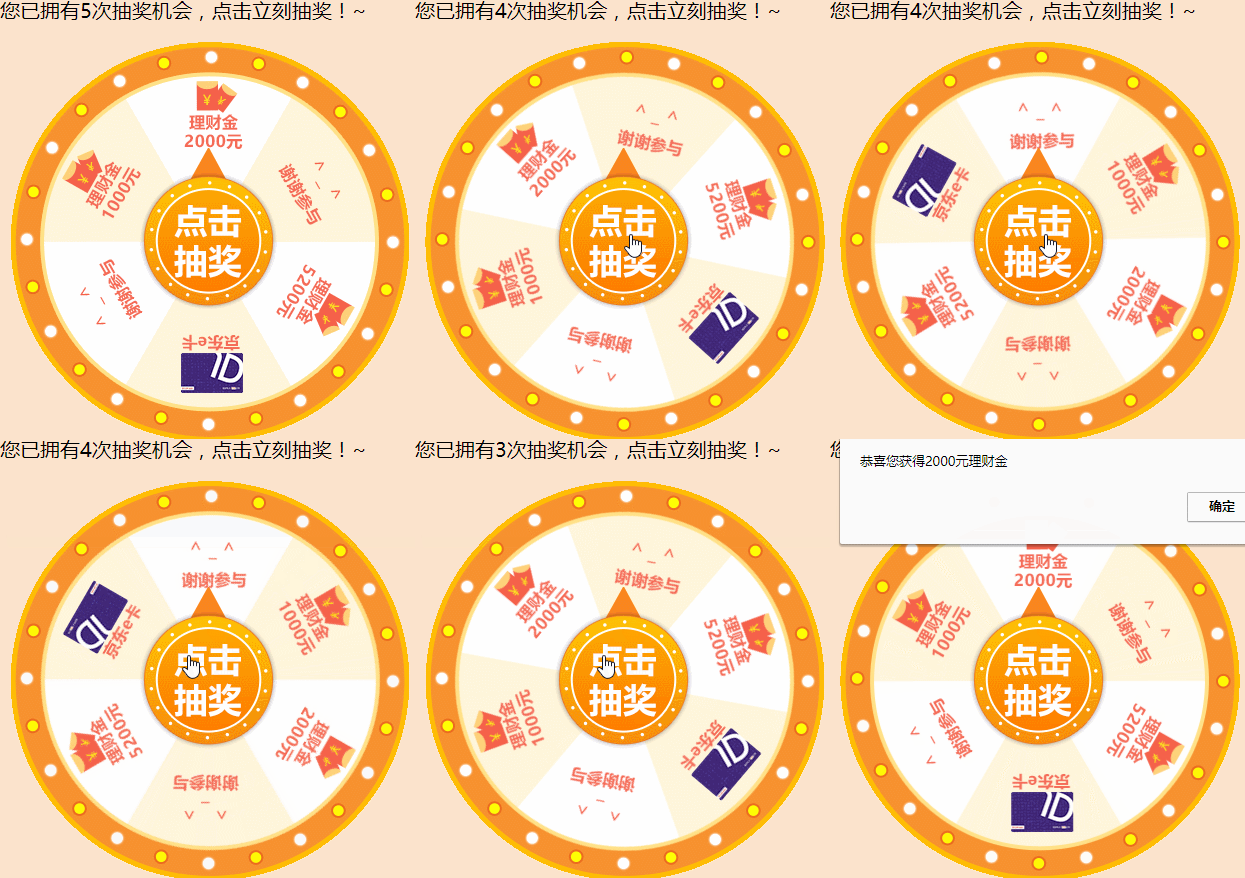
一、页面结构:
 <div class="g-content">

     <div class="g-lottery-case">

         <div class="g-left">

             <h2>您已拥有<span class="playnum"></span>次抽奖机会,点击立刻抽奖!~</h2>

             <div class="g-lottery-box">

                 <div class="g-lottery-img">

                 </div>

                 <a class="playbtn" href="javascript:;" title="开始抽奖"></a>

             </div>

         </div>

     </div>

 </div>
标签h2为提示内容,.playnum是剩余抽奖次数,.g-lottery-img是最外层的闪灯,.g-lottery-img是转动的内容,.playbtn是点击抽奖按钮。
这里用的是jquery.rotate.js,所以要引入jquery然后引入jquery.rotate.js,百度一下很简单的,没几个AIP。

二、简单的样式:
 <style>

     .g-content {

         width: 100%;

         background: #fbe3cc;

         height: auto;

         font-family: "微软雅黑", "microsoft yahei";

     }

     .g-content .g-lottery-case {

         width: 500px;

         margin: 0 auto;

         overflow: hidden;

     }

     .g-content .g-lottery-case .g-left h2 {

         font-size: 20px;

         line-height: 32px;

         font-weight: normal;

         margin-left: 20px;

     }

     .g-content .g-lottery-case .g-left {

         width: 450px;

         float: left;

     }

     .g-lottery-box {

         width: 400px;

         height: 400px;

         margin-left: 30px;

         position: relative;

         background: url(ly-plate-c.gif) no-repeat;

     }

     .g-lottery-box .g-lottery-img {

         width: 340px;

         height: 340px;

         position: relative;

         background: url(bg-lottery.png) no-repeat;

         left: 30px;

         top: 30px;

     }

     .g-lottery-box .playbtn {

         width: 186px;

         height: 186px;

         position: absolute;

         top: 50%;

         left: 50%;

         margin-left: -94px;

         margin-top: -94px;

         background: url(playbtn.png) no-repeat;

     }

 </style>
样式就定一下高度,居中一下,显示一下背景图片
三、JS代码:
 <script>

     $(function() {

         var $btn = $('.g-lottery-img');// 旋转的div

         var playnum = 5; //初始次数,由后台传入

         $('.playnum').html(playnum);//显示还剩下多少次抽奖机会

         var isture = 0;//是否正在抽奖

         var clickfunc = function() {

             var data = [1, 2, 3, 4, 5, 6];//抽奖

             //data为随机出来的结果,根据概率后的结果

             data = data[Math.floor(Math.random() * data.length)];//1~6的随机数

             switch(data) {

                 case 1:

                     rotateFunc(1, 0, '恭喜您获得2000元理财金');

                     break;

                 case 2:

                     rotateFunc(2, 0, '恭喜您获得2000元理财金2');

                     break;

                 case 3:

                     rotateFunc(3, 0, '恭喜您获得2000元理财金3');

                     break;

                 case 4:

                     rotateFunc(4, -60, '谢谢参与4');

                     break;

                 case 5:

                     rotateFunc(5, 120, '谢谢参与5');

                     break;

                 case 6:

                     rotateFunc(6, 120, '谢谢参与6');

                     break;

             }

         }

         $(".playbtn").click(function() {

             if(isture) return; // 如果在执行就退出

             isture = true; // 标志为 在执行

             if(playnum <= 0) { //当抽奖次数为0的时候执行

                 alert("没有次数了");

                 $('.playnum').html(0);//次数显示为0

                 isture = false;

             } else { //还有次数就执行

                 playnum = playnum - 1; //执行转盘了则次数减1

                 if(playnum <= 0) {

                     playnum = 0;

                 }

                 $('.playnum').html(playnum);

                 clickfunc();

             }

         });

         var rotateFunc = function(awards, angle, text) {

             isture = true;

             $btn.stopRotate();

             $btn.rotate({

                 angle: 0,//旋转的角度数

                 duration: 4000, //旋转时间

                 animateTo: angle + 1440, //给定的角度,让它根据得出来的结果加上1440度旋转

                 callback: function() {

                     isture = false; // 标志为 执行完毕

                     alert(text);

                 }

             });

         };

     });

 </script>
说到底就是用一个1~6的随机数,然后把对应的角度值传给jquery.rotate.js,它就会转到相应的地方,最后做一下对应剩余次数的判断和修改。
最后所有代码为:
<!DOCTYPE html>

<html>

<head>

    <meta charset="utf-8" />

    <title>抽奖</title>

    <meta name="keywords" content="">

    <meta name="description" content="">

    <meta http-equiv="X-UA-Compatible" content="IE=edge">

    <meta name="renderer" content="webkit">

    <style>

    .g-content {

        width: 100%;

        background: #fbe3cc;

        height: auto;

        font-family: "微软雅黑", "microsoft yahei";

    }

    .g-content .g-lottery-case {

        width: 500px;

        margin: 0 auto;

        overflow: hidden;

    }

    .g-content .g-lottery-case .g-left h2 {

        font-size: 20px;

        line-height: 32px;

        font-weight: normal;

        margin-left: 20px;

    }

    .g-content .g-lottery-case .g-left {

        width: 450px;

        float: left;

    }

    .g-lottery-box {

        width: 400px;

        height: 400px;

        margin-left: 30px;

        position: relative;

        background: url(ly-plate-c.gif) no-repeat;

    }

    .g-lottery-box .g-lottery-img {

        width: 340px;

        height: 340px;

        position: relative;

        background: url(bg-lottery.png) no-repeat;

        left: 30px;

        top: 30px;

    }

    .g-lottery-box .playbtn {

        width: 186px;

        height: 186px;

        position: absolute;

        top: 50%;

        left: 50%;

        margin-left: -94px;

        margin-top: -94px;

        background: url(playbtn.png) no-repeat;

    }

    </style>

</head>

<body>

<div class="g-content">

    <div class="g-lottery-case">

        <div class="g-left">

            <h2>您已拥有<span class="playnum"></span>次抽奖机会,点击立刻抽奖!~</h2>

            <div class="g-lottery-box">

                <div class="g-lottery-img">

                </div>

                <a class="playbtn" href="javascript:;" title="开始抽奖"></a>

            </div>

        </div>

    </div>

</div>

<script src="http://libs.baidu.com/jquery/2.1.4/jquery.min.js"></script>

<script type="text/javascript" src="jsmin/jquery.rotate.min.js"></script>

<script>

$(function() {

    var $btn = $('.g-lottery-img');// 旋转的div

    var playnum = 5; //初始次数,由后台传入

    $('.playnum').html(playnum);//显示还剩下多少次抽奖机会

    var isture = 0;//是否正在抽奖

    var clickfunc = function() {

        var data = [1, 2, 3, 4, 5, 6];//抽奖

        //data为随机出来的结果,根据概率后的结果

        data = data[Math.floor(Math.random() * data.length)];//1~6的随机数

        switch(data) {

            case 1:

                rotateFunc(1, 0, '恭喜您获得2000元理财金');

                break;

            case 2:

                rotateFunc(2, 0, '恭喜您获得2000元理财金2');

                break;

            case 3:

                rotateFunc(3, 0, '恭喜您获得2000元理财金3');

                break;

            case 4:

                rotateFunc(4, -60, '谢谢参与4');

                break;

            case 5:

                rotateFunc(5, 120, '谢谢参与5');

                break;

            case 6:

                rotateFunc(6, 120, '谢谢参与6');

                break;

        }

    }

    $(".playbtn").click(function() {

        if(isture) return; // 如果在执行就退出

        isture = true; // 标志为 在执行

        if(playnum <= 0) { //当抽奖次数为0的时候执行

            alert("没有次数了");

            $('.playnum').html(0);//次数显示为0

            isture = false;

        } else { //还有次数就执行

            playnum = playnum - 1; //执行转盘了则次数减1

            if(playnum <= 0) {

                playnum = 0;

            }

            $('.playnum').html(playnum);

            clickfunc();

        }

    });

    var rotateFunc = function(awards, angle, text) {

        isture = true;

        $btn.stopRotate();

        $btn.rotate({

            angle: 0,//旋转的角度数

            duration: 4000, //旋转时间

            animateTo: angle + 1440, //给定的角度,让它根据得出来的结果加上1440度旋转

            callback: function() {

                isture = false; // 标志为 执行完毕

                alert(text);

            }

        });

    };

});

</script>

</body>

</html>
所需要的图片(这里好像上传不了压缩文件,所以不能整个打包上传了):
#复制下面的图片名称-鼠标移到图片上-右键-图片另存为-粘贴保存#
1.最外面的闪灯:ly-plate-c.gif

2.六个中奖内容:bg-lottery.png

3.点击抽奖按钮: playbtn.png

jquery.rotate.js可选抽奖次数和中奖内容的转盘抽奖demo的更多相关文章
- jquery.rotate.js实现可选抽奖次数和中奖内容的转盘抽奖代码
需求: 抽奖代码最多可以抽奖5次,而且,每次只会中“2000元理财金”或者“谢谢参与”,其它的不会抽中(哈哈,果然都是套路). 效果如下: 一.页面结构: ? 1 2 3 4 5 6 7 8 9 10 ...
- jQuery.rotate.js(控制图片转动)
jQuery.rotate.js笔记 1. jQuery.rotate.js是什么 一个开源的兼容多浏览器的jQuery插件用来对元素进行任意角度的旋转动画. 这个库开发的目的是为了旋转img的, ...
- jQuery.rotate.js笔记
1. jQuery.rotate.js是什么 一个开源的兼容多浏览器的jQuery插件用来对元素进行任意角度的旋转动画. 这个库开发的目的是为了旋转img的,在3.x之后的版本可能支持其它元素,但旋转 ...
- jquery.rotate.js实现旋转动画
1.页面引入jquery.rotate.js文件, 下载地址:https://files.cnblogs.com/files/zhoujl-5071/jquery.rotate.js(打开这个网址,c ...
- C#保留2位小数几种场景总结 游标遍历所有数据库循环执行修改数据库的sql命令 原生js轮盘抽奖实例分析(幸运大转盘抽奖) javascript中的typeof和类型判断
C#保留2位小数几种场景总结 场景1: C#保留2位小数,.ToString("f2")确实可以,但是如果这个数字本来就小数点后面三位比如1.253,那么转化之后就会变成1.2 ...
- jQuery.rotate.js参数
CSS3 提供了多种变形效果,比如矩阵变形.位移.缩放.旋转和倾斜等等,让页面更加生动活泼有趣,不再一动不动.然后 IE10 以下版本的浏览器不支持 CSS3 变形,虽然 IE 有私有属性滤镜(fil ...
- 原生js轮盘抽奖实例分析(幸运大转盘抽奖)
效果图: 所需图片素材: 这张图是pointer.png的位置的. turntable-bg.jpg这张是转盘背景图,在背景位置. 这张是turntable.png位置的. 需要这三张图片,如果要实现 ...
- jquery.rotate.js库中的rotate函数怎么用。
rotate是jQuery旋转rotate插件,支持Internet Explorer 6.0+ .Firefox 2.0 .Safari 3 .Opera 9 .Google Chrome,高级浏览 ...
- jQuery旋转插件jquery.rotate.js 让图片旋转
演示1 直接旋转一个角度 $('#img1').rotate(45); 演示2 鼠标移动效果 $('#img2').rotate({ bind : { mouseover : function(){ ...
随机推荐
- 跟我一起读postgresql源码(一)——psql命令
进公司以来做的都是postgresql相关的东西,每次都是测试.修改边边角角的东西,这样感觉只能留在表面,不能深入了解这个开源数据库的精髓,遂想着看看postgresql的源码,以加深对数据库的理解, ...
- SDUT OJ 顺序表应用1:多余元素删除之移位算法
顺序表应用1:多余元素删除之移位算法 Time Limit: 1000 ms Memory Limit: 650 KiB Submit Statistic Discuss Problem Descri ...
- iframe里面的元素触发父窗口元素事件的jquery代码 转
例如父窗口定义了一个事件. top: $(dom1).bind('topEvent', function(){}); 那么iframe里面的元素怎样触发父窗口dom1的事件呢?这样吗? $(dom1, ...
- 洛谷 P1149 火柴棒等式
嗯.... 这道题好讨厌啊!!!! 一开始莫名RE,然后发现数组小了,然后发现后面几个点总是WA,原来推的少了.... 并且这道题的思路真的好水啊!! 先看一下题: 题目描述 给你n根 ...
- ionic4 添加自定义字体图标
在angular.json中的style中引入css文件: 然后在variables.scss中添加内容:
- Android 单选按钮(RadioButton)和复选框(CheckBox)的使用
1.RadioButton (1)介绍 (2)单选按钮点击事件的用法 (3)RadioButton与RadioGroup配合使用实现单选题功能 (4)xml布局及使用 <?xml version ...
- tornado 06 数据库—ORM—SQLAlchemy——基本内容及操作
tornado 06 数据库—ORM—SQLAlchemy——基本内容及操作 一. ORM #在服务器后台,数据是要储存在数据库的,但是如果项目在开发和部署的时候,是使用的不同的数据库,该怎么办?是不 ...
- C++_新特性1-类型转换运算符
C++的创始人认为C语言的类型转换运算符太过于松散.他采取了更加严格的限制允许的类型转换.并添加了4个类型转换运算符. 这部分特性比较高阶,我把它归于奇技淫巧的范畴.这里简单介绍一下,以后实际有用到再 ...
- 【贪心】洛谷P1607 [USACO09FEB]庙会班车Fair Shuttle 题解
不是很容易写出正解的贪心问题. 题目描述 Although Farmer John has no problems walking around the fair to collect pri ...
- bzoj1934 Vote 善意的投票 最小割(最大匹配)
题目传送门 题目大意:很多小朋友,每个小朋友都有自己的立场,赞成或者反对,如果投了和自己立场不同的票会得到一个能量.又有很多朋友关系,如果一个人和他的一个朋友投的票不同,也会得到一个能量,现在问,通过 ...