
Js实现抽奖转盘,和点击返回某个模块顶部的功能
最近写了几个转盘抽奖的活动页面:
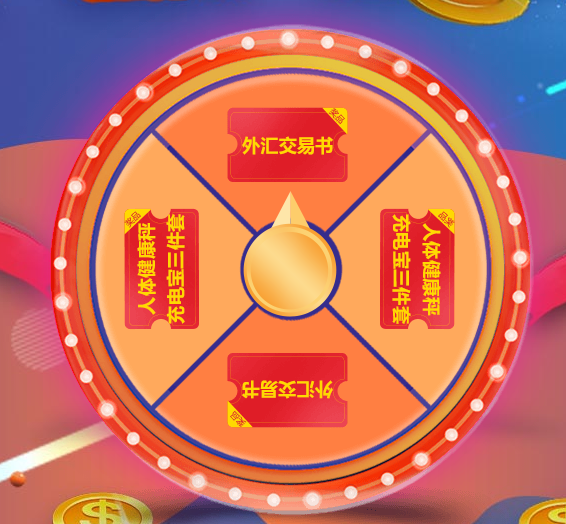
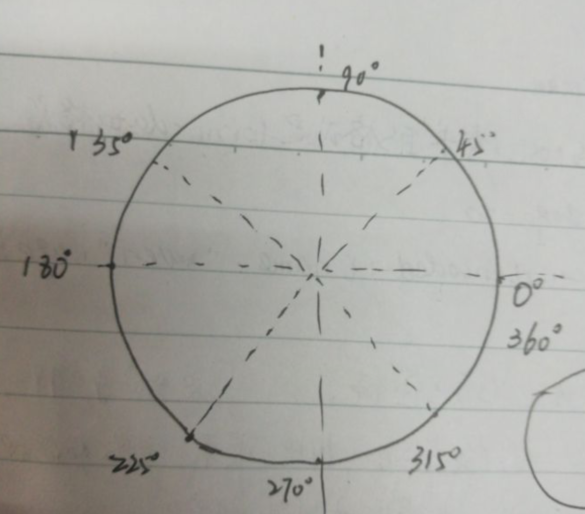
1.设定旋转的角度:

HTML部分:
转盘代码:

    <div class="lottery">

                <div class="lottery_box">

                    <div class="flash-light flash"></div>

                    <div class="lottery_cont" id="lottery_cont"></div>

                       <div class="lottery_btn" id="lottery_btn"></div>

                </div>

            </div>
立即注册弹窗:
<div class="popup">
<div class="popup-img" >
<div class="popup-btn"></div>
<div class="close">X</div>
</div>
</div>
/** lottery css **/

.lottery {

    position: absolute;

    text-align: center;

    height: 549px;

    width: 100%;

    background: url(images/lottery-bg.png) no-repeat top center;

    z-index: 4;

    top: 20%;

}

.lottery_cont{

position: absolute;

    height: 445px;

    width: 444px;

    background: url(images/lottery.png) no-repeat top center;

    z-index: 4;

    top: 52px;

    left: 50%;

    margin-left: -223px;

   transition: all .2s ease-out;

   -webkit-transition:all .2s ease-out;

}

.lottery_btn{

position: absolute;

    height: 126px;

    width: 94px;

    background: url(images/lot-btn.png) no-repeat top center;

    z-index: 4;

    top: 35.6%;

    left: 50%;

    margin-left: -48px;

    cursor: pointer;

}

.lottery_btn:hover{

    transform: scale(1.1);

}

/**popup css **/

.popup {

    position: absolute;

    top: 0px;

    width: 100%;

    background: rgba(0,0,0,0.5);

    z-index: 10;

    height: 100%;

    text-align: center;

    padding: 10% 0;

    display: none;

}

.popup-img{background: url(images/popup.png)top center no-repeat;width:481px;height:590px;margin: 0 auto;position: relative; }

.popup-btn{    position: absolute;

    width: 86%;

    bottom: 0%;

    left: 8%;

    height: 12%;

    cursor: pointer;}

.box {position: relative;}

.close {

    position: absolute;

    top: 0;

    color: #fff;

    font-size: 30px;

    right: -50%;

    cursor: pointer;

}
JS部分:

    var currentdeg=0;  //初始化角度

   function get_ram(){

        var willdeg=360+(parseInt(Math.random()*10)*36);

        return willdeg;

    }

    // var speed=willdeg/5;

       $('#lottery_btn').click(function(){

        var willdeg = get_ram();

      content.style.transform="rotate("+willdeg+"deg)";

        var enddeg=content.style.transform.slice(7);

         enddeg=willdeg-360;

          console.log(enddeg);

       var timer=setTimeout(function(){

            if(45<enddeg&&enddeg<=135){

                $(".popup").show(500);

                $(".popup-btn").addClass('popup-real');

            }

            else if(135<enddeg&&enddeg<=225){

                 $(".popup").show(500);

                $(".popup-btn").removeClass('popup-real');

            }

            else if(225<enddeg&&enddeg<=315){

                $(".popup").show(500);

                $(".popup-btn").addClass('popup-real');

            }

            else if(0<=enddeg&&enddeg<=45||315<enddeg&&enddeg<=360){

                  $(".popup").show(500);

                  $(".popup-btn").removeClass('popup-real');

            }

        },2000);

    });

 $(".close").click(function(){

     $(".popup").fadeOut(1000);

    content.style.transform="rotate(0deg)";

    });
此外滑到固定div的js代码为:
       $(".demo,.real,.popup-btn").click(function(){

         $('html,body').animate({scrollTop:$('#register').offset().top},2000);

                });
添加加载进度条功能:
<div id="loading">

<img src="data:images/loading.gif">

</div>

<style>

div#loading {width: 100%;height: 100%;position: fixed;background:#fff;z-index: 100000;text-align: center;}

 div#loading img{width: auto;position: fixed;top: 50%;}

</style>

<script>

$(window).on('load',function(){

    $("#loading").hide();

});

<script>
Js实现抽奖转盘,和点击返回某个模块顶部的功能的更多相关文章
- 使用CSS3+jquery.js 实现微信抽奖转盘效果
上次发表了一篇 微信抽奖转盘活动-效果源码分析 最近想起了刚接到这个项目时第一时间脑海里迸出的解决方法 “CSS3”! 为什么不能用CSS3来实现呢? 所以我打算用CSS3来实现这个效果.并不需要依赖 ...
- C#保留2位小数几种场景总结 游标遍历所有数据库循环执行修改数据库的sql命令 原生js轮盘抽奖实例分析(幸运大转盘抽奖) javascript中的typeof和类型判断
C#保留2位小数几种场景总结 场景1: C#保留2位小数,.ToString("f2")确实可以,但是如果这个数字本来就小数点后面三位比如1.253,那么转化之后就会变成1.2 ...
- 抽奖转盘(jqueryrotate.js)
jqueryrotate.js抽奖转盘,使用方便,兼容各浏览器,效果如下图 <!DOCTYPE> <head> <meta http-equiv="Conten ...
- jquery.rotate.js可选抽奖次数和中奖内容的转盘抽奖demo
需求: 最多可以抽奖5次,而且,每次只会中“2000元理财金”或者“谢谢参与”,其它的不会抽中(哈哈,果然都是套路). 效果如下: 一.页面结构: <div class="g-cont ...
- 【Vue.js游戏机实战】- Vue.js实现大转盘抽奖总结
大家好!先上图看看本次案例的整体效果. 实现思路: Vue component实现大转盘组件,可以嵌套到任意要使用的页面. css3 transform控制大转盘抽奖过程的动画效果. 抽奖组件内使用钩 ...
- JS:九宫格抽奖转盘实例
工作需要,所以做了个抽奖转盘的插件,当然这里只做最简单的演示.可以用于取代一些flash抽奖程序. 机制说明: 1.通过定义lottery-unit来控制节点的个数及索引: 2.通过设置lottery ...
- js中点击返回顶部
window.scrollTo(0, 0);当点击返回顶部的时候调用这个方法即可 handleScrollTop(){ window.scrollTo(0, 0); }
- Html5-Canvas实现简易的抽奖转盘
###Html5实现抽奖转盘效果 1.实现的基本效果 2.主要的内容 html5中canvas标签的使用 jQueryRotate.js旋转插件 3.主要html代码 <body> < ...
- 利用java实现抽奖转盘(着重安全控制)
本文是针对jquery 实现抽奖转盘作者的一个补充(主要用java去实现转盘结果生成及存储,解决jquery 做法 非法用户采用模拟器实现改变转盘值的风险性),针对jQuery的具体实现,请看案例:h ...
- jquery实现抽奖转盘
用jquery通过配置参数实现抽奖转盘 1.html代码 <!DOCTYPE html> <html lang="zh-CN"> <head> ...
随机推荐
- sql语句TRUNCATE 清空表数据
清空表数据 TRUNCATE TABLE zzsfp_hwmx;
- 从优秀到卓越:成为DevOps专家的7项软技能
在我的职业生涯中,遇见过许多专业人士,他们在技术上非常健全,对自己的领域和技术有很好的掌握和专业知识,但是由于缺乏软技能,他们错过了晋升.现场机会.高级技术面试以及职业生涯中的机会.很震惊吧,技术好却 ...
- 7 HTML锚点应用
7 锚点应用 锚点( anchor )是超链接的一种应用,也叫命名锚记,锚点可以像一个定位器一样,可以实现页面内的链接跳转,运用相当普遍.例如,我们有一个网页,由于内容太多,导致页面很长,而且里面的内 ...
- Native Drawing开发指导,实现HarmonyOS基本图形和字体的绘制
场景介绍 Native Drawing模块提供了一系列的接口用于基本图形和字体的绘制.常见的应用场景举例: ● 2D图形绘制. ● 文本绘制. 接口说明 接口名 描述 OH_Drawing_Bit ...
- DevEco Device Tool 3.0 Beta2新版本发布,新增实用功能一览
DevEco Device Tool是面向智能设备开发者提供的一站式集成开发环境,支持HarmonyOS Connect/OpenHarmony的组件按需定制,支持代码编辑.编译.烧录和调试.性能监测 ...
- Access Single User Mode (Reset Root Password)--CentOS 修改root密码
Access Single User Mode (Reset Root Password) Published on: Wed, Sep 17, 2014 at 12:52 pm EST FAQ L ...
- c# 属性类(特性)
前言 c# 属性类也称做特性.这是一篇垫文,为后面的过滤器和其他特性类的东西做铺垫. 正文 看一段代码: static void Main(string[] args) { Attribitefunc ...
- 重新整理.net core 计1400篇[四] (.net core 修改sdk )
前言 可能有些人还不知道什么是sdk,software development kit,中文是软件开发包的意思. 然后什么是软件开发包? 软件开发工具包是一些被软件工程师用于为特定的软件包.软件框架. ...
- MMDeploy部署实战系列【第二章】:mmdeploy安装及环境搭建
MMDeploy部署实战系列[第二章]:mmdeploy安装及环境搭建 这个系列是一个随笔,是我走过的一些路,有些地方可能不太完善.如果有那个地方没看懂,评论区问就可以,我给补充. 版权声明:本文为博 ...
- shell脚本中的运算符和条件判断
shell脚本中的运算符和条件判断: 一.算术运算符 在Shell脚本中,你可以使用各种运算符来执行数学运算.比较和逻辑操作. 计算方式: $[ ] $(( )) 例: a=$[(9+5)90] 打印 ...