
centos7下安装、配置Nginx、设置Nginx开机自启动
测试环境:
[root@centos-linux ~]# cat /etc/redhat-release
CentOS Linux release 7.6.1810 (Core)
[root@centos-linux ~]# php --version
PHP 7.2.32 (cli)
首先安装必要的库(nginx 中gzip模块需要 zlib 库,rewrite模块需要 pcre 库,ssl 功能需要openssl库)
1、安装相关的依赖包。
yum install -y gcc-c++
yum install -y pcre pcre-devel
yum install -y zlib zlib-devel
yum install -y openssl openssl-devel
2、下载Nginx
wget http://nginx.org/download/nginx-1.18.0.tar.gz
3、解压安装包
tar zxvf nginx-1.18.0.tar.gz
4、进入安装包目录
cd nginx-1.18.0/
5、编译安装
./configure --prefix=/usr/local/nginx --with-http_stub_status_module --with-http_ssl_module
make
make install
6、创建 Nginx 运行使用的用户 www:
/usr/sbin/groupadd www
/usr/sbin/useradd -g www www
7、nginx.conf最小配置(/usr/local/nginx/conf/nginx.conf),红色为新增内容
user www www;

worker_processes  1;

error_log /usr/local/nginx/logs/nginx_error.log crit; #日志位置和日志级别

pid /usr/local/nginx/nginx.pid;

events {

    worker_connections  1024;

}

http {

    include       mime.types;

    default_type  application/octet-stream;

    sendfile        on;

    keepalive_timeout  65;

    server {

        listen       80;

        server_name  localhost;

        index index.html index.htm index.php;

        root /usr/local/nginx/html;#站点目录

        location / {

            root   html;

            index  index.html index.htm;

        }

        error_page   500 502 503 504  /50x.html;

        location = /50x.html {

            root   html;

        }

    }

}
8、检查配置文件正确性的命令
# /usr/local/nginx/sbin/nginx -t
nginx: the configuration file /usr/local/nginx/conf/nginx.conf syntax is ok
nginx: configuration file /usr/local/nginx/conf/nginx.conf test is successful
9、启动Nginx
/usr/local/nginx/sbin/nginx

10、站点访问
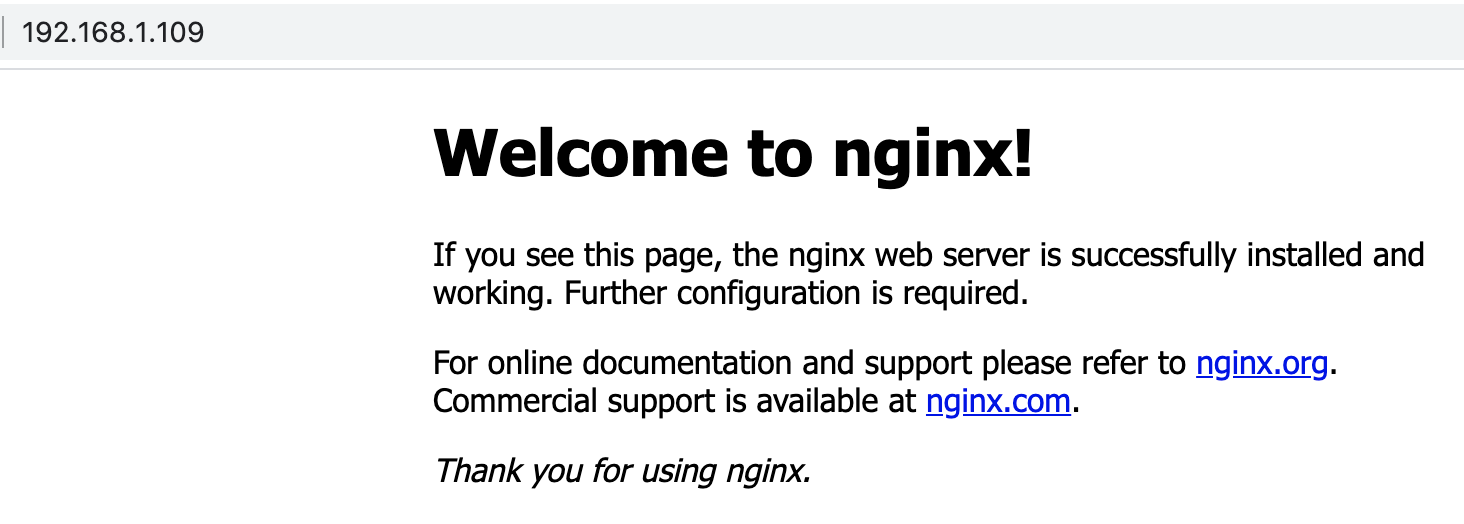
11、Nginx常用命令
/usr/local/webserver/nginx/sbin/nginx -s reload # 重新载入配置文件
/usr/local/webserver/nginx/sbin/nginx -s reopen # 重启Nginx
/usr/local/webserver/nginx/sbin/nginx -s stop # 停止 Nginx
12、Nginx调用PHP
先启动php-fpm
systemctl start php-fpm // 需要加入systemctl服务后才可以
在配置文件中增加如下内容
location ~ \.php$ {

            fastcgi_pass   127.0.0.1:9000;

            fastcgi_index  index.php;

            fastcgi_param  SCRIPT_FILENAME  $document_root$fastcgi_script_name;

            include        fastcgi_params;

         # include fastcgi.conf;  #或用此句替代以上两句。不通版本的nginx不一定都包含该文件,如果没有该配置文件,则使用上面两句话。
}
13、使用yum安装Nignx
// yum -y install epel-release  // 如果需要添加CentOS EPEL仓库

yum -y install nginx
启动Nginx
systemctl start nginx
14、卸载Nginx
查找nginx相关文件
find / -name nginx*
从源头删除
rm -rf /usr/sbin/nginx

rm -rf /etc/nginx

rm -rf /etc/init.d/nginx
在使用yum清理
yum remove nginx
15、设置Nginx开机自启动
在/lib/systemd/system目录下,创建nginx.service文件
编辑nginx.service文件,增加如下内容
[Unit]

Description=nginx service

After=network.target

[Service]

Type=forking

ExecStart=/usr/local/nginx/sbin/nginx

ExecReload=/usr/local/nginx/sbin/nginx -s reload

ExecStop=/usr/local/nginx/sbin/nginx -s quit

PrivateTmp=true

[Install]

WantedBy=multi-user.target
# systemctl start nginx.service          // 启动nginx服务

# systemctl stop nginx.service           // 停止服务

# systemctl restart nginx.service        // 重新启动服务

# systemctl list-units --type=service     // 查看所有已启动的服务

# systemctl status nginx.service          // 查看服务当前状态

# systemctl enable nginx.service          // 设置开机自启动

# systemctl disable nginx.service         //停止开机自启动
可能遇到的错误提示:
centos7下安装、配置Nginx、设置Nginx开机自启动的更多相关文章
- Centos7下安装配置Redsocks
Redsocks是一个开源的网络程序,代码依赖开源的libevent网络库.Redsocks允许你将所有TCP连接重定向到SOCKS或HTTPS代理,比如Shadowsocks(Centos7下安装配 ...
- Centos7系统下编写systemd脚本设置redis开机自启动
今天想设置redis开机自启动,我觉得这样子比较好,但是在网上找了很长时间发现大家都是基于chkconfig的写法来设置的,并不能由systemd进程来统一管理,所以这里我自己编写了一个,希望大家可以 ...
- CentOS7下安装配置Nginx
一:安装依赖项 1.pcre:2.openssl:3.zlib:4.gcc:可直接通过yum安装 二:创建nginx账户(可以配置nginx.conf的user为此账户) useradd nginx ...
- Centos下安装配置WordPress与nginx教程
感谢大佬:https://www.howtoing.com/how-to-install-wordpress-with-nginx-on-centos-6-2 WordPress是一个免费和开源网站和 ...
- CentOS7下安装配置vncserver
之前试了xmanager,不过好像和在centos6有很大不同,居然没成功,然后找到了vncserver,试了下,成了 参考:http://blog.csdn.net/jiangliqing1234/ ...
- Centos7 下安装配置tomcat7
首先下载压缩包 wget http://mirrors.tuna.tsinghua.edu.cn/apache/tomcat/tomcat-7/v7.0.78/bin/apache-tomcat-7. ...
- Centos7下安装配置keepalived
这里用的是两台设备做高可用 master服务器ip地址:192.168.12.78 slave服务器ip地址:192.168.12.79 虚拟ip(VIP,一个尚未占用的内网ip即可)地址:192.1 ...
- Linux(centos7)安装redis并设置redis开机自启动
1.下载redis安装包 wget http://download.redis.io/releases/redis-4.0.6.tar.gz 2.解压安装包 tar -zxvf redis-4.0.6 ...
- centos7下安装配置prometheus
prometheus官网:https://prometheus.io/download/ 搭建环境参考:https://blog.csdn.net/baidu_36943075/article/det ...
- Ubuntu14.04下安装redis-3.2.0以及开机自启动
去官网下载Redis-3.2.0.tar.gz,将redis-3.2.0.tar.gz放入/opt目录下 解压redis-3.2.0.tar.gz xiaoyao@xiaoyao-virtual-ma ...
随机推荐
- OSPF-OSPF通用报头
验证理论 1.OSPF信息类型,每个信息类型的作用,每个信息类型中每个字段存在的价值 第一节--通用报头 实验拓扑: 初始配置: 将接口配置地址,抓包开始后配置上OSPF 1.OSPF通用报头 OSP ...
- Java第二次博客作业
Java第二次博客作业 时间过的很快啊,在不知不觉中这门课程的学习也就快要过去一半了,现在就来总结一下在这个第二个月的学习当中存在的问题以及得到的心得. 1.前言 第四次题目集和第五次题目集给我的感觉 ...
- [翻译]Go与C#的比较,第二篇:垃圾回收
Go vs C#, part 2: Garbage Collection | by Alex Yakunin | ServiceTitan - Titan Tech | Medium 目录 译者注 什 ...
- Spring Cloud底层原理解析
概述 毫无疑问,Spring Cloud是目前微服务架构领域的翘楚,无数的书籍博客都在讲解这个技术.不过大多数讲解还停留在对Spring Cloud功能使用的层面,其底层的很多原理,很多人可能并不知晓 ...
- CDQ分治(三维偏序集)
排序,三关键字 去重 归并排序+树状数组 #include<bits/stdc++.h> using namespace std; #define re register int cons ...
- MIT6.828 Lab2 内存管理
Lab2 0. 任务介绍 你将编写一个内存管理代码.主要分为两大部分.分别对物理内存和虚拟内存的管理. 对于物理内存,每次分配内存分配器会为你分配4096bytes.也称为一个页(在大部分操作系统中一 ...
- 第11章 PADS功能使用技巧(2)-最全面
原文链接点击这里 七.Flood与Hatch有什么区别? 我们先看看PADS Layout Help 文档是怎么说的,如下图所示: 从检索到的帮助信息,我们可以得到Hatch与Pour的区别,原文如下 ...
- zookeeper集群及kafka集群搭建
1.zookeeper集群搭建 1.1 上传安装包 官网推荐至少3个节点,我们这里也用三个节点192.169.2.18 192.169.1.82 192.169.1.95 准备好安装包,zooke ...
- 服务器通信REST、gRPC,Swagger/OpenAPI,Consul
服务间的通信方式是在采用微服务架构时需要做出一个最基本的决策.默认的选项是通过 HTTP 发送 JSON,也就是所谓的 REST API.我们也是从 REST 开始的,但最近我们决定改用 gRPC. ...
- 三剑客-awk
1.作用特点 排除信息 查询信息 统计信息 替换信息 2.语法格式 awk [参数] '模式-动作' 文件 3.awk命令执行原理 4.命令使用方法 创建测试环境 [root@shuai ~]# ca ...