
Lua OpenResty容器化(考古历程)
背景
公司有几个“远古时期”的项目,一直都相对较为稳定,但是项目每天总会在一些时段,请求每分钟QPS到达峰值800K左右,导致机器的性能出现了一些瓶颈,每到峰值时期,总会出现一个告警,实在是令人头疼。更糟糕的是这只是远古时期项目中的其中一个而且都是部署在物理机器上,所有机器加起来接近100台。
出于稳定性(削峰)和成本的角度考虑,我们最终决定将所有的Lua OpenResty项目上到k8s集群。

选择合适的openresty基础镜像
通过查看线上在使用的openresty版本信息:
/usr/local/openresty/nginx/sbin/nginx -V

nginx version: openresty/1.13.6.2

built by gcc 4.8.5 20150623 (Red Hat 4.8.5-16) (GCC)

built with OpenSSL 1.1.0h 27 Mar 2018 (running with OpenSSL 1.1.0k 28 May 2019)

TLS SNI support enabled

configure arguments: --prefix=/usr/local/openresty/nginx ...
lua -v

Lua 5.1.4 Copyright (C) 1994-2008 Lua.org, PUC-Rio
得知在使用的是openresty/1.13.6.2和Lua 5.1.4 :
docker pull openresty/openresty:1.13.6.2-2-centos
Q:能不能选择使用更小的alpine系列的呢?
A:因为项目依赖许多的so库,都是glibc编译的,alpine的话是musl-lib,不兼容。
Q:为啥不重新编译?
A:一方面是风险问题,另外一方面是有一些so库不一定能找到。
查找项目的动态库依赖关系
Nginx配置文件
$ tree -L 3 nginx/conf

nginx/conf

├── vhosts/

│ ├── inner.prometheus.nginx.conf

│ └── project.nginx.conf

└── nginx.conf
自编译的C动态库文件,如binary_protocol.so
编写好dockerfile,然后将项目打包进容器,执行:
/usr/local/openresty/nginx/sbin/nginx nginx -t
果不其然,报错:
/usr/local/openresty/nginx/lua/init.lua:1: module 'binary_protocol' not found:

no field package.preload['binary_protocol']

no file '/usr/local/openresty/nginx/lua/binary_protocol.lua'

no file '/usr/local/openresty/nginx/lua_lib/binary_protocol.lua'

no file '/usr/local/openresty/nginx/luarocks/share/lua/5.1/binary_protocol.lua'

no file '/usr/local/openresty/site/lualib/binary_protocol.ljbc'

…… ……

no file '/usr/local/openresty/nginx/luarocks/lib64/lua/5.1/binary_protocol.so'

no file '/usr/local/openresty/site/lualib/binary_protocol.so'

no file '/usr/local/openresty/lualib/binary_protocol.so'

no file '/usr/local/openresty/site/lualib/binary_protocol.so'

no file '/usr/local/openresty/lualib/binary_protocol.so'

no file './binary_protocol.so'

no file '/usr/local/lib/lua/5.1/binary_protocol.so'

no file '/usr/local/openresty/luajit/lib/lua/5.1/binary_protocol.so'

no file '/usr/local/lib/lua/5.1/loadall.so'

no file '/usr/local/openresty/luajit/lib/lua/5.1/binary_protocol.so'
Q:仔细观察,发现so动态库是内部编译出来提供给lua调用的,如何找到它们呢?
通过ldd、pldd命令,可以查看so所相关的依赖
ldd binary_protocol.so

linux-vdso.so.1 => (0x00007fff40bd4000)

libtolua++.so => not found ## 会告诉我们ldd缺少这个依赖

libcrypto.so.6 => not found

liblog4cplus.so.2 => not found

libstdc++.so.6 => /lib64/libstdc++.so.6 (0x00007f458d9ef000)

libm.so.6 => /lib64/libm.so.6 (0x00007f458d6ed000)

libgcc_s.so.1 => /lib64/libgcc_s.so.1 (0x00007f458d4d7000)

libc.so.6 => /lib64/libc.so.6 (0x00007f458d10a000)

/lib64/ld-linux-x86-64.so.2 (0x00007f458df1e000)
通过这些方法,一点点跟踪,知道找齐所有依赖库即可。
Luarocks外部包文件
从线上的nginx.conf找到lua_package_path和lua_package_cpath中包括的luarocks路径,再从这个路径中,找到manifest文件,此文件有描述安装了哪些luarocks库。

luarocks 外部依赖安装
RUN luarocks --tree=${WORK_DIR}/luarocks install lua-cjson \

&& luarocks --tree=${WORK_DIR}/luarocks install penlight \

&& luarocks --tree=${WORK_DIR}/luarocks install version \

&& luarocks --tree=${WORK_DIR}/luarocks install lua-resty-http \

&& luarocks --tree=${WORK_DIR}/luarocks install luaunit \

&& luarocks --tree=${WORK_DIR}/luarocks install ldoc \

&& luarocks --tree=${WORK_DIR}/luarocks install lua-discount \

&& luarocks --tree=${WORK_DIR}/luarocks install serpent \

&& luarocks --tree=${WORK_DIR}/luarocks install luacov \

&& luarocks --tree=${WORK_DIR}/luarocks install cluacov \

&& luarocks --tree=${WORK_DIR}/luarocks install mmdblua \

&& luarocks --tree=${WORK_DIR}/luarocks install lua-resty-jit-uuid \

&& luarocks --tree=${WORK_DIR}/luarocks install luasocket

RUN luarocks --tree=/usr/local/openresty/nginx/luarocks install nginx-lua-prometheus
遇到的问题及其解决方法
问题1:容器老被OOM Killed
经过分析,的确占用了非常大的内存:
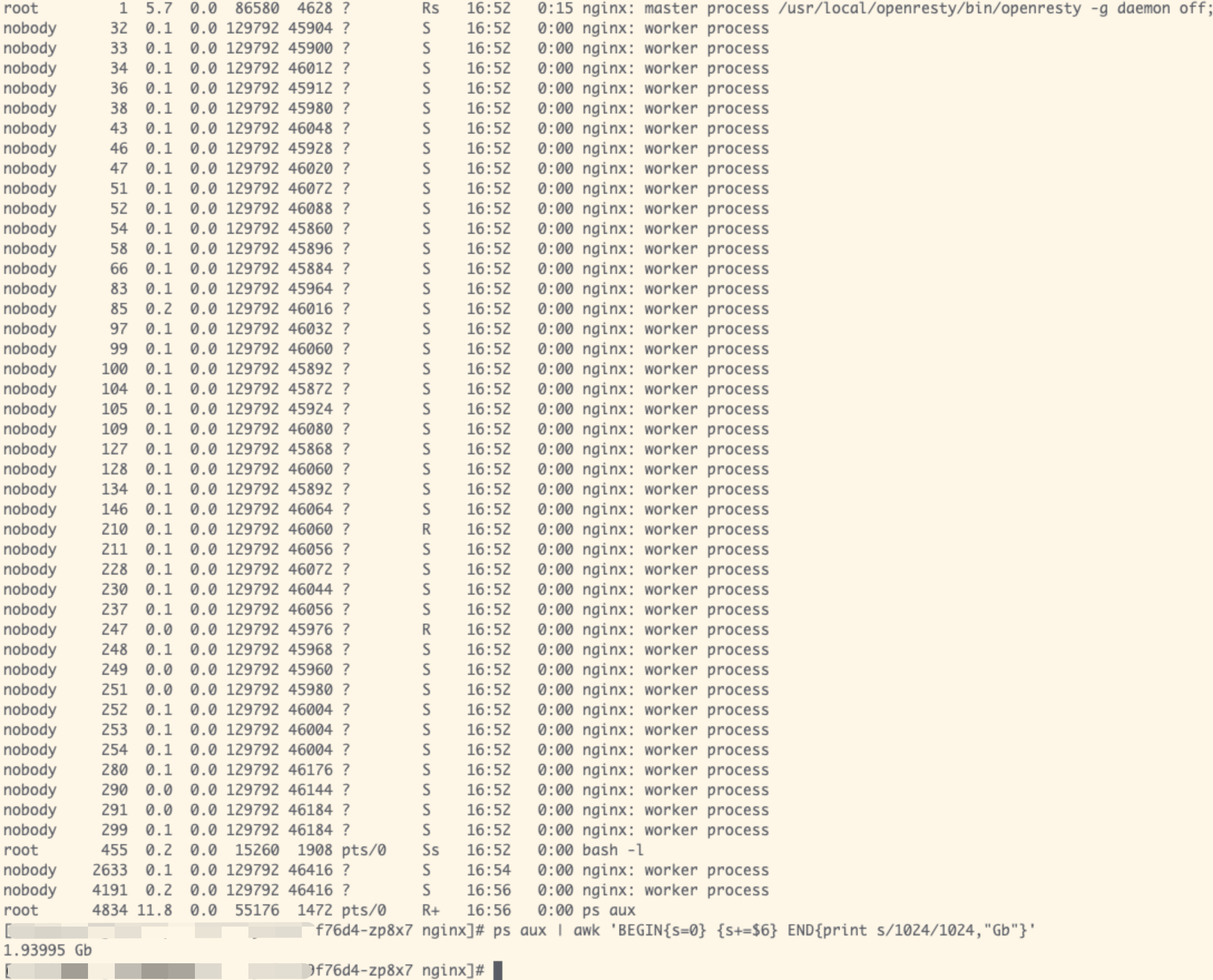
通过ps命令定位到 worker 数量非常多
解决方法:
限定worker数量:worker_processes 4;
Q:为啥会产生这么多worker?
A:在k8s上,nginx 启动的 worker process,并没有遵循我们给 Pod 设置的 limit,而是与 Pod 所在 node 有关。
问题2:nginx worker process exited on signal 9

是由于Deployment设定的内存限额太小所致
解决方法:调大requests资源限额
resources:

limits:

cpu: "2000m"

memory: "1Gi"

requests:

cpu: "1000m"

memory: "512Mi"
ps:启动4个Worker大约消耗200Mi。
问题3:attempt to index upvalue ‘result_dict’ (a nil value)
原因是线上的nginx.conf有相关的定义
而代码层面上没有,加上即可:
lua_shared_dict monitor_status 150m;
缩减镜像大小的一个小技巧
如何接入Prometheus监控
在OpenResty中接入 Prometheus,https://github.com/knyar/nginx-lua-prometheus
安装依赖
luarocks --tree=/usr/local/openresty/nginx/luarocks install nginx-lua-prometheus
新增配置
为nginx/conf/vhosts/project.nginx.conf增加:
lua_shared_dict prometheus_metrics 10M;

log_by_lua_block {

metric_requests:inc(1, {ngx.var.server_name, ngx.var.status})

metric_latency:observe(tonumber(ngx.var.request_time), {ngx.var.server_name})

}
新增配置文件
新增nginx/conf/vhosts/inner.prometheus.nginx.conf
server {

listen 8099;

location /metrics {

content_by_lua_block {

metric_connections:set(ngx.var.connections_reading, {"reading"})

metric_connections:set(ngx.var.connections_waiting, {"waiting"})

metric_connections:set(ngx.var.connections_writing, {"writing"})

prometheus:collect()

}

}

}
更新deployment配置
apiVersion: extensions/v1beta1

kind: Deployment

metadata:

name: ${name}

namespace: ${namespace}

labels:

test-app: test-server

spec:

replicas: ${replicas}

template:

metadata:

labels:

test-app: test-server

annotations: # <----------------------- 新增

prometheus.io/scrape: "true"

prometheus.io/path: "/metrics"

prometheus.io/port: "8099"
总结
至此,lua的一个项目容器化完成,中途遇到的问题还是蛮多的,上面也只记录了几个主要的步骤和问题。
Lua OpenResty容器化(考古历程)的更多相关文章
- 用Nginx+Lua(OpenResty)开发高性能Web应用
在互联网公司,Nginx可以说是标配组件,但是主要场景还是负载均衡.反向代理.代理缓存.限流等场景:而把Nginx作为一个Web容器使用的还不是那么广泛.Nginx的高性能是大家公认的,而Nginx开 ...
- Nginx+Lua(OpenResty)开发高性能Web应用
使用Nginx+Lua(OpenResty)开发高性能Web应用 博客分类: 跟我学Nginx+Lua开发 架构 ngx_luaopenresty 在互联网公司,Nginx可以说是标配组件,但是主要场 ...
- 使用Nginx+Lua(OpenResty)开发高性能Web应用
摘自(http://jinnianshilongnian.iteye.com/blog/2280928) 在互联网公司,Nginx可以说是标配组件,但是主要场景还是负载均衡.反向代理.代理缓存.限流等 ...
- 支付宝客户端架构解析:Android 容器化框架初探
摘要: 本文将介绍支付宝 Android 容器化框架设计的基本思路. 1. 前言 由本章节开始,我们将从支付宝客户端的架构设计方案入手,细分拆解客户端在“容器化框架设计”.“网络优化”.“性能启动优化 ...
- 容器化-Docker介绍
导读:本文章对Docker技术进行了介绍,阐述了Docker的技术发展历程.容器与虚拟机的差异.Docker原理.特点.Docker三组件和Docker带来的影响,为我们进一步理解Docker打下基础 ...
- 安装Nginx+Lua+OpenResty开发环境配置全过程实例
安装Nginx+Lua+OpenResty开发环境配置全过程实例 OpenResty由Nginx核心加很多第三方模块组成,默认集成了Lua开发环境,使得Nginx可以作为一个Web Server使用. ...
- 【运维技术】JENKINS管道部署容器化初探
目标服务器安装docker参考官方文档 https://docs.docker.com/install/linux/docker-ce/centos/ (可选)在目标服务器上安装docker私服 ht ...
- 案例 | 腾讯广告 AMS 的容器化之路
作者 张煜,15年加入腾讯并从事腾讯广告维护工作.20年开始引导腾讯广告技术团队接入公司的TKEx-teg,从业务的日常痛点并结合腾讯云原生特性来完善腾讯广告自有的容器化解决方案 项目背景 腾讯广告承 ...
- docker4dotnet #2 容器化主机
.NET 猿自从认识了小鲸鱼,感觉功力大增.上篇<docker4dotnet #1 前世今生&世界你好>中给大家介绍了如何在Windows上面配置Docker for Window ...
随机推荐
- HDFS 02 - HDFS 的机制:副本机制、机架感知机制、负载均衡机制
目录 1 - HDFS 的副本机制 2 - HDFS 的机架感知机制 3 - HDFS 的负载均衡机制 参考资料 版权声明 1 - HDFS 的副本机制 HDFS 中的文件,在物理上都是以分块(blo ...
- Unity3d 拖拽脚本报错Can't add the script component "" because the script class cannot be found
解决办法: ①报错原因:文件名与文件内容中的类名不相符. ②关闭360.鲁大师等防护软件,重新安装系统.
- Google单元测试框架gtest之官方sample笔记1--简单用例
1.0 通用部分 和常见的测试工具一样,gtest提供了单体测试常见的工具和组件.比如判断各种类型的值相等,大于,小于等,管理多个测试的测试组如testsuit下辖testcase,为了方便处理初始化 ...
- TERSUS无代码开发(笔记02)-简单实例加法
简单实例加法 1.用户端元件(显示元件)(40个) 图标 英文名称 元件名称 使用说明 服务器端 客户端 Pane 显示块 是一个显示块,是HTML的div标签 √ Row 行 行元件中的显示元件 ...
- 微信小程序:快速生成less文件类嵌套的结构
全部选中标签结构,按住ctrl+shift+p,选中插件Generate CSS tree(提前安装CSS Tree),先删除undefined,将img替换成image,删除标签名view. 完整的 ...
- Go的map
目录 map 一.map的创建 1.map的类型 2.定义并初始化 二.给map添加元素 三.获取map的元素 四.删除map的元素 五.获取map的长度 六.map的类型 七.map的相等性 八.循 ...
- 第45天学习打卡(Set 不安全 Map不安全 Callable 常用的辅助类 读写锁 阻塞队列 线程池)
Set不安全 package com.kuang.unsafe; import java.util.*; import java.util.concurrent.CopyOnWriteArray ...
- SOLID架构设计原则
最近通读了<架构整洁之道>,受益匪浅,遂摘选出设计原则部分,与大家分享,希望大家能从中获益. 以下为书中第3部分 设计原则的原文. 设计原则概述 通常来说,要想构建-个好的软件系统,应该从 ...
- AOP +FreeSql 跨方法异步事务
AOP +FreeSql 跨方法异步事务 Autofac.Extensions.DependencyInjection Autofac.Extras.DynamicProxy Castle.Core. ...
- MySQL提权 通过UDF
目录 UDF是什么 命令执行 文本写入 Example: 远程写入 反弹Shell 提权 UDF是什么 参考:https://www.cnblogs.com/litlife/p/9030673.htm ...