
ant生成jmeter测试报告没有数据【已解决】
1.如下图,在配置build时,到网上找配置文件,配置样式表文件名经常是jmeter-results-detail-report_21.xsl,
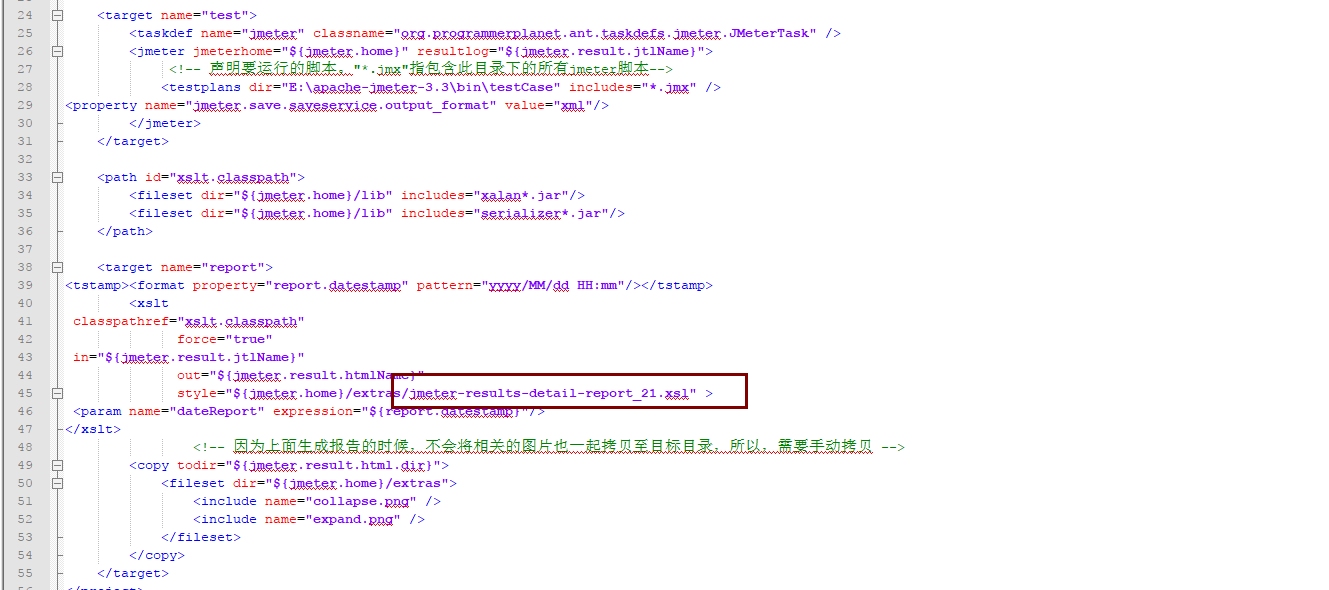
3.但是在其他版本可能被不是这个文件名,在jmeter根目录下模糊搜索 jmeter-res,就会出来,然后再把jmeter-results-detail-report.xsl替换到上面ant的配置文件中

3.再次使用ant尝试生成测试报告如果测试报告生成了,但是只是个空文件。那么需要把jmeter-results-detail-report.xsl里内容都替换掉(替换整个文件内容)再尝试生成
<?xml version="1.0"?>
<xsl:stylesheet xmlns:xsl="http://www.w3.org/1999/XSL/Transform" version="1.0"> <!--
Licensed to the Apache Software Foundation (ASF) under one or more
contributor license agreements. See the NOTICE file distributed with
this work for additional information regarding copyright ownership.
The ASF licenses this file to You under the Apache License, Version 2.0
(the "License"); you may not use this file except in compliance with
the License. You may obtain a copy of the License at http://www.apache.org/licenses/LICENSE-2.0 Unless required by applicable law or agreed to in writing, software
distributed under the License is distributed on an "AS IS" BASIS,
WITHOUT WARRANTIES OR CONDITIONS OF ANY KIND, either express or implied.
See the License for the specific language governing permissions and
limitations under the License.
--> <!--
Stylesheet for processing 2.1 output format test result files
To uses this directly in a browser, add the following to the JTL file as line 2:
<?xml-stylesheet type="text/xsl" href="../extras/jmeter-results-detail-report_21.xsl"?>
and you can then view the JTL in a browser
--> <xsl:output method="html" indent="yes" encoding="UTF-8" doctype-public="-//W3C//DTD HTML 4.01 Transitional//EN" /> <!-- Defined parameters (overrideable) -->
<xsl:param name="showData" select="'n'"/>
<xsl:param name="titleReport" select="'Load Test Results'"/>
<xsl:param name="dateReport" select="'date not defined'"/> <xsl:template match="testResults">
<html>
<head>
<title><xsl:value-of select="$titleReport" /></title>
<style type="text/css">
body {
font:normal 68% verdana,arial,helvetica;
color:#000000;
}
table tr td, table tr th {
font-size: 68%;
}
table.details tr th{
color: #ffffff;
font-weight: bold;
text-align:center;
background:#2674a6;
white-space: nowrap;
}
table.details tr td{
background:#eeeee0;
white-space: nowrap;
}
h1 {
margin: 0px 0px 5px; font: 165% verdana,arial,helvetica
}
h2 {
margin-top: 1em; margin-bottom: 0.5em; font: bold 125% verdana,arial,helvetica
}
h3 {
margin-bottom: 0.5em; font: bold 115% verdana,arial,helvetica
}
.Failure {
font-weight:bold; color:red;
} img
{
border-width: 0px;
} .expand_link
{
position=absolute;
right: 0px;
width: 27px;
top: 1px;
height: 27px;
} .page_details
{
display: none;
} .page_details_expanded
{
display: block;
display/* hide this definition from IE5/6 */: table-row;
} </style>
<script language="JavaScript"><![CDATA[
function expand(details_id)
{ document.getElementById(details_id).className = "page_details_expanded";
} function collapse(details_id)
{ document.getElementById(details_id).className = "page_details";
} function change(details_id)
{
if(document.getElementById(details_id+"_image").src.match("expand"))
{
document.getElementById(details_id+"_image").src = "collapse.png";
expand(details_id);
}
else
{
document.getElementById(details_id+"_image").src = "expand.png";
collapse(details_id);
}
}
]]></script>
</head>
<body> <xsl:call-template name="pageHeader" /> <xsl:call-template name="summary" />
<hr size="1" width="95%" align="center" /> <xsl:call-template name="pagelist" />
<hr size="1" width="95%" align="center" /> <xsl:call-template name="detail" /> </body>
</html>
</xsl:template> <xsl:template name="pageHeader">
<h1><xsl:value-of select="$titleReport" /></h1>
<table width="100%">
<tr>
<td align="left">Date report: <xsl:value-of select="$dateReport" /></td>
<td align="right">Designed for use with <a href="http://jmeter.apache.org/">JMeter</a> and <a href="http://ant.apache.org">Ant</a>.</td>
</tr>
</table>
<hr size="1" />
</xsl:template> <xsl:template name="summary">
<h2>Summary</h2>
<table align="center" class="details" border="0" cellpadding="5" cellspacing="2" width="95%">
<tr valign="top">
<th># Samples</th>
<th>Failures</th>
<th>Success Rate</th>
<th>Average Time</th>
<th>Min Time</th>
<th>Max Time</th>
</tr>
<tr valign="top">
<xsl:variable name="allCount" select="count(/testResults/*)" />
<xsl:variable name="allFailureCount" select="count(/testResults/*[attribute::s='false'])" />
<xsl:variable name="allSuccessCount" select="count(/testResults/*[attribute::s='true'])" />
<xsl:variable name="allSuccessPercent" select="$allSuccessCount div $allCount" />
<xsl:variable name="allTotalTime" select="sum(/testResults/*/@t)" />
<xsl:variable name="allAverageTime" select="$allTotalTime div $allCount" />
<xsl:variable name="allMinTime">
<xsl:call-template name="min">
<xsl:with-param name="nodes" select="/testResults/*/@t" />
</xsl:call-template>
</xsl:variable>
<xsl:variable name="allMaxTime">
<xsl:call-template name="max">
<xsl:with-param name="nodes" select="/testResults/*/@t" />
</xsl:call-template>
</xsl:variable>
<xsl:attribute name="class">
<xsl:choose>
<xsl:when test="$allFailureCount > 0">Failure</xsl:when>
</xsl:choose>
</xsl:attribute>
<td align="center">
<xsl:value-of select="$allCount" />
</td>
<td align="center">
<xsl:value-of select="$allFailureCount" />
</td>
<td align="center">
<xsl:call-template name="display-percent">
<xsl:with-param name="value" select="$allSuccessPercent" />
</xsl:call-template>
</td>
<td align="center">
<xsl:call-template name="display-time">
<xsl:with-param name="value" select="$allAverageTime" />
</xsl:call-template>
</td>
<td align="center">
<xsl:call-template name="display-time">
<xsl:with-param name="value" select="$allMinTime" />
</xsl:call-template>
</td>
<td align="center">
<xsl:call-template name="display-time">
<xsl:with-param name="value" select="$allMaxTime" />
</xsl:call-template>
</td>
</tr>
</table>
</xsl:template> <xsl:template name="pagelist">
<h2>Pages</h2>
<table align="center" class="details" border="0" cellpadding="5" cellspacing="2" width="95%">
<tr valign="top">
<th>URL</th>
<th># Samples</th>
<th>Failures</th>
<th>Success Rate</th>
<th>Average Time</th>
<th>Min Time</th>
<th>Max Time</th>
<th></th>
</tr>
<xsl:for-each select="/testResults/*[not(@lb = preceding::*/@lb)]">
<xsl:variable name="label" select="@lb" />
<xsl:variable name="count" select="count(../*[@lb = current()/@lb])" />
<xsl:variable name="failureCount" select="count(../*[@lb = current()/@lb][attribute::s='false'])" />
<xsl:variable name="successCount" select="count(../*[@lb = current()/@lb][attribute::s='true'])" />
<xsl:variable name="successPercent" select="$successCount div $count" />
<xsl:variable name="totalTime" select="sum(../*[@lb = current()/@lb]/@t)" />
<xsl:variable name="averageTime" select="$totalTime div $count" />
<xsl:variable name="minTime">
<xsl:call-template name="min">
<xsl:with-param name="nodes" select="../*[@lb = current()/@lb]/@t" />
</xsl:call-template>
</xsl:variable>
<xsl:variable name="maxTime">
<xsl:call-template name="max">
<xsl:with-param name="nodes" select="../*[@lb = current()/@lb]/@t" />
</xsl:call-template>
</xsl:variable>
<tr valign="top">
<xsl:attribute name="class">
<xsl:choose>
<xsl:when test="$failureCount > 0">Failure</xsl:when>
</xsl:choose>
</xsl:attribute>
<td>
<xsl:if test="$failureCount > 0">
<a><xsl:attribute name="href">#<xsl:value-of select="$label" /></xsl:attribute>
<xsl:value-of select="$label" />
</a>
</xsl:if>
<xsl:if test="0 >= $failureCount">
<xsl:value-of select="$label" />
</xsl:if>
</td>
<td align="center">
<xsl:value-of select="$count" />
</td>
<td align="center">
<xsl:value-of select="$failureCount" />
</td>
<td align="right">
<xsl:call-template name="display-percent">
<xsl:with-param name="value" select="$successPercent" />
</xsl:call-template>
</td>
<td align="right">
<xsl:call-template name="display-time">
<xsl:with-param name="value" select="$averageTime" />
</xsl:call-template>
</td>
<td align="right">
<xsl:call-template name="display-time">
<xsl:with-param name="value" select="$minTime" />
</xsl:call-template>
</td>
<td align="right">
<xsl:call-template name="display-time">
<xsl:with-param name="value" select="$maxTime" />
</xsl:call-template>
</td>
<td align="center">
<a href="">
<xsl:attribute name="href"><xsl:text/>javascript:change('page_details_<xsl:value-of select="position()" />')</xsl:attribute>
<img src="expand.png" alt="expand/collapse"><xsl:attribute name="id"><xsl:text/>page_details_<xsl:value-of select="position()" />_image</xsl:attribute></img>
</a>
</td>
</tr> <tr class="page_details">
<xsl:attribute name="id"><xsl:text/>page_details_<xsl:value-of select="position()" /></xsl:attribute>
<td colspan="8" bgcolor="#FF0000">
<div align="center">
<b>Details for Page "<xsl:value-of select="$label" />"</b>
<table bordercolor="#000000" bgcolor="#2674A6" border="0" cellpadding="1" cellspacing="1" width="95%">
<tr>
<th>Thread</th>
<th>Iteration</th>
<th>Time (milliseconds)</th>
<th>Bytes</th>
<th>Success</th>
</tr> <xsl:for-each select="../*[@lb = $label and @tn != $label]">
<tr>
<td><xsl:value-of select="@tn" /></td>
<td align="center"><xsl:value-of select="position()" /></td>
<td align="right"><xsl:value-of select="@t" /></td>
<!-- TODO allow for missing bytes field -->
<td align="right"><xsl:value-of select="@by" /></td>
<td align="center"><xsl:value-of select="@s" /></td>
</tr>
</xsl:for-each> </table>
</div>
</td>
</tr> </xsl:for-each>
</table>
</xsl:template> <xsl:template name="detail">
<xsl:variable name="allFailureCount" select="count(/testResults/*[attribute::s='false'])" /> <xsl:if test="$allFailureCount > 0">
<h2>Failure Detail</h2> <xsl:for-each select="/testResults/*[not(@lb = preceding::*/@lb)]"> <xsl:variable name="failureCount" select="count(../*[@lb = current()/@lb][attribute::s='false'])" /> <xsl:if test="$failureCount > 0">
<h3><xsl:value-of select="@lb" /><a><xsl:attribute name="name"><xsl:value-of select="@lb" /></xsl:attribute></a></h3> <table align="center" class="details" border="0" cellpadding="5" cellspacing="2" width="95%">
<tr valign="top">
<th>Response</th>
<th>Failure Message</th>
<xsl:if test="$showData = 'y'">
<th>Response Data</th>
</xsl:if>
</tr> <xsl:for-each select="/testResults/*[@lb = current()/@lb][attribute::s='false']">
<tr>
<td><xsl:value-of select="@rc | @rs" /> - <xsl:value-of select="@rm" /></td>
<td><xsl:value-of select="assertionResult/failureMessage" /></td>
<xsl:if test="$showData = 'y'">
<td><xsl:value-of select="./binary" /></td>
</xsl:if>
</tr>
</xsl:for-each> </table>
</xsl:if> </xsl:for-each>
</xsl:if>
</xsl:template> <xsl:template name="min">
<xsl:param name="nodes" select="/.." />
<xsl:choose>
<xsl:when test="not($nodes)">NaN</xsl:when>
<xsl:otherwise>
<xsl:for-each select="$nodes">
<xsl:sort data-type="number" />
<xsl:if test="position() = 1">
<xsl:value-of select="number(.)" />
</xsl:if>
</xsl:for-each>
</xsl:otherwise>
</xsl:choose>
</xsl:template> <xsl:template name="max">
<xsl:param name="nodes" select="/.." />
<xsl:choose>
<xsl:when test="not($nodes)">NaN</xsl:when>
<xsl:otherwise>
<xsl:for-each select="$nodes">
<xsl:sort data-type="number" order="descending" />
<xsl:if test="position() = 1">
<xsl:value-of select="number(.)" />
</xsl:if>
</xsl:for-each>
</xsl:otherwise>
</xsl:choose>
</xsl:template> <xsl:template name="display-percent">
<xsl:param name="value" />
<xsl:value-of select="format-number($value,'0.00%')" />
</xsl:template> <xsl:template name="display-time">
<xsl:param name="value" />
<xsl:value-of select="format-number($value,'0 ms')" />
</xsl:template> </xsl:stylesheet>
ant生成jmeter测试报告没有数据【已解决】的更多相关文章
- jquery easyui使用(三)······datagrid加载数据(已解决)
<div id="table_Data"> </div> $("#table_Data").datagrid({ toolbar: '# ...
- Linux下利用Ant调用Jmeter脚本生成HTML测试报告
今天我们学习如何利用Ant调用Jmeter脚本,并将生成的 jtl 文件转换为 HTML 格式的测试报告. 准备工作 需要在Linux上提前安装好 JDK. Jmeter 和 Ant. 1,JDK(可 ...
- Jenkins+Jmeter+Ant 生成测试报告
<?xml version="1.0" encoding="UTF-8"?> <project name="wms_test&quo ...
- Ant Jmeter Jenkins生成html测试报告
Ant配置1. 将jmeter安装目录或者源码目录下\apache-jmeter-3.1\extras的ant-jmeter-1.1.1.jar复制到ant安装目录下apache-ant-1.10.3 ...
- jmeter+ant+jenkins+mac报告优化(一):解决Min Time和Max Time显示NaN
一.在上篇博客中生成的报告有两个问题: 1.date not defined 2.Min Time和Max Time显示成了NaN 二.Jmeter+Ant报告生成原理: 1.在Jmeter的extr ...
- sqlserver,执行生成脚本时“引发类型为“System.OutOfMemoryException”的异常”(已解决)
sqlserver,执行生成脚本时“引发类型为“System.OutOfMemoryException”的异常”(已解决) 出现此错误主要是因为.sql的脚本文件过大(一般都超过100M)造成内存无法 ...
- Jmeter测试报告生成
Jmeter测试报告生成 本文使用的 Jmeter 版本为 apache-jmeter-3.2 1. 命令行模式将 jtl 文件转成测试图表 注意: 这种方式只适用于jmeter3.0以后的版本 1. ...
- Testng生成的测试报告乱码解决办法
Testng生成的测试报告乱码解决办法 2017-06-16 1 问题描述 乱码是程序编码不统一,比如Java源代码是utf-8,编译是gbk,这时会乱码. 代码如下: org.testng.Repo ...
- jmeter+ant生成xml报告
1.jdk安装 2.jmter安装 3.ant安装 下载apache-ant-1.10.6-bin.zip,直接解压就可使用,和jmeter类似 ant环境变量配置 新建系统变量:ANT_HOME,变 ...
随机推荐
- 深入浅出WPF-03.XAML语法
2 XAML语法 树形结构,我们将整个XAML的结构想象成一棵树,我们从树的顶部向下看,形成俯视图.最上面的叶子节点会覆盖父节点,同级的子节点,后面的(也就是树的最上面)会覆盖前面的.覆盖包含了形状( ...
- LR Socket接收超时TPS上不去解决方法
在一次做项目中,由于Socket协议接收的报文会有不定长度,基本每次都会有变化,在data.ws 接收buf1有固定长度,这是在接收的实时报文会有长度不一致的问题.这时LR默认会去与接收的报文的长度及 ...
- 学习Tomcat(五)之Context和Wrapper容器
前面的文章中,我们介绍了Tomcat的Engine和Host容器,我们知道一个Tomcat最多只有一个Engine容器,一个Engine容器可以包含多个Host容器,请求中的不同的Host对应不用的H ...
- Mysql explain中key_len的作用及计算规则
key_len表示索引使用的字节数,根据这个值可以判断索引的使用情况,特别是在组合索引的时候,判断该索引有多少部分被使用到非常重要. 在计算key_len时,下面是一些需要考虑的点: 索引字段的附加信 ...
- 开源框架 - 新 代码生成器 WebFirst / .NET Core
框架描述 WebFirst 是一新代的 代码生成器,用法简单,功能强大,支持多种数据库 ,具体功能如下: 一. 建库.CodeFirst方式在线建表,没用到CodeFirst的用户可以用工具轻松体验 ...
- css的公共属性及原因
在我们写多个网页的时候,会发现总会遇到很多相同的css样式,若是每次都要在网页代码中写,会浪费时间,同时也会消耗浏览器和计算机的性能.因此,我个人将我敲代码过程中的经常用到的css样式总结了一下.再用 ...
- Linux下关于用户账户的几个文件解析
Linux下关于用户账户的几个文件解析 Linux是一个多用户系统,但是对于一个多用户共存的系统中,当然不能够出现用户相互越权等一系列的安全问题,所以如何正确的管理账户成为了Linux系统中至关重要的 ...
- macbook air m1上传文件到github
一,首先安装git,打开ssh文件里的id_rsa.pub,然后复制所有内容. 二,github上申请自己的账号,右上角settings里选择SSH and GPG keys,点击new ssh ke ...
- FFT 的一些技巧
三次变两次 FFT 我们发现: \[(F(x)+iG(x))^2=F(x)^2-G(x)^2+2iF(x)G(x) \] 也就是说,我们把 \(F(x)\) 作为实部,\(G(x)\) 作为虚部,那么 ...
- 洛谷3703 SDOI2017树点涂色(LCT+线段树+dfs序)
又一道好题啊qwqqqq 一开始看这个题,还以为是一个树剖的什么毒瘤题目 (不过的确貌似可以用树剖啊) qwq这真是一道\(LCT\)维护颜色的好题 首先,我们来一个一个操作的考虑. 对于操作\(1\ ...