
java输入/输出流的基本知识
通过流可以读写文件,流是一组有序列的数据序列,以先进先出方式发送信息的通道。
输入/输出流抽象类有两种:InputStream/OutputStream字节输入流和Reader/Writer字符输入流。
一、字节流
1.InputStream类
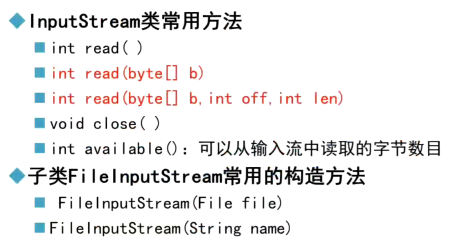
int read():从输入流中读取下一个字节,并返回该字节对应的整型数字 0-255。
int read(byte[ ] b):从输入流中读取多个字节,并将字节存放到数组b[ ]中,返回读到的字节个数,即数组长度。
int read(byte[ ] b ,int off ,int len):从输入流中读取多个字节,并将字节存放到数组b[ ]中,从数组的off位置处开始存放,len是读到的字节个数。
2.OutputStream类

字节流输入步骤:
1.引用相关类;
2.创建FileInputStream类对象;
3.读取文本文件;
4.关闭流。
字节流输出步骤:
1.引用相关类;
2.创建FileOutputStream类对象;
3.写入文本文件;
4.关闭流。
案例:
package com.yh.filestring;

import java.io.*;

public class FileTest2 {

    public static void main(String[] args) {

        // 创建目录

        File dir = new File("d:/eclipseWJ/HelloWorld/FileTest2");

        dir.mkdirs();

        // 创建文件

        File file = new File("d:/eclipseWJ/HelloWorld/FileTest2/test2.txt");

        FileOutputStream fos = null;

        FileInputStream fis = null;

        try {
            if(!file.exists())

                file.createNewFile();

            fos = new FileOutputStream(file,true); // 在文件原有的内容上追加
            fos = new FileOutputStream(file); // 直接覆盖文件原有的内容

            String str = "学习Java!";

            byte[] words = str.getBytes();

            fos.write(words, 0, words.length);

            // 创建输入流对象

            fis = new FileInputStream(file);

            int data;

            while ((data = fis.read()) != -1) {

                System.out.print((char) data);

            }

        } catch (FileNotFoundException e) {

            // TODO Auto-generated catch block

            e.printStackTrace();

        } catch (IOException e) {

            // TODO Auto-generated catch block

            e.printStackTrace();

        } finally {

            // 关闭输入流

            try {

                fos.close();

                fis.close();

            } catch (IOException e) {

                // TODO Auto-generated catch block

                e.printStackTrace();

            }

        }

    }

}
案例:将file1中的内容复制到file2
package com.yh.filestring;

import java.io.*;

public class FileCopy {

    public static void main(String[] args) {

        File dir = new File("D:/eclipseWJ/HelloWorld/filecopy");

        File file1 = new File("D:/eclipseWJ/HelloWorld/filecopy/file1.txt");

        File file2 = new File("d:/eclipseWJ/HelloWorld/filecopy/file2.txt");

        dir.mkdirs();

        FileInputStream fis = null;

        FileOutputStream fos = null;

        try {
            if(!file1.exists())

                file1.createNewFile();
            if(!file2.exists())

                file2.createNewFile();

            fos = new FileOutputStream(file1);

            String str = "HelloWorld";

            byte[] words = str.getBytes();

            fos.write(words, 0, str.length());

            fos.close();

            fis = new FileInputStream(file1);

            fos = new FileOutputStream(file2, true);

            int len;

            byte[] word = new byte[1024];

            while ((len = fis.read(word)) != -1) { // 读取到的字节存到数组word[]中,追加存储

                fos.write(word,0,len);

            }

            fis.close();

            fis = new FileInputStream(file2);

            int data;

            while ((data = fis.read()) != -1) {

                System.out.print((char)data);

            }

        } catch (IOException e) {

            // TODO Auto-generated catch block

            e.printStackTrace();

        } finally {

            try {

                fis.close();

                fos.close();

            } catch (IOException e) {

                // TODO Auto-generated catch block

                e.printStackTrace();

            }

        }

    }

}
二、字符流
1.Reader类

Reader类常用方法:
int read():从输入流中读取下一个字符,并返回该字符对应的整型数字 0-65535。
int read(char[ ] c):从输入流中读取多个字符,并将字符存放到数组b[ ]中,返回读到的字符个数,即数组长度。
int read(char[ ] c ,int off ,int len):从输入流中读取多个字符,并将字符存放到数组b[ ]中,从数组的off位置处开始存放,len是读到的字符个数。
子类InputStreamReader常用构造方法:
InputStreamReader(InputStream in):参数是一个字节流对象,将一个字节流包装成字符流,读取内容按本地平台默认编码。
InputStreamReader(InputStream in ,String charserName):参数是一个字节流对象和字符集编码,先将字节流包装成字符流,然后再按照这个字符集编码来读取到内容。
步骤:
1.创建FileInputStream类对象(字节流);
2.创建InputStreamReader类对象,并将FileInputStream类对象和字符集编码名字作为构造函数的参数(字符流);
3.创建BufferedReader类对象,并将InputStreamReader类对象作为构造函数的参数(字符流);
4.读取文本。
代码示例(较为综合):
package com.yh.filestring;

import java.io.*;

public class InputStreamReaderDemo {

    public static void main(String[] args) {

        // TODO Auto-generated method stub

        File file = new File("D:\\eclipseWJ\\HelloWorld\\Chapter\\File3.txt");

        InputStream is = null;

        Reader isr = null;

        BufferedReader br = null;

        try {

            is = new FileInputStream(file);

            isr = new InputStreamReader(is,"UTF-8");

            br = new BufferedReader(isr);

            StringBuffer bf = new StringBuffer();

            String line = null;

            if((line = br.readLine())!=null) {

                bf.append(line);

            }

            System.out.println(bf);

        } catch (FileNotFoundException e) {

            // TODO Auto-generated catch block

            e.printStackTrace();

        } catch (IOException e) {

            // TODO Auto-generated catch block

            e.printStackTrace();

        } finally {

            try {

                br.close();

                isr.close();

            } catch (IOException e) {

                // TODO Auto-generated catch block

                e.printStackTrace();

            }

        }

    }

}
文本文件读取类FileReader是InputStreamReader的子类:
构造方法:
FileReader(File file)
FileReader(String pathName)
FileReader只能按照本地平台的字符编码来读,不能通过用户特定的字符集编码来读。
本地平台字符集编码获得:String encoding = System.getProperty("file.encoding");
使用FileReader类读取文本步骤:
1.引用相关类;
2.创建FileReader类对象;
3.读取文本文件;
4.关闭流。
代码示例:
package com.yh.filestring;

import java.io.*;

public class FileReaderDemo {

    public static void main(String[] args) {

        FileReader filereader;

        try {

            filereader = new FileReader("d:/eclipseWJ/HelloWorld/FileTest2/test2.txt");

            StringBuffer sbf = new StringBuffer();

            char[] words = new char[1024];

            while(filereader.read(words)!=-1) { // while只执行一次

                sbf.append(words);

            }

            System.out.println(sbf);

        } catch (FileNotFoundException e) {

            // TODO Auto-generated catch block

            e.printStackTrace();

        } catch (IOException e) {

            // TODO Auto-generated catch block

            e.printStackTrace();

        }

    }

}
BufferReader类:带有缓冲区的字符输入流
代码示例:
package com.yh.filestring;

import java.io.*;

public class FileTestBuffer {

    public static void main(String[] args) {

        BufferedReader reader = null;

        try {

            // 创建目录

            File dir = new File("Chapter");

            dir.mkdirs();

            // 创建文件

            File f = new File("D:\\eclipseWJ\\HelloWorld\\Chapter\\File1.txt");

            f.createNewFile();

            // 写入文本

            FileWriter writer = new FileWriter(f); // 覆盖重写
            FileWriter writer = new FileWriter(f, true); // 追加

            BufferedWriter bufferedwriter = new BufferedWriter(writer);

            bufferedwriter.write("你好");
            bufferedwriter.flush(); //将缓冲区的内容全部写入文本

            bufferedwriter.close();

            // 输出目录中的文件

            if (dir.isDirectory()) {

                String[] fileContents = dir.list();

                for (String i : fileContents)

                    System.out.println(i);

            }

            // 读出文件内容

            FileReader fileReader = new FileReader(f);

            reader = new BufferedReader(fileReader);

            String line = null;

            while ((line = reader.readLine()) != null)

                System.out.println(line);

        } catch (FileNotFoundException ex) {

            ex.printStackTrace();

        } catch (IOException ex) {

            ex.printStackTrace();

        }finally {

            try {

                reader.close();

            } catch (IOException e) {

                // TODO Auto-generated catch block

                e.printStackTrace();

            }

        }

    }

}
2.Writer类
参考上述Reader类。
三、读写二进制文件
读取特定图片并完成该图片的复制
代码示例:
package com.yh.filestring;

import java.io.*;

public class FIleImg {

    public static void main(String[] args) {

        // TODO Auto-generated method stub

        FileInputStream fis = null;

        DataInputStream dis = null;

        FileOutputStream fos = null;

        DataOutputStream dos = null;

        try {

            fis = new FileInputStream("D:\\eclipseWJ\\HelloWorld\\fish.jpg");

            dis = new DataInputStream(fis);

            fos = new FileOutputStream("D:\\eclipseWJ\\HelloWorld\\newfish.jpg");

            dos = new DataOutputStream(fos);

            int data;

            while ((data = dis.read()) != -1) {

                dos.write(data);

            }

            //dos.flush();

        } catch (FileNotFoundException e) {

            // TODO Auto-generated catch block

            e.printStackTrace();

        } catch (IOException e) {

            // TODO Auto-generated catch block

            e.printStackTrace();

        } finally {

            try {

                dos.close();

                fos.close();

                dis.close();

                fis.close();

            } catch (IOException e) {

                // TODO Auto-generated catch block

                e.printStackTrace();

            }

        }

    }

}
四、序列化和反序列化
五、总结
1.类的继承关系总结:
InputStream类(字节流)—— FileInputStream类 —— DataInputStream类(读取二进制文件)
OutputStream类(字节流)—— FileOutputStream类 —— DataOutputStream类(写入二进制文件)
Reader类(字符流)—— InputStreamReader类(构造函数参数:一个字节流InputStream类对象和字符集编码名字)和BufferedReader类(构造函数参数:一个Reader对象,提供通用的缓冲方式文本读取,readLine读取一个文本行)—— FileReader类(构造函数参数:File类对象或完整路径,无法指定字符集编码)
Writer类(字符流)—— OutputStreamWriter类(构造函数参数:一个字节流OutputStream类对象和字符集编码名字)和BufferedWriter类(构造函数参数:一个Writer对象,提供通用的缓冲方式文本写入)—— FileWriter类(构造函数参数:File类对象或完整路径,无法指定字符集编码)
2.字节和字符的关系:
Java采用unicode来表示字符,java中的一个char是2个字节,一个中文或英文字符的unicode编码都占2个字节,但如果采用其他编码方式,一个字符占用的字节数则各不相同。
在 GB-2312 编码或 GBK 编码中,一个英文字母字符存储需要1个字节,一个汉子字符存储需要2个字节。
在UTF-8编码中,一个英文字母字符存储需要1个字节,一个汉字字符储存需要3到4个字节。
在UTF-16编码中,一个英文字母字符存储需要2个字节,一个汉字字符储存需要3到4个字节(Unicode扩展区的一些汉字存储需要4个字节)。
在UTF-32编码中,世界上任何字符的存储都需要4个字节。
3.flush()方法
在进行文件写入相关操作时,需要调用。
java输入/输出流的基本知识的更多相关文章
- 深入理解Java输入输出流
Java.io包的File类,File类用于目录和文件的创建.删除.遍历等操作,但不能用于文件的读写. Java 对文件的写入和读取涉及到流的概念,写入为输出流,读取为输入流.如何理解流的概念呢?可以 ...
- Java输入/输出流体系
在用java的io流读写文件时,总是被它的各种流能得很混乱,有40多个类,理清啦,过一段时间又混乱啦,决定整理一下!以防再忘 Java输入/输出流体系 1.字节流和字符流 字节流:按字节读取.字符流: ...
- java基础---->java输入输出流
今天我们总结一下java中关于输入流和输出流的知识,博客的代码选自Thinking in java一书.我突然很想忘了你,就像从未遇见你. java中的输入流 huhx.txt文件的内容如下: I l ...
- Java 输入输出流 转载
转载自:http://blog.csdn.net/hguisu/article/details/7418161 1.什么是IO Java中I/O操作主要是指使用Java进行输入,输出操作. Java所 ...
- Java输入输出流(一)——常用的输入输出流
1.流的概念:在Java中,流是从源到目的地的字节的有序序列.Java中有两种基本的流--输入流(InputStream)和输出流(OutputStream). 根据流相对于程序的另一个端点的不同,分 ...
- java 输入输出流1 FileInputStrem&&FileOutStream
通过文件输入流读取问价 package unit6; import java.io.FileInputStream; import java.io.FileNotFoundException; imp ...
- java输入输出流总结 转载
一.基本概念 1.1 什么是IO? IO(Input/Output)是计算机输入/输出的接口.Java中I/O操作主要是指使用Java进行输入,输出操作. Java所有的I/O机制都是 ...
- java输入输出流(内容练习)
1,编写一个程序,读取文件test.txt的内容并在控制台输出.如果源文件不存在,则显示相应的错误信息. package src; import java.io.File; import java.i ...
- Java输入输出流(转载)
转自http://blog.csdn.net/hguisu/article/details/7418161 目录(?)[+] 1.什么是IO Java中I/O操作主要是指使用Java进行输入,输出操作 ...
随机推荐
- 自动下载MarkDown格式会议论文的程序
近期师兄发给我一个压缩包让我整理文献,而我发现压缩包里的内容是这样: 这样: 和这样的: 我大概看了一下,可能有270多篇文章是这种格式,俗话说的好,没有困难的工作,只有勇敢的研究僧.所以决定用Pyt ...
- C# 两个具有相同属性的类赋值
最近有遇到两个类之间的赋值问题,两个类的属性几乎都一样的,所以写了个通过反射获取属性的然后赋值的方法,把一个类的属性的值赋值给另一个类. 框架是.net 4.5 public static D Map ...
- 基于Netty实现自定义消息通信协议(协议设计及解析应用实战)
所谓的协议,是由语法.语义.时序这三个要素组成的一种规范,通信双方按照该协议规范来实现网络数据传输,这样通信双方才能实现数据正常通信和解析. 由于不同的中间件在功能方面有一定差异,所以其实应该是没有一 ...
- 微信小程序(七)
组件: 组件是视图层的基本组成单元 组件自带一些功能与微信风格的样式 一个组件通常包括:开始标签和结束标签,属性用来修饰这个组件,内容在两个标签之内. 媒体组件 地图 开放能力 画布 视图容器 vie ...
- 菜鸡的Java笔记第二 - java 数据类型
1.程序的本质实际上就是在于数据的处理上. JAVA中的数据类型有两类 基本数据类型:是进行内容的操作而不是内存的操作 数值型: 整型:byte(-128 ~ 127),short(-32768 ~ ...
- [atARC087E]Prefix-free Game
建一棵trie树,考虑一个串,相当于限制了其子树内部+其到根的链 如果将所有点补全,那么这个问题可以看作每一个极浅(子树内没有其他满足条件)的到根路径以及子树内部没有其他结束点的子树的子问题 对于多个 ...
- bean注解
1.beans.xml <?xml version="1.0" encoding="UTF-8"?> <beans xmlns:xsi=&qu ...
- page_fault_in_nonpaged_area异常解决方案(已解决)
电脑在运行虚拟机的时候异常重启,多次打开结果一样,问了客服告诉我导致蓝屏的原因很多,可能是驱动不兼容,系统,或其他.{没点有用的} 百度到这个方案: 打开->此电脑->右键属性->高 ...
- docker详细
镜像(image) 容器(container) 启动,删除,停止 仓库(repository) docker images
- 调试:'Object reference note set to an instance of an object.'
今天调试代码遇到一个奇怪的问题,每次调试到 var files = new List<string>()这一行代码,总是报错:System.NullReferenceException: ...