
将给定数据源生成静态HTML页面持久化到项目之外的硬盘
一、java代码
设置好数据源map
Map<String,String> map=new HashMap<>();

        map.put("knowledgeName",tBasKnowledgebase.getKnowledgeName());

        map.put("htmlContent",tBasKnowledgebase.getHtmlContent());

        map.put("publishDate",new java.text.SimpleDateFormat("yyyy-MM-dd").format(tBasKnowledgebase.getPublishDate()));

        CreateHtmlUtils.MakeHtml(rpath,map,htmlPath,tBasKnowledgebase.getKnowledgeId());
工具类方法
/**

     * @Title: MakeHtml

     * @Description: 创建html

     * @param    filePath 设定模板文件

     * @param    map 需要显示图片的路径

     * @param    disrPath  生成html的存放路径

     * @param    fileName  生成html名字

     * @return void    返回类型

     * @throws

     */

    public static void MakeHtml(String filePath, Map<String,String> map, String disrPath, String fileName ){

        try {

            System.out.print(filePath);

            String templateContent = "";

            // 读取模板文件,模板文件,是工程中的一个html页面,里面有一些需要替换的字段

            FileInputStream fileinputstream = new FileInputStream(filePath);

            int lenght = fileinputstream.available();

            byte bytes[] = new byte[lenght];

            fileinputstream.read(bytes);

            fileinputstream.close();

            templateContent = new String(bytes, "utf-8");

            System.out.print(templateContent);

            // 替换掉模板中的一些字段,填充数据渲染页面

            for (Map.Entry<String,String> entry : map.entrySet()) {

                String key=entry.getKey();

                String value=entry.getValue();

                templateContent = templateContent.replaceAll("###"+key+"###", value);

                System.out.println("Key = " + entry.getKey() + ", Value = " + entry.getValue());

            }

            System.out.print(templateContent);

            String fileame = fileName + ".html";

            // 生成的html文件保存路径,html文件全路径,选择服务器上工程目录下以外的路径,持久化存储到硬盘,这样发布新版本原来的静态文件不会丢失

            fileame = disrPath+"/" + fileame;

            // 根据文件全路径创建file对象

            File file=new File(fileame);

            if(!file.getParentFile().exists()){

                file.getParentFile().mkdirs();

            }

            if(!file.exists()){

                file.createNewFile();

            }

            FileOutputStream fileOutputStream=new FileOutputStream(file);

            OutputStreamWriter oStreamWriter = new OutputStreamWriter(fileOutputStream, "utf-8");

            // 将替换完数据的模板页面形成的文件流持久化到硬盘

            oStreamWriter.append(templateContent);

            oStreamWriter.close();

        } catch (Exception e) {

            System.out.print(e.toString());

        }

    }
工程中的模板HTML文件:
<!DOCTYPE html>

<html lang="en">

<head>

    <meta charset="utf-8" />

    <title>###knowledgeName###</title>

    <style>

        body{ text-align:center;border: 0;margin: 0;}

        .div{ margin:20px auto;max-width: 1000px}

        .title{

            font-size: 20px;

            font-weight: bold;

            margin-bottom: 20px;

        }

        .date{

            border-bottom: 1px solid #9a9a9a;

            padding: 0 16px 16px;

            font-size: 15px;

        }

        .content{

            text-align: left;

            padding-top: 10px;

            line-height: 30px;

        }

        .toolsBox {

            height: 36px;

            border: 1px solid #d8d8d8;

            background: #fafbfb;

            font-size: 14px;

            color: #666;

            line-height: 36px;

            text-align: center;

            margin-top: 70px;

        }

        .toolsBox a, .toolsBox i {

            color: #666;

            cursor: pointer;

            font-style: normal;

            text-decoration: none;

        }

        .toolsBox i.on {

            color: #ff8400;

        }

    </style>

</head>

<body>

<div class="div">

    <div class="title">

        ###knowledgeName###

    </div>

    <div class="date">

        ###publishDate###

    </div>

    <div class="content">

        ###htmlContent###

    </div>

    <div class="toolsBox">字体:【 <i>大</i>  <i @cile class="on">中</i>  <i>小</i> 】<a href="javascript:window.print();">【打印 】</a><a href="javascript:window.close();">【关闭】</a></div>

</div>

<script src="/js/jquery-1.8.3.min.js"></script>

<script type="text/javascript">

    (function () {

        // 字号设置

        function setFontSize(oElement,size){

            var size = size || 14;

            $(oElement).css({'fontSize': size+"px"});

        }

        $('.toolsBox i').eq(0).click(function() {

            setFontSize('.content p','16');

            $(this).siblings('i').removeClass('on');

            $(this).addClass('on');

        });

        $('.toolsBox i').eq(1).click(function() {

            setFontSize('.content p','14');

            $(this).siblings('i').removeClass('on');

            $(this).addClass('on');

        });

        $('.toolsBox i').eq(2).click(function() {

            setFontSize('.content p','12');

            $(this).siblings('i').removeClass('on');

            $(this).addClass('on');

        });

    })();

</script>

</body>

</html>
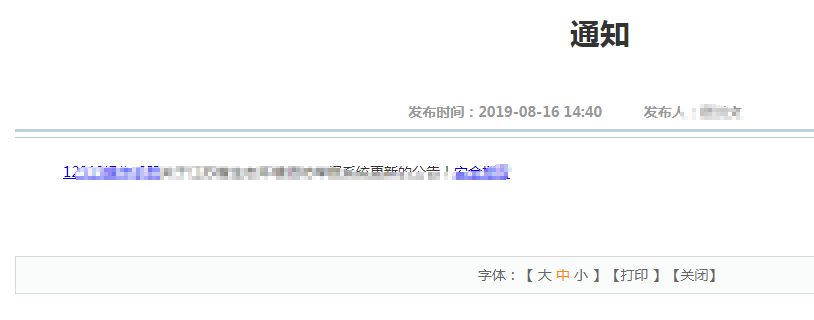
效果:
将给定数据源生成静态HTML页面持久化到项目之外的硬盘的更多相关文章
- JSP生成静态Html页面
[转载]JSP生成静态Html页面 在网站项目中,为了访问速度加快,为了方便百度爬虫抓取网页的内容,需要把jsp的动态页面转为html静态页面.通常有2种常用的方式: 1.伪静态,使用URL Rewr ...
- 利用PHP的ob函数实现生成静态化页面
之前用过一些开源的CMS管理系统,当时就很好奇后台中的生成HTML静态文件是怎么实现的.今天和同事讨论了下,没想到同事之前做过这类的生成静态页面的功能,果断向他请教了下. 经他讲解后,才知道其实生成静 ...
- 用php生成静态html页面(通用2种方法)
因为每次用户点击动态链接的时候都会对服务器发送数据查询的要求 对于一个访问量可能达百万千万级别的网站来说 这无疑是服务器一个大大的负担 所以把动态数据转换成静态html页面就成了节省人力物力的首选 因 ...
- java使用freemarker生成静态html页面
1. 模板文件static.html <!DOCTYPE html PUBLIC "-//W3C//DTD HTML 4.01 Transitional//EN" " ...
- 【转载】JSP生成静态Html页面
在网站项目中,为了访问速度加快,为了方便百度爬虫抓取网页的内容,需要把jsp的动态页面转为html静态页面.通常有2种常用的方式: 1.伪静态,使用URL Rewriter 2.纯静态,本文中代码实现 ...
- springboot2.0结合freemarker生成静态化页面
目录 1. pom.xml配置 2. application.yml配置 3. 使用模板文件静态化 3.1 创建测试类,编写测试方法 3.2 使用模板字符串静态化 使用freemarker将页面生成h ...
- PHP基础-生成静态html页面原理是怎样
设置example.html为模板文件,然后按照此模板文件生成article-1.html~article-5.html,以此来做简单的演示,代码如下: <?php//将数据存入二维数组$con ...
- 比较详细PHP生成静态页面教程
一,PHP脚本与动态页面. PHP脚本是一种服务器端脚本程序,可通过嵌入等方法与HTML文件混合, 也可以类,函数封装等形式,以模板的方式对用户请求进行处理.无论以何种方式,它的基本原理是这样的.由客 ...
- .NET生成静态页面的方案总结
转载自:http://www.cnblogs.com/cuihongyu3503319/archive/2012/12/06/2804233.html 方法一:在服务器上指定aspx网页,生成html ...
随机推荐
- 从小白角度探索Android事件分发机制
今早来上班时看到郭神这边文章超赞,剧情很好引人入胜,特此备份! https://mp.weixin.qq.com/s?__biz=MzA5MzI3NjE2MA==&mid=2650244386 ...
- JUC学习笔记(三)
JUC学习笔记(一)https://www.cnblogs.com/lm66/p/15118407.html JUC学习笔记(二)https://www.cnblogs.com/lm66/p/1511 ...
- 漏洞分析:CVE 2021-3156
漏洞分析:CVE 2021-3156 漏洞简述 漏洞名称:sudo堆溢出本地提权 漏洞编号:CVE-2021-3156 漏洞类型:堆溢出 漏洞影响:本地提权 利用难度:较高 基础权限:需要普通用户权限 ...
- PostgreSQL 时间转换
背景:最近频繁使用到时间转换相关的操作,特此小记. 1.实时取最近24小时内数据. select now() - interval '24h'; 通过sql获得符合要求的时间段,当做where条件即可 ...
- Python3实现Two-Pass算法检测区域连通性
技术背景 连通性检测是图论中常常遇到的一个问题,我们可以用五子棋的思路来理解这个问题五子棋中,横.竖.斜相邻的两个棋子,被认为是相连接的,而一样的道理,在一个二维的图中,只要在横.竖.斜三个方向中的一 ...
- 微信SDK的使用
一.导入依赖 <!--微信支付--> <dependency> <groupId>com.github.wxpay</groupId> <arti ...
- linux 磁盘IO速度测试
写入速度测试命令:time dd oflag=direct if=/dev/zero of=/data2/test bs=2k count=1000000 //if表示从哪里读取 of表示写入到哪里 ...
- SQL注入之MySQL报错注入整理
看大佬们的文章看得我虎躯一震,精神抖擞,于是心血来潮,整理一下MySQL报错注入常见的手段和方法,再举几个例子 <代码审计:企业级Web代码安全架构>一书中介绍过报错注入十大方法,依次是: ...
- OSPF的DR与BDR
一.实验拓扑 二.实验编址 三.实验步骤: 1.设置路由器的端口IP等信息 2.搭建ospf网络 重启(退出系统模式):reset ospf process 查看: 查看完整的邻居信息: 可以看到DR ...
- Windows莫名内存到百分之百,需要修改虚拟内存
借鉴别人的操作: https://blog.csdn.net/xjpdf10/article/details/82849112