
MyBatis动态SQL(使用)整理
MyBatis 令人喜欢的一大特性就是动态 SQL。在使用 JDBC 的过程中, 根据条件进行 SQL 的拼接是很麻烦且很容易出错的。MyBatis 动态 SQL 的出现, 解决了这个麻烦。
MyBatis通过 OGNL 来进行动态 SQL 的使用的。
目前, 动态 SQL 支持以下几种标签
| 元素 | 作用 | 备注 |
|---|---|---|
| if | 判断语句 | 单条件分支 |
| choose(when、otherwise) | 相当于 Java 中的 if else | 多条件分支 |
| trim(where、set) | 辅助元素 | 用于处理 SQL 拼接问题 |
| foreach | 循环语句 | 批量插入, 更新, 查询时经常用到 |
| bind | 创建一个变量, 并绑定到上下文中 | 用于兼容不同的数据库, 防止 SQL 注入等 |
1 数据准备
为了后面的演示, 创建了一个 Maven 项目 mybatis-dynamic, 创建了对应的数据库和表
DROP TABLE IF EXISTS `student`;

CREATE TABLE `student` (
  `student_id` int(10) unsigned NOT NULL AUTO_INCREMENT COMMENT '编号',
  `name` varchar(20) DEFAULT NULL COMMENT '姓名',
  `phone` varchar(20) DEFAULT NULL COMMENT '电话',
  `email` varchar(50) DEFAULT NULL COMMENT '邮箱',
  `sex` tinyint(4) DEFAULT NULL COMMENT '性别',
  `locked` tinyint(4) DEFAULT NULL COMMENT '状态(0:正常,1:锁定)',
  `gmt_created` datetime DEFAULT CURRENT_TIMESTAMP COMMENT '存入数据库的时间',
  `gmt_modified` datetime DEFAULT CURRENT_TIMESTAMP ON UPDATE CURRENT_TIMESTAMP COMMENT '修改的时间',
  `delete` int(11) DEFAULT NULL,
  PRIMARY KEY (`student_id`)
) ENGINE=InnoDB AUTO_INCREMENT=7 DEFAULT CHARSET=utf8mb4 COLLATE=utf8mb4_0900_ai_ci COMMENT='学生表';
对应的项目结构:
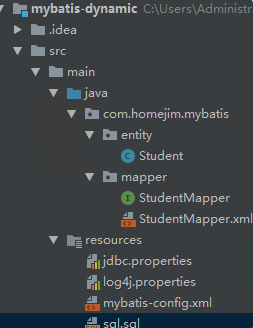
2 if 标签
if 标签是我们最常使用的。在查询、删除、更新的时候很可能会使用到。必须结合 test 属性联合使用。
2.1 在 WHERE 条件中使用 if 标签
这是常见的一种现象, 我们在进行按条件查询的时候, 可能会有多种情况。
2.1.1 查询条件
根据输入的学生信息进行条件检索
- 当只输入用户名时, 使用用户名进行模糊检索;
- 当只输入性别时, 使用性别进行完全匹配
- 当用户名和性别都存在时, 用这两个条件进行查询匹配查询
2.1.2 动态 SQL
接口函数
    /**
     * 根据输入的学生信息进行条件检索
     * 1. 当只输入用户名时, 使用用户名进行模糊检索;
     * 2. 当只输入邮箱时, 使用性别进行完全匹配
     * 3. 当用户名和性别都存在时, 用这两个条件进行查询匹配的用
     * @param student
     * @return
     */
        List<Student> selectByStudentSelective(Student student);
对应的动态 SQL
  <select id="selectByStudentSelective" resultMap="BaseResultMap" parameterType="com.homejim.mybatis.entity.Student">
    select
    <include refid="Base_Column_List" />
    from student
    where 1=1
    <if test="name != null and name !=''">
      and name like concat('%', #{name}, '%')
    </if>
    <if test="sex != null">
      and sex=#{sex}
    </if>
  </select>
在此 SQL 语句中, where 1=1 是多条件拼接时的小技巧, 后面的条件查询就可以都用 and 了。
同时, 我们添加了 if 标签来处理动态 SQL
    <if test="name != null and name !=''">
      and name like concat('%', #{name}, '%')
    </if>
    <if test="sex != null">
      and sex=#{sex}
    </if>
此 if 标签的 test 属性值是一个符合 OGNL 的表达式, 表达式可以是 true 或 false。如果表达式返回的是数值, 则0为 false, 非 0 为 true;
2.1.3 测试
      @Test
    public void selectByStudent() {
        SqlSession sqlSession = null;
        sqlSession = sqlSessionFactory.openSession();
        StudentMapper studentMapper = sqlSession.getMapper(StudentMapper.class);

        Student search = new Student();
        search.setName("明");

        System.out.println("只有名字时的查询");
        List<Student> studentsByName = studentMapper.selectByStudentSelective(search);
        for (int i = 0; i < studentsByName.size(); i++) {
            System.out.println(ToStringBuilder.reflectionToString(studentsByName.get(i), ToStringStyle.MULTI_LINE_STYLE));
        }

        search.setName(null);
        search.setSex((byte) 1);
        System.out.println("只有性别时的查询");
        List<Student> studentsBySex = studentMapper.selectByStudentSelective(search);
        for (int i = 0; i < studentsBySex.size(); i++) {
            System.out.println(ToStringBuilder.reflectionToString(studentsBySex.get(i), ToStringStyle.MULTI_LINE_STYLE));
        }

        System.out.println("姓名和性别同时存在的查询");
        search.setName("明");
        List<Student> studentsByNameAndSex = studentMapper.selectByStudentSelective(search);
        for (int i = 0; i < studentsByNameAndSex.size(); i++) {
            System.out.println(ToStringBuilder.reflectionToString(studentsByNameAndSex.get(i), ToStringStyle.MULTI_LINE_STYLE));
        }

        sqlSession.commit();
        sqlSession.close();
    }
只有名字时的查询, 发送的语句和结果

只有名字时的查询
查询的条件只发送了
where 1=1 and name like concat('%', ?, '%')
只有性别时的查询, 发送的语句和结果

只有性别时的查询
查询的条件只发送了
where 1=1 and sex=?
姓名和性别同时存在的查询, 发送的语句和结果

姓名和性别同时存在的查询
查询条件
where 1=1 and name like concat('%', ?, '%') and sex=?
2.2 在 UPDATE 更新列中使用 if 标签
有时候我们不希望更新所有的字段, 只更新有变化的字段。
2.2.1 更新条件
只更新有变化的字段, 空值不更新。
2.2.1 动态 SQL
接口方法
    /**
     * 更新非空属性
     */
    int updateByPrimaryKeySelective(Student record);
对应的 SQL
  <update id="updateByPrimaryKeySelective" parameterType="com.homejim.mybatis.entity.Student">
    update student
    <set>
      <if test="name != null">
        `name` = #{name,jdbcType=VARCHAR},
      </if>
      <if test="phone != null">
        phone = #{phone,jdbcType=VARCHAR},
      </if>
      <if test="email != null">
        email = #{email,jdbcType=VARCHAR},
      </if>
      <if test="sex != null">
        sex = #{sex,jdbcType=TINYINT},
      </if>
      <if test="locked != null">
        locked = #{locked,jdbcType=TINYINT},
      </if>
      <if test="gmtCreated != null">
        gmt_created = #{gmtCreated,jdbcType=TIMESTAMP},
      </if>
      <if test="gmtModified != null">
        gmt_modified = #{gmtModified,jdbcType=TIMESTAMP},
      </if>
    </set>
    where student_id = #{studentId,jdbcType=INTEGER}
2.2.3 测试
    @Test
    public void updateByStudentSelective() {
        SqlSession sqlSession = null;
        sqlSession = sqlSessionFactory.openSession();
        StudentMapper studentMapper = sqlSession.getMapper(StudentMapper.class);

        Student student = new Student();
        student.setStudentId(1);
        student.setName("明明");
        student.setPhone("13838438888");
        System.out.println(studentMapper.updateByPrimaryKeySelective(student));

        sqlSession.commit();
        sqlSession.close();
    }
结果如下

在 UPDATE 更新列中使用 if 标签
2.3 在 INSERT 动态插入中使用 if 标签
我们插入数据库中的一条记录, 不是每一个字段都有值的, 而是动态变化的。在这时候使用 if 标签, 可帮我们解决这个问题。
2.3.1 插入条件
只有非空属性才插入。
2.3.2 动态SQL
接口方法
    /**
     * 非空字段才进行插入
     */
    int insertSelective(Student record);
对应的SQL
<insert id="insertSelective" parameterType="com.homejim.mybatis.entity.Student">
    insert into student
    <trim prefix="(" suffix=")" suffixOverrides=",">
      <if test="studentId != null">
        student_id,
      </if>
      <if test="name != null">
        `name`,
      </if>
      <if test="phone != null">
        phone,
      </if>
      <if test="email != null">
        email,
      </if>
      <if test="sex != null">
        sex,
      </if>
      <if test="locked != null">
        locked,
      </if>
      <if test="gmtCreated != null">
        gmt_created,
      </if>
      <if test="gmtModified != null">
        gmt_modified,
      </if>
    </trim>
    <trim prefix="values (" suffix=")" suffixOverrides=",">
      <if test="studentId != null">
        #{studentId,jdbcType=INTEGER},
      </if>
      <if test="name != null">
        #{name,jdbcType=VARCHAR},
      </if>
      <if test="phone != null">
        #{phone,jdbcType=VARCHAR},
      </if>
      <if test="email != null">
        #{email,jdbcType=VARCHAR},
      </if>
      <if test="sex != null">
        #{sex,jdbcType=TINYINT},
      </if>
      <if test="locked != null">
        #{locked,jdbcType=TINYINT},
      </if>
      <if test="gmtCreated != null">
        #{gmtCreated,jdbcType=TIMESTAMP},
      </if>
      <if test="gmtModified != null">
        #{gmtModified,jdbcType=TIMESTAMP},
      </if>
    </trim>
  </insert>
这个 SQL 大家应该很熟悉, 毕竟是自动生成的。
2.3.3 测试
    @Test
    public void insertByStudentSelective() {
        SqlSession sqlSession = null;
        sqlSession = sqlSessionFactory.openSession();
        StudentMapper studentMapper = sqlSession.getMapper(StudentMapper.class);

        Student student = new Student();
        student.setName("小飞机");
        student.setPhone("13838438899");
        student.setEmail("xiaofeiji@qq.com");
        student.setLocked((byte) 0);

        System.out.println(studentMapper.insertSelective(student));

        sqlSession.commit();
        sqlSession.close();
    }
对应的结果

在 INSERT 动态插入中使用 if 标签
SQL 中, 只有非空的字段才进行了插入。
3 choose 标签
choose when otherwise 标签可以帮我们实现 if else 的逻辑。
一个 choose 标签至少有一个 when, 最多一个otherwise
下面是一个查询的例子。
3.1 查询条件
假设 name 具有唯一性, 查询一个学生
- 当 studen_id 有值时, 使用 studen_id 进行查询;
- 当 studen_id 没有值时, 使用 name 进行查询;
- 否则返回空
3.2 动态SQL
接口方法
    /**
     * - 当 studen_id 有值时, 使用 studen_id 进行查询;
     * - 当 studen_id 没有值时, 使用 name 进行查询;
     * - 否则返回空
     */
    Student selectByIdOrName(Student record);
对应的SQL
  <select id="selectByIdOrName" resultMap="BaseResultMap" parameterType="com.homejim.mybatis.entity.Student">
    select
    <include refid="Base_Column_List" />
    from student
    where 1=1
    <choose>
      <when test="studentId != null">
        and student_id=#{studentId}
      </when>
      <when test="name != null and name != ''">
        and name=#{name}
      </when>
      <otherwise>
        and 1=2
      </otherwise>
    </choose>
  </select>
3.3 测试
 @Test
    public void selectByIdOrName() {
        SqlSession sqlSession = null;
        sqlSession = sqlSessionFactory.openSession();
        StudentMapper studentMapper = sqlSession.getMapper(StudentMapper.class);

        Student student = new Student();
        student.setName("小飞机");
        student.setStudentId(1);

        Student studentById = studentMapper.selectByIdOrName(student);
        System.out.println("有 ID 则根据 ID 获取");
        System.out.println(ToStringBuilder.reflectionToString(studentById, ToStringStyle.MULTI_LINE_STYLE));

        student.setStudentId(null);
        Student studentByName = studentMapper.selectByIdOrName(student);
        System.out.println("没有 ID 则根据 name 获取");
        System.out.println(ToStringBuilder.reflectionToString(studentByName, ToStringStyle.MULTI_LINE_STYLE));

        student.setName(null);
        Student studentNull = studentMapper.selectByIdOrName(student);
        System.out.println("没有 ID 和 name, 返回 null");
        Assert.assertNull(studentNull);

        sqlSession.commit();
        sqlSession.close();
    }
有 ID 则根据 ID 获取, 结果

有 ID 则根据 ID 获取
没有 ID 则根据 name 获取

没有 ID 则根据 name 获取
没有 ID 和 name, 返回 null

没有 ID 和 name, 返回 null
4 trim(set、where)
这三个其实解决的是类似的问题。如我们在写前面的[在 WHERE 条件中使用 if 标签] SQL 的时候, where 1=1 这个条件我们是不希望存在的。
4.1 where
4.1.1 查询条件
根据输入的学生信息进行条件检索。
- 当只输入用户名时, 使用用户名进行模糊检索;
- 当只输入性别时, 使用性别进行完全匹配
- 当用户名和性别都存在时, 用这两个条件进行查询匹配查询
不使用 where 1=1。
4.1.2 动态 SQL
很显然, 我们要解决这几个问题
- 当条件都不满足时:此时 SQL 中应该要不能有 where , 否则导致出错
- 当 if 有条件满足时:SQL 中需要有 where, 且第一个成立的 if 标签下的 and | or 等要去掉
这时候, 我们可以使用 where 标签。
接口方法
    /**
     * 根据输入的学生信息进行条件检索
     * 1. 当只输入用户名时, 使用用户名进行模糊检索;
     * 2. 当只输入邮箱时, 使用性别进行完全匹配
     * 3. 当用户名和性别都存在时, 用这两个条件进行查询匹配的用
     */
    List<Student> selectByStudentSelectiveWhereTag(Student student);
对应的 SQL
  <select id="selectByStudentSelectiveWhereTag" resultMap="BaseResultMap" parameterType="com.homejim.mybatis.entity.Student">
    select
    <include refid="Base_Column_List" />
    from student
   <where>
    <if test="name != null and name !=''">
      and name like concat('%', #{name}, '%')
    </if>
    <if test="sex != null">
      and sex=#{sex}
    </if>
   </where>
  </select>
4.1.3 测试
    @Test
    public void selectByStudentWhereTag() {
        SqlSession sqlSession = null;
        sqlSession = sqlSessionFactory.openSession();
        StudentMapper studentMapper = sqlSession.getMapper(StudentMapper.class);

        Student search = new Student();
        search.setName("明");

        System.out.println("只有名字时的查询");
        List<Student> studentsByName = studentMapper.selectByStudentSelectiveWhereTag(search);
        for (int i = 0; i < studentsByName.size(); i++) {
            System.out.println(ToStringBuilder.reflectionToString(studentsByName.get(i), ToStringStyle.MULTI_LINE_STYLE));
        }

        search.setSex((byte) 1);
        System.out.println("姓名和性别同时存在的查询");
        List<Student> studentsBySex = studentMapper.selectByStudentSelectiveWhereTag(search);
        for (int i = 0; i < studentsBySex.size(); i++) {
            System.out.println(ToStringBuilder.reflectionToString(studentsBySex.get(i), ToStringStyle.MULTI_LINE_STYLE));
        }

        System.out.println("姓名和性别都不存在时查询");
        search.setName(null);
        search.setSex(null);
        List<Student> studentsByNameAndSex = studentMapper.selectByStudentSelectiveWhereTag(search);
        for (int i = 0; i < studentsByNameAndSex.size(); i++) {
            System.out.println(ToStringBuilder.reflectionToString(studentsByNameAndSex.get(i), ToStringStyle.MULTI_LINE_STYLE));
        }

        sqlSession.commit();
        sqlSession.close();
    }
只有名字时的查询, 有 where

只有名字时的查询
姓名和性别同时存在的查询, 有 where

姓名和性别同时存在的查询
姓名和性别都不存在时查询, 此时, where 不会再出现了。
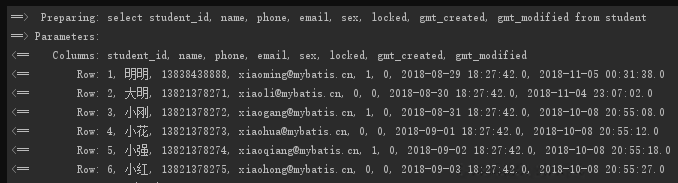
姓名和性别都不存在时查询
4.2 set
set 标签也类似, 在 [2.2 在 UPDATE 更新列中使用 if 标签] 中, 如果我们的方法updateByPrimaryKeySelective 没有使用 标签, 那么我们就要想办法处理字段全为空的条件, 字段不为空的条件等。有了这个, 我们只需要写 if 标签即可, 不需要处理类似的问题。
4.3 trim
set 和 where 其实都是 trim 标签的一种类型, 该两种功能都可以使用 trim 标签进行实现。
4.3.1 trim 来表示 where
如以上的 where 标签, 我们也可以写成
<trim prefix="where" prefixOverrides="AND |OR">
</trim>
表示当 trim 中含有内容时, 添加 where, 且第一个为 and 或 or 时, 会将其去掉。而如果没有内容, 则不添加 where。
4.3.2 trim 来表示 set
相应的, set 标签可以如下表示
<trim prefix="SET" suffixOverrides=",">
</trim>
表示当 trim 中含有内容时, 添加 set, 且最后的内容为 , 时, 会将其去掉。而没有内容, 不添加 set
4.3.3 trim 的几个属性
- prefix: 当 trim 元素包含有内容时, 增加 prefix 所指定的前缀
- prefixOverrides: 当 trim 元素包含有内容时, 去除 prefixOverrides 指定的 前缀
- suffix: 当 trim 元素包含有内容时, 增加 suffix 所指定的后缀
- suffixOverrides:当 trim 元素包含有内容时, 去除 suffixOverrides 指定的后缀
5 foreach 标签
foreach 标签可以对数组, Map 或实现 Iterable 接口。
foreach 中有以下几个属性
- collection: 必填, 集合/数组/Map的名称.
- item: 变量名。即从迭代的对象中取出的每一个值
- index: 索引的属性名。当迭代的对象为 Map 时, 该值为 Map 中的 Key.
- open: 循环开头的字符串
- close: 循环结束的字符串
- separator: 每次循环的分隔符
其他的比较好理解, collection 中的值应该怎么设定呢?
跟接口方法中的参数相关。
1. 只有一个数组参数或集合参数
默认情况:集合collection=list, 数组是collection=array
推荐:使用 @Param 来指定参数的名称, 如我们在参数前@Param("ids"), 则就填写 collection=ids
2. 多参数
多参数请使用 @Param 来指定, 否则SQL中会很不方便
3. 参数是Map
指定为 Map 中的对应的 Key 即可。其实上面的 @Param 最后也是转化为 Map 的。
4. 参数是对象
使用属性.属性即可。
5.1 在 where 中使用 foreach
在 where条件中使用, 如按id集合查询, 按id集合删除等。
5.1.1 查询条件
我们希望查询用户 id 集合中的所有用户信息。
5.1.2 动态 SQL
函数接口
    /**
     * 获取 id 集合中的用户信息
     * @param ids
     * @return
     */
    List<Student> selectByStudentIdList(List<Integer> ids);
对应 SQL
  <select id="selectByStudentIdList" resultMap="BaseResultMap">
    select
    <include refid="Base_Column_List" />
    from student
    where student_id in
    <foreach collection="list" item="id" open="(" close=")" separator="," index="i">
      #{id}
    </foreach>
  </select>
5.1.3 测试
    @Test
    public void selectByStudentIdList() {
        SqlSession sqlSession = null;
        sqlSession = sqlSessionFactory.openSession();
        StudentMapper studentMapper = sqlSession.getMapper(StudentMapper.class);

        List<Integer> ids = new LinkedList<>();
        ids.add(1);
        ids.add(3);

        List<Student> students = studentMapper.selectByStudentIdList(ids);
        for (int i = 0; i < students.size(); i++) {
            System.out.println(ToStringBuilder.reflectionToString(students.get(i), ToStringStyle.MULTI_LINE_STYLE));
        }

        sqlSession.commit();
        sqlSession.close();
    }
结果

在 where 中使用 foreach
5.2 foreach 实现批量插入
可以通过foreach来实现批量插入。
5.2.1 动态SQL
接口方法
    /**
     * 批量插入学生
     */
    int insertList(List<Student> students);
对应的SQL
  <insert id="insertList">
    insert into student(name, phone, email, sex, locked)
    values
    <foreach collection="list" item="student" separator=",">
      (
      #{student.name}, #{student.phone},#{student.email},
      #{student.sex},#{student.locked}
      )
    </foreach>
  </insert>
5.2.2 测试
    @Test
    public void insertList() {
        SqlSession sqlSession = null;
        sqlSession = sqlSessionFactory.openSession();
        StudentMapper studentMapper = sqlSession.getMapper(StudentMapper.class);

        List<Student> students = new LinkedList<>();
        Student stu1 = new Student();
        stu1.setName("批量01");
        stu1.setPhone("13888888881");
        stu1.setLocked((byte) 0);
        stu1.setEmail("13888888881@138.com");
        stu1.setSex((byte) 1);
        students.add(stu1);

        Student stu2 = new Student();
        stu2.setName("批量02");
        stu2.setPhone("13888888882");
        stu2.setLocked((byte) 0);
        stu2.setEmail("13888888882@138.com");
        stu2.setSex((byte) 0);
        students.add(stu2);

        System.out.println(studentMapper.insertList(students));
        sqlSession.commit();
        sqlSession.close();
    }
结果

foreach 实现批量插入
6 bind 标签
bind 标签是通过 OGNL 表达式去定义一个上下文的变量, 这样方便我们使用。
如在 selectByStudentSelective 方法中, 有如下
<if test="name != null and name !=''">
      and name like concat('%', #{name}, '%')
    </if>
在 MySQL 中, 该函数支持多参数, 但在 Oracle 中只支持两个参数。那么我们可以使用 bind 来让该 SQL 达到支持两个数据库的作用
<if test="name != null and name !=''">
     <bind name="nameLike" value="'%'+name+'%'"/>
     and name like #{nameLike}
</if>
更改后的查询结果如下

MyBatis动态SQL(使用)整理的更多相关文章
- mybatis实战教程(mybatis in action)之八:mybatis 动态sql语句
mybatis 的动态sql语句是基于OGNL表达式的.可以方便的在 sql 语句中实现某些逻辑. 总体说来mybatis 动态SQL 语句主要有以下几类:1. if 语句 (简单的条件判断)2. c ...
- 9.mybatis动态SQL标签的用法
mybatis动态SQL标签的用法 动态 SQL MyBatis 的强大特性之一便是它的动态 SQL.如果你有使用 JDBC 或其他类似框架的经验,你就能体会到根据不同条件拼接 SQL 语句有多么 ...
- 自己动手实现mybatis动态sql
发现要坚持写博客真的是一件很困难的事情,各种原因都会导致顾不上博客.本来打算写自己动手实现orm,看看时间,还是先实现一个动态sql,下次有时间再补上orm完整的实现吧. 用过mybatis的人,估计 ...
- Mybatis动态SQL单一基础类型参数用if标签
Mybatis动态SQL单一基础类型参数用if标签时,test中应该用 _parameter,如: 1 2 3 4 5 6 <select id="selectByName" ...
- 超全MyBatis动态SQL详解!( 看完SQL爽多了)
MyBatis 令人喜欢的一大特性就是动态 SQL. 在使用 JDBC 的过程中, 根据条件进行 SQL 的拼接是很麻烦且很容易出错的. MyBatis 动态 SQL 的出现, 解决了这个麻烦. My ...
- Mybatis动态SQL简单了解 Mybatis简介(四)
动态SQL概况 MyBatis 的强大特性之一便是它的动态 SQL 在Java开发中经常遇到条件判断,比如: if(x>0){ //执行一些逻辑........ } Mybatis应用中,S ...
- mybatis原理分析学习记录,mybatis动态sql学习记录
以下个人学习笔记,仅供参考,欢迎指正. MyBatis 是支持定制化 SQL.存储过程以及高级映射的持久层框架,其主要就完成2件事情: 封装JDBC操作 利用反射打通Java类与SQL语句之间的相互转 ...
- mybatis 动态sql和参数
mybatis 动态sql 名词解析 OGNL表达式 OGNL,全称为Object-Graph Navigation Language,它是一个功能强大的表达式语言,用来获取和设置Java对象的属性, ...
- MyBatis动态SQL之一使用 if 标签和 choose标签
bootstrap react https://segmentfault.com/a/1190000010383464 xml 中 < 转义 to thi tha <if test=&qu ...
随机推荐
- JS DOM操作案例
显示隐藏表单文本内容 <input type="text" value="手机"> var text = document.querySelecto ...
- Canal v1.1.4版本避坑指南
前提 在忍耐了很久之后,忍不住爆发了,在掘金发了条沸点(下班时发的): 这是一个令人悲伤的故事,这条情感爆发的沸点好像被屏蔽了,另外小水渠(Canal意为水道.管道)上线一段时间,不出坑的时候风平浪静 ...
- # c++运算符重载之 前置++, 后置++, 负号运算符, 类型转换函数, 以及输入输出运算符
c++运算符重载之 前置++, 后置++, 负号运算符, 类型转换函数, 以及输入输出运算符 标签(空格分隔): c++ 前言 我在c++学习的过程中, 对这几个不太常见的运算符重载不太会写.出现了很 ...
- python设计模式之命令模式
python设计模式之命令模式 现在多数应用都有撤销操作.虽然难以想象,但在很多年里,任何软件中确实都不存在撤销操作.撤销操作是在1974年引入的,但Fortran和Lisp分别早在1957年和195 ...
- 安装Ubuntu 出现ubi partman crashed,ubi-partman failed with exit code 10
出现这个问题好像是因为硬盘中有遗留的raid信息导致. 在安装选项中添加 nodmraid参数,再启动进行安装就好了 如果不会添加参数可以参考这篇文章:安装ubuntu时黑屏三种解决办法 就和添加 n ...
- 一些Java中不为人知的特殊方法,学完后面试官可能都没你知道的多!
如果你用过反射并且执行过getDeclaredMethods方法的话,你可能会感到很吃惊.你会发现出现了很多源代码里没有的方法.如果你看一下这些方法的修饰符的话,可能会发现里面有些方法是volatil ...
- Python版常见的排序算法
学习笔记 排序算法 目录 学习笔记 排序算法 1.冒泡排序 2.选择排序 3.插入排序 4.希尔排序 5.快速排序 6.归并排序 7.堆排序 排序分为两类,比较类排序和非比较类排序,比较类排序通过比较 ...
- 为什么LinkedList不建议使用for循环遍历,而使用iterator方式进行遍历,但ArrayList建议使用for循环进行遍历呢?
如果使用for循环方式遍历链表,由于链表中元素是通过指针连接彼此的,不存在索引的概念,如果使用for循环方式遍历LinkedList,依次传入索引值,则就相当于每次都要将链表撸一遍. 如:在下面的这个 ...
- Swing记事本项目
具备记事本功能:文件保存.文件打开.复制.黏贴.撤销.全选.字体修改.字体颜色修改.背景颜色修改
- 记录一次idae和maven设置的巨坑
这个忽略pom.xml文件千万别勾选,不然会导致项目的pom.xml怎么填写都无法导入新的依赖包!