
总线SPI的Arduino库函数
来源参考:https://www.cnblogs.com/MyAutomation/p/9348480.html
总线SPI的Arduino库函数
SPI基本知识
SPI:高速同步串行口。是一种标准的四线同步双向串行总线。
SPI,是英语Serial Peripheral interface的缩写,顾名思义就是串行外围设备接口。是Motorola首先在其MC68HCXX系列处理器上定义的。SPI接口主要应用在 EEPROM,FLASH,实时时钟,AD转换器,还有数字信号处理器和数字信号解码器之间。SPI,是一种高速的,全双工,同步的通信总线,并且在芯片的管脚上只占用四根线,节约了芯片的管脚,同时为PCB的布局上节省空间,提供方便,正是出于这种简单易用的特性,如今越来越多的芯片集成了这种通信协议,比如AT91RM9200。
SPI总线系统是一种同步串行外设接口,它可以使MCU与各种外围设备以串行方式进行通信以交换信息。外围设置FLASHRAM、网络控制器、LCD显示驱动器、A/D转换器和MCU等。SPI总线系统可直接与各个厂家生产的多种标准外围器件直接接口,该接口一般使用4条线:串行时钟线(SCLK)、主机输入/从机输出数据线MISO、主机输出/从机输入数据线MOSI和低电平有效的从机选择线SS(有的SPI接口芯片带有中断信号线INT、有的SPI接口芯片没有主机输出/从机输入数据线MOSI)。
SPI的通信原理很简单,它以主从方式工作,这种模式通常有一个主设备和一个或多个从设备,需要至少4根线,事实上3根也可以(用于单向传输时,也就是半双工方式)。也是所有基于SPI的设备共有的,它们是SDI(数据输入)、SDO(数据输出)、SCLK(时钟)、CS(片选)。
MOSI–SPI总线主机输出/ 从机输入(SPI Bus Master Output/Slave Input);
MISO–SPI总线主机输入/ 从机输出(SPI Bus Master Input/Slave Output);
SCLK–时钟信号,由主设备产生;
CS–从设备使能信号,由主设备控制(Chip select),有的IC此pin脚叫SS。
其中CS是控制芯片是否被选中的,也就是说只有片选信号为预先规定的使能信号时(高电位或低电位),对此芯片的操作才有效。这就允许在同一总线上连接多个SPI设备成为可能。
3根线MOSI,MISO,SCLK负责通讯。通讯是通过数据交换完成的,SPI是串行通讯协议,也就是说数据是一位一位的传输的。由SCK提供时钟脉冲,SDI,SDO则基于此脉冲完成数据传输,这就是SCLK时钟线存在的原因。数据输出通过 SDO线,数据在时钟上升沿或下降沿时改变,在紧接着的下降沿或上升沿被读取。完成一位数据传输,输入也使用同样原理。这样,在至少8次时钟信号的改变(上沿和下沿为1次),就可以完成8位数据的传输。
在点对点的通信中,SPI接口不需要进行寻址操作,且为全双工通信,简单高效。在多个从设备的系统中,每个从设备需要独立的使能信号,硬件上比I2C要稍微复杂。


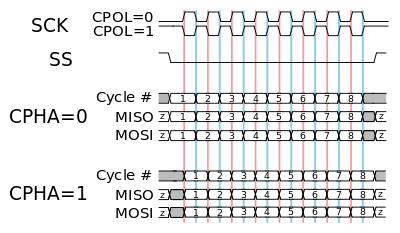
SPI通信有4种不同的模式,不同的从设备可能在出厂时就配置为某种模式,这是不能改变的;但通信双方必须是工作在同一模式下,所以需要对主设备的SPI模式进行配置。通过CPOL(时钟极性)和CPHA(时钟相位)来设置主设备的通信模式,具体如下: Mode0:CPOL=0,CPHA=0 Mode1:CPOL=0,CPHA=1 Mode2:CPOL=1,CPHA=0 Mode3:CPOL=1,CPHA=1
时钟极性CPOL用来配置SCLK的电平处于哪种状态时是空闲态或者有效态,时钟相位CPHA用来配置数据采样是在第几个SCLK脉冲边沿: CPOL=0,表示当SCLK=0时处于空闲态,所以有效状态就是SCLK处于高电平时 CPOL=1,表示当SCLK=1时处于空闲态,所以有效状态就是SCLK处于低电平时 CPHA=0,表示数据采样是在第1个边沿,数据发送在第2个边沿 CPHA=1,表示数据采样是在第2个边沿,数据发送在第1个边沿
例如: CPOL=0,CPHA=0:此时空闲态时,SCLK处于低电平,数据采样是在第1个边沿,也就是SCLK由低电平到高电平的跳变,所以数据采样是在上升沿,数据发送是在下降沿。
CPOL=0,CPHA=1:此时空闲态时,SCLK处于低电平,数据发送是在第1个边沿,也就是SCLK由低电平到高电平的跳变,所以数据采样是在下降沿,数据发送是在上升沿。
CPOL=1,CPHA=0:此时空闲态时,SCLK处于高电平,数据采集是在第1个边沿,也就是SCLK由高电平到低电平的跳变,所以数据采集是在下降沿,数据发送是在上升沿。
CPOL=1,CPHA=1:此时空闲态时,SCLK处于高电平,数据发送是在第1个边沿,也就是SCLK由高电平到低电平的跳变,所以数据采集是在上升沿,数据发送是在下降沿。
SPI库函数
SPISettings 配置SPI总线端口
Description 描述
The SPISettings object is used to configure the SPI port for your SPI device. All 3 parameters are combined to a single SPISettings object, which is given to SPI.beginTransaction().
When all of your settings are constants, SPISettings should be used directly in SPI.beginTransaction(). See the syntax section below. For constants, this syntax results in smaller and faster code.
If any of your settings are variables, you may create a SPISettings object to hold the 3 settings. Then you can give the object name to SPI.beginTransaction(). Creating a named SPISettings object may be more efficient when your settings are not constants, especially if the maximum speed is a variable computed or configured, rather than a number you type directly into your sketch.
Syntax 语法
SPI.beginTransaction(SPISettings(14000000, MSBFIRST, SPI_MODE0)) Note:Best if all 3 settings are constants
SPISettings mySettting(speedMaximum, dataOrder, dataMode) Note:Best when any setting is a variable''
Parameters 参数
speedMaximum: The maximum speed of communication. For a SPI chip rated up to 20 MHz, use 20000000.
dataOrder: MSBFIRST or LSBFIRST
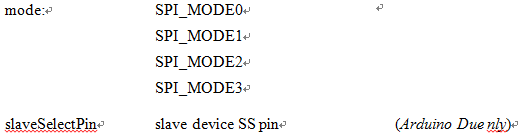
dataMode : SPI_MODE0, SPI_MODE1, SPI_MODE2, or SPI_MODE3 四种数据传送模式
Returns None 返回
begin() 初始化SPI总线的参数
Description
Initializes the SPI bus by setting SCK, MOSI, and SS to outputs, pulling SCK and MOSI low, and SS high.
Syntax SPI.begin()
Parameters None
Returns None
end() 关闭SPI总线
Description
Disables the SPI bus (leaving pin modes unchanged).
Syntax SPI.end()
Parameters None
Returns None
beginTransaction() 开始使用SPI总线
Description
Initializes the SPI bus using the defined SPISettings.
Syntax
SPI.beginTransaction(mySettings);
Parameters
mySettings: the chosen settings according to SPISettings.
Returns None.
endTransaction() 停用SPI总线
Description
Stop using the SPI bus. Normally this is called after de-asserting the chip select, to allow other libraries to use the SPI bus.
Syntax
SPI.endTransaction()
Parameters None.
Returns None.
setBitOrder() 设置传输数据时的先后顺序
Description
This function should not be used in new projects. Use SPISettings with SPI.beginTransaction() to configure SPI parameters.
Sets the order of the bits shifted out of and into the SPI bus, either LSBFIRST (least-significant bit first) or MSBFIRST (most-significant bit first).
Syntax
SPI.setBitOrder(order)
Parameters
order: either LSBFIRST or MSBFIRST
Returns None
setClockDivider() 设置时钟分频器
Description
This function should not be used in new projects. Use SPISettings with SPI.beginTransaction() to configure SPI parameters.
Sets the SPI clock divider relative to the system clock. On AVR based boards, the dividers available are 2, 4, 8, 16, 32, 64 or 128. The default setting is SPI_CLOCK_DIV4, which sets the SPI clock to one-quarter the frequency of the system clock (4 Mhz for the boards at 16 MHz).
Arduino DueOn the Due, the system clock can be divided by values from 1 to 255. The default value is 21, which sets the clock to 4 MHz like other Arduino boards.
Syntax
SPI.setClockDivider(divider)
Parameters

Returns None
setDataMode() 设置数据模式,即时钟的极性和相位
Description
This function should not be used in new projects. Use SPISettings with SPI.beginTransaction() to configure SPI parameters.
Sets the SPI data mode: that is, clock polarity and phase. See the Wikipedia article on SPI for details.
Syntax
SPI.setDataMode(mode)
Parameters
Returns None
transfer(), transfer16() 数据传送
Description
SPI transfer is based on a simultaneous send and receive: the received data is returned in receivedVal (or receivedVal16). In case of buffer transfers the received data is stored in the buffer in-place (the old data is replaced with the data received).
Syntax
receivedVal = SPI.transfer(val) receivedVal16 = SPI.transfer16(val16) SPI.transfer(buffer, size)
Parameters
val: the byte to send out over the bus val16: the two bytes variable to send out over the bus buffer: the array of data to be transferred
Returns the received data
usingInterrupt() 在中断中做SPI处理
Description
If your program will perform SPI transactions within an interrupt, call this function to register the interrupt number or name with the SPI library. This allows SPI.beginTransaction() to prevent usage conflicts. Note that the interrupt specified in the call to usingInterrupt() will be disabled on a call to beginTransaction() and re-enabled in endTransaction().
Syntax
SPI.usingInterrupt(interruptNumber)
Parameters
interruptNumber: the associated interrupt number.
Returns None.
总线SPI的Arduino库函数的更多相关文章
- OneWire总线的Arduino库函数
OneWire总线基本点 One-wire总线是DALLAS公司研制开发的一种协议,采用单根信号线,既传输时钟,又传输数据而且数据传输是双向的.它具有节省I/O 口线资源.结构简单.成本低廉.便于总线 ...
- I2C总线的Arduino库函数
I2C总线的Arduino库函数 I2C即Inter-Integrated Circuit串行总线的缩写,是PHILIPS公司推出的芯片间串行传输总线.它以1根串行数据线(SDA)和1根串行时钟线(S ...
- Arduino库函数中文说明
#define 常量名 常量值 % 取模运算符 String abc / char abc[n] 定义字符串 pinMode(pin,mode); 用于引脚的初始化 mode包括 INPUT ...
- arduino库函数1
https://wenku.baidu.com/view/e657b1f0bcd126fff6050baf.html 的阅读笔记.现在到了 第四十页. setup应该是 在开始 执行一次. 然后 lo ...
- 步进电机的Arduino库函数
This library allows you to control unipolar or bipolar stepper motors. To use it you will need a ste ...
- 伺服电机的Arduino库函数
servo.attach(pin) //连接伺服电机的信号线于控制板的引脚,9或10号引脚servo.attach(pin, min, max) servo: a variable of type ...
- SPI、I2C、UART三种串行总线协议的区别
第一个区别当然是名字: SPI(Serial Peripheral Interface:串行外设接口); I2C(INTER IC BUS) UART(Universal Asynchronous R ...
- SPI、I2C、UART三种串行总线协议的区别和SPI接口介绍(转)
SPI.I2C.UART三种串行总线协议的区别 第一个区别当然是名字: SPI(Serial Peripheral Interface:串行外设接口); I2C(INTER IC BUS) UART( ...
- SPI总线介绍
1. 简介 SPI, Serial Peripheral Interface, 串行外设接口, 是一种高速的.全双工.同步的通信总线SPI在芯片的管脚上只占用四根线 SPI接口主要用于MCU与各种外围 ...
随机推荐
- Java 获取一段时间内的每一天
有时候我们会遇到一些业务场景,需要去获取一段时间内的每一天日期 public static List<Date> findDates(Date dBegin, Date dEnd) { L ...
- 12_进程,线程,协程,IO多路复用的区别
1.进程 1.进程可以使用计算机多核 2.进程是资源分配的单位 3.进程的创建要比线程消耗更多的资源效率很低 4.进程空间独立,数据安全性跟好操作有专门的进程间通信方式 5.一个进程可以包含多个线程, ...
- [Python]打印指定目录下所有子目录
import os for root,dirs,files in os.walk(r"/home/os-hy01"): for dir in dirs: print(dir) -- ...
- 转载:把你的精力专注在java,jvm原理,spring原理,mysql锁,事务,多线程,大并发,分布式架构,微服务,以及相关的项目管理等等,这样你的核心竞争力才会越来越高
https://developer.51cto.com/art/202001/608984.htm 把你的精力专注在java,jvm原理,spring原理,mysql锁,事务,多线程,大并发,分布式架 ...
- leetcode刷题-79单词搜索
题目 给定一个二维网格和一个单词,找出该单词是否存在于网格中. 单词必须按照字母顺序,通过相邻的单元格内的字母构成,其中“相邻”单元格是那些水平相邻或垂直相邻的单元格.同一个单元格内的字母不允许被重复 ...
- VSCode注册关联自定义类型文件
打开你要注册的文件类型文件[本文中用 ".txt"到".lua"演示] 在VSCode窗口右下角有当前文件类型"Plain Text" 是可 ...
- css常用属性之绝对定位、相对定位、滚动条属性、背景图属性、字体、鼠标、超链接跳转页面
1.绝对定位position: fixed(比如广告页面向下滑动的时候,页面最上方有个标题不能随之滑动,就需要用到position: fixed,同时还需要用到一个标签(标签高度很高才会出现滚动的情况 ...
- 向你的C语言项目中加入多线程
C语言在标准库<pthread.h>中为程序员提供了多线程操作接口. 先从简单操作入手 int pthread_create(pthread_t *thread, pthread_attr ...
- yum管理——yum常用配置(2)
一.网络源的缓存设置 [root@yunwei ~]# vim /etc/yum.conf [main] cachedir=/var/cache/yum/$basearch/$releasever k ...
- python:一切皆对象
学过java语言的童鞋都知道,java是一门面向对象语言,其基本思想就是一切皆对象.Python也是一样的,甚至Python将面向对象思想贯彻地更加彻底,因为在Python中,class本身是一个 ...