
windbg安装pykd记录
https://githomelab.ru/pykd/pykd
1、安装python (坑,分x86和x64,对应windbg版本)
2、安装pykd:'pip install pykd'
3、安装Windbg插件,
下载地址:https://githomelab.ru/pykd/pykd-ext/-/wikis/Downloads
安装步骤:https://githomelab.ru/pykd/pykd-ext
排坑记录:
1、执行!py命令后提示:failed to find python interpreter
解决方案:安装对于版本的python
2、执行!py命令后windbg闪退
排错过程:
windbg加载C:\Users\xxx\AppData\Local\CrashDumps目录下的dump文件
!analyze -v
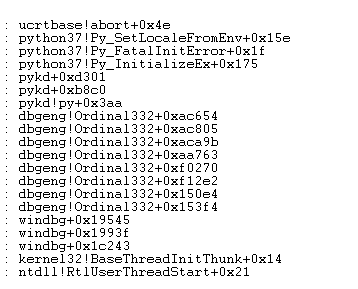
应该是环境的问题,搜索中发现:https://stackoverflow.com/questions/43688302/windbg-cant-find-python-interpreter-for-pykd/45856752#45856752
I had this issue when having multiple python installations on the same machine. Managed to solve it by manually creating required registry key, as I did not want to reinstall any python versions, nor change the global path/pythonpath variables.
Note that you will need x64 python for windbgx64 and x86 python for windbgx86
Let's say you want to use python 3.7x86 installed at c:\python37_x86, and python 3.6x64installed at c:\python36_x64
Create keys leading to
HKEY_LOCAL_MACHINE\SOFTWARE\WOW6432Node\Python\PythonCore\3.7-32\InstallPaththere, and set the(Default)toc:\python37_x86\(the trailing backslash is important!)Similarly, create keys leading to
HKEY_LOCAL_MACHINE\SOFTWARE\Python\PythonCore\3.6\InstallPaththere, and set the(Default)toc:\python36_x64\- Unfortunately the
PYTHONPATHenvironment variable is still being used, and must match the referenced python version(otherwise you will encounterFatal Python error: unable to load the file system codec. NOTE: this may only be important if one of the versions is 2.x and the other 3.x. Try making it work without this step
To circumvent the last issue I created .bat files to modify the environment and launch windbg with the correct environment.
For example for launching 32 bit windbg:
set PYTHONPATH=C:\python37_x86\Lib;[...Rest of the PYTHONPATH for this python version...]

start windbgx -debugArch x86 -c ".load c:\dev\tools\pykd\x86\pykd.dll"
解决方案:使用bat脚本启动对应windbg
根据个人环境修改
x86:
e:

cd E:\Windows Kits\10\Debuggers\x86

set PYTHONPATH=D:\sdk\python37_86\Lib;

start windbg
x64
e:

cd E:\Windows Kits\10\Debuggers\x64

set PYTHONPATH=D:\sdk\Anaconda3\Lib;

start windbg
over!
windbg安装pykd记录的更多相关文章
- 安装jessie记录
// */ // ]]> 安装jessie记录 Table of Contents 1 引言 2 目标 3 usb安装 4 无线网卡 5 代理上网 6 rabbitvcs 7 locale ...
- 013_VM+WinDbg安装
预计平均三天一课,录制过程中,大纲会实时更新(更改) 主讲:郁金香灬老师 QQ150330575 开发环境:VC6,VS2003,VS2008 www.yjxsoft.net www.yjxsoft ...
- Ubuntu14.04 Tomcat 安装过程记录
Ubuntu14.04 Tomcat 安装过程记录 检查java的版本 zhousp@ubuntu:~$ sudo java -version [sudo] password for zhousp: ...
- FastDFS安装全过程记录(V5.05)
FastDFS安装全过程记录 1.安装准备 HA虚拟IP:192.168.1.208 HA软件:Keepalived 操作系统:CentOS 7 用户:root 数据目录:/data/fastdfs ...
- openvswitch 2.7 安装过程记录 总结
envswitch 2.7 安装过程记录 总结 安装思路是参考文档: http://docs.openvswitch.org/en/latest/intro/install/general/#obta ...
- CentOS 7下安装vertica记录
CentOS 7下安装vertica记录 1. 安装好centeros 并更新 Centeros安装就不说了,安装完之后联网环境下 yum update.更新下,使得那些包都是新的.(要想用中文 ...
- ubuntu 1604安装docker-ce 记录
以前在linux 内核为2.x的低版本中安装过docker,但是很多功能特性都无法使用,本次是在ubuntu 16.04上安装,记录安装过程,方便后续查阅. 一.安装前准备: 1. 安装包,允许 ap ...
- Centos 7 安装Docker-ce记录
以前尝试过在centos 6上安装Docker , 需要升级内核,支持aufs,比较麻烦:在使用过程中出现过Docker挂掉的情况,官方建议在64 位 centos 7 上运行,本文将安装步骤记录下来 ...
- k8s1.4.3安装实践记录(2)-k8s安装
前面一篇已经安装好了ETCD.docker与flannel(k8s1.4.3安装实践记录(1)),现在可以开始安装k8s了 1.K8S 目前centos yum上的kubernetes还是1.2.0, ...
随机推荐
- MarkDown语法详解
MarkDown语法详解 编辑器:Typora 下载官网:https://typora.io 提速镜像:https://gitee.com/typora-mirror/Typora-Mirror/re ...
- Debian8.1 安装samba与windows共享文件,在系统重启后samba服务无法自动启动
Debian8.1安装配置完成并成功与window共享文件后,系统重启后再次访问时出现如下问题 (图)的解决方法 手动重启samba sudo /etc/init.d/samba start 从win ...
- HTTP cache in depth
HTTP cache in depth HTTP 缓存 https://developers.google.com/web/fundamentals/performance/optimizing-co ...
- web testing
web testing cypress https://www.cypress.io/ https://github.com/cypress-io/cypress https://docs.cypre ...
- express+mongodb开发网站
准备工作: 1安装git 进入官网 使用方法:使用git教程 2安装node.js 进入官网 3安装mongodb 进入官网 需要技术: 1.基础知识:html .css. js .jquery 2 ...
- Python算法_爬楼梯(08)
假设你正在爬楼梯.需要 n 阶你才能到达楼顶. 每次你可以爬 1 或 2 个台阶.你有多少种不同的方法可以爬到楼顶呢? 注意:给定 n 是一个正整数. 示例 1: 输入: 2输出: 2解释: 有两种方 ...
- Spark在处理数据的时候,会将数据都加载到内存再做处理吗?
对于Spark的初学者,往往会有一个疑问:Spark(如SparkRDD.SparkSQL)在处理数据的时候,会将数据都加载到内存再做处理吗? 很显然,答案是否定的! 对该问题产生疑问的根源还是对Sp ...
- C语言:试探算法解决“八皇后”问题
#include <stdio.h> #define N 4 int solution[N], j, k, count, sols; int place(int row, int col) ...
- cocos2dx创建工程
p.p1 { margin: 0; font: 17px "Helvetica Neue"; color: rgba(69, 69, 69, 1) } 官网镇楼: http://w ...
- const成员函数可以将非const指针作为返回值吗?
先给出一段代码 class A { int *x; public: int *f() const { return x; } }; 成员函数f返回指向私有成员 x 的非常量指针,我认为这会修改成员x ...