
EF Core 2.1 支持数据库一对一关系
在使用EF Core和设计数据库的时候,通常一对多、多对多关系使用得比较多,但是一对一关系使用得就比较少了。最近我发现实际上EF Core很好地支持了数据库的一对一关系。
数据库
我们先来看看SQL Server数据库中的表:
Person表代表的是一个人,表中有些字段来简单描述一个人,其建表语句如下:
CREATE TABLE [dbo].[Person](

    [ID] [int] IDENTITY(1,1) NOT NULL,

    [PersonCode] [nvarchar](50) NULL,

    [Name] [nvarchar](50) NULL,

    [Age] [int] NULL,

    [City] [nvarchar](50) NULL,

    [CreateTime] [datetime] NULL,

 CONSTRAINT [PK_Person] PRIMARY KEY CLUSTERED

(

    [ID] ASC

)WITH (PAD_INDEX = OFF, STATISTICS_NORECOMPUTE = OFF, IGNORE_DUP_KEY = OFF, ALLOW_ROW_LOCKS = ON, ALLOW_PAGE_LOCKS = ON) ON [PRIMARY],

 CONSTRAINT [IX_Person] UNIQUE NONCLUSTERED

(

    [PersonCode] ASC

)WITH (PAD_INDEX = OFF, STATISTICS_NORECOMPUTE = OFF, IGNORE_DUP_KEY = OFF, ALLOW_ROW_LOCKS = ON, ALLOW_PAGE_LOCKS = ON) ON [PRIMARY]

) ON [PRIMARY]

GO

ALTER TABLE [dbo].[Person] ADD  CONSTRAINT [DF_Person_CreateTime]  DEFAULT (getdate()) FOR [CreateTime]

GO
从上面可以看出,除了主键ID外,我们还设置了列PersonCode为唯一键IX_Person。
然后数据库中还有张表IdentificationCard,其代表的是一个人的身份证,其中列IdentificationNo是身份证号码,其建表语句如下:
CREATE TABLE [dbo].[IdentificationCard](

    [ID] [int] IDENTITY(1,1) NOT NULL,

    [IdentificationNo] [nvarchar](50) NULL,

    [PersonCode] [nvarchar](50) NULL,

    [CreateTime] [datetime] NULL,

 CONSTRAINT [PK_IdentificationCard] PRIMARY KEY CLUSTERED

(

    [ID] ASC

)WITH (PAD_INDEX = OFF, STATISTICS_NORECOMPUTE = OFF, IGNORE_DUP_KEY = OFF, ALLOW_ROW_LOCKS = ON, ALLOW_PAGE_LOCKS = ON) ON [PRIMARY],

 CONSTRAINT [IX_IdentificationCard] UNIQUE NONCLUSTERED

(

    [PersonCode] ASC

)WITH (PAD_INDEX = OFF, STATISTICS_NORECOMPUTE = OFF, IGNORE_DUP_KEY = OFF, ALLOW_ROW_LOCKS = ON, ALLOW_PAGE_LOCKS = ON) ON [PRIMARY]

) ON [PRIMARY]

GO

ALTER TABLE [dbo].[IdentificationCard] ADD  CONSTRAINT [DF_IdentificationCard_CreateTime]  DEFAULT (getdate()) FOR [CreateTime]

GO

ALTER TABLE [dbo].[IdentificationCard]  WITH CHECK ADD  CONSTRAINT [FK_IdentificationCard_Person] FOREIGN KEY([PersonCode])

REFERENCES [dbo].[Person] ([PersonCode])

ON UPDATE CASCADE

ON DELETE CASCADE

GO

ALTER TABLE [dbo].[IdentificationCard] CHECK CONSTRAINT [FK_IdentificationCard_Person]

GO
其中设置外键关系FK_IdentificationCard_Person:通过IdentificationCard表的PersonCode列来关联Person表的PersonCode列,从而指明一张身份证属于哪个Person。
然后我们同样设置了IdentificationCard表的PersonCode列为唯一键IX_IdentificationCard,这样外键FK_IdentificationCard_Person表示的实际上就是一对一关系了,因为IdentificationCard表的一行数据通过列PersonCode只能找到一行Person表数据,而现在IdentificationCard表的PersonCode列又是唯一键,所以反过来Person表在IdentificationCard表中最多也只能找到一行数据,所以这是个典型的一对一关系。
我们还在FK_IdentificationCard_Person外键关系上使用了CASCADE设置了级联删除和级联更新。
EF Core实体
接着我们新建了一个.NET Core控制台项目,使用EF Core的Scaffold-DbContext指令自动从数据库中生成实体,可以看到通过我们在数据库中设置的唯一键和外键,EF Core自动识别出了Person表和IdentificationCard表之间是一对一关系,生成的代码如下:
Person实体,对应的是数据库中的Person表,注意其中包含一个属性IdentificationCard,表示Person表和IdentificationCard表的一对一关系:
using System;

using System.Collections.Generic;

namespace FFCoreOneToOne.Entities

{

    /// <summary>

    /// Person实体,对应数据库中的Person表,可以看到其中有一个IdentificationCard属性,表示Person实体对应一个IdentificationCard实体

    /// </summary>

    public partial class Person

    {

        public int Id { get; set; }

        public string PersonCode { get; set; }

        public string Name { get; set; }

        public int? Age { get; set; }

        public string City { get; set; }

        public DateTime? CreateTime { get; set; }

        public IdentificationCard IdentificationCard { get; set; }

    }

}
IdentificationCard实体,对应的是数据库中的IdentificationCard表,注意其中包含一个属性PersonCodeNavigation,表示IdentificationCard表和Person表的一对一关系:
using System;

using System.Collections.Generic;

namespace FFCoreOneToOne.Entities

{

    /// <summary>

    /// IdentificationCard实体,对应数据库中的IdentificationCard表,可以看到其中有一个PersonCodeNavigation属性,表示IdentificationCard实体对应一个Person实体

    /// </summary>

    public partial class IdentificationCard

    {

        public int Id { get; set; }

        public string IdentificationNo { get; set; }

        public string PersonCode { get; set; }

        public DateTime? CreateTime { get; set; }

        public Person PersonCodeNavigation { get; set; }

    }

}
最后是Scaffold-DbContext指令生成的DbContext类TestDBContext,其中比较重要的地方是OnModelCreating方法中,设置IdentificationCard实体和Person实体间一对一关系的Fluent API代码,我用注释详细阐述了每一步的含义:
using System;

using FFCoreOneToOne.Logger;

using Microsoft.EntityFrameworkCore;

using Microsoft.EntityFrameworkCore.Metadata;

namespace FFCoreOneToOne.Entities

{

    public partial class TestDBContext : DbContext

    {

        public TestDBContext()

        {

        }

        public TestDBContext(DbContextOptions<TestDBContext> options)

            : base(options)

        {

        }

        public virtual DbSet<IdentificationCard> IdentificationCard { get; set; }

        public virtual DbSet<Person> Person { get; set; }

        protected override void OnConfiguring(DbContextOptionsBuilder optionsBuilder)

        {

            if (!optionsBuilder.IsConfigured)

            {

                optionsBuilder.UseSqlServer("Server=localhost;User Id=sa;Password=1qaz!QAZ;Database=TestDB");

            }

        }

        protected override void OnModelCreating(ModelBuilder modelBuilder)

        {

            modelBuilder.Entity<IdentificationCard>(entity =>

            {

                entity.HasIndex(e => e.PersonCode)

                    .HasName("IX_IdentificationCard")

                    .IsUnique();

                entity.Property(e => e.Id).HasColumnName("ID");

                entity.Property(e => e.CreateTime)

                    .HasColumnType("datetime")

                    .HasDefaultValueSql("(getdate())");

                entity.Property(e => e.IdentificationNo).HasMaxLength();

                entity.Property(e => e.PersonCode).HasMaxLength();

                //设置IdentificationCard实体和Person实体的一对一关系

                entity.HasOne(d => d.PersonCodeNavigation)//HasOne设置IdentificationCard实体中有一个Person实体,可以通过IdentificationCard实体的PersonCodeNavigation属性访问到

                    .WithOne(p => p.IdentificationCard)//WithOne设置Person实体中有一个IdentificationCard实体,可以通过Person实体的IdentificationCard属性访问到

                    .HasPrincipalKey<Person>(p => p.PersonCode)//设置数据库中Person表的PersonCode列是一对一关系的主表键

                    .HasForeignKey<IdentificationCard>(d => d.PersonCode)//设置数据库中IdentificationCard表的PersonCode列是一对一关系的从表外键

                    .OnDelete(DeleteBehavior.Cascade)//由于我们在数据库中开启了IdentificationCard表外键FK_IdentificationCard_Person的级联删除,所以这里也生成了实体级联删除的Fluent API

                    .HasConstraintName("FK_IdentificationCard_Person");//设置IdentificationCard实体和Person实体的一对一关系采用的是数据库外键FK_IdentificationCard_Person

            });

            modelBuilder.Entity<Person>(entity =>

            {

                entity.HasIndex(e => e.PersonCode)

                    .HasName("IX_Person")

                    .IsUnique();

                entity.Property(e => e.Id).HasColumnName("ID");

                entity.Property(e => e.City).HasMaxLength();

                entity.Property(e => e.CreateTime)

                    .HasColumnType("datetime")

                    .HasDefaultValueSql("(getdate())");

                entity.Property(e => e.Name).HasMaxLength();

                entity.Property(e => e.PersonCode)

                    .IsRequired()

                    .HasMaxLength();

            });

        }

    }

}
示例代码
接着我们在.NET Core控制台项目的Program类中定义了些示例代码,其中AddPersonWithIdentificationCard和AddIdentificationCardWithPerson方法使用DbContext来添加数据到数据库,RemoveIdentificationCardFromPerson和RemovePersonFromIdentificationCard方法用来演示如何通过实体的导航属性来删除数据,最后DeleteAllPersons是清表语句,删除数据库中IdentificationCard表和Person表的所有数据。
这里先把示例代码全部贴出来:
using FFCoreOneToOne.Entities;

using Microsoft.EntityFrameworkCore;

using System;

using System.Collections.Generic;

using System.Linq;

namespace FFCoreOneToOne

{

    class Program

    {

        /// <summary>

        /// 删除数据库Person表和IdentificationCard表的所有数据

        /// </summary>

        static void DeleteAllPersons()

        {

            using (TestDBContext dbContext = new TestDBContext())

            {

                dbContext.Database.ExecuteSqlCommand("DELETE FROM [dbo].[IdentificationCard]");

                dbContext.Database.ExecuteSqlCommand("DELETE FROM [dbo].[Person]");

            }

        }

        /// <summary>

        /// 通过添加Person来添加IdentificationCard

        /// </summary>

        static void AddPersonWithIdentificationCard()

        {

            //通过添加Person实体来添加IdentificationCard实体,将Person实体的IdentificationCard属性设置为对应的IdentificationCard实体即可

            using (TestDBContext dbContext = new TestDBContext())

            {

                var james = new Person() { Name = "James", Age = , PersonCode = "P001", City = "Beijing" };

                james.IdentificationCard = new IdentificationCard() { IdentificationNo = "" };

                var tom = new Person() { Name = "Tom", Age = , PersonCode = "P002", City = "Shanghai" };

                tom.IdentificationCard = new IdentificationCard() { IdentificationNo = "" };

                var sam = new Person() { Name = "Sam", Age = , PersonCode = "P003", City = "Chongqing" };

                sam.IdentificationCard = new IdentificationCard() { IdentificationNo = "" };

                dbContext.Person.Add(james);

                dbContext.Person.Add(tom);

                dbContext.Person.Add(sam);

                dbContext.SaveChanges();

            }

        }

        /// <summary>

        /// 通过添加IdentificationCard来添加Person,从EF Core的日志中可以看到使用这种方式还是先执行的插入Person表数据的SQL,再执行的插入IdentificationCard表数据的SQL

        /// </summary>

        static void AddIdentificationCardWithPerson()

        {

            //通过添加IdentificationCard实体来添加Person实体,将IdentificationCard实体的PersonCodeNavigation属性设置为对应的Person实体即可

            using (TestDBContext dbContext = new TestDBContext())

            {

                var jamesCard = new IdentificationCard() { IdentificationNo = "" };

                jamesCard.PersonCodeNavigation = new Person() { Name = "James", Age = , PersonCode = "P001", City = "Beijing" };

                var tomCard = new IdentificationCard() { IdentificationNo = "" };

                tomCard.PersonCodeNavigation = new Person() { Name = "Tom", Age = , PersonCode = "P002", City = "Shanghai" };

                var samCard = new IdentificationCard() { IdentificationNo = "" };

                samCard.PersonCodeNavigation = new Person() { Name = "Sam", Age = , PersonCode = "P003", City = "Chongqing" };

                dbContext.IdentificationCard.Add(jamesCard);

                dbContext.IdentificationCard.Add(tomCard);

                dbContext.IdentificationCard.Add(samCard);

                dbContext.SaveChanges();

            }

        }

        /// <summary>

        /// 通过设置Person实体的IdentificationCard属性为null来删除IdentificationCard表的数据

        /// </summary>

        static void RemoveIdentificationCardFromPerson()

        {

            //先用DbContext从数据库中查询出Person实体,然后设置其IdentificationCard属性为null,来删除IdentificationCard表的数据

            //注意在查询Person实体的时候,记得要用EF Core中Eager Loading的Include方法也查询出IdentificationCard实体,这样我们在设置Person实体的IdentificationCard属性为null后,DbContext才能跟踪到变更,才会在下面调用DbContext.SaveChanges方法时,生成删除IdentificationCard表数据的SQL语句

            using (TestDBContext dbContext = new TestDBContext())

            {

                var james = dbContext.Person.Include(e => e.IdentificationCard).First(e => e.Name == "James");

                james.IdentificationCard = null;

                var tom = dbContext.Person.Include(e => e.IdentificationCard).First(e => e.Name == "Tom");

                tom.IdentificationCard = null;

                var sam = dbContext.Person.Include(e => e.IdentificationCard).First(e => e.Name == "Sam");

                sam.IdentificationCard = null;

                dbContext.SaveChanges();

            }

        }

        /// <summary>

        /// 本来这个方法是想用来通过设置IdentificationCard实体的PersonCodeNavigation属性为null,来删除Person表的数据,但是结果是还是删除的IdentificationCard表数据

        /// </summary>

        static void RemovePersonFromIdentificationCard()

        {

            //原本我想的是,先用DbContext从数据库中查询出IdentificationCard实体,并用EF Core中Eager Loading的Include方法也查询出Person实体,然后设置IdentificationCard实体的PersonCodeNavigation属性为null,来删除Person表的数据

            //结果这样做EF Core最后还是删除的IdentificationCard表的数据,原因是IdentificationCard表是一对一外键关系的从表,设置从表实体的外键属性PersonCodeNavigation为null,EF Core认为的是从表的数据作废,所以删除了从表IdentificationCard中的数据,主表Person的数据还在。。。

            using (TestDBContext dbContext = new TestDBContext())

            {

                var jamesCard = dbContext.IdentificationCard.Include(e => e.PersonCodeNavigation).First(e => e.IdentificationNo == "");

                jamesCard.PersonCodeNavigation = null;

                var tomCard = dbContext.IdentificationCard.Include(e => e.PersonCodeNavigation).First(e => e.IdentificationNo == "");

                tomCard.PersonCodeNavigation = null;

                var samCard = dbContext.IdentificationCard.Include(e => e.PersonCodeNavigation).First(e => e.IdentificationNo == "");

                samCard.PersonCodeNavigation = null;

                dbContext.SaveChanges();

            }

        }

        static void Main(string[] args)

        {

            DeleteAllPersons();

            AddPersonWithIdentificationCard();

            AddIdentificationCardWithPerson();

            RemoveIdentificationCardFromPerson();

            RemovePersonFromIdentificationCard();

            Console.WriteLine("Press any key to quit...");

            Console.ReadKey();

        }

    }

}
AddPersonWithIdentificationCard
首先我们测试AddPersonWithIdentificationCard方法,其通过添加Person实体到数据库来添加IdentificationCard表的数据,更改Main方法的代码如下,并执行程序:
static void Main(string[] args)

{

    DeleteAllPersons();

    AddPersonWithIdentificationCard();

    //AddIdentificationCardWithPerson();

    //RemoveIdentificationCardFromPerson();

    //RemovePersonFromIdentificationCard();

    Console.WriteLine("Press any key to quit...");

    Console.ReadKey();

}
执行后数据库中Person表的数据如下:
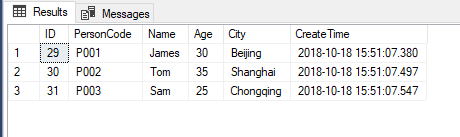
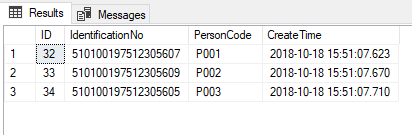
IdentificationCard表的数据如下:
AddIdentificationCardWithPerson
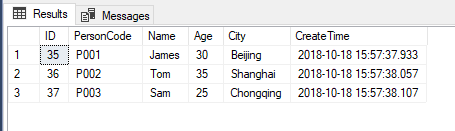
然后我们测试AddIdentificationCardWithPerson方法,其通过添加IdentificationCard实体到数据库来添加Person表的数据,从EF Core的日志中可以看到使用这种方式还是先执行的插入Person表数据的SQL,再执行的插入IdentificationCard表数据的SQL。更改Main方法的代码如下,并执行程序:
static void Main(string[] args)

{

    DeleteAllPersons();

    //AddPersonWithIdentificationCard();

    AddIdentificationCardWithPerson();

    //RemoveIdentificationCardFromPerson();

    //RemovePersonFromIdentificationCard();

    Console.WriteLine("Press any key to quit...");

    Console.ReadKey();

}
执行后数据库中Person表的数据如下:
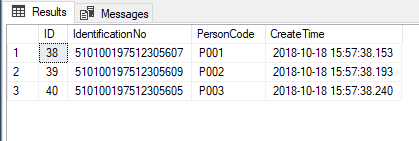
IdentificationCard表的数据如下:
RemoveIdentificationCardFromPerson
然后我们测试RemoveIdentificationCardFromPerson方法,其通过设置Person实体的IdentificationCard属性为null,来删除IdentificationCard表的数据,更改Main方法的代码如下,并执行程序:
static void Main(string[] args)

{

    DeleteAllPersons();

    AddPersonWithIdentificationCard();

    //AddIdentificationCardWithPerson();

    RemoveIdentificationCardFromPerson();

    //RemovePersonFromIdentificationCard();

    Console.WriteLine("Press any key to quit...");

    Console.ReadKey();

}
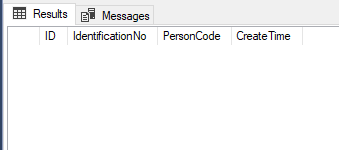
执行后数据库中Person表的数据如下:
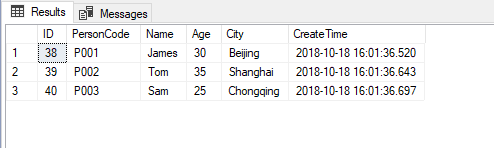
IdentificationCard表的数据如下:
RemovePersonFromIdentificationCard
最后我们测试RemovePersonFromIdentificationCard方法,本来这个方法我是设计用来通过设置IdentificationCard实体的PersonCodeNavigation属性为null,来删除Person表的数据,但是测试后发现结果还是删除的IdentificationCard表的数据,原因可以看下上面示例代码中RemovePersonFromIdentificationCard方法中的注释。更改Main方法的代码如下,并执行程序:
static void Main(string[] args)

{

    DeleteAllPersons();

    AddPersonWithIdentificationCard();

    //AddIdentificationCardWithPerson();

    //RemoveIdentificationCardFromPerson();

    RemovePersonFromIdentificationCard();

    Console.WriteLine("Press any key to quit...");

    Console.ReadKey();

}
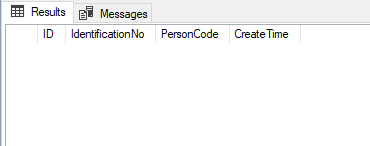
执行后数据库中Person表的数据如下:
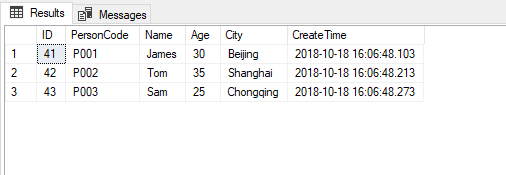
IdentificationCard表的数据如下:
EF Core 2.1 支持数据库一对一关系的更多相关文章
- .NET 5/.NET Core使用EF Core 5连接MySQL数据库写入/读取数据示例教程
本文首发于<.NET 5/.NET Core使用EF Core 5(Entity Framework Core)连接MySQL数据库写入/读取数据示例教程> 前言 在.NET Core/. ...
- EF Core中如何设置数据库表自己与自己的多对多关系
本文的代码基于.NET Core 3.0和EF Core 3.0 有时候在数据库设计中,一个表自己会和自己是多对多关系. 在SQL Server数据库中,现在我们有Person表,代表一个人,建表语句 ...
- 在ef core中使用postgres数据库的全文检索功能实战之中文支持
前言 有关通用的postgres数据库全文检索在ef core中的使用方法,参见我的上一篇文章. 本文实践了zhparser中文插件进行全文检索. 准备工作 安装插件,最方便的方法是直接使用安装好插件 ...
- 最新版的EF Core对UWP支持的怎么样
为啥写这篇帖子呢?其实是因为翻微软的文档中心偶然翻到的,于是就出于好奇就试试了,看看用着怎么样. 以前没注意图片,所以我今天发现的时候,显示EF Core3.1支持standard2.0,于是就想试试 ...
- 在ef core中使用postgres数据库的全文检索功能实战
起源 之前做的很多项目都使用solr/elasticsearch作为全文检索引擎,它们功能全面而强大,但是对于较小的项目而言,构建和维护成本显然过高,尤其是从关系数据库/文档数据库到全文检索引擎的数据 ...
- asp.net Core EF core ( Entity Framework 7 ) 数据库更新维护
CreateDatabaseIfNotExists等之前的API已经废弃,现在采用的是微软封装好,简化.高效的API,migrations 因为,旧API,要付出高昂的代价,以及局限性 打开VS20 ...
- EF Core 中处理 1对1 关系
最近在开发记录感想功能的时候用到了1对1的数据关系,具体情况是这样的,有这样两个1对1的类型 public class Item { public int Id { get; set; } publi ...
- 基于ef core 2.0的数据库增删改审计系统
1.首先是建审计存储表 CREATE TABLE [dbo].[Audit] ( [Id] [uniqueidentifier] NOT NULL, [EntityName] [nvarchar](1 ...
- EF Core 根据已有的数据库来生成 EF 领域模型
1. 如图: 2. 命令 <Project Sdk="Microsoft.NET.Sdk"> <PropertyGroup> <TargetFrame ...
随机推荐
- String对象的match方法
RegExp对象的exec方法和String对象的match方法用法十分相似,分两篇博客讲讲其各自的用法和它们之间的异同.上一篇将exec方法的用法,这篇讲解match方法,并比较其异同. 定义与语法 ...
- 【Html基础】之<h1>~<h6> <p> <br> <hr>
学习html无从下手,就在w3school的html手册按着教程学习了下. 什么是html? html是指超文本标记语言,即Hyper Text Markup Language html不是一种编程语 ...
- WebService发布与调用问题:expected: {http://schemas.xmlsoap.org/soap/envelope/}Envelope but found: {http://schemas.xmlsoap.org/wsdl/}definitions
Mailbox===AsYVzdwoY_b6uD s>>>>>>>javax.xml.ws.Service@103bf65 hs>>>> ...
- Java设计模式—桥梁模式
终于又碰到了一个简单点的模式了. 桥梁模式也叫做桥接模式,定义如下: 将抽象和实现解耦,使得两者可以独立地变化. 这句话也太难理解了,桥梁模式是为了解决类继承的缺点而设计 ...
- LeetCode赛题----Find Left Most Element
问题描述 Given a binary tree, find the left most element in the last row of the tree. Example 1: Input: ...
- Java学习笔记(2)----散列集/线性表/队列/集合/图(Set,List,Queue,Collection,Map)
1. Java集合框架中的所有实例类都实现了Cloneable和Seriablizable接口.所以,它们的实例都是可复制和可序列化的. 2. 规则集存储的是不重复的元素.若要在集合中存储重复的元素, ...
- MySQL 练习题2
CREATE TABLE `dept` ( `did` ) NOT NULL AUTO_INCREMENT, `dname` ) DEFAULT NULL, `address` ) DEFAULT N ...
- vue知识day1
HTML语义.CSS:样式 js:行为 jQuery:简化了js操作 boostrap :框架 ,以类方式展现 react:facebook 公司的产品 angular:谷歌公司产品 vue:作者尤雨 ...
- GOOGLE高级搜索技巧
前记: 我是完整的看完了.内容有点乱啊,自己没有时间整理,先放在自己的印象笔记里了.... 二,GOOGLE特色 GOOGLE支持多达132种语言,包括简体中文和繁体中文: GOOGLE网站只提 ...
- 使用Virtual Audio Cable软件实现电脑混音支持电脑录音
http://blog.csdn.net/cuoban/article/details/50552644