
.NET 5/.NET Core使用EF Core 5连接MySQL数据库写入/读取数据示例教程
本文首发于《.NET 5/.NET Core使用EF Core 5(Entity Framework Core)连接MySQL数据库写入/读取数据示例教程》
前言
在.NET Core/.NET 5的应用程序开发,与其经常搭配的数据库可能是SQL Server。而将.NET Core/.NET 5应用程序与SQL Server数据库的ORM组件有微软官方提供的EF Core(Entity Framework Core),也有像SqlSugar这样的第三方ORM组件。EF Core连接SQL Server数据库微软官方就有比较详细的使用教程和文档。
本文将为大家分享的是在.NET Core/.NET 5应用程序中使用EF Core 5连接MySQL数据库的方法和示例。
本示例源码托管地址请至《.NET 5/.NET Core使用EF Core 5(Entity Framework Core)连接MySQL数据库写入/读取数据示例教程》查看。
创建示例项目
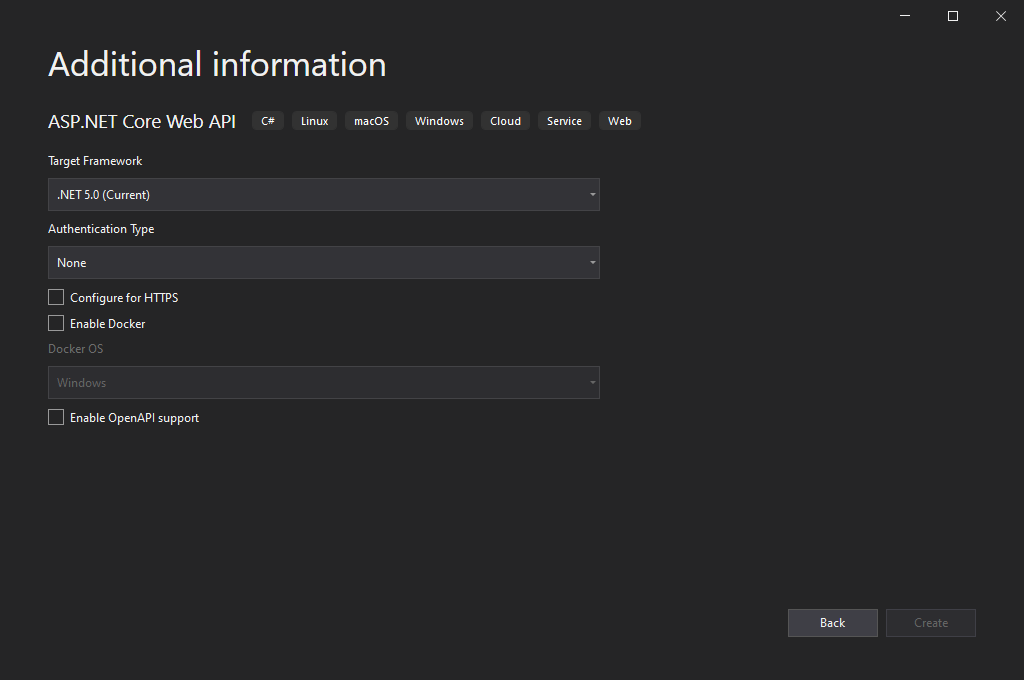
使用Visual Studio 2019(当然,如果你喜欢使用VS Code也是没有问题的,笔者还是更喜欢在Visual Studio编辑器中编写.NET代码)创建一个基于.NET 5的Web API示例项目,这里取名为MySQLSample:
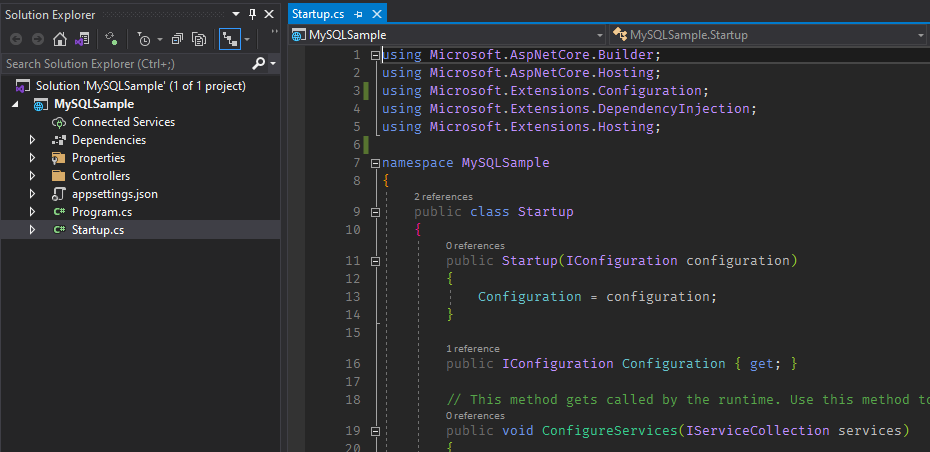
项目创建好后,删除其中自动生成的多余的文件,最终的结构如下:
安装依赖包
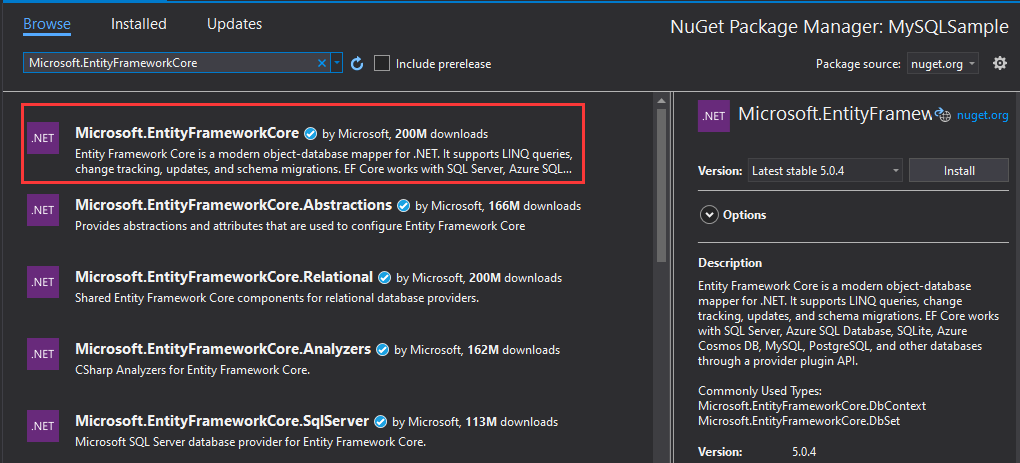
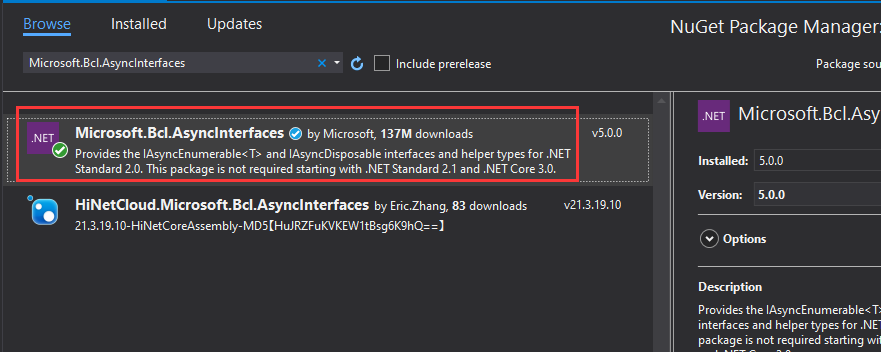
打开程序包管理工具,安装如下关于EF Core的依赖包:
- Microsoft.EntityFrameworkCore
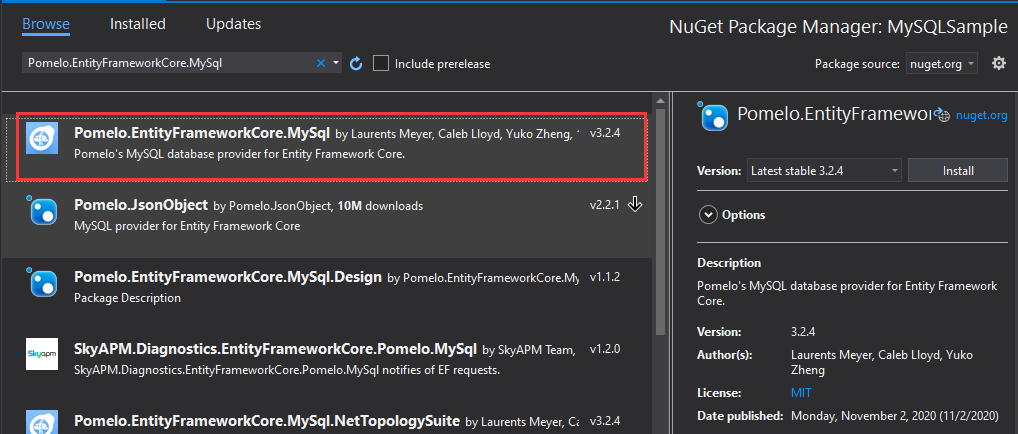
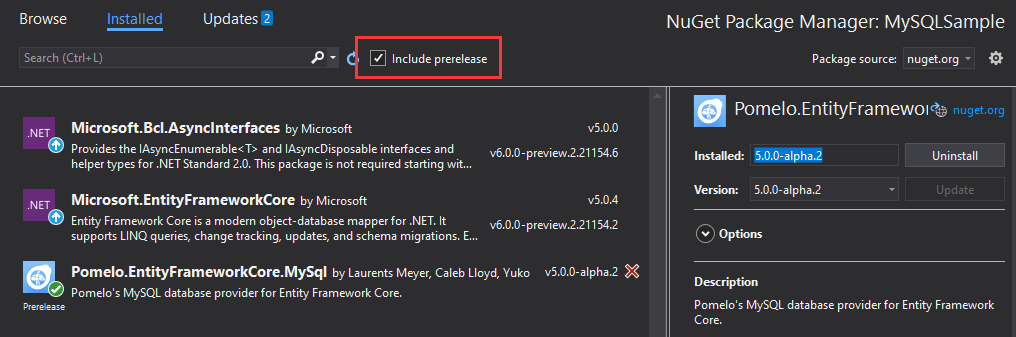
- Pomelo.EntityFrameworkCore.MySql (5.0.0-alpha.2)
- Microsoft.Bcl.AsyncInterfaces
请注意
Pomelo.EntityFrameworkCore.MySql包的版本,安装包时请开启包含预览,如:
创建实体和数据库上下文
创建实体
创建一个实体Person.cs,并定义一些用于测试的属性,如下:
using System;

using System.ComponentModel.DataAnnotations;

using System.ComponentModel.DataAnnotations.Schema;

namespace MySQLSample.Models

{

    [Table("people")]

    public class Person

    {

        [Key]

        public int Id { get; set; }

        public string FirstName { get; set; }

        public string LastName { get; set; }

        public DateTime CreatedAt { get; set; }

    }

}
创建数据库上下文
创建一个数据库上下文MyDbContext.cs,如下:
using Microsoft.EntityFrameworkCore;

using MySQLSample.Models;

namespace MySQLSample

{

    public class MyDbContext : DbContext

    {

        public DbSet<Person> People { get; set; }

        public MyDbContext(DbContextOptions<MyDbContext> options) : base(options)

        {

        }

    }

}
数据表脚本
CREATE TABLE `people`  (

  `Id` int NOT NULL AUTO_INCREMENT,

  `FirstName` varchar(50) NULL,

  `LastName` varchar(50) NULL,

  `CreatedAt` datetime NULL,

  PRIMARY KEY (`Id`)

);
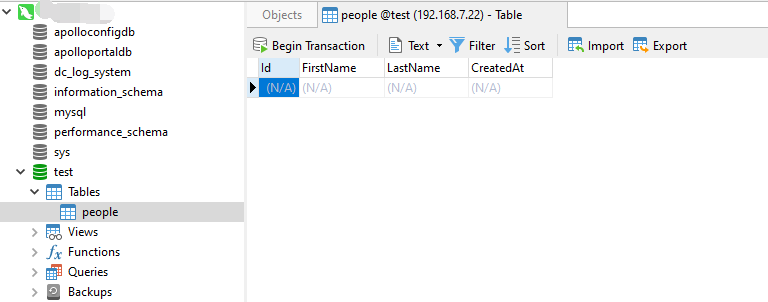
创建好的空数据表people如图:
配置appsettings.json
将MySQL数据连接字符串配置到appsettings.json配置文件中,如下:
{

    "Logging": {

        "LogLevel": {

            "Default": "Information",

            "Microsoft": "Warning",

            "Microsoft.Hosting.Lifetime": "Information"

        }

    },

    "AllowedHosts": "*",

    "ConnectionStrings": {

        "MySQL": "server=192.168.1.22;userid=root;password=xxxxxx;database=test;"

    }

}
Startup.cs注册
在Startup.cs注册MySQL数据库上下文服务,如下:
using Microsoft.AspNetCore.Builder;

using Microsoft.AspNetCore.Hosting;

using Microsoft.EntityFrameworkCore;

using Microsoft.Extensions.Configuration;

using Microsoft.Extensions.DependencyInjection;

using Microsoft.Extensions.Hosting;

namespace MySQLSample

{

    public class Startup

    {

        public Startup(IConfiguration configuration)

        {

            Configuration = configuration;

        }

        public IConfiguration Configuration { get; }

        public void ConfigureServices(IServiceCollection services)

        {

            services.AddDbContext<MyDbContext>(options => options.UseMySql(Configuration.GetConnectionString("MySQL"), MySqlServerVersion.LatestSupportedServerVersion));

            services.AddControllers();

        }

        public void Configure(IApplicationBuilder app, IWebHostEnvironment env)

        {

            if (env.IsDevelopment())

            {

                app.UseDeveloperExceptionPage();

            }

            app.UseRouting();

            app.UseAuthorization();

            app.UseEndpoints(endpoints =>

            {

                endpoints.MapControllers();

            });

        }

    }

}
创建一个名为PeopleController的控制器,写入如下代码:
using Microsoft.AspNetCore.Mvc;

using MySQLSample.Models;

using System;

using System.Linq;

namespace MySQLSample.Controllers

{

    [ApiController]

    [Route("api/[controller]/[action]")]

    public class PeopleController : ControllerBase

    {

        private readonly MyDbContext _dbContext;

        public PeopleController(MyDbContext dbContext)

        {

            _dbContext = dbContext;

        }

        /// <summary>

        /// 创建

        /// </summary>

        /// <returns></returns>

        [HttpGet]

        public IActionResult Create()

        {

            var message = "";

            using (_dbContext)

            {

                var person = new Person

                {

                    FirstName = "Rector",

                    LastName = "Liu",

                    CreatedAt = DateTime.Now

                };

                _dbContext.People.Add(person);

                var i = _dbContext.SaveChanges();

                message = i > 0 ? "数据写入成功" : "数据写入失败";

            }

            return Ok(message);

        }

        /// <summary>

        /// 读取指定Id的数据

        /// </summary>

        /// <returns></returns>

        [HttpGet]

        public IActionResult GetById(int id)

        {

            using (_dbContext)

            {

                var list = _dbContext.People.Find(id);

                return Ok(list);

            }

        }

        /// <summary>

        /// 读取所有

        /// </summary>

        /// <returns></returns>

        [HttpGet]

        public IActionResult GetAll()

        {

            using (_dbContext)

            {

                var list = _dbContext.People.ToList();

                return Ok(list);

            }

        }

    }

}
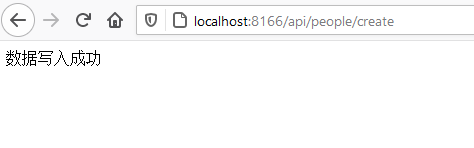
访问地址:http://localhost:8166/api/people/create 来向MySQL数据库写入测试数据,返回结果为:
查看MySQL数据库people表的结果:
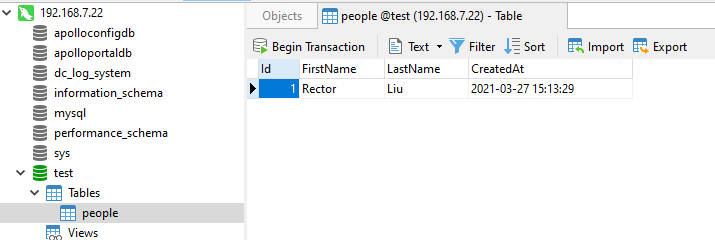
说明使用EF Core 5成功连接到MySQL数据并写入了期望的数据。
再访问地址:http://localhost:8166/api/people/getall 查看使用EF Core 5读取MySQL数据库操作是否成功,结果如下:
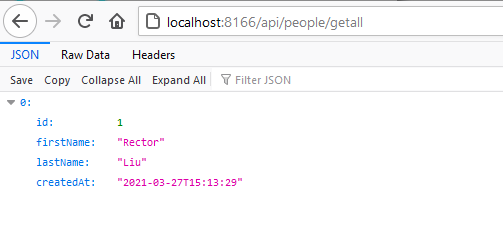
到此,.NET 5/.NET Core使用EF Core 5(Entity Framework Core)连接MySQL数据库写入/读取数据的示例就大功告成了。
谢谢你的阅读,希望本文的.NET 5/.NET Core使用EF Core 5(Entity Framework Core)连接MySQL数据库写入/读取数据的示例对你有所帮助。
我是码友网的创建者-Rector。
.NET 5/.NET Core使用EF Core 5连接MySQL数据库写入/读取数据示例教程的更多相关文章
- EF 连接MySQL 数据库 保存中文数据后乱码问题
EF 连接MySQL 数据库 保存中文数据后乱码问题 采用Code First 生成的数据库,MySQL数据库中,生成的表的编码格式为***** 发现这个问题后,全部手动改成UTF8(图是另一个表的 ...
- C# 之 .net core -- EF code first连接Mysql数据库
一.在Models 新建两个数据库类 这个是数据库需要生成的类基础(塑造外观) public class User { [Key] public string ID { get; set; } [Ma ...
- net Core 通过 Ef Core 访问、管理Mysql
net Core 通过 Ef Core 访问.管理Mysql 本文地址:http://www.cnblogs.com/likeli/p/5910524.html 环境 dotnet Core版本:1. ...
- Entity Framework Core(EF Core) 最简单的入门示例
目录 概述 基于 .NET Core 的 EF Core 入门 创建新项目 更改当前目录 安装 Entity Framework Core 创建模型 创建数据库 使用模型 基于 ASP.NET Cor ...
- .net core webapi+EF Core
.net core webapi+EF Core 一.描述: EF Core必须下载.net core2.0版本 Micorsoft.EntityFrameworkCore:EF框架的核心包Micor ...
- 【ASP.NET Core】EF Core - “影子属性” 深入浅出经典面试题:从浏览器中输入URL到页面加载发生了什么 - Part 1
[ASP.NET Core]EF Core - “影子属性” 有朋友说老周近来博客更新较慢,确实有些慢,因为有些 bug 要研究,另外就是老周把部分内容转到直播上面,所以写博客的内容减少了一点. ...
- 一个官翻教程集合:ASP.NET Core 和 EF Core 系列教程
通过一个大学课程案例讲解了复杂实体的创建过程及讲解 1.ASP.NET Core 和 Entity Framework Core 系列教程——入门 (1 / 10) 2.ASP.NET Core 和 ...
- ASP.NET CORE 使用 EF CORE访问数据库
asp.net core通过ef core来访问数据库,这里用的是代码优先,通过迁移来同步数据库与模型. 环境:vs2017,win10,asp.net core 2.1 一.从建立asp.net c ...
- [.NET Core] - 使用 EF Core 的 Scaffold-DbContext 脚手架命令创建 DbContext
Scaffold-DbContext 命令 参数 Scaffold-DbContext [-Connection] <String> [-Provider] <String> ...
随机推荐
- Docker备份迁移
目录 Docker备份迁移 1.容器保存为镜像 2.镜像打包成压缩文件 3.把压缩文件恢复成镜像 Docker备份迁移 1.容器保存为镜像 将已经装好各种软件的容器再次打包为镜像,这样下次直接装这个镜 ...
- DRF 三大认证之身份认证
目录 路由组件补充 三大认证 一.身份认证 1.如何进行身份认证 2.jwt认证规则原理 3.jwt的组成 4.jwt的使用方法 4.1 签发算法 4.2 校验算法 4.3 刷新算法 二.权限认证 三 ...
- Docker 概述(一)
1-1 虚拟化技术发展史 在虚拟化技术出现之前,如果我们想搭建一台服务器,我们需要做如下的工作: 购买一台硬件服务器:在硬件服务器上安装配置操作系统系统:在操作系统之上配置应用运行环境:部署并运行应用 ...
- js--闭包与垃圾回收机制
前言 闭包和垃圾回收机制常常作为前端学习开发中的难点,也经常在面试中遇到这样的问题,本文记录一下在学习工作中关于这方面的笔记. 正文 1.闭包 闭包(closure)是Javascript语言的一个难 ...
- 给新手的 11 个 Docker 免费上手项目
转: 给新手的 11 个 Docker 免费上手项目 作者:老K玩代码 来源:toutiao.com/i6882755471015576072 Docker 是一个开源的应用容器引擎,让开发者可以打包 ...
- 使用NATAPP内网穿透工具
准备资料 netapp客户端 百度云下载: 官网下载:https://natapp.cn/#download 按照自己的需求进行下载 可以访问到本地的web服务 下载后解压,获得natapp_wind ...
- Python3+pygame实现的90坦克大战 代码完整 有演示效果
我是一个典型的80后,年轻时玩过了特别多的游戏,所以这几天用Python3+pygame实现了一个另外小游戏"坦克大战"(其他的游戏,请翻阅我的博客) 本实例代码量有些多,完整的版 ...
- WPF 基础 - MultiBinding
MultiBinding 与 Binding 一样继承自 BindingBase,因此可以使用 Binding 的地方都可以使用 MultiBinding. namespace System.Wind ...
- [笔记] 扩展Lucas定理
[笔记] 扩展\(Lucas\)定理 \(Lucas\)定理:\(\binom{n}{m} \equiv \binom{n/P}{m/P} \binom{n \% P}{m \% P}\pmod{P} ...
- go中sync.Mutex源码解读
互斥锁 前言 什么是sync.Mutex 分析下源码 Lock 位运算 Unlock 总结 参考 互斥锁 前言 本次的代码是基于go version go1.13.15 darwin/amd64 什么 ...