
Android——RadioGroup和CheckBox
xml
<?xml version="1.0" encoding="utf-8"?>

<LinearLayout xmlns:android="http://schemas.android.com/apk/res/android"

    xmlns:tools="http://schemas.android.com/tools"

    android:layout_width="match_parent"

    android:layout_height="match_parent"

    android:orientation="vertical"

    tools:context="com.example.chenshuai.test322.UIActivity">

    <TextView

        android:layout_width="wrap_content"

        android:layout_height="wrap_content"

        android:text="请选择Android的开发语言是什么?"

        android:padding="10dp"/>

    <RadioGroup

        android:layout_width="match_parent"

        android:layout_height="wrap_content"

        android:orientation="horizontal"

        android:id="@+id/rg">

        <RadioButton

            android:layout_width="wrap_content"

            android:layout_height="wrap_content"

            android:text="C++"

            android:id="@+id/rb1"

            android:layout_marginRight="30dp"

            android:checked="true"

            />

        <RadioButton

            android:layout_width="wrap_content"

            android:layout_height="wrap_content"

            android:text="C"

            android:id="@+id/rb2"

            android:layout_marginRight="30dp"

            />

        <RadioButton

            android:layout_width="wrap_content"

            android:layout_height="wrap_content"

            android:text="JAVA"

            android:id="@+id/rb3"

            android:layout_marginRight="30dp"

            />

        <RadioButton

            android:layout_width="wrap_content"

            android:layout_height="wrap_content"

            android:text="C#"

            android:id="@+id/rb4"

            />

    </RadioGroup>

    <TextView

        android:layout_width="wrap_content"

        android:layout_height="wrap_content"

        android:text="请选择字体效果:"

        android:id="@+id/ziti"/>

    <CheckBox

        android:layout_width="wrap_content"

        android:layout_height="wrap_content"

        android:text="宋体"

        android:checked="true"

        android:id="@+id/cb_song"/>

    <CheckBox

        android:layout_width="wrap_content"

        android:layout_height="wrap_content"

        android:text="加粗"

        android:id="@+id/cb_cu"/>

    <CheckBox

        android:layout_width="wrap_content"

        android:layout_height="wrap_content"

        android:text="斜体"

        android:id="@+id/cb_xie"/>

    <CheckBox

        android:layout_width="wrap_content"

        android:layout_height="wrap_content"

        android:text="下划线"

        android:id="@+id/cb_xia"/>

</LinearLayout>
java
package com.example.chenshuai.test322;

import android.os.Bundle;

import android.support.v7.app.AppCompatActivity;

import android.widget.CheckBox;

import android.widget.CompoundButton;

import android.widget.RadioButton;

import android.widget.RadioGroup;

import android.widget.Toast;

public class UIActivity extends AppCompatActivity {

    @Override

    protected void onCreate(Bundle savedInstanceState) {

        super.onCreate(savedInstanceState);

        setContentView(R.layout.activity_ui);

        RadioGroup radioGroup = (RadioGroup)findViewById(R.id.rg);

        //radiogroup的监听事件 匿名内部类

        radioGroup.setOnCheckedChangeListener(new RadioGroup.OnCheckedChangeListener() {

            @Override

            public void onCheckedChanged(RadioGroup group, int checkedId) {

                RadioButton rb = (RadioButton) findViewById(checkedId);

                if (checkedId == R.id.rb3) {

                    Toast.makeText(UIActivity.this, "选对了", Toast.LENGTH_LONG).show();

                }

                Toast.makeText(UIActivity.this, rb.getText(), Toast.LENGTH_LONG).show();

            }

        });

        CheckBox cb_song = (CheckBox)findViewById(R.id.cb_song);

        cb_song.setOnCheckedChangeListener(new cboncheckedchangelistener());

        CheckBox cb_cu = (CheckBox)findViewById(R.id.cb_cu);

        cb_cu.setOnCheckedChangeListener(new cboncheckedchangelistener());

        CheckBox cb_xia = (CheckBox)findViewById(R.id.cb_xia);

        cb_xia.setOnCheckedChangeListener(new cboncheckedchangelistener());

        CheckBox cb_xie = (CheckBox)findViewById(R.id.cb_xie);

        cb_xie.setOnCheckedChangeListener(new cboncheckedchangelistener());

    }

    //checkbox的监听事件 内部类

    private class cboncheckedchangelistener implements CompoundButton.OnCheckedChangeListener

    {

        @Override

        public void onCheckedChanged(CompoundButton buttonView, boolean isChecked) {

            CheckBox cb = (CheckBox)buttonView;

            if (isChecked)

            {

                Toast.makeText(UIActivity.this, "选中了"+cb.getText(), Toast.LENGTH_SHORT).show();

            }

            else

            {

                Toast.makeText(UIActivity.this, "取消选中了"+cb.getText(), Toast.LENGTH_SHORT).show();

            }

        }

    }

}
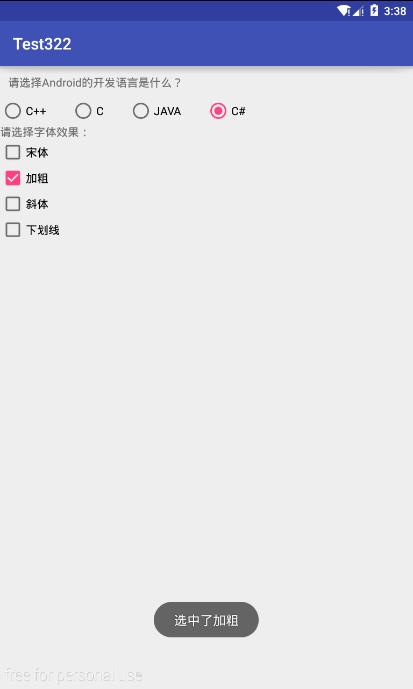
Android——RadioGroup和CheckBox的更多相关文章
- Android UI系列-----CheckBox和RadioButton(1)
主要记录一下CheckBox多选框和RadioGroup.RadioButton单选框的设置以及注册监听器 1.CheckBox 布局文件: <LinearLayout xmlns:androi ...
- Android ExpandableListView 带有Checkbox的简单应用
expandablelistview2_groups.xml <?xml version="1.0" encoding="utf-8"?> < ...
- android listview 使用checkbox问题
在android中使用listview时需要了解listview加载数据的原理,为了避免listview由于列表项过多每次需要进行new造成性能低下的问题,android中的listview使用了控件 ...
- [转]Android中自定义checkbox样式
android中自定义checkbox的图片和大小 其实很简单,分三步: 1.在drawable中创建文件checkbox_selector.xml: <?xml version=" ...
- Android ListView带CheckBox实现单选
第1种方法: 首先是我们的bean: public class Bean { private boolean isChecked; private String msg = "这是一条测试数 ...
- Android Studio 之 CheckBox
•任务 •基本用法 CheckBox,复选框,即可以同时选中多个选项. 从网上找了三个图标,分别命名为 apple.jpg , banana.jpg , oranges.jpg 放置在了 drawab ...
- Android RadioGroup和RadioButton详解
实现RadioButton由两部分组成,也就是RadioButton和RadioGroup配合使用.RadioGroup是单选组合框,可以容纳多个RadioButton的容器.在没有RadioGrou ...
- Android学习笔记——CheckBox
该工程的功能实现在一个activity中显示一个单选框和一个多选框 以下代码是MainActivity.java文件中的代码 package com.example.checkbox; import ...
- Android RadioGroup 及资源文件 & selector
RadioGroup :单选组 RadioButton :单选按钮 RadioButton和CheckBox的区别: 1.单个RadioButton在选中后,通过点击无法变为未选中 单 ...
随机推荐
- ASP.NET#LinqDataSource控件配置对象模型时遇到的问题
使用LinqDataSource控件时,配置数据源的时候,发现没有DataContext对象可选,但已通过可视化操作完成了对象模型的建立.这个时候,可以通过现在Default.aspx.cs文件中做如 ...
- iOS同一项目多个Target的快速实现方法 - 两种使用场景详解
我们项目中,默认建好是只有一个target的,但是,一些场景中,多target能帮助我们更好的使用项目. 场景1: 同一项目,一般会分不同环境:开发环境.测试环境.正式(生产)环境. 这就涉及到一个请 ...
- 在linux下安装并使用websocket
前言 首先,对websocket要有一个简要的了解与认识 websocket是HTML5开始提供的一种浏览器与服务器进行全双工通讯的网络技术,属于应用层协议. 它基于TCP传输协议,并复用HTTP的握 ...
- java获取某个范围内的一个随机数
一.取模操作 public static void main(String[] args){ for (int i = 1; i <= 20; i++){ int j = i % 11; Sys ...
- JavaScript 设计模式之代理模式
一.代理模式概念解读 1.代理模式概念文字解读 代理,顾名思义就是帮助别人做事,GOF对代理模式的定义如下: 代理模式(Proxy),为其他对象提供一种代理以控制对这个对象的访问.代理模式使得代理对象 ...
- 【LeetCode】128. Longest Consecutive Sequence
Longest Consecutive Sequence Given an unsorted array of integers, find the length of the longest con ...
- eclipse svn登陆用户保存信息删除
win7系统 eclipse svn saveinfo path:磁盘:\%用户名%\AppData\Roaming\Subversion\auth\svn.simple 例如:D:\Users\用户 ...
- 房产地图google map的初步应用点滴.2)(转)
房产地图google map的初步应用点滴.1)房产地图google map的初步应用点滴.2)房产地图google map的初步应用点滴.3) 房产地图google map的初步应用点滴.4) 本来 ...
- go学习笔记(3) -- package fmt
package fmt fmt包实现了格式化的I/O函数,这点类似C语言中的printf和scanf,但是更加简单,其中的格式“占位符”衍生自 C 占位符 一般占位符 布尔占位符 浮点数及其复合构成占 ...
- mark 百度Echarts统计图表
mark http://git.oschina.net/seeyoui/kensite_cms/blob/master/src/main/java/com/seeyoui/kensite/framew ...