
5_python之路之员工管理系统
python之路之员工管理系统
1.程序说明:Readme.cmd
1.程序文件:info_management.py user_info

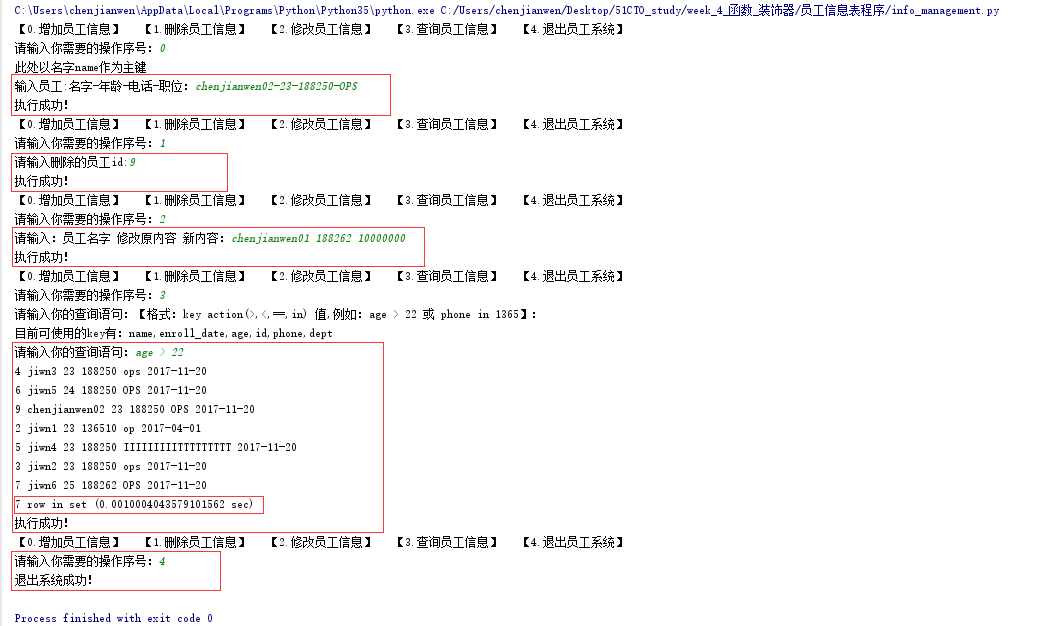
2.程序文件说明:info_management.py-主程序    user_info-存放员工数据

3.python版本:python-3.5.3

4.程序使用:将info_management.py和user_info放到同一目录下,执行python info_management.py

5.程序解析:

    【0.增加员工信息】此处以名字name作为主键 增加输入格式,以-隔开:名字-年龄-电话-职位    (直接对文件的操作)

    【1.删除员工信息】直接输入员工的id即可删除 (直接对文件的操作)

    【2.修改员工信息】输入员工名字,修改原内容,新内容 格式:员工名字 修改原内容 新内容        (直接对文件的操作)

    【3.查询员工信息】使用动态代码对字典格式实现多种操作查询    (字典,exec)

    【4.退出员工系统】

6.程序执行结果:请亲自动手执行或者查看我的博客

7.程序博客地址:http://www.cnblogs.com/chenjw-note/p/7866737.html
2.程序代码:info_management.py
#!/usr/bin/env python

# _*_ coding: utf-8 _*_

# author:chenjianwen

# email:1071179133@qq.com

import json,time,re,os

user_info = {}

print_out = 'print(user_info[name]["id"],user_info[name]["name"],user_info[name]["age"],user_info[name]["phone"],user_info[name]["dept"],user_info[name]["enroll_date"])'

count = 0

##读取文件,把用户信息生成字典格式

def read_file_to_info():

    with open('user_info','r') as f_r:

        for line in f_r:

            line = line.rstrip('\n')    ##去除空行

            if line:

                line = line.strip()

                id = line.split(' ')[0]

                name = line.split(' ')[1]

                age = line.split(' ')[2]

                phone = line.split(' ')[3]

                dept = line.split(' ')[4]

                enroll_date = line.split(' ')[5]

                #global user_info

                user_info[name] = {

                        'id':'%s'%id,

                        'name':'%s'%name,

                        'age':'%s'%age,

                        'phone':'%s'%phone,

                        'dept':'%s'%dept,

                        'enroll_date':'%s'%enroll_date

                        }

##写入文件函数

def write_file(*args,**kwargs):

    with open('user_info', 'a+') as f_w:

        f_w.write(*args,**kwargs)

##查询函数1

def select_info_number(key,parallel,number):

    cmd = 'if int(user_info[name]["%s"]) %s %s:%s;global count;count = count + 1'%(key,parallel,number,print_out)

    start_time = time.time()

    for name in user_info:

        exec(cmd)

    end_time = time.time()

    use_time = end_time - start_time

    print("%s row in set (%s sec)"%(count,use_time))

    return True

##查询函数2

def select_info_message(message,parallel,key):

    cmd = 'if "%s" %s user_info[name]["%s"]:%s;global count;count = count + 1'%(message,parallel,key,print_out)

    start_time = time.time()

    for name in user_info:

        exec(cmd)

    end_time = time.time()

    use_time = end_time - start_time

    print("%s row in set (%s sec)" %(count,use_time))

    return True

##增加函数

def add_person_info():

    #print(user_info)

    id = len(user_info) + 1

    print("此处以名字name作为主键")

    pinfo = input("输入员工:名字-年龄-电话-职位:")

    name, age, phone, dept = pinfo.split('-')[0],pinfo.split('-')[1],pinfo.split('-')[2],pinfo.split('-')[3]

    enroll_date = time.strftime("%Y-%m-%d")

    if name in user_info:

        print("该员工已存在..")

        exit()

    else:

        data = '\n%s %s %s %s %s %s'%(id,name,age,phone,dept,enroll_date)

        write_file(data)

    read_file_to_info()

    return True

##删除函数

def del_person_info():

    id = input("请输入删除的员工id:")

    f_r = open('user_info', mode='r', encoding='utf-8')

    f_w = open('user_info1', mode='w+', encoding='utf-8')

    for line in f_r:

        line = line.strip()

        if line.split(' ')[0] == id:

            pass

        else:

            f_w.write(line + '\n')

    f_r.close()

    f_w.close()

    os.remove('user_info')

    os.rename('user_info1', 'user_info')

    read_file_to_info()

    return True

##修改函数

def replace_person_info():

    message = input("请输入:员工名字 修改原内容 新内容:")

    name = message.split(' ')[0]

    old_dept = message.split(' ')[1]

    new_dept = message.split(' ')[2]

    f_r = open('user_info',mode='r',encoding='utf-8')

    f_w = open('user_info1', mode='w+', encoding='utf-8')

    for line in f_r:

        line = line.strip()

        if name in line:

            line = line.replace(old_dept,new_dept)

        f_w.write(line + '\n')

    f_r.close()

    f_w.close()

    os.remove('user_info')

    os.rename('user_info1', 'user_info')

    read_file_to_info()

    return True

if __name__ == '__main__':

    while True:

        read_file_to_info()

        ops = ['增加员工信息','删除员工信息','修改员工信息','查询员工信息','退出员工系统']

        for key,i in enumerate(ops):

            print("【%s.%s】"%(key,i),end='   ')

        print()

        ops_key = int(input("请输入你需要的操作序号:"))

        if ops_key == 0:

            if add_person_info():

                print("执行成功!")

                continue

            else:

                print('执行失败!')

                continue

        elif ops_key == 1:

            if del_person_info():

                print("执行成功!")

                continue

            else:

                print('执行失败!')

                continue

        elif ops_key == 2:

            if replace_person_info():

                print("执行成功!")

                continue

            else:

                print('执行失败!')

                continue

        elif ops_key == 3:

            print("请输入你的查询语句:【格式:key action(>,<,==,in) 值,例如:age > 22 或 phone in 1365】:")

            print("目前可使用的key有:name,enroll_date,age,id,phone,dept")

            select_message = input("请输入你的查询语句:")

            key = select_message.split(' ')[0]

            parallel = select_message.split(' ')[1]

            message = select_message.split(' ')[2]

            if parallel == '==':

                if select_info_message(message, parallel, key):
            count = 0

                    print("执行成功!")

                    continue

                else:

                    print('执行失败!')

                    continue

            elif not re.findall('[a-zA-Z]+',parallel):

                if select_info_number(key, parallel, message):
            count = 0

                    print("执行成功!")

                    continue

                else:

                    print('执行失败!')

                    continue

            else:

                if select_info_message(message, parallel, key):
            count = 0

                    print("执行成功!")

                    continue

                else:

                    print('执行失败!')

                    continue

        elif ops_key == 4:

            print("退出系统成功!")

            exit()

        else:

            print("你的输入有误,请重新输入...")
3.程序附件-数据库:user_info
1 admin 22 136510 IT 2017-04-01

2 jiwn1 23 136510 op 2017-04-01

3 jiwn2 23 188250 ops 2017-11-20

4 jiwn3 23 188250 ops 2017-11-20

5 jiwn4 23 188250 IIIIIIIIITTTTTTTTT 2017-11-20

6 jiwn5 24 188250 OPS 2017-11-20

7 jiwn6 25 188262 OPS 2017-11-20

8 chenjianwen01 22 188262 IT 2017-11-20
4.程序执行输出
5_python之路之员工管理系统的更多相关文章
- 基于SSM实现的简易员工管理系统(网站上线篇)
经历无数苦难,好不容易,网站终于上线了.=.=内牛满面ing.chengmingwei.top就是本员工管理系统的主页啦.是的,很简陋,但是毕竟是第一次嘛,所以慢慢来嘛. 如上次所说的(网站简介,见: ...
- 基于SSM实现的简易员工管理系统
之前自学完了JAVA基础,一直以来也没有做什么好玩的项目,最近暑假,时间上比较空闲,所以又学习了一下最近在企业实际应用中比较流行的SSM框架,以此为基础,通过网络课程,学习编写了一个基于SSM实现的M ...
- 基于SSH实现员工管理系统之框架整合篇
本篇文章来源于:https://blog.csdn.net/zhang_ling_yun/article/details/77803178 以下内容来自慕课网的课程:基于SSH实现员工管理系统之框架整 ...
- PureMVC和Unity3D的UGUI制作一个简单的员工管理系统实例
前言: 1.关于PureMVC: MVC框架在很多项目当中拥有广泛的应用,很多时候做项目前人开坑开了一半就消失了,后人为了填补各种的坑就遭殃的不得了.嘛,程序猿大家都不喜欢像文案策划一样组织文字写东西 ...
- Java普通员工管理系统
login GUI界面(登录) package 普通员工管理系统; import java.awt.event.ActionEvent; import java.awt.event.ActionLis ...
- 员工管理系统(集合与IO流的结合使用 beta1.0 ArrayList<Employee>)
package cn.employee; public class Employee { private int empNo; private String name; private String ...
- 员工管理系统(集合与IO流的结合使用 beta2.0 ObjectInputStream/ ObjectOutputStream)
package cn.employee; import java.io.Serializable; public class Employee implements Serializable{ pri ...
- 员工管理系统(集合与IO流的结合使用 beta5.0 BufferedReader/ BufferedWriter)
package cn.gee; public class Emp { private String id;//员工编号 一般是唯一的 private String sname; private int ...
- 员工管理系统(集合与IO流的结合使用 beta4.0 ObjectInputStream/ ObjectOutputStream)
package cn.employee_io; import java.io.Serializable; public class Employee implements Serializable{ ...
随机推荐
- js获取当前日期(年月日格式)
function getNowFormatDate() { var date = new Date(); var seperator1 = "-"; var year = date ...
- 机器学习算法--svm实战
1.不平衡数据分类问题 对于非平衡级分类超平面,使用不平衡SVC找出最优分类超平面,基本的思想是,我们先找到一个普通的分类超平面,自动进行校正,求出最优的分类超平面 测试代码如下: import nu ...
- HDU - 5917 水题
题意:n个点m条边,找点集个数,点集满足有任意三个点成环,或者三个点互不相连 题解:暴力复杂度O(n^5/120*O(ok))==O(能过) //#pragma comment(linker, &qu ...
- poj1087最大流拆点
刚开始看这题太长了就放着,后来做了之后才发现并不难,就是构造图有点麻烦 一开始写了180行@.@结果tle了,后来想到用map直接访问的话可能会快点,就不用每次循环了 #include<map& ...
- @ModelAttribute运用详解(二十一)
@ModelAttribute使用详解 1.@ModelAttribute注释方法 例子(1),(2),(3)类似,被@ModelAttribute注释的方法会在此controller每个方法 ...
- qt忙等与非忙等
非忙等: void delay(int msec) { QTime end = QTime::currentTime().addMSecs(msec); while( QTime::currentTi ...
- strtol 笔记
今天看了一下网上关于这个函数的解释,根据文章大意记录一下 strtol 是将字符串转换为long int的一个函数 strtol(const char* nptr, char **endptr, in ...
- gulp-css-spriter 将css代码中的切片图片合并成雪碧图
NPM地址:https://www.npmjs.com/package/gulp-css-spriter/ 配置gulpfile.js: var gulp = require('gulp'), ...
- Swift自定义头视图和尾视图
var data: [[String]]! override func viewDidLoad() { super.viewDidLoad() // Do any additional setup a ...
- Python Logger使用
1. 单文件的logging配置 import logging logging.basicConfig(level=logging.DEBUG, format='%(asctime)s %(filen ...