
Android服务--布局服务(LayoutInflater)
1. 基本概念
1. 概念:
参考资料:https://www.cnblogs.com/androidez/archive/2013/07/01/3164729.html
一个用于加载布局的系统服务,就是实例化与Layout XML文件对应的View对象,不能直接使用, 需要通过getLayoutInflater( )方法或getSystemService( )方法来获得与当前Context绑定的 LayoutInflater实例;记住:他是一个服务!!
LayoutInflater这个类它的作用类似于findViewById()。
不同点是LayoutInflater是用来找res/layout/下的xml布局文件,并且实例化;而findViewById()是找xml布局文件下的具体widget控件(如Button、TextView等)。
具体作用:
1、对于一个没有被载入或者想要动态载入的界面,都需要使用LayoutInflater.inflate()来载入;
2、对于一个已经载入的界面,就可以使用Activiyt.findViewById()方法来获得其中的界面元素。
说白了就是用来动态加载控件的服务
2. 获得 LayoutInflater 实例的三种方式:
1.LayoutInflater inflater = getLayoutInflater(); //调用Activity的getLayoutInflater()
2.LayoutInflater localinflater =(LayoutInflater)context.getSystemService(Context.LAYOUT_INFLATER_SERVICE); //从这里可以看出来他是一个服务
3. LayoutInflater inflater = LayoutInflater.from(context); //很多时候用这一种
2. 代码
<?xml version="1.0" encoding="utf-8"?>

<android.support.constraint.ConstraintLayout xmlns:android="http://schemas.android.com/apk/res/android"

    xmlns:app="http://schemas.android.com/apk/res-auto"

    xmlns:tools="http://schemas.android.com/tools"

    android:layout_width="match_parent"

    android:layout_height="match_parent"

    tools:context="com.example.aplex_new1.myapplication.MainActivity">

</android.support.constraint.ConstraintLayout>
<?xml version="1.0" encoding="utf-8"?>

<LinearLayout xmlns:android="http://schemas.android.com/apk/res/android"

    xmlns:app="http://schemas.android.com/apk/res-auto"

    xmlns:tools="http://schemas.android.com/tools"

    android:layout_width="match_parent"

    android:layout_height="match_parent"

    android:id="@+id/id_center"

    android:background="@color/colorAccent"

    android:gravity="center"

    tools:context="com.example.aplex_new1.myapplication.MainActivity">

    <Button

        android:layout_width="wrap_content"

        android:layout_height="wrap_content"

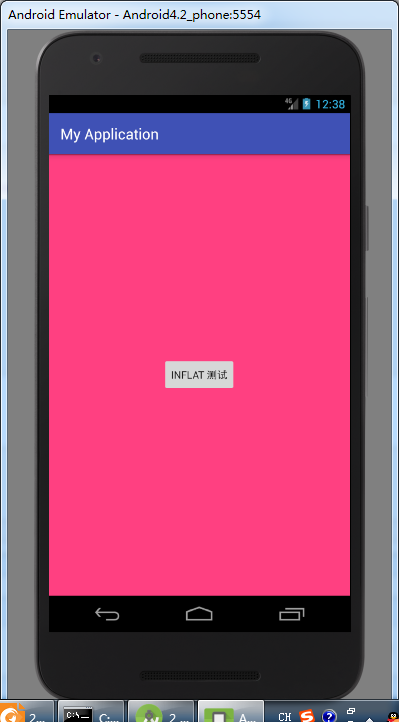
        android:text="inflat 测试"/>

</LinearLayout>
public class MainActivity extends AppCompatActivity {

    @Override

    protected void onCreate(Bundle savedInstanceState) {

        super.onCreate(savedInstanceState);

        setContentView(R.layout.activity_main);

        //找到这个界面

        //LinearLayout linerlayout = findViewById(R.id.id_center);

        LayoutInflater inflater = LayoutInflater.from(this);

        //找到test_inflat.xml并且实例化

        LinearLayout ll = (LinearLayout)inflater.inflate(R.layout.test_inflat,null, false);

                //.findViewById(R.id.id_center);

        //将已经实例化的布局显示出来

        setContentView(ll);

    }

}
Android服务--布局服务(LayoutInflater)的更多相关文章
- Android调用Web服务
现在大部分应用程序都把业务逻辑处理,数据调用等功能封装成了服务的形式,应用程序只需要调用这些web服务就好了,在这里就不赘述web服务的优点了.本文总结如何在android中调用Web服务,通过传递基 ...
- Android(java)学习笔记228:服务(service)之绑定服务调用服务里面的方法
1.绑定服务调用服务里面的方法,图解: 步骤: (1)在Activity代码里面绑定 bindService(),以bind的方式开启服务 : bindServ ...
- Android窗口管理服务WindowManagerService显示窗口动画的原理分析
文章转载至CSDN社区罗升阳的安卓之旅,原文地址:http://blog.csdn.net/luoshengyang/article/details/8611754 在前一文中,我们分析了Activi ...
- Android窗口管理服务WindowManagerService切换Activity窗口(App Transition)的过程分析
文章转载至CSDN社区罗升阳的安卓之旅,原文地址:http://blog.csdn.net/luoshengyang/article/details/8596449 在Android系统中,同一时刻只 ...
- Android窗口管理服务WindowManagerService显示Activity组件的启动窗口(Starting Window)的过程分析
文章转载至CSDN社区罗升阳的安卓之旅,原文地址:http://blog.csdn.net/luoshengyang/article/details/8577789 在Android系统中,Activ ...
- Android窗口管理服务WindowManagerService计算窗口Z轴位置的过程分析
文章转载至CSDN社区罗升阳的安卓之旅,原文地址:http://blog.csdn.net/luoshengyang/article/details/8570428 通过前面几篇文章的学习,我们知道了 ...
- Android窗口管理服务WindowManagerService对壁纸窗口(Wallpaper Window)的管理分析
文章转载至CSDN社区罗升阳的安卓之旅,原文地址:http://blog.csdn.net/luoshengyang/article/details/8550820 Android系统中,壁纸窗口和输 ...
- Android窗口管理服务WindowManagerService对输入法窗口(Input Method Window)的管理分析
文章转载至CSDN社区罗升阳的安卓之旅,原文地址:http://blog.csdn.net/luoshengyang/article/details/8526644 在Android系统中,输入法窗口 ...
- Android中的服务
Android中的服务 四大组件都是运行在主线程 Android中的服务,是在后台运行 .可以理解成是在后台运行并且是没有界面的Activity. Foreground process 前台进程 ,用 ...
随机推荐
- centos 下wps 与goland 不能输入中文的解决办法
输入法:CentOS7自带ibus,如果你用的是fcitx请在对应的地方进行修改 系统:CentOS7,这个方案应该适用于大多数Linux发行版本 intelliJ goland中文输入法问题解决 首 ...
- 在jquery中怎么使用css类名和id来获取元素?
在jquery中,你可以很容易的使用CSS类名和id类获取元素. 例如: 1.ID:#id $('#idA')——选择id为idA的所有元素,不管元素的标签名如何. $('div#idA')——选择i ...
- 浅析Object基类提供的Equals方法
当我们去查看object.cs源代码文件的时候,会发现object基类提供了三种判断相等性的方法.弄清楚每种方法存在的原因,也就是具体解决了什么问题,对我们理解.net判断对象相等性的逻辑很有帮助,下 ...
- insert into 的另一种添加插入新行方式
语法 1 插入一行 insert into table (field1,field2.....) select value1,value2........; 2 插入多行 insert into ta ...
- LOJ#6045. 「雅礼集训 2017 Day8」价(最小割)
题面 传送门 题解 首先先把所有权值取个相反数来求最大收益,因为最小收益很奇怪 然后建图如下:\(S\to\)药,容量\(\inf+p_i\),药\(\to\)药材,容量\(\inf\),药材\(\t ...
- CTF中常见的 PHP 弱类型漏洞总结
作者:ZERO 所属团队:Arctic Shell 参考资料: http://archimesan.me/2017/12/21/php%E5%BC%B1%E7%B1%BB%E5%9E%8B%E6 ...
- 代码 | 自适应大邻域搜索系列之(4) - Solution定义和管理的代码实现解析
前言 上一篇讲解了destroy和repair方法的具体实现代码,好多读者都在喊酸爽和得劲儿--今天这篇就讲点简单的,关于solution的定义和管理的代码实现,让大家回回神吧--哈哈. 01 总体概 ...
- UVA10140 Prime Distance
UVA10140 Prime Distance 给定两个整数L,R(1<=L<=R<=2^{31},R-L<=10^6)L,R(1<=L<=R<=231,R− ...
- 架构师养成记--31.Redis的几种类型
String类型 Redis一共分为五种基本数据类型:String.Hash.List.Set.ZSet String类型是包含很多张类型的特殊类型,并且是二进制安全的.比如对序列化的对象进行存储,比 ...
- QuantLib 金融计算——QuantLib 入门
目录 QuantLib 金融计算--QuantLib 入门 简介 主要功能 安装与使用 学习指南 The HARD Way The EASY Way QuantLib 金融计算--QuantLib 入 ...