
WCF寄宿到Windows Service
WCF寄宿到Windows Service[1]
2014-06-14
WCF寄宿到Windows Service
在前面创建一个简单的WCF程序,我们把WCF的服务寄宿到了Host这个控制台项目中了。下面将介绍如何把WCF的服务寄宿到Windows服务中(源代码):
1. 删除原来Host控制台项目,然后在solution上右键,新建一个WindowService项目。如下图:
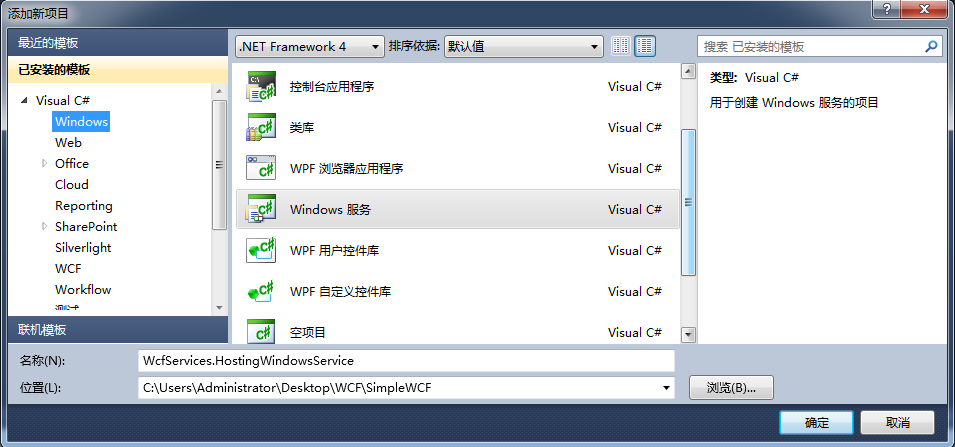
2.对WcfServices.HostingWindowsSerice项目添加对Contracts项目、Service项目和System.ServiceModel的引用。
3.将WcfServices.HostingWindowsSerice项目中的Class1.cs文件重命名为CalculatorHost.cs,然后打开这个文件,里面代码如下:
 using System.ServiceProcess;

 using System.ServiceModel;

 using WcfServices.Services;

 namespace WcfServices.HostingWindowsService

 {

     public partial class CalculatorHost : ServiceBase

     {

         private ServiceHost _host;

         public ServiceHost Host

         {

             get { return _host; }

             set { _host = value; }

         }

         public CalculatorHost()

         {

             InitializeComponent();

         }

         protected override void OnStart(string[] args)

         {

             Host = new ServiceHost(typeof(CalculatorService));

             Host.Open();

         }

         protected override void OnStop()

         {

             if (Host != null)

             {

                 Host.Close();

                 Host = null;

             }

         }

     }

 }
4.CalculatorHost.cs[Design]的界面上右键,选择添加安装器(Add Installer)。这时,项目里会自动生成一个ProjectInstaller.cs文件。
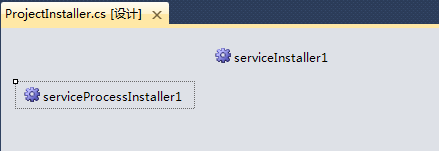
5.打开ProjectInstaller.cs[Design]的设计界面,将会出现下图:
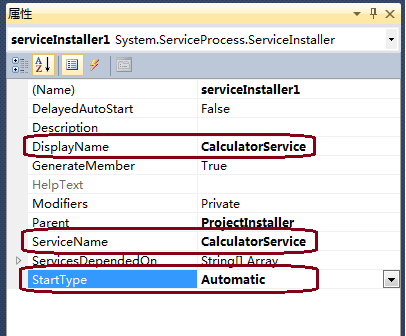
6.选中serviceInstaller1,打开它的属性视图(Ctrl W,P),修改属性。如下图所示:
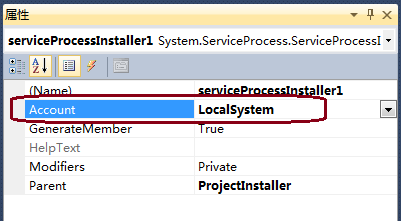
7.接着选中serviceProcessInstaller1,打开它的属性视图,修改属性。如下图:(这里服务账号也可以是其他的。)
8.接下来我们看看这个项目里的program.cs文件。代码如下:
 using System.ServiceProcess;

 namespace WcfServices.HostingWindowsService

 {

     static class Program

     {

         /// <summary>

         /// 应用程序的主入口点。

         /// </summary>

         static void Main()

         {

             ServiceBase[] ServicesToRun;

             ServicesToRun = new ServiceBase[]

             {

                 new CalculatorHost()

             };

             ServiceBase.Run(ServicesToRun);

         }

     }

 }
9.这些都做好了之后,在WcfServices.HostingWindowsSerice项目中添加服务端的配置文件。这个在上一节中也写过,代码如下:
 <?xml version="1.0" encoding="utf-8" ?>

 <configuration>

   <system.serviceModel>

     <behaviors>

       <serviceBehaviors>

         <behavior name="CaclulaterBehavior">

           <serviceMetadata httpGetEnabled="true" />

         </behavior>

       </serviceBehaviors>

     </behaviors>

     <services>

       <service behaviorConfiguration="CaclulaterBehavior" name="WcfServices.Services.CalculatorService">

         <endpoint address="http://localhost:8080/calculatorservice" binding="basicHttpBinding"

             bindingConfiguration="" contract="WcfServices.Contracts.ICalculator" />

         <host>

           <baseAddresses>

             <add baseAddress="http://localhost:8080/calculatorservice" />

           </baseAddresses>

         </host>

       </service>

     </services>

   </system.serviceModel>

 </configuration>
10.Build项目WcfServices.HostingWindowsSerice,查看生成的文件如下:
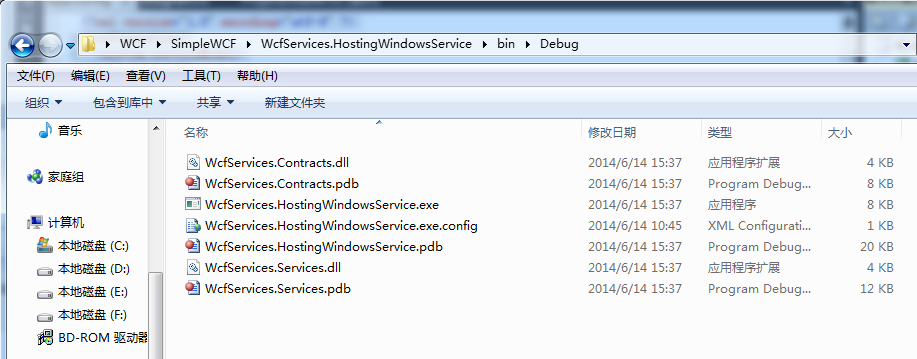
将整个debug文件夹中文件拷出来,放到另外一个目录下。比如D:\WCF\CalculatorService中。后面我们注册的windows服务将从这个目录下找exe文件。
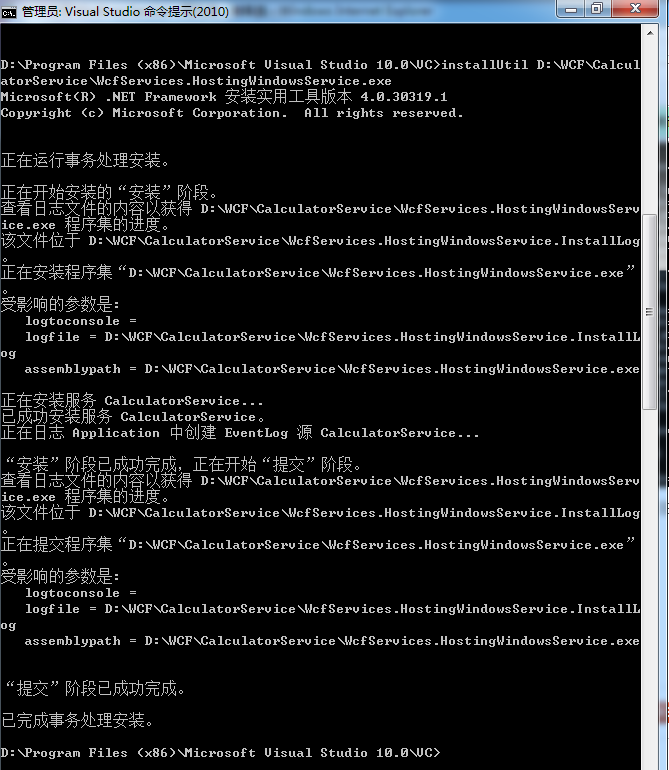
11.下面就是要注册了。我们用InstallUtil.exe来注册(当然你也可以用sc)。打开InstallUtil.exe在我的电脑的目录是:C:\WINDOWS\Microsoft.NET\Framework\v4.0.30319。你可以从命令行进如这个目录,然后执行InstallUtil命令。也可以在所有程序中找到visual studio Tools,里面的visual studio command prompt命令行工具。执行安装的命令是InstallUtil D:\WCF\CalculatorService\WcfServices.HostingWindowsSerice.exe
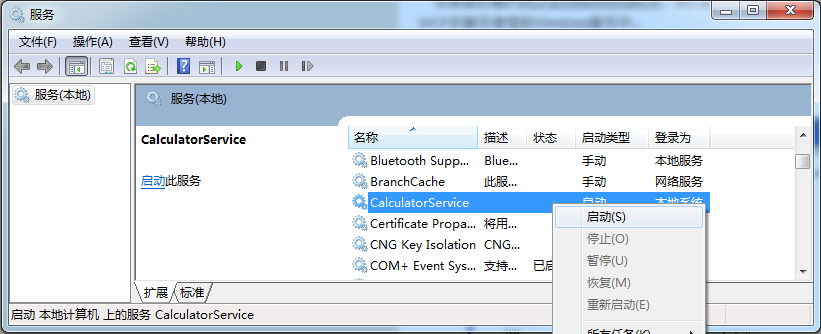
12.成功后,你就可以在控制面板->管理工具->服务中找到它了,如下图:
参考:
[1] WCF注册Windows Service http://www.cnblogs.com/judastree/archive/2012/08/29/2662184.html
WCF寄宿到Windows Service的更多相关文章
- WCF寄宿到Windows Service[1]
WCF寄宿到Windows Service 返回 在前面创建一个简单的WCF程序,我们把WCF的服务寄宿到了Host这个控制台项目中了.下面将介绍如何把WCF的服务寄宿到Windows服务中(源代码) ...
- 重温WCF之构建一个简单的WCF(一)(2)通过Windows Service寄宿服务和WCF中实现操作重载
参考地址:http://www.cnblogs.com/zhili/p/4039111.html 一.如何在Windows Services中寄宿WCF服务 第一步:创建Windows 服务项目,具体 ...
- WCF学习之旅—WCF服务的Windows 服务程序寄宿(十一)
上接 WCF学习之旅—WCF服务部署到IIS7.5(九) WCF学习之旅—WCF服务部署到应用程序(十) 七 WCF服务的Windows 服务程序寄宿 这种方式的服务寄宿,和IIS一样有一个一样 ...
- 编写寄宿于windows服务的WCF服务
由于业务中有些任务需要在后台静默长期运行,或者有些服务队响应的要求比较苛刻,这样的WCF服务就不适合寄宿于IIS中.IIS每隔一段时间w3wp进程会闲置超时,造成服务的运行停止,因此这种耗时或者定时任 ...
- 将WCF寄宿在托管的Windows服务中
在我之前的一篇博客中我介绍了如何发布WCF服务并将该服务寄宿于IIS上,今天我再来介绍一种方式,就是将WCF服务寄宿在Windows服务中,这样做有什么好处呢?当然可以省去部署IIS等一系列的问题,能 ...
- WCF寄宿控制台.WindowsService.WinFrom.WebAPI寄宿控制台和windows服务
先建立wcf类库.会默认生成一些试用代码.如下: public class Service1 { public string GetData(int value) { return string.Fo ...
- 创建寄宿在Windows服务中的WCF服务
1.创建Windows服务项目 2.Server1改名为你想要的名称,比如WinServer 3.在项目中新建一个WCF文件夹,用于存放wcf服务文件. 注:在WcfServer类的上面还要添加 [S ...
- WCF Windows Service Using TopShelf and ServiceModelEx z
http://lourenco.co.za/blog/2013/08/wcf-windows-service-using-topshelf-and-servicemodelex/ There are ...
- WCF - Windows Service Hosting
WCF - Windows Service Hosting The operation of Windows service hosting is a simple one. Given below ...
随机推荐
- git server
选择Git服务器部署策略 找了一圈,发现如下方法来架设Git服务器: Git Candy:http://github.com/Aimeast/GitCandy/ AE大神的作品, Git Candy© ...
- MariaDB卸载
二进制安装方式的MariaDB卸载 关闭mysql服务 service mysql stop 或 /etc/init.d/mysql stop 或 mysqladmin shutdown -uroot ...
- 怎么将txt文件转化为html格式的文件?--极为丑陋的方式
# -*- coding: utf-8 -*- #python 27 #xiaodeng #怎么将txt文件转化为html格式的文件?--极为丑陋的方式 import os #找出所有的txt格式的文 ...
- Redis学习(7)-通用命令
keys pattern: 获取所有与pattern匹配的key,返回所有与该key匹配的keys. 通配符: *表示任意一个或多个字符串. ?表示一个字符. 例如: 查询所有的key:keys * ...
- Centos调出图形化的网络管理
在Linux中设置网路,图形化很方便.在命令行下/etc/sysconfig/network-scripts/ifcfg-eth0 00.命令行下修正网路 [root@dzswj-test ~]#ca ...
- Web前端开发笔试&面试_02(others)
AL>> 1.CSS 3 如何实现旋转图片? 答:transform : rotate 2.写CSS 的工具? 答:LESS.SASS 3.JavaScript 倒计时? 答:setTim ...
- RabbitMQ3.6.3集群搭建+HAProxy1.6做负载均衡
目录 目录 1.基本概念 1.1.RabbitMQ集群概述 1.2.软件负载均衡器HAProxy 2.RabbitMQ的配置步骤 2.1.安装 Erlang.RabbitMQ 2.2.修改 /etc/ ...
- razor----js
<script> $(document).ready(function () { // 2 直接加引号转换 var SpecialAptitude = '@Model.SpecialAp ...
- Spring.net(二)----初探IOC容器
我在上一篇关于Spring.net的文章“Spring.NET框架简介及模块说明 ”中很详细的介绍了,本文就不旧话从提.我门就直奔主题吧. 1.首先了解两个接口. IObjectFactory接口和 ...
- 从汇编角度来理解linux下多层函数调用堆栈运行状态
我们用下面的C代码来研究函数调用的过程. C++ Code 1 2 3 4 5 6 7 8 9 10 11 12 13 14 15 16 int bar(int c, int d) { ...