
WCF学习之旅—WCF服务的Windows 服务程序寄宿(十一)
上接 WCF学习之旅—WCF服务部署到IIS7.5(九)
WCF学习之旅—WCF服务部署到应用程序(十)
七 WCF服务的Windows 服务程序寄宿
这种方式的服务寄宿,和IIS一样有一个一样的优点,系统启动后,WCF服务也会跟着启动了,不用人工干预,也是一种较好的寄宿方式。
(1) 在解决方案下新建控制台输出项目 WinServiceHosting。如下图。
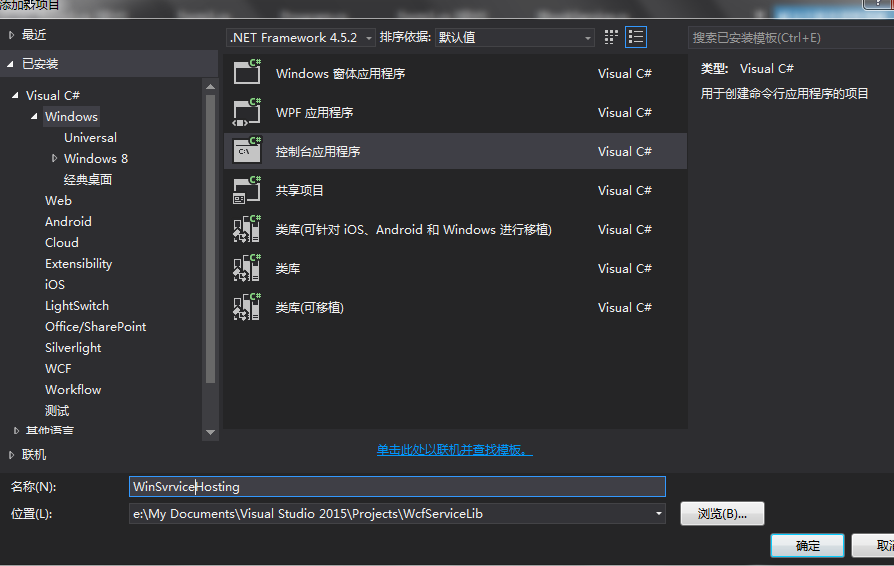
(2)添加 System.ServiceModel.dll 的引用。
(3)添加 WCF 服务类库(WcfServiceLib)的项目引用。
(4) 添加响应的Window服务类。如下图。
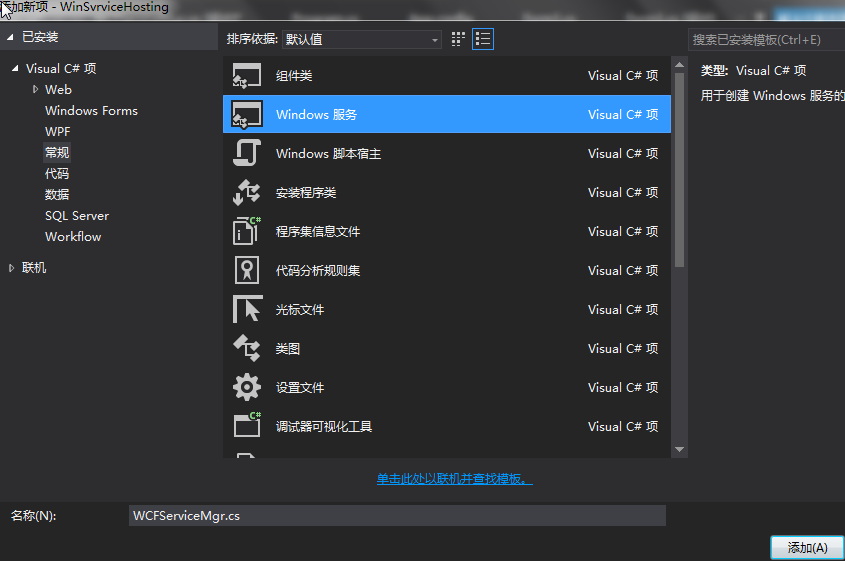
(5)然后在服务类启动里面添加WCF的寄宿代码,如下所示。
using System;

using System.Collections.Generic;

using System.ComponentModel;

using System.Data;

using System.Diagnostics;

using System.Linq;

using System.ServiceModel;

using System.ServiceProcess;

using System.Text;

using System.Threading.Tasks;

namespace WinSvrviceHosting

{

    partial class WCFServiceMgr : ServiceBase

    {

        string Name = "WCF服务Windows Service寄宿";

        public WCFServiceMgr()

        {

            InitializeComponent();

            this.ServiceName = Name;

        }

        protected override void OnStart(string[] args)

        {

            // TODO: 在此处添加代码以启动服务。

            try

            {

                svrHost = new ServiceHost(typeof(WCFServiceMgr));

                if (svrHost.State != CommunicationState.Opened)

                {

                    svrHost.Open();

                }

            }

            catch (Exception ex)

            {

                Logger.Log(ex,string.Empty,string.Empty,string.Empty);

            }

            Logger.Log(Name + DateTime.Now.ToShortTimeString() + "已成功调用了服务一次。");

            Logger.Log(Name + "已成功启动。");

        }

        protected override void OnStop()

        {

            // TODO: 在此处添加代码以执行停止服务所需的关闭操作。

            if (svrHost!=null)

            {

                svrHost.Close();

                svrHost = null;

            }

        }

        private static object syncRoot = new Object();//同步锁

        private ServiceHost svrHost = null; //寄宿服务对象

    }

}
(6) 在WCFServiceMgr.cs的设计界面上右键,在弹出菜单中选择“添加安装程序”。如下图1。这时,项目里会自动生成一个ProjectInstaller.cs文件。如下图2。
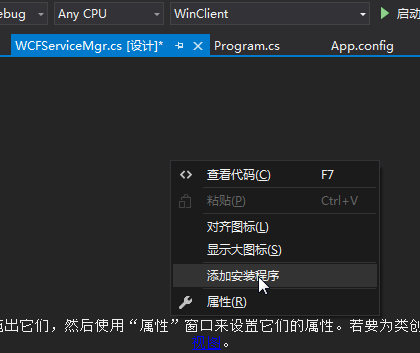
图1
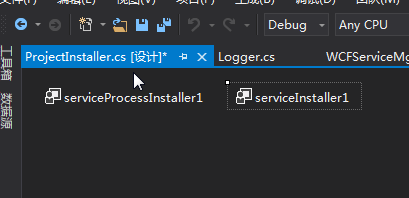
图2
( 7) 选中serviceInstaller1,打开它的属性视图,修改属性。如下图所示:
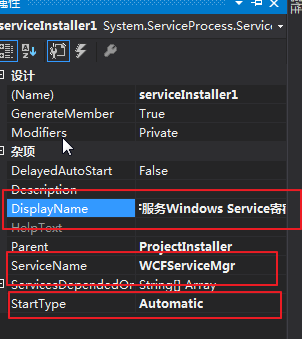
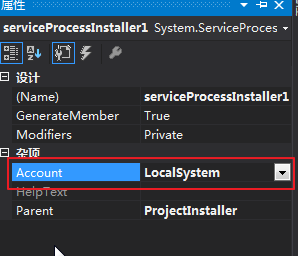
(8) 接着选中serviceProcessInstaller1,打开它的属性视图,修改属性。如下图:(这里服务账号也可以是其他的。)
(9) 为了实现通过该控制台程序实现参数化安装和卸载服务,我们需要拦截控制台的参数,并进行相应的操作,如下所示。
using System;

using System.Collections.Generic;

using System.Configuration.Install;

using System.Linq;

using System.ServiceProcess;

using System.Text;

using System.Threading.Tasks;

namespace WinSvrviceHosting

{

    class Program

    {

        static void Main(string[] args)

        {

            ServiceController service = new ServiceController(WCFServiceMgr.Name);

            // 运行服务

            if (args.Length == )

            {

                ServiceBase[] ServicesToRun;

                ServicesToRun = new ServiceBase[] { new WCFServiceMgr() };

                ServiceBase.Run(ServicesToRun);

            }

            else if (args[].ToLower() == "/i" || args[].ToLower() == "-i")

            {

                #region 安装服务

                if (!IsServiceExisted("WCFServiceMgr"))

                {

                    try

                    {

                        string[] cmdline = { };

                        string serviceFileName = System.Reflection.Assembly.GetExecutingAssembly().Location;

                        TransactedInstaller transactedInstaller = new TransactedInstaller();

                        AssemblyInstaller assemblyInstaller = new AssemblyInstaller(serviceFileName, cmdline);

                        transactedInstaller.Installers.Add(assemblyInstaller);

                        transactedInstaller.Install(new System.Collections.Hashtable());

                        TimeSpan timeout = TimeSpan.FromMilliseconds( * );

                        service.Start();                        service.WaitForStatus(ServiceControllerStatus.Running, timeout);

                    }

                    catch (Exception ex)

                    {                        Logger.Log(ex,string.Empty,string.Empty,string.Empty);

                        throw ex;

                    }

                }

                #endregion

            }

            else if (args[].ToLower() == "/u" || args[].ToLower() == "-u")

            {

                #region 删除服务

                try

                {

                    if (IsServiceExisted("WCFServiceMgr"))

                    {

                        string[] cmdline = { };

                        string serviceFileName = System.Reflection.Assembly.GetExecutingAssembly().Location;

                        TransactedInstaller transactedInstaller = new TransactedInstaller();

                        AssemblyInstaller assemblyInstaller = new AssemblyInstaller(serviceFileName, cmdline);

                        transactedInstaller.Installers.Add(assemblyInstaller);

                        transactedInstaller.Uninstall(null);

                    }

                }

                catch (Exception ex)

                {

                    Logger.Log(ex, string.Empty, string.Empty, string.Empty);

                    throw ex;

                }

                #endregion

            }

        }

        #region 检查服务存在的存在性

        /// <summary>

        /// 检查服务存在的存在性

        /// </summary>

        /// <param name=" NameService ">服务名</param>

        /// <returns>存在返回 true,否则返回 false;</returns>

        public static bool IsServiceExisted(string NameService)

        {

            ServiceController[] services = ServiceController.GetServices();

            foreach (ServiceController s in services)

            {

                if (s.ServiceName.ToLower() == NameService.ToLower())

                {

                    return true;

                }

            }

            return false;

        }

        #endregion

    }

}
(10)添加应用程序配置文件App.config,这次我们使用配置的方式进行WCF服务的公布,WCF服务配置代码如下。
<?xml version="1.0" encoding="utf-8" ?>

<configuration>

    <startup>

        <supportedRuntime version="v4.0" sku=".NETFramework,Version=v4.5.2" />

    </startup>

  <system.serviceModel>

    <diagnostics>

      <messageLogging logEntireMessage="true" logKnownPii="false" logMalformedMessages="true"

        logMessagesAtServiceLevel="true" logMessagesAtTransportLevel="true" />

      <endToEndTracing propagateActivity="true" activityTracing="true"

        messageFlowTracing="true" />

    </diagnostics>

    <behaviors>

      <serviceBehaviors>

        <behavior name="metadataBehavior">

          <serviceMetadata httpGetEnabled="true" httpGetUrl="http://127.0.0.1:8080/BookService/metadata" />

          <serviceDebug includeExceptionDetailInFaults="True" />

        </behavior>

      </serviceBehaviors>

    </behaviors>

    <services>

      <service behaviorConfiguration="metadataBehavior" name="WcfServiceLib.BookService">

        <endpoint address="http://127.0.0.1:8080/BookService" binding="wsHttpBinding"

        contract="WcfServiceLib.IBookService" />

      </service>

    </services>

  </system.serviceModel>

</configuration>
(11) 编译程序成功后,我们添加两个批处理的DOS脚本来实现执行程序的自动安装和卸载,如下所示。
--安装脚本

"WinSvrviceHosting.exe" -i

pause
--卸载脚本

"WinSvrviceHosting.exe" -u

Pause
(12) 我们首先执行安装脚本。结果如下图。
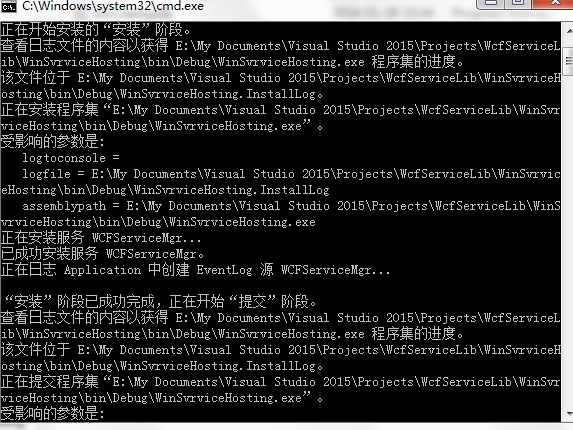
(13) 顺利执行脚本后,“管理工具—》服务”,在服务列表里面就增加一个服务项目了。如下图。
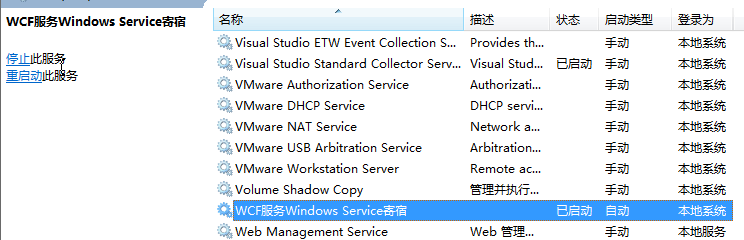
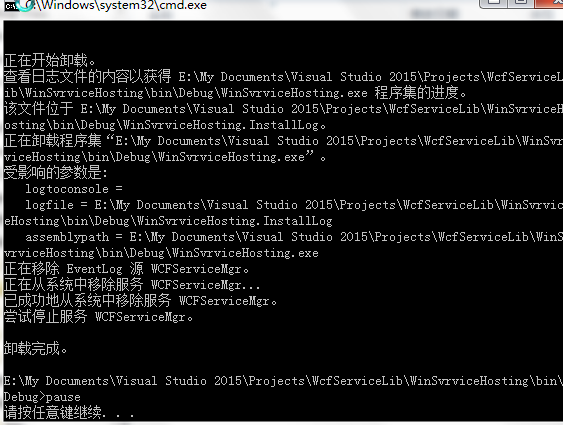
(14) 执行卸载脚本,脚本就会卸载服务。如下图。
建立客户端
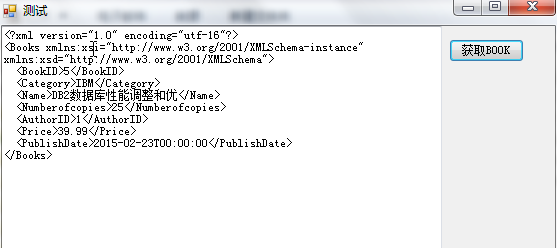
使用我们在Console寄宿程序编写的客户端,去访问Windows窗体宿主程序的WCF服务。
WCF学习之旅—WCF服务的Windows 服务程序寄宿(十一)的更多相关文章
- WCF学习之旅—WCF服务部署到IIS7.5(九)
上接 WCF学习之旅—WCF寄宿前的准备(八) 四.WCF服务部署到IIS7.5 我们把WCF寄宿在IIS之上,在IIS中宿主一个服务的主要优点是在发生客户端请求时宿主进程会被自动启动,并且你可以 ...
- WCF学习之旅—WCF服务部署到应用程序(十)
上接 WCF学习之旅—WCF寄宿前的准备(八) WCF学习之旅—WCF服务部署到IIS7.5(九) 五.控制台应用程序宿主 (1) 在解决方案下新建控制台输出项目 ConsoleHosting.如下 ...
- WCF学习之旅—WCF服务的WAS寄宿(十二)
上接 WCF学习之旅—WCF服务部署到IIS7.5(九) WCF学习之旅—WCF服务部署到应用程序(十) WCF学习之旅—WCF服务的Windows 服务程序寄宿(十一) 八.WAS宿主 IIS ...
- WCF学习之旅—WCF服务的批量寄宿(十三)
上接 WCF学习之旅—WCF服务部署到IIS7.5(九) WCF学习之旅—WCF服务部署到应用程序(十) WCF学习之旅—WCF服务的Windows 服务程序寄宿(十一) WCF学习之旅—WCF ...
- WCF学习之旅—WCF第二个示例(五)
二.WCF服务端应用程序 第一步,创建WCF服务应用程序项目 打开Visual Studio 2015,在菜单上点击文件—>新建—>项目—>WCF服务应用程序.在弹出界面的“名称”对 ...
- WCF学习之旅—WCF第二个示例(七)
三.创建客户端应用程序 若要创建客户端应用程序,你将另外添加一个项目,添加对该项目的服务引用,配置数据源,并创建一个用户界面以显示服务中的数据. 在第一个步骤中,你将 Windows 窗体项目添加到解 ...
- WCF学习之旅—WCF第二个示例(六)
第五步,创建数据服务 在“解决方案资源管理器”中,使用鼠标左键选中“SCF.WcfService”项目,然后在菜单栏上,依次选择“项目”.“添加新项”. 在“添加新项”对话框中,选择“Web”节点,然 ...
- WCF学习之旅—WCF寄宿前的准备(八)
一.WCF服务应用程序与WCF服务库 我们在平时开发的过程中常用的项目类型有“WCF 服务应用程序”和“WCF服务库”. WCF服务应用程序,是一个可以执行的程序,它有独立的进程,WCF服务类协定的定 ...
- WCF学习之旅—WCF概述(四)
一.WCF概述 1) 什么是WCF? Windows Communication Foundation (WCF) 是用于构建面向服务的应用程序的框架.借助 WCF,可以将数据作为异步消息从一个服务终 ...
随机推荐
- 为什么 NaN 不等于自身?
NaN 即Not a Number , 不是一个数字, 那么NaN到底是什么呢? 话说在JavaScript中,有6大数据类型,分别包括string,number,boolean,undefined, ...
- ASP.NET Aries 入门开发教程3:开发一个列表页面及操控查询区
前言: Aries框架毕竟是开发框架,所以重点还是要写代码的,这样开发人员才不会失业,哈. 步骤1:新建html 建一个Html,主要有三步: 1:引入Aries.Loader.js 2:弄一个tab ...
- 一看就懂的ReactJs入门教程-精华版
现在最热门的前端框架有AngularJS.React.Bootstrap等.自从接触了ReactJS,ReactJs的虚拟DOM(Virtual DOM)和组件化的开发深深的吸引了我,下面来跟我一起领 ...
- 高大上的微服务可以很简单,使用node写微服务
安装 npm install m-service --save 使用 编写服务处理函数 // dir1/file1.js // 使用传入的console参数输出可以自动在日志里带上request id ...
- tomcat开发远程调试端口以及利用eclipse进行远程调试
一.tomcat开发远程调试端口 方法1 WIN系统 在catalina.bat里: SET CATALINA_OPTS=-server -Xdebug -Xnoagent -Djava.compi ...
- node模块加载层级优化
模块加载痛点 大家也或多或少的了解node模块的加载机制,最为粗浅的表述就是依次从当前目录向上级查询node_modules目录,若发现依赖则加载.但是随着应用规模的加大,目录层级越来越深,若是在某个 ...
- C#创建、安装、卸载、调试Windows Service(Windows 服务)的简单教程
前言:Microsoft Windows 服务能够创建在它们自己的 Windows 会话中可长时间运行的可执行应用程序.这些服务可以在计算机启动时自动启动,可以暂停和重新启动而且不显示任何用户界面.这 ...
- CentOS:Yum源的配置
# cd /etc/yum.repos.d/ # mv CentOS-Base.repo CentOS-Base.repo.bak # wget http://mirrors.163.com/.hel ...
- javascript中的变量作用域以及变量提升
在javascript中, 理解变量的作用域以及变量提升是非常有必要的.这个看起来是否很简单,但其实并不是你想的那样,还要一些重要的细节你需要理解. 变量作用域 “一个变量的作用域表示这个变量存在的上 ...
- 用Taurus.MVC 做个企业站(上)
前言: 之前是打算写一篇文章叫:Taurus.MVC 从入门到精通,一篇完事篇! 后来转指一念,还是把教程集在这个企业站项目上吧!!! 企业站风格: 之前发过一个帮师妹写的企业站:最近花了几个夜晚帮师 ...