
UDP实现一个简易的聊天室 (Unity&&C#完成)
效果展示(尚未完善)
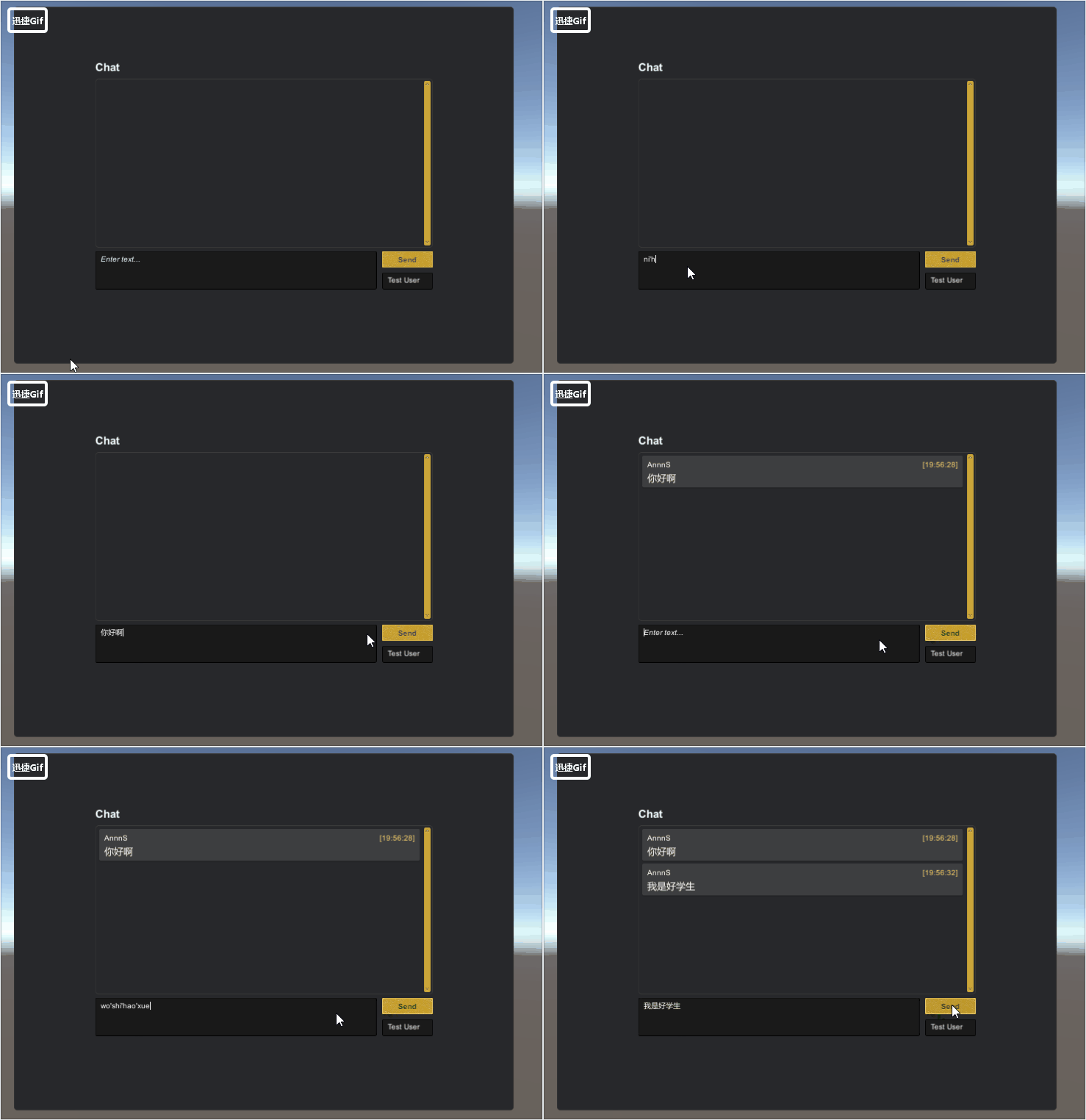
UDP
User Data Protocol 用户数据报协议
概述
UDP是不连接的数据报模式。即传输数据之前源端和终端不建立连接。使用尽最大努力交付原则,即不保证可靠交付。
数据报模式:由于不建立连接,收到的数据可能是任意主机发送的,所以接收端Read次数必须与发送端Write次数相同,每次只接收一个报文,避免多个报文合并。但如果报文过长,多出部分会被丢弃,所以注意数据最大为1472字节。
实现步骤
服务端 客户端
获取本机终结点 获取本机终结点
创建UdpClient对象 创建UdpClient对象
接收任意终结点消息 接收任意终结点消息
向客户端发送消息 向服务端发送消息
…… …
关闭连接 关闭连接
using System.Collections;

using System.Collections.Generic;

using UnityEngine;

using System.Threading;

using System.Net;

using System.Net.Sockets;

using System.Text;

using Common;

using UIWidgetsSamples;

using System;

/// <summary>

/// 服务端

/// </summary>

public class ChatUDPServerTest : MonoBehaviour

{

    public string serverIP;

    //IP地址

    public int serverPort;

    //端口

    //1.创建Scoket对象 IP Port

    private Thread thread;

    private UdpClient udpSeivic;

    public void Start()

    {

        chatView = transform.FindChildByName("ChatView").

            GetComponent<ChatView>();

        //给端口和IP

        //构建终结点  IP和一个端口

        IPEndPoint localEP = new

            IPEndPoint(IPAddress.Parse(serverIP), serverPort);

        udpSeivic = new UdpClient(localEP);

        thread = new Thread(ReceiveMessage);

        thread.Start();

    }

    /// <summary>

    /// 接收消息

    /// </summary>

    private void ReceiveMessage()

    {

        while (true)

        {

            IPEndPoint remote = new

                IPEndPoint(IPAddress.Any, );

            //创建任意终结点

            //ref

            byte[] date = udpSeivic.Receive(ref remote);

            //Receive接收消息  如果没有收到消息 线程阻塞  放在线程中

            string msg = Encoding.UTF8.GetString(date);

            //获取的客户都安信息

            Debug.Log(remote.Address + "===" + remote.Port);

            //如果接收客户端的消息,会把任意终结点修改为客户端的终结点

            ThreadCrossHelper.Instance.ExecuteOnMainThread(() => { ShowMessage(msg); });

        }

    }

    private ChatView chatView;

    /// <summary>

    /// 显示消息

    /// </summary>

    /// <param name="msg"></param>

    public void ShowMessage(string msg)

    {

        chatView.DataSource.Add(new ChatLine()

        {

            UserName = "AnnnS",

            Message = msg,

            Time = DateTime.Now,

            Type = ChatLineType.User,

        });

    }

    private void OnApplicationQuit()

    {

        udpSeivic.Close();

        thread.Abort();

    }

}
ChatUDPServerTest
脚本引用的工具箱
- MonoSingleton (泛型单例)
- ThreadCrossHelper (为子线程提供,可以在主线程中执行的方法)
- TransformHelper(根据名称查找后代元素)
using System.Collections;

using System.Collections.Generic;

using UnityEngine;

namespace Common

{

    /// <summary>

    ///

    /// </summary>

    public class MonoSingleton<T> : MonoBehaviour where T : MonoSingleton<T>

    {

        //public static T Instance

        //{

        //    get;

        //    private set;

        //}

        //private void Awake()

        //{

        //    Instance = this as T;

        //}

        //按需加载

        private static T instance;

        public static T Instance

        {

            get

            {

                if (instance == null)

                {

                    //在场景中查找对象

                    instance = FindObjectOfType<T>();

                    if (instance == null)

                    {

                        //创建游戏对象 附加 脚本对象

                        new GameObject("Singleton of " + typeof(T)).AddComponent<T>();//立即执行Awake

                    }

                    else

                    {

                        instance.Initialized();

                    }

                }

                return instance;

            }

        }

        protected virtual void Initialized()

        {

        }

        [Tooltip("是否需要跨场景不销毁")]

        public bool isDontDestroy = true;

        //如果管理类自行附加到物体中

        //在Awake中为instance赋值

        protected void Awake()

        {

            if (isDontDestroy)

            {

                DontDestroyOnLoad(gameObject);

            }

            if (instance == null)

            {

                instance = this as T;

                instance.Initialized();

            }

        }

    }

}
MonoSingleton
using System;

using System.Collections;

using System.Collections.Generic;

using UnityEngine;

namespace Common

{

    /// <summary>

    ///

    /// </summary>

    public class ThreadCrossHelper : MonoSingleton<ThreadCrossHelper>

    {

        /// <summary>

        /// 延迟项

        /// </summary>

        class DelayedItem

        {

            public Action CurrentAction { get; set; }

            public DateTime Time { get; set; }

        }

        private List<DelayedItem> actionList;

        //private List<Action> actionList;

        //private List<float> timeList;

        protected override void Initialized()

        {

            base.Initialized();

            actionList = new List<DelayedItem>();

        }

        private void Update()

        {

            for (int i = actionList.Count - ; i >= ; i--)

            {

                //到时间

                if (actionList[i].Time <= DateTime.Now)

                {

                    lock (actionList)

                    {

                        actionList[i].CurrentAction();//执行

                        actionList.RemoveAt(i);//从列表中移除

                    }

                }

            }

        }

        /// <summary>

        /// 为子线程提供,可以在主线程中执行的方法

        /// </summary>

        /// <param name="action"></param>

        /// <param name="dealy"></param>

        public void ExecuteOnMainThread(Action action, float dealy = )

        {

            DelayedItem item = new DelayedItem()

            {

                CurrentAction = action,

                //Time = Time.time + dealy

                Time = DateTime.Now.AddSeconds(dealy)

            };

            lock (actionList)

            {

                actionList.Add(item);

            }

        }

    }

}
ThreadCrossHelper
using System.Collections;

using System.Collections.Generic;

using UnityEngine;

namespace Common

{

    /// <summary>

    /// 变换组件助手类

    /// </summary>

    public static  class TransformHelper

    {

        /// <summary>

        /// 未知层级,根据名称查找后代元素

        /// </summary>

        /// <param name="currentTF"></param>

        /// <param name="childName"></param>

        /// <returns></returns>

        public static Transform FindChildByName(this Transform currentTF, string childName)

        {

            Transform childTF = currentTF.Find(childName);

            if (childTF != null) return childTF;

            //将问题推迟给子物体

            for (int i = ; i < currentTF.childCount; i++)

            {

                //在方法体内部,又遇到了相同的问题,所以需要调用自身。

                childTF = FindChildByName(currentTF.GetChild(i), childName);

                if (childTF != null) return childTF;

            }

            return null;

        }

    }

}
TransformHelper
UDP实现一个简易的聊天室 (Unity&&C#完成)的更多相关文章
- C 基于UDP实现一个简易的聊天室
引言 本文是围绕Linux udp api 构建一个简易的多人聊天室.重点看思路,帮助我们加深 对udp开发中一些api了解.相对而言udp socket开发相比tcp socket开发注意的细节要少 ...
- TCP实现一个简易的聊天室 (Unity&&C#完成)
效果展示 TCP Transmission Control Protocol 传输控制协议 TCP是面向连接的流模式(俗称:网络流).即传输数据之前源端和终端建立可靠的连接,保证数据传输的正确性. 流 ...
- 与众不同 windows phone (31) - Communication(通信)之基于 Socket UDP 开发一个多人聊天室
原文:与众不同 windows phone (31) - Communication(通信)之基于 Socket UDP 开发一个多人聊天室 [索引页][源码下载] 与众不同 windows phon ...
- 与众不同 windows phone (30) - Communication(通信)之基于 Socket TCP 开发一个多人聊天室
原文:与众不同 windows phone (30) - Communication(通信)之基于 Socket TCP 开发一个多人聊天室 [索引页][源码下载] 与众不同 windows phon ...
- [SignalR]一个简单的聊天室
原文:[SignalR]一个简单的聊天室 1.说明 开发环境:Microsoft Visual Studio 2010 以及需要安装NuGet. 2.添加SignalR所需要的类库以及脚本文件: 3. ...
- 用ServletContext做一个简单的聊天室
这里主要是ServletContext的一个特性:ServletContext是一个公共的空间,可以被所有的客户访问.由此可见ServletContext比cookie和session的作用范围要大[ ...
- 基于websocket实现的一个简单的聊天室
本文是基于websocket写的一个简单的聊天室的例子,可以实现简单的群聊和私聊.是基于websocket的注解方式编写的.(有一个小的缺陷,如果用户名是中文,会乱码,不知如何处理,如有人知道,请告知 ...
- [XMPP]简易的聊天室实现[二](使用CocoaAsyncSocket)
@import url(http://i.cnblogs.com/Load.ashx?type=style&file=SyntaxHighlighter.css);@import url(/c ...
- 利用JavaUDPSocket+多线程模拟实现一个简单的聊天室程序
对Socket的一点个人理解:Socket原意是指插座.家家户户都有五花八门的家用电器,但它们共用统一制式的插座.这样做的好处就是将所有家用电器的通电方式统一化,不需要大费周章地在墙壁上凿洞并专门接电 ...
随机推荐
- Selenium Webdriver——AutoIt和robot实现右键另存
方案如下: 1.selenium 弹出右键菜单 2.robot选择相关菜单 3.调用autoIt实现windows gui另存操作 test case 如下: 1.打开百度(谷歌浏览器) 2.选择百度 ...
- 37.使用PreResultListener实现回调
转自:https://wenku.baidu.com/view/84fa86ae360cba1aa911da02.html 在进行本实例前请前复习:五.2自定义拦截器.因为PreResultListe ...
- Spring Boot 2.x 启动全过程源码分析
Spring Boot 2.x 启动全过程源码分析 SpringApplication 实例 run 方法运行过程 上面分析了 SpringApplication 实例对象构造方法初始化过程,下面继续 ...
- IOS 文件解析
import java.io.BufferedInputStream; import java.io.File; import java.io.FileInputStream; import java ...
- //todo 的用处
在代码中添加 //todo 以后要做的事 可以暂时打上标记,以后再来处理. 光有这个没什么用,关键是IDE要支持,比如VS2017,只要按下 ctrl+w,t 就可以在输出窗口中显示出所有 todo的 ...
- manjaro 下golang protobuf的使用
1.下载protobuf compiler sudo pacman -S protobuf 2.添加环境变量GOBIN export GOBIN=~/go/bin 3.下载golang依赖的包 go ...
- fabric本地一键部署LAMP
一.添加普通用户jeff执行sudo时无需输入密码 $ sudo vim /etc/sudoers ---------------------------------------> ## All ...
- oracle之Sequences
产生这样的代码,运行即可
- Unity Shader-简单均值模糊
http://blog.csdn.net/puppet_master/article/details/52547442 与Amplify中的Simple Blur例子实现一样
- strops()
<?php echo strpos("You love php, I love php too!","php"); ?>