
按钮在执行frame动画的时候怎么响应触发事件?
按钮在执行frame动画的时候怎么响应触发事件?
代码中效果(请注意,我并没有点击到按钮,而是点击到按钮的终点frame值处):
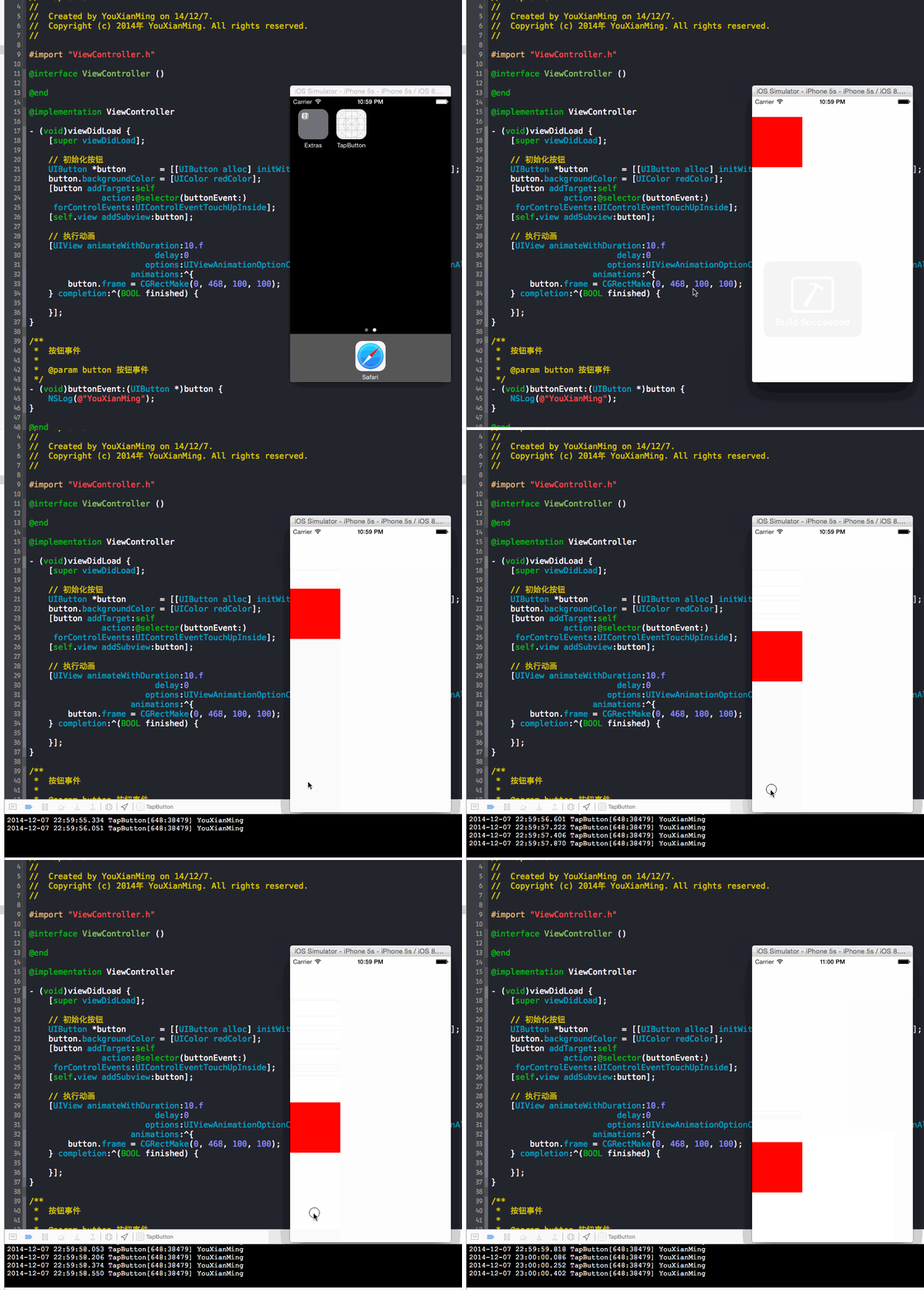
对应的代码:
//

//  ViewController.m

//  TapButton

//

//  Created by YouXianMing on 14/12/7.

//  Copyright (c) 2014年 YouXianMing. All rights reserved.

//

#import "ViewController.h"

@interface ViewController ()

@end

@implementation ViewController

- (void)viewDidLoad {

    [super viewDidLoad];

    // 初始化按钮

    UIButton *button       = [[UIButton alloc] initWithFrame:CGRectMake(, , , )];

    button.backgroundColor = [UIColor redColor];

    [button addTarget:self

               action:@selector(buttonEvent:)

     forControlEvents:UIControlEventTouchUpInside];

    [self.view addSubview:button];

    // 执行动画

    [UIView animateWithDuration:.f

                          delay:

                        options:UIViewAnimationOptionCurveLinear | UIViewAnimationOptionAllowUserInteraction

                     animations:^{

        button.frame = CGRectMake(, , , );

    } completion:^(BOOL finished) {

    }];

}

/**

 *  按钮事件

 *

 *  @param button 按钮事件

 */

- (void)buttonEvent:(UIButton *)button {

    NSLog(@"YouXianMing");

}

@end
修改过后的效果:
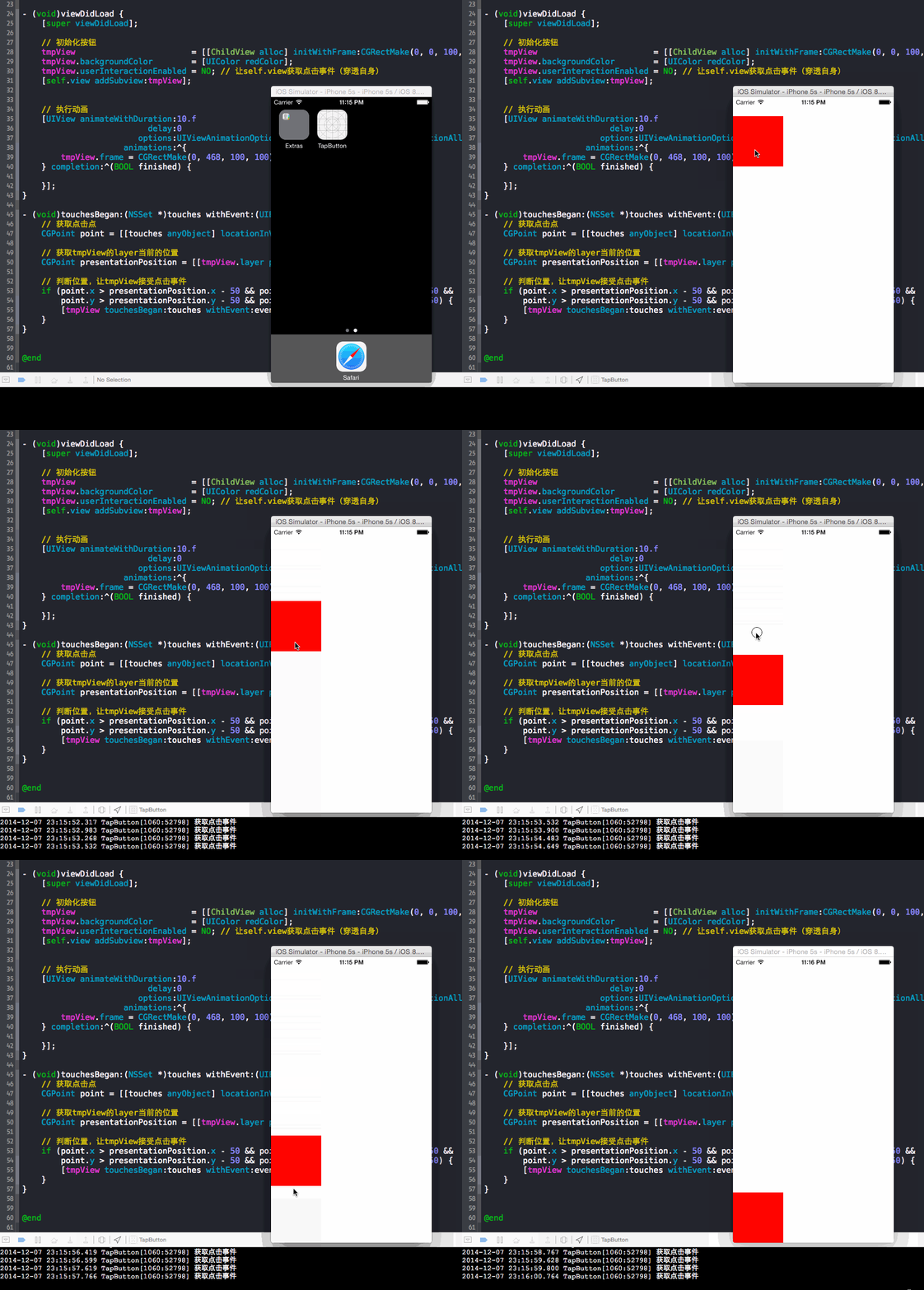
源码:
//

//  ViewController.m

//  TapButton

//

//  Created by YouXianMing on 14/12/7.

//  Copyright (c) 2014年 YouXianMing. All rights reserved.

//

#import "ViewController.h"

#import "ChildView.h"

@interface ViewController ()

{

    ChildView *tmpView;

}

@end

@implementation ViewController

- (void)viewDidLoad {

    [super viewDidLoad];

    // 初始化按钮

    tmpView                        = [[ChildView alloc] initWithFrame:CGRectMake(, , , )];

    tmpView.backgroundColor        = [UIColor redColor];

    tmpView.userInteractionEnabled = NO; // 让self.view获取点击事件(穿透自身)

    [self.view addSubview:tmpView];

    // 执行动画

    [UIView animateWithDuration:.f

                          delay:

                        options:UIViewAnimationOptionCurveLinear | UIViewAnimationOptionAllowUserInteraction

                     animations:^{

        tmpView.frame = CGRectMake(, , , );

    } completion:^(BOOL finished) {

    }];

}

- (void)touchesBegan:(NSSet *)touches withEvent:(UIEvent *)event {

    // 获取点击点

    CGPoint point = [[touches anyObject] locationInView:self.view];

    // 获取tmpView的layer当前的位置

    CGPoint presentationPosition = [[tmpView.layer presentationLayer] position];

    // 判断位置,让tmpView接受点击事件

    if (point.x > presentationPosition.x -  && point.x < presentationPosition.x +  &&

        point.y > presentationPosition.y -  && point.y < presentationPosition.y + ) {

        [tmpView touchesBegan:touches withEvent:event];

    }

}

@end
ChildView.h 与 ChildView.m
//

//  ChildView.h

//  TapButton

//

//  Created by YouXianMing on 14/12/7.

//  Copyright (c) 2014年 YouXianMing. All rights reserved.

//

#import <UIKit/UIKit.h>

@interface ChildView : UIView

@end
//

//  ChildView.m

//  TapButton

//

//  Created by YouXianMing on 14/12/7.

//  Copyright (c) 2014年 YouXianMing. All rights reserved.

//

#import "ChildView.h"

@implementation ChildView

- (void)touchesBegan:(NSSet *)touches withEvent:(UIEvent *)event {

    NSLog(@"获取点击事件");

}

@end
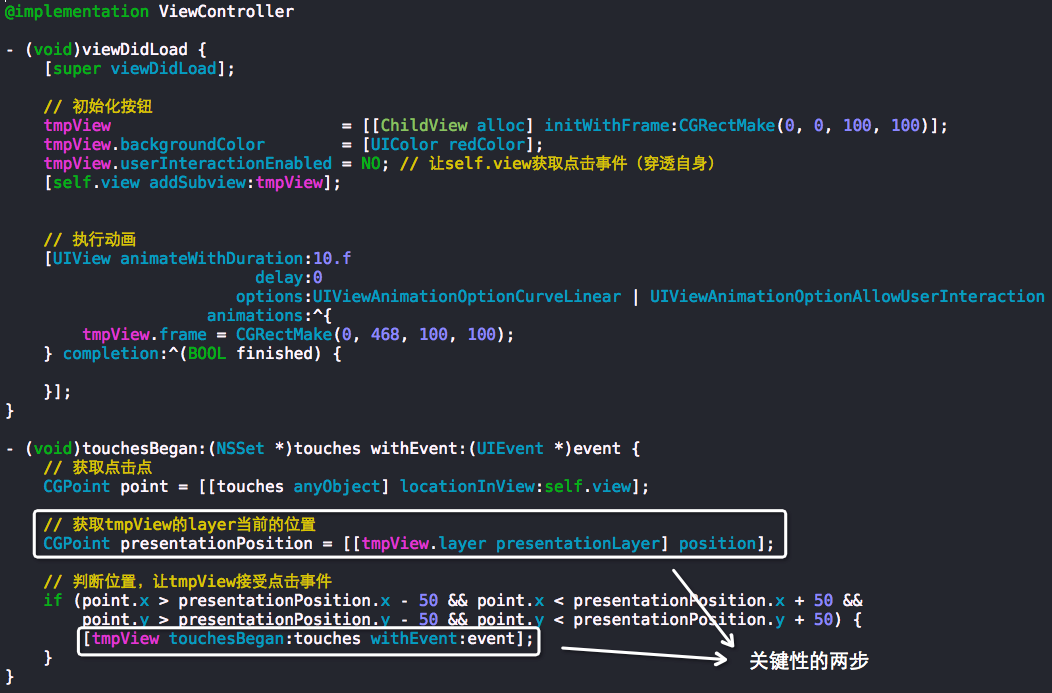
关键性的两步:
按钮在执行frame动画的时候怎么响应触发事件?的更多相关文章
- Frame动画实战
Android动画分为Tween动画和Frame动画,Tween动画主要包括图片的放大缩小.旋转.透明度变化.移动等等操作:Frame动画则简单得多了,就是把一张张的图片连续播放产生动画效果. 本节主 ...
- android之frame动画详解
上一篇我们说了android中的tween动画,这一篇我们说说frame动画,frame动画主要是实现了一种类似于gif动画的效果,就是多张图按预先设定好的时间依次连续显示. 新建一个android项 ...
- 动画--问题追踪:ImageView执行缩放动画ScaleAnimation之后,图像显示不全的问题。
http://www.bkjia.com/Androidjc/929473.html: 问题追踪:ImageView执行缩放动画ScaleAnimation之后,图像显示不全的问题., 问题:我有一个 ...
- COCOS2D-X FRAME动画创作随笔
CCAnimate继承CCActionInterval,和CCAnimate是一家action,有着action所有的属性和方法. CCAnimate一些重要的方法: static CCAnimate ...
- [WPF] 动画Completed事件里获取执行该动画的UI对象
原文:[WPF] 动画Completed事件里获取执行该动画的UI对象 昨天群里有位童鞋提出如何在动画完成事件Completed里获取到执行该动画的UI对象. WPF里动画的Completed的本身并 ...
- GridView中的编辑和删除按钮,执行更新和删除代码之前的更新提示或删除提示
在GridView中,可以通过设计界面GridViewr任务->编辑列->CommandField,很简单的添加的编辑和删除按钮 在前台源码中,可以看到GridView自动生成了两个列. ...
- 消除点击连接或者按钮或者执行onclick事件时出现的边框
css中添加 *:not(input) { font-family: sans-serif; font-size-adjust: none; -webkit-user-select: none; -w ...
- 背水一战 Windows 10 (42) - 控件(导航类): Frame 动画
[源码下载] 背水一战 Windows 10 (42) - 控件(导航类): Frame 动画 作者:webabcd 介绍背水一战 Windows 10 之 控件(导航类) Frame 动画 示例An ...
- Android Frame动画demo
Android动画介绍:Android为我们提供了两种动画实现,Frame和Tween. 两者之间的区别: 1.Frame动画:就像放电影一样,是通过预先做好的图片进行连续播放从而形成动画效果 2.T ...
随机推荐
- DotNetCore跨平台~autofac属性的自动注入
回到目录 在使用autofac这个DI工具时,我们一般使用的是构造方法注入,而dotnetcore的标准框架里也集成了构造方法注入,而属性注入在一些场景下,表现的更为灵活,像java的spring框架 ...
- python-TCP模拟ftp文件传输
#!/usr/bin/python #coding=utf-8 #server from socket import* import sys,os def command(): l=[ "W ...
- css3圆形轨迹动画
<!doctype html> <html lang="en"> <head> <meta char ...
- JavaScript引擎理解
JavaScript 虽然给人感觉是一个多线程执行的语言,但是其实JavaScript引擎是伪多线程,是单线程执行的, 浏览器内核:实现允许多个线程异步执行,这些线程在内核制控下相互配合以保持同步.假 ...
- java几个经典的算法题目----------二维矩阵算法
public class testClockwiseOutput { public static void main(String[] args) { //1.构建矩阵数据 int[][] arr = ...
- CI中使用log4php调试程序
下载log4php.我下载的版本是:apache-log4php-2.3.0-src.zip.借压缩,将压缩文件中的src/main/php/文件夹拷贝到CI的application/thrid_pa ...
- linux系统挂载U盘,中文文件名乱码解决方案
本人(壮壮熊)所用系统:ubuntu 12.4 今天在使用mount指令挂在硬盘时,出现令人头疼的中文文件名乱码. 问题: 使用mount /dev/sdb1 /media指令挂在第二颗硬盘的第一个分 ...
- 基于开源Red5搭建的视频直播平台
开始之前,为了便于大家了解Red5,此处引用网络文字,非原创 引言 流媒体文件是目前非常流行的网络媒体格式之一,这种文件允许用户一边下载一边播放,从而大大减少了用户等待播放的时间.另外通过网络播放流媒 ...
- DataGridview 绘制行序号
RowPostpaint 事件 通过Rectangle(矩形的意思)对象绘制矩形区域,然后在通过textRenderer的DeawText方法来绘制序列号. Rectangle(x,y width ...
- VS2013漂亮字体
使用字体:Fixedsys Excelsior 3.011.首先下载字体:http://www.fixedsysexcelsior.com/ 2.安装字体:控制面板 -> 字体,复制下载的文件进 ...